
SpringBoot中的静态资源访问
一、说在前面的话
我们之间介绍过SpringBoot自动配置的原理,基本上是如下:
xxxxAutoConfiguration:帮我们给容器中自动配置组件;

xxxxProperties:配置类来封装配置文件的内容;
具体可参考【SpringBoot之自动配置原理解析】
二、静态资源映射规则
1、对哪些目录映射?
classpath:/META-INF/resources/

classpath:/resources/

classpath:/static/

classpath:/public/

/:当前项目的根路径
2、什么意思?
就我们在上面五个目录下放静态资源(比如:a.js等),可以直接访问(http://localhost:8080/a.js),类似于以前web项目的webapp下;放到其他目录下无法被访问。
3、为什么是那几个目录?
3.1、看源码
我们一起来读下源码,这个是SpringBoot自动配置的WebMvcAutoConfiguration.java类来帮我们干的。
@Override

public void addResourceHandlers(ResourceHandlerRegistry registry) {

    if (!this.resourceProperties.isAddMappings()) {

        logger.debug("Default resource handling disabled");

        return;

    }

    Integer cachePeriod = this.resourceProperties.getCachePeriod();

    if (!registry.hasMappingForPattern("/webjars/**")) {

        customizeResourceHandlerRegistration(

                registry.addResourceHandler("/webjars/**")

                        .addResourceLocations(

                                "classpath:/META-INF/resources/webjars/")

                .setCachePeriod(cachePeriod));

    }

    String staticPathPattern = this.mvcProperties.getStaticPathPattern();

    if (!registry.hasMappingForPattern(staticPathPattern)) {

        customizeResourceHandlerRegistration(

                registry.addResourceHandler(staticPathPattern)

                        .addResourceLocations(

                                this.resourceProperties.getStaticLocations())

                .setCachePeriod(cachePeriod));

    }

}
3.2、分析源码
我们重点分析后半截,前半截后面会介绍。
// staticPathPattern是/**

String staticPathPattern = this.mvcProperties.getStaticPathPattern();

if (!registry.hasMappingForPattern(staticPathPattern)) {

    customizeResourceHandlerRegistration(

            registry.addResourceHandler(staticPathPattern)

                    .addResourceLocations(

                            this.resourceProperties.getStaticLocations())

            .setCachePeriod(cachePeriod));

}

this.resourceProperties.getStaticLocations()

========>

ResourceProperties

public String[] getStaticLocations() {

    return this.staticLocations;

}

========>

private String[] staticLocations = RESOURCE_LOCATIONS;

========>

private static final String[] RESOURCE_LOCATIONS;

private static final String[] SERVLET_RESOURCE_LOCATIONS = { "/" };

private static final String[] CLASSPATH_RESOURCE_LOCATIONS = {

            "classpath:/META-INF/resources/", "classpath:/resources/",

            "classpath:/static/", "classpath:/public/" };

========>

static {

    // 可以看到如下是对上面两个数组进行复制操作到一个新数组上,也就是合并。

    RESOURCE_LOCATIONS = new String[CLASSPATH_RESOURCE_LOCATIONS.length

            + SERVLET_RESOURCE_LOCATIONS.length];

    System.arraycopy(SERVLET_RESOURCE_LOCATIONS, 0, RESOURCE_LOCATIONS, 0,

            SERVLET_RESOURCE_LOCATIONS.length);

    System.arraycopy(CLASSPATH_RESOURCE_LOCATIONS, 0, RESOURCE_LOCATIONS,

            SERVLET_RESOURCE_LOCATIONS.length, CLASSPATH_RESOURCE_LOCATIONS.length);

}

所以上述代码经过我的翻译后成为了如下样子:

registry.addResourceHandler("/**").addResourceLocations(

    "classpath:/META-INF/resources/", "classpath:/resources/",

            "classpath:/static/", "classpath:/public/", "/")

    // 设置缓存时间

    .setCachePeriod(cachePeriod));
3.3、一句话概括
WebMvcAutoConfiguration类自动为我们注册了如下目录为静态资源目录,也就是说直接可访问到资源的目录。
classpath:/META-INF/resources/

classpath:/resources/

classpath:/static/

classpath:/public/

/:当前项目的根路径
优先级从上到下。
所以,如果static里面有个index.html,public下面也有个index.html,则优先会加载static下面的index.html,因为优先级!
4、默认首页
PS:就是直接输入ip:port/项目名称默认进入的页面。
4.1、看源码
WebMvcAutoConfiguration.java

@Bean

public WelcomePageHandlerMapping welcomePageHandlerMapping(

      ResourceProperties resourceProperties) {

   return new WelcomePageHandlerMapping(resourceProperties.getWelcomePage(),

         this.mvcProperties.getStaticPathPattern());

}
4.2、分析源码
resourceProperties.getWelcomePage()

========>

public Resource getWelcomePage() {

    // 遍历默认静态资源目录后面拼接个index.html的数组

    // 比如:[/static/index.html, /public/index.html等等]

    for (String location : getStaticWelcomePageLocations()) {

        Resource resource = this.resourceLoader.getResource(location);

        try {

            if (resource.exists()) {

                resource.getURL();

                return resource;

            }

        }

        catch (Exception ex) {

            // Ignore

        }

    }

    return null;

}

========>

// 下面这段代码通俗易懂,就是给默认静态资源目录后面拼接个index.html并返回,比如:/static/index.html

private String[] getStaticWelcomePageLocations() {

    String[] result = new String[this.staticLocations.length];

    for (int i = 0; i < result.length; i++) {

        String location = this.staticLocations[i];

        if (!location.endsWith("/")) {

            location = location + "/";

        }

        result[i] = location + "index.html";

    }

    return result;

}
所以上述代码经过我的翻译后成为了如下样子:
return new WelcomePageHandlerMapping(

    "classpath:/META-INF/resources/index.html",

    "classpath:/resources/index.html",

    "classpath:/static/index.html",

    "classpath:/public/index.html",

    "/index.html"

    , "/**");
4.3、一句话概括
WebMvcAutoConfiguration类自动为我们注册了如下文件为默认首页。
classpath:/META-INF/resources/index.html

classpath:/resources/index.html

classpath:/static/index.html

classpath:/public/index.html

/index.html
优先级从上到下。
所以,如果static里面有个index.html,public下面也有个index.html,则优先会加载static下面的index.html,因为优先级!
5、favicon.ico
PS:就是
image.png这个图标。

5.1、看源码
@Configuration

@ConditionalOnProperty(value = "spring.mvc.favicon.enabled", matchIfMissing = true)

public static class FaviconConfiguration {

   private final ResourceProperties resourceProperties;

   public FaviconConfiguration(ResourceProperties resourceProperties) {

      this.resourceProperties = resourceProperties;

   }

   @Bean

   public SimpleUrlHandlerMapping faviconHandlerMapping() {

      SimpleUrlHandlerMapping mapping = new SimpleUrlHandlerMapping();

      mapping.setOrder(Ordered.HIGHEST_PRECEDENCE + 1);

      mapping.setUrlMap(Collections.singletonMap("**/favicon.ico",

            faviconRequestHandler()));

      return mapping;

   }

   @Bean

   public ResourceHttpRequestHandler faviconRequestHandler() {

      ResourceHttpRequestHandler requestHandler = new ResourceHttpRequestHandler();

      requestHandler

            .setLocations(this.resourceProperties.getFaviconLocations());

      return requestHandler;

   }

}
5.2、分析源码
// 首先可以看到的是可以设置是否生效,通过参数spring.mvc.favicon.enabled来配置,若无此参数,则默认是生效的。

@ConditionalOnProperty(value = "spring.mvc.favicon.enabled", matchIfMissing = true)

========》

// 可以看到所有的**/favicon.ico都是在faviconRequestHandler()这个方法里找。

mapping.setUrlMap(Collections.singletonMap("**/favicon.ico", faviconRequestHandler()));

========》

faviconRequestHandler().this.resourceProperties.getFaviconLocations()

// 就是之前的五个静态资源文件夹。

List<Resource> getFaviconLocations() {

    List<Resource> locations = new ArrayList<Resource>(

            this.staticLocations.length + 1);

    if (this.resourceLoader != null) {

        for (String location : this.staticLocations) {

            locations.add(this.resourceLoader.getResource(location));

        }

    }

    locations.add(new ClassPathResource("/"));

    return Collections.unmodifiableList(locations);

}
5.3、一句话概括
只要把favicon.ico放到如下目录下,就会自动生效。
classpath:/META-INF/resources/

classpath:/resources/

classpath:/static/

classpath:/public/

/:当前项目的根路径
6、webjars
6.1、看源码
WebMvcAutoConfiguration

@Override

public void addResourceHandlers(ResourceHandlerRegistry registry) {

    if (!this.resourceProperties.isAddMappings()) {

        logger.debug("Default resource handling disabled");

        return;

    }

    Integer cachePeriod = this.resourceProperties.getCachePeriod();

    if (!registry.hasMappingForPattern("/webjars/**")) {

        customizeResourceHandlerRegistration(

                registry.addResourceHandler("/webjars/**")

                        .addResourceLocations(

                                "classpath:/META-INF/resources/webjars/")

                .setCachePeriod(cachePeriod));

    }

    String staticPathPattern = this.mvcProperties.getStaticPathPattern();

    if (!registry.hasMappingForPattern(staticPathPattern)) {

        customizeResourceHandlerRegistration(

                registry.addResourceHandler(staticPathPattern)

                        .addResourceLocations(

                                this.resourceProperties.getStaticLocations())

                .setCachePeriod(cachePeriod));

    }

}
6.2、分析源码
这次我们来分析前半截。
Integer cachePeriod = this.resourceProperties.getCachePeriod();

if (!registry.hasMappingForPattern("/webjars/**")) {

    customizeResourceHandlerRegistration(

            registry.addResourceHandler("/webjars/**")

                    .addResourceLocations(

                            "classpath:/META-INF/resources/webjars/")

            .setCachePeriod(cachePeriod));

}
6.3、一句话概括
所有/webjars/**都从classpath:/META-INF/resources/webjars/路径下去找对应的静态资源。
6.4、什么是webjars?
就是以jar包的方式引入静态资源。
官网地址:http://www.webjars.org/。类似于maven仓库。

我们可以做个例子,将jquery引入到项目中
<dependency>

    <groupId>org.webjars</groupId>

    <artifactId>jquery</artifactId>

    <version>3.3.1</version>

</dependency>
看项目依赖

会自动为我们引入jquery,要怎么使用呢?我们上面说过:
所有/webjars/*都从classpath:/META-INF/resources/webjars/路径下去找对应的静态资源。
所以我们启动项目,访问:http://localhost:8080/webjars/jquery/3.3.1/jquery.js即可。
以上原文:
链接:https://www.jianshu.com/p/a64195021ae7
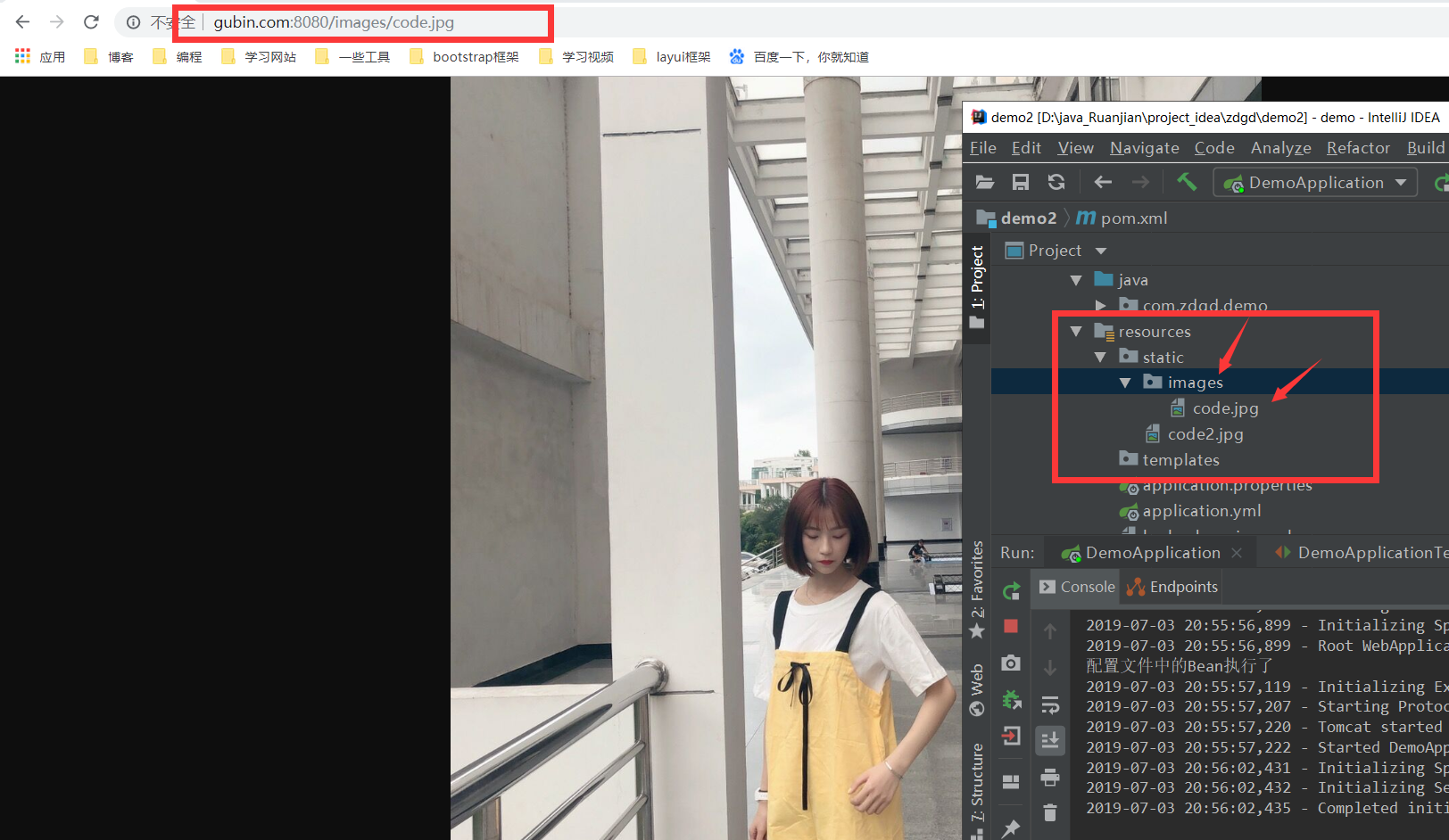
必须在这几个路径下SpringBoot才会扫描到!
"classpath:/META-INF/resources/",
"classpath:/resources/",
"classpath:/static/",
"classpath:/public/"
"/":当前项目的根路径
SpringBoot中的静态资源访问的更多相关文章
- SpringBoot 常用配置 静态资源访问配置/内置tomcat虚拟文件映射路径
Springboot 再模板引擎中引入Js等文件,出现服务器拒绝访问的错误,需要配置过滤器 静态资源访问配置 @Configuration @EnableWebMvc public class Sta ...
- SpringBoot2.X中的静态资源访问失效
今天开始使用SpringBoot写项目,于是先让其能够访问静态资源,但是配置半天也不能访问我的helloWorld页面,原来,在SpringBoot2.x中,一下静态资源路径不生效了. classpa ...
- springboot 静态资源访问,和文件上传 ,以及路径问题
springboot 静态资源访问: 这是springboot 默认的静态资源访问路径 访问顺序依次从前到后(http://localhost:8080/bb.jpg) spring.resourc ...
- IntelliJ IDEA+SpringBoot中静态资源访问路径陷阱:静态资源访问404
IntelliJ IDEA+SpringBoot中静态资源访问路径陷阱:静态资源访问404 .embody{ padding:10px 10px 10px; margin:0 -20px; borde ...
- SpringBoot静态资源访问+拦截器+Thymeleaf模板引擎实现简单登陆
在此记录一下这十几天的学习情况,卡在模板引擎这里已经是四天了. 对Springboot的配置有一个比较深刻的认识,在此和大家分享一下初学者入门Spring Boot的注意事项,如果是初学SpringB ...
- 聊聊、SpringBoot 静态资源访问
SpringBoot 1.X 版本和 SpringBoot 2.X 版本在静态资源访问上有一些区别,如果直接从 1.X 升级到 2.X 肯定是有问题的.这篇文章就来讲讲这方面问题,也是项目中的坑. 先 ...
- springmvc、springboot静态资源访问配置
如何访问项目中的静态资源? 一.springmvc springmvc中访问静态资源,如果DispatcherServlet拦截的为"",那么静态资源的访问也会交给Dispatch ...
- springboot + thymeleaf静态资源访问404
在使用springboot 和thtmeleaf开发时引用静态资源404,静态资源结如下: index.html文件: <!DOCTYPE html> <html xmlns:th= ...
- springboot学习入门简易版四---springboot2.0静态资源访问及整合freemarker视图层
2.4.4 SpringBoot静态资源访问(9) Springboot默认提供静态资源目录位置需放在classpath下,目录名需要符合如下规则 /static /public /resourc ...
随机推荐
- C语言:c++ ++c
#include <stdio.h> int main() {int a=3,x; x=(a++)+(++a)+(++a); printf("%d",x); getch ...
- RPC远程协议之原理分析
在近几年工作中发现,功能服务化或微服务化越来越流行,逐渐成为实现中大型分布式系统架构的主要方式,而在分布式系统中的不同节点应用间的通信中,RPC远程协议扮演关键作用.实际上,在日常工作中,我们也多多少 ...
- maven添加阿里云镜像
apache的maven服务器国内访问太慢了,用阿里的镜像会好很多. 1.maven的配置文件有两个,安装目录conf文件夹下settings.xml和用户目录.m2文件夹下的settings.xml ...
- 安装react后运行报错
错误提示:npm WARN checkPermissions Missing write access to C:\Users\LXD\Desktop\webpack-base\node_module ...
- POJ3268-最短路径-反向存边
因为是单向边,牛儿来回的路径长度并不相同,所以需要用两次dijkstra,一次正向从x开始dijkstra,再将边全部反向存再来一次. 因为是板子题比较良心n比较小,我们就可以用矩阵来存储啦.如果n比 ...
- informix数据库分页
需求描述 当查询结果返回大量数据情况下,比如报表查询.需要按一定条件排序提供分页呈现数据. INFORMIX实现方案:Informix 数据库提供了非常便捷.高效的SQL. SELECT SKIP M ...
- SSM框架,在Html界面利用ajax,json,jQuery实现省市区下拉框联动
1.先生成省市区表格 2.建立实体类 3.在html画出下拉框 <select id="province"> <option value="" ...
- frame window 和open 的关系
建立一个如下的关系框架 windowA.html <!DOCTYPE html> <html lang="en"> <head> <met ...
- Python - dict 字典的多种遍历方式
前置知识 for 循环详解:https://www.cnblogs.com/poloyy/p/15087053.html 使用 for key in dict 遍历字典 可以使用 for key in ...
- Linux下Nginx基础应用
Nginx简介: Nginx ("engine x") 是一个高性能的HTTP和反向代理服务器,也是一个IMAP/POP3/SMTP服务器.其将源代码以类BSD许可证的形式发布,因 ...