
Android 开发进程 0.35 升级编译版本Android12
Android12升级
工作需要升级到编译版本31 在这里记录一下遇到的问题。
错误:Manifest merger failedManifest merger failed 这个问题通常搜到的答案是manifest文件格式错误,但这是由于升级编译版本的原因,在Android SDK 31中,需要明确声明组件的 exported属性 android:exported="true" 官方文档如下:
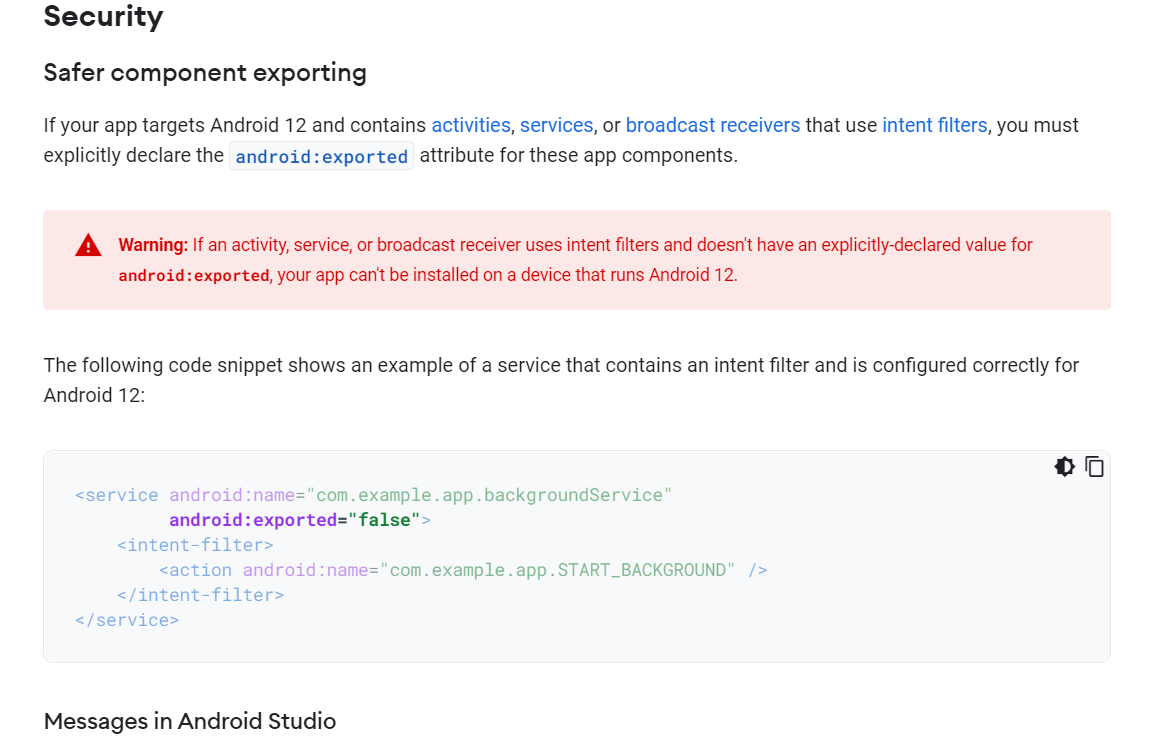
这意味这我们的manifest中每个组件的字段都需要添加exported的属性,包括所有依赖的库和module,主工程和module可以自己修改,但如果依赖的库没有写规范,结果会编译成功后在Android12版本上不能正确安装,而远程依赖的库和插件是不好修改的。此时要用到Android构建特性,Android在打包过程中,所有的组件和依赖产生的manifest文件将集合到一起,同时主manifest即我们app的manifest文件将会被重写,所以可以用gradle文件Groovy脚本实现。
具体在GitHub上有实现,笔者在此只是转载:https://github.com/phamtdat/AndroidSnippets/blob/master/Android12AndroidManifestAddMissingAndroidExported/build.gradle
具体代码如下:
import org.w3c.dom.Element

import org.w3c.dom.Node

import javax.xml.transform.dom.DOMSource

import javax.xml.transform.stream.StreamResult

import javax.xml.transform.TransformerFactory

import javax.xml.transform.Transformer

def addAndroidExportedIfNecessary(File manifestFile) {

    def manifestAltered = false

    def reader = manifestFile.newReader()

    def document = groovy.xml.DOMBuilder.parse(reader)

    def application = document.getElementsByTagName("application").item(0)

    if (application != null) {

        println "Searching for activities, services and receivers with intent filters..."

        application.childNodes.each { child ->

            def childNodeName = child.nodeName

            if (childNodeName == "activity" || childNodeName == "activity-alias" ||

                    childNodeName == "service" || childNodeName == "receiver") {

                def attributes = child.getAttributes()

                if (attributes.getNamedItem("android:exported") == null) {

                    def intentFilters = child.childNodes.findAll {

                        it.nodeName == "intent-filter"

                    }

                    if (intentFilters.size() > 0) {

                        println "found ${childNodeName} ${attributes.getNamedItem("android:name").nodeValue} " +

                                "with intent filters but without android:exported attribute"

                        def exportedAttrAdded = false

                        for (def i = 0; i < intentFilters.size(); i++) {

                            def intentFilter = intentFilters[i]

                            def actions = intentFilter.childNodes.findAll {

                                it.nodeName == "action"

                            }

                            for (def j = 0; j < actions.size(); j++) {

                                def action = actions[j]

                                def actionName = action.getAttributes().getNamedItem("android:name").nodeValue

                                if (actionName == "com.google.firebase.MESSAGING_EVENT") {

                                    println "adding exported=false to ${attributes.getNamedItem("android:name")}..."

                                    ((Element) child).setAttribute("android:exported", "false")

                                    manifestAltered = true

                                    exportedAttrAdded = true

                                }

                            }

                        }

                        if (!exportedAttrAdded) {

                            println "adding exported=true to ${attributes.getNamedItem("android:name")}..."

                            ((Element) child).setAttribute("android:exported", "true")

                            manifestAltered = true

                        }

                    }

                }

            }

        }

    }

    if (manifestAltered) {

        document.setXmlStandalone(true)

        Transformer transformer = TransformerFactory.newInstance().newTransformer()

        DOMSource source = new DOMSource(document)

        FileWriter writer = new FileWriter(manifestFile)

        StreamResult result = new StreamResult(writer)

        transformer.transform(source, result)

        println "Done adding missing android:exported attributes to your AndroidManifest.xml. You may want to" +

                "additionally prettify it in Android Studio using [command + option + L](mac) or [CTRL+ALT+L](windows)."

    } else {

        println "Hooray, your AndroidManifest.xml did not need any change."

    }

}

def getMissingAndroidExportedComponents(File manifestFile) {

    List<Node> nodesFromDependencies = new ArrayList<>()

    def reader = manifestFile.newReader()

    def document = groovy.xml.DOMBuilder.parse(reader)

    def application = document.getElementsByTagName("application").item(0)

    if (application != null) {

        println "Searching for activities, services and receivers with intent filters..."

        application.childNodes.each { child ->

            def childNodeName = child.nodeName

            if (childNodeName == "activity" || childNodeName == "activity-alias" ||

                    childNodeName == "service" || childNodeName == "receiver") {

                def attributes = child.getAttributes()

                if (attributes.getNamedItem("android:exported") == null) {

                    def intentFilters = child.childNodes.findAll {

                        it.nodeName == "intent-filter"

                    }

                    if (intentFilters.size() > 0) {

                        println "found ${childNodeName} ${attributes.getNamedItem("android:name").nodeValue} " +

                                "with intent filters but without android:exported attribute"

                        def exportedAttrAdded = false

                        for (def i = 0; i < intentFilters.size(); i++) {

                            def intentFilter = intentFilters[i]

                            def actions = intentFilter.childNodes.findAll {

                                it.nodeName == "action"

                            }

                            for (def j = 0; j < actions.size(); j++) {

                                def action = actions[j]

                                def actionName = action.getAttributes().getNamedItem("android:name").nodeValue

                                if (actionName == "com.google.firebase.MESSAGING_EVENT") {

                                    println "adding exported=false to ${attributes.getNamedItem("android:name")}..."

                                    ((Element) child).setAttribute("android:exported", "false")

                                    exportedAttrAdded = true

                                }

                            }

                        }

                        if (!exportedAttrAdded) {

                            println "adding exported=true to ${attributes.getNamedItem("android:name")}..."

                            ((Element) child).setAttribute("android:exported", "true")

                        }

                        nodesFromDependencies.add(child)

                    }

                }

            }

        }

    }

    return nodesFromDependencies

}

def addManifestFileComponents(File manifestFile, List<Node> components) {

    def reader = manifestFile.newReader()

    def document = groovy.xml.DOMBuilder.parse(reader)

    def application = document.getElementsByTagName("application").item(0)

    if (application != null) {

        println "Adding missing components with android:exported attribute to ${manifestFile.absolutePath} ..."

        components.each { node ->

            Node importedNode = document.importNode(node, true)

            application.appendChild(importedNode)

        }

    }

    if (components.size() > 0) {

        document.setXmlStandalone(true)

        Transformer transformer = TransformerFactory.newInstance().newTransformer()

        DOMSource source = new DOMSource(document)

        FileWriter writer = new FileWriter(manifestFile)

        StreamResult result = new StreamResult(writer)

        transformer.transform(source, result)

        println "Added missing app-dependencies components with android:exported attributes to your " +

                "AndroidManifest.xml.You may want to additionally prettify it in Android Studio using " +

                "[command + option + L](mac) or [CTRL+ALT+L](windows)."

    }

    println "----"

}

task doAddAndroidExportedIfNecessary {

    doLast {

        def root = new File(project.rootDir, "")

        if (root.isDirectory()) {

            def children = root.listFiles()

            for (def i = 0; i < children.size(); i++) {

                File child = children[i]

                if (child.isDirectory()) {

                    File srcDirectory = new File(child, "src")

                    if (srcDirectory.exists() && srcDirectory.isDirectory()) {

                        def srcChildren = srcDirectory.listFiles()

                        for (def j = 0; j < srcChildren.size(); j++) {

                            File manifestFile = new File(srcChildren[j], "AndroidManifest.xml")

                            if (manifestFile.exists() && manifestFile.isFile()) {

                                println "found manifest file: ${manifestFile.absolutePath}"

                                addAndroidExportedIfNecessary(manifestFile)

                                println "-----"

                            }

                        }

                    }

                }

            }

        }

    }

}

task doAddAndroidExportedForDependencies {

    doLast {

        List<Node> missingComponents = new ArrayList<>()

        def root = new File(project.rootDir, "")

        if (root.isDirectory()) {

            def children = root.listFiles()

            for (def i = 0; i < children.size(); i++) {

                File child = children[i]

                if (child.isDirectory()) {

                    File mergedManifestsDirectory = new File(child, "build/intermediates/merged_manifests")

                    if (mergedManifestsDirectory.exists() && mergedManifestsDirectory.isDirectory()) {

                        def manifestFiles = mergedManifestsDirectory.listFiles().findAll { directoryChild ->

                            directoryChild.isDirectory() &&

                                    (new File(directoryChild, "AndroidManifest.xml")).exists()

                        }.stream().map { directoryWithManifest ->

                            new File(directoryWithManifest, "AndroidManifest.xml")

                        }.toArray()

                        if (manifestFiles.size() > 0) {

                            File mergedManifest = manifestFiles[0]

                            if (mergedManifest.exists() && mergedManifest.isFile()) {

                                missingComponents = getMissingAndroidExportedComponents(mergedManifest)

                                if (missingComponents.size() > 0) {

                                    File srcDirectory = new File(child, "src")

                                    if (srcDirectory.exists() && srcDirectory.isDirectory()) {

                                        def srcChildren = srcDirectory.listFiles()

                                        for (def j = 0; j < srcChildren.size(); j++) {

                                            File manifestFile = new File(srcChildren[j], "AndroidManifest.xml")

                                            if (manifestFile.exists() && manifestFile.isFile()) {

                                                addManifestFileComponents(manifestFile, missingComponents)

                                            }

                                        }

                                    }

                                }

                            }

                        }

                    }

                }

            }

        }

    }

}
具体使用方法将此代码加入app中的gradle中,也可以抽出为独立gradle文件,在build后执行doAddAndroidExportedIfNecessary 任务,如果成功后会在app中的manifest文件中找到遍历出来未明确表明的exported得组件声明。
如果失败的话可以尝试将SDK版本降到30在执行构建任务再提高编译版本。之后就可以开启12的特新测试了。在此感谢提供脚本的大佬。
Android 开发进程 0.35 升级编译版本Android12的更多相关文章
- Android开发进程0.1 轮播图 Scrollview Fragment
轮播图的实现 轮播图通过banner可以较为便捷的实现 1.添加本地依赖,在dependence中搜索相关依赖 2.添加banner的view组件 3.创建适配器GlideImageLoader ex ...
- Android开发学习总结(一)——搭建最新版本的Android开发环境
Android开发学习总结(一)——搭建最新版本的Android开发环境(转) 最近由于工作中要负责开发一款Android的App,之前都是做JavaWeb的开发,Android开发虽然有所了解,但是 ...
- Qt for Windows:Qt 5.4.0 MinGW 静态编译版本制作 (转)
大致流程: 1.安装Qt(源码版)以及其他必要的环境 2.编译/安装 3.配置 4.使用 ----------正文分割线---------- 1.安装Qt(源码版) 1.1 下载Qt(两个地址二选一即 ...
- 转:Android开发实践:用脚本编译Android工程
转自: http://ticktick.blog.51cto.com/823160/1365947 一般情况下,我们都是使用Eclipse+ADT插件或者Android studio软件来编译Andr ...
- android开发--数据库(更新或者降低版本)
Andoird的SQLiteOpenHelper类中有一个onUpgrade方法. 1. 帮助文档里说的"数据库升级"是指什么? 你开发了一个应用,当前是1.0版本.该程序用到了数 ...
- 【转】Android开发学习总结(一)——搭建最新版本的Android开发环境
最近由于工作中要负责开发一款Android的App,之前都是做JavaWeb的开发,Android开发虽然有所了解,但是一直没有搭建开发环境去学习,Android的更新速度比较快了,Android1. ...
- Android开发指南--0 总览
无意间发现一个网站,主打IOS方面的教程,然而作为一个Android开发者,我就找了下网站里有没有Android的教程,还真有,这里就翻译一下. 翻译目标教程:https://www.raywende ...
- android开发(0):android studio的下载安装与简单使用 | sdk的安装与编译运行
android studio,简称AS,是集成开发环境,所谓集成,就是集编辑.编译.调试.打包等于一体.简单来说,通过AS,就可以开发出在android系统上运行的APP. 我使用的是macos系统. ...
- Android 开发 8.0版本启动Service的方法
前言 google在更新Android8.0后对Service的权限越发收紧.导致目前想要启动服务必需实现服务的前台化(否则在服务启动5秒后,系统将自动报错).下面我们就来看看如何在8.0上启动服务 ...
随机推荐
- Qt生成和调用动态库dll,和静态库.a(windows和linux通用)
系统1:ThinkPad T570.Windows10.QT5.12.2(Qt Creater 4.8.2)一.动态库.dll的创建和调用1.在qtcreater中按如下步骤创建动态库,动态库名为my ...
- Windows系统搭建Redis集群三种模式(零坑、最新版)
目录 主从复制 修改配置文件 启动各节点 验证 哨兵模式 修改配置文件 启动实例 验证 集群模式 修改配置文件 启动实例 验证 主从复制 新建以下三个目录,用来部署一主二从 redis 的安装在另外一 ...
- Go测试--子测试
目录 简介 简单的例子 子测试命名规则 过滤筛选 子测试并发 总结 简介 简单的说,子测试提供一种在一个测试函数中执行多个测试的能力,比如原来有TestA.TestB和TestC三个测试函数,每个测试 ...
- 高德地图&兴趣点(poi)
<!DOCTYPE html> <html> <head> <meta charset="utf-8" /> <title&g ...
- ubuntu 2018 apt 代理proxy设置
永久设置 打开代理文件,好像默认没有,98proxy是自己新建的 sudo gedit /etc/apt/apt.conf.d/98proxy 在打开的文件中输入如下内容,其中username和pas ...
- 微前端框架single-spa初探
前言 最近入职的一家公司采用single-spa这个微前端框架,所以自学了此框架. single-spa这个微前端框架虽然有中文文档,但是有些零散和晦涩. 所以我想在学习之余,写篇博客拉平一下这个学习 ...
- Shiro02
Shiro认证 Pom依赖 <dependency> <groupId>org.apache.shiro</groupId> <artifactId>s ...
- windows系统框架
- VUE006. 前端跨域代理服务器ProxyTable概述与配置
概述 使用 vue-cli 工具生成一个 vue 项目: vue init webpack my-project-vue 在生成的项目结构里,会有一个 index.js 文件.在这个文件里 ...
- http接口实现附件对接
1.推送附件 filebody /** * 推送附件方法 * @param args */ public static void main2(String[] args){ CloseableHttp ...