
用开源项目FlipImageView实现图片的翻转效果
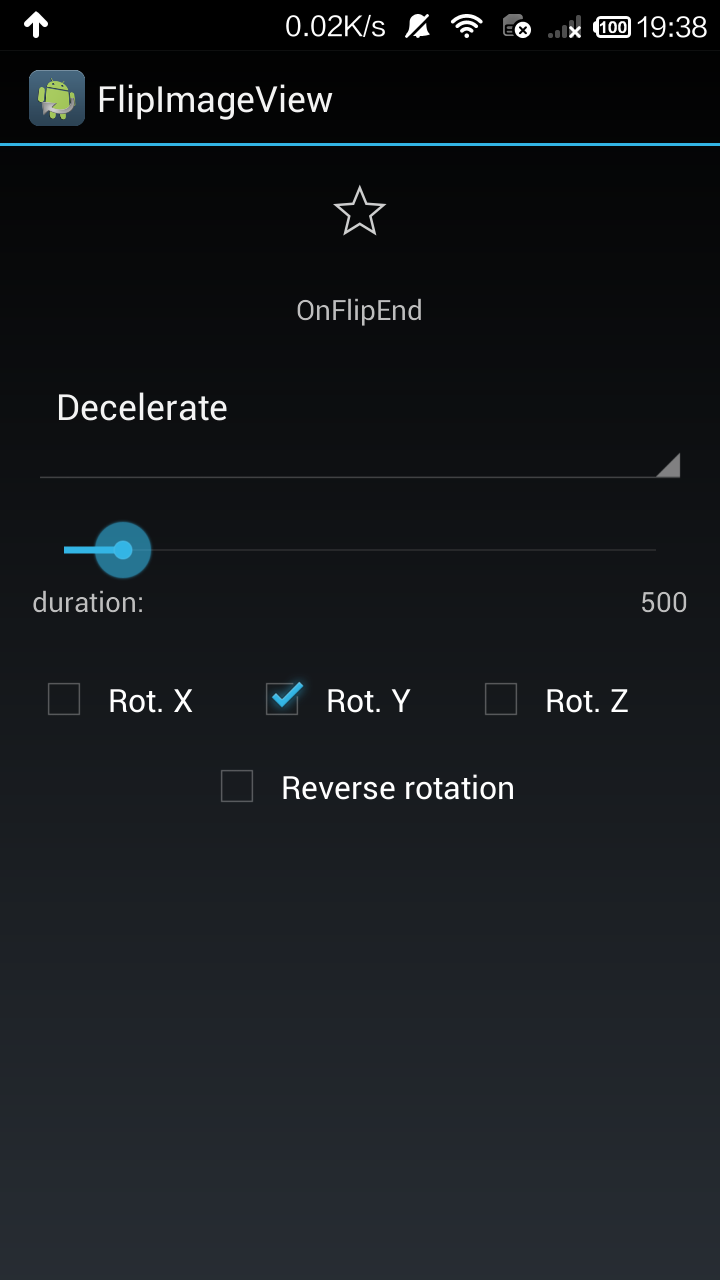


开源项目地址:https://github.com/castorflex/FlipImageView
本实例我没做什么改动,就是添加了注释,方便大家阅读。和之前一样,导入library和工程文件即可明白如何使用。
布局文件
<?xml version="1.0" encoding="utf-8"?>

<LinearLayout xmlns:android="http://schemas.android.com/apk/res/android"

    xmlns:app="http://schemas.android.com/apk/res-auto"

    android:orientation="vertical"

    android:layout_width="match_parent"

    android:layout_height="match_parent"

    android:padding="16dp"

    android:gravity="center_horizontal">

    <fr.castorflex.android.flipimageview.library.FlipImageView

        android:id="@+id/imageview"

        android:layout_width="match_parent"

        android:layout_height="wrap_content"

        android:scaleType="center"

        android:layout_gravity="center"

        android:src="@drawable/ic_action_star_0"

        app:flipDrawable="@drawable/ic_action_star_10"

        app:flipDuration="5000"

        app:flipInterpolator="@android:anim/bounce_interpolator"

        app:flipRotations="y|x|z"

        app:reverseRotation="true"/>

    <TextView

        android:id="@+id/textview"

        android:layout_marginTop="24dp"

        android:layout_width="wrap_content"

        android:layout_height="wrap_content" />

    <Spinner

        android:id="@+id/spinner"

        android:layout_height="wrap_content"

        android:layout_width="match_parent" />

    <SeekBar

        android:id="@+id/seekbar"

        android:layout_height="wrap_content"

        android:layout_width="match_parent"

        android:layout_marginTop="16dp"

        android:max="5000"

        android:progress="500" />

    <LinearLayout

        android:orientation="horizontal"

        android:layout_height="wrap_content"

        android:layout_width="match_parent">

        <TextView

            android:layout_height="wrap_content"

            android:layout_width="0dp"

            android:layout_weight="1"

            android:text="duration:" />

        <TextView

            android:id="@+id/textview_duration"

            android:layout_height="wrap_content"

            android:layout_width="wrap_content"

            android:text="500" />

    </LinearLayout>

    <LinearLayout

        android:orientation="horizontal"

        android:layout_height="wrap_content"

        android:layout_width="match_parent"

        android:layout_marginTop="16dp"

        android:minHeight="48dp"

        android:gravity="center">

        <CheckBox

            android:id="@+id/checkedtextview_x"

            android:layout_width="0dp"

            android:layout_weight="1"

            android:layout_height="wrap_content"

            android:text="Rot. X" />

        <CheckBox

            android:id="@+id/checkedtextview_y"

            android:layout_width="0dp"

            android:layout_weight="1"

            android:layout_height="wrap_content"

            android:text="Rot. Y"

            android:checked="true"/>

        <CheckBox

            android:id="@+id/checkedtextview_z"

            android:layout_width="0dp"

            android:layout_weight="1"

            android:layout_height="wrap_content"

            android:text="Rot. Z" />

    </LinearLayout>

        <CheckBox

            android:id="@+id/checkedtextview_reverse"

            android:layout_width="wrap_content"

            android:layout_height="wrap_content"

            android:text="Reverse rotation" />

</LinearLayout>
SampleActivity
package fr.castorflex.android.flipimageview.sample;

import android.app.Activity;

import android.os.Bundle;

import android.view.animation.AccelerateDecelerateInterpolator;

import android.view.animation.AccelerateInterpolator;

import android.view.animation.AnticipateOvershootInterpolator;

import android.view.animation.BounceInterpolator;

import android.view.animation.DecelerateInterpolator;

import android.view.animation.Interpolator;

import android.view.animation.OvershootInterpolator;

import android.widget.ArrayAdapter;

import android.widget.CheckBox;

import android.widget.SeekBar;

import android.widget.Spinner;

import android.widget.TextView;

import fr.castorflex.android.flipimageview.R;

import fr.castorflex.android.flipimageview.library.FlipImageView;

public class SampleActivity extends Activity implements FlipImageView.OnFlipListener,

        SeekBar.OnSeekBarChangeListener {

    /**

     * 定义翻转的模式,用作spinner的数据

     */

    private static final String[] fData = new String[]{

            "Decelerate",

            "Accelerate",

            "AccelerateDecelerate",

            "Bounce",

            "Overshoot",

            "AnticipateOvershoot"

    };

    private static final Interpolator[] fInterpolators = new Interpolator[]{

            new DecelerateInterpolator(),

            new AccelerateInterpolator(),

            new AccelerateDecelerateInterpolator(),

            new BounceInterpolator(),

            new OvershootInterpolator(),

            new AnticipateOvershootInterpolator()

    };

    private SeekBar mSeekBar;

    private Spinner mSpinner;

    private TextView mTextViewDuration;

    private FlipImageView mFlipImageView;

    private CheckBox mCheckBoxX;

    private CheckBox mCheckBoxY;

    private CheckBox mCheckBoxZ;

    private CheckBox mCheckBoxReverse;

    private TextView mTextViewAnimationListener;

    /**

     * Called when the activity is first created.

     */

    @Override

    public void onCreate(Bundle savedInstanceState) {

        super.onCreate(savedInstanceState);

        setContentView(R.layout.main);

        //翻转成功、翻转中的表示文字,用监听器触发

        mTextViewAnimationListener = (TextView) findViewById(R.id.textview);

        //将要翻转的图片

        mFlipImageView = (FlipImageView) findViewById(R.id.imageview);

        //设置翻转模式的spinner

        mSpinner = (Spinner) findViewById(R.id.spinner);

        //提示选择翻转时间的文字

        mTextViewDuration = (TextView) findViewById(R.id.textview_duration);

        //设置翻转时间的滑动条

        mSeekBar = (SeekBar) findViewById(R.id.seekbar);

        //选择翻转轴的选择框,X Y Z轴,不进行轴旋转,可以多选

        mCheckBoxX = (CheckBox) findViewById(R.id.checkedtextview_x);

        mCheckBoxY = (CheckBox) findViewById(R.id.checkedtextview_y);

        mCheckBoxZ = (CheckBox) findViewById(R.id.checkedtextview_z);

        //没设置XYZ轴翻转的情况下,此选项进行简单的缩放翻转

        mCheckBoxReverse = (CheckBox) findViewById(R.id.checkedtextview_reverse);

        mSpinner.setAdapter(

                new ArrayAdapter<String>(this, android.R.layout.simple_dropdown_item_1line, fData));

        mSeekBar.setOnSeekBarChangeListener(this);

        mFlipImageView.setOnFlipListener(this);

    }

    /////////////////////FLIP IMAGE VIEW///////////////////

    @Override

    public void onClick(FlipImageView view) {

        //设置效果    mFlipImageView.setInterpolator(interpolator)

        mFlipImageView.setInterpolator(fInterpolators[mSpinner.getSelectedItemPosition()]);

        //设置时间,时间是毫秒

        mFlipImageView.setDuration(mSeekBar.getProgress());

        //设置翻转的轴、或不按轴翻转,传入的参数都是boolean型

        mFlipImageView.setRotationXEnabled(mCheckBoxX.isChecked());

        mFlipImageView.setRotationYEnabled(mCheckBoxY.isChecked());

        mFlipImageView.setRotationZEnabled(mCheckBoxZ.isChecked());

        mFlipImageView.setRotationReversed(mCheckBoxReverse.isChecked());

        //下面要设置监听器了

        //FlipImageView.OnFlipListener

    }

    /* (非 Javadoc)

     * @see fr.castorflex.android.flipimageview.library.FlipImageView.OnFlipListener#onFlipStart(fr.castorflex.android.flipimageview.library.FlipImageView)

     * 监听器

     */

    @Override

    public void onFlipStart(FlipImageView view) {

        //开始翻转

        mTextViewAnimationListener.setText("OnFlipStart");

    }

    /* (非 Javadoc)

     * @see fr.castorflex.android.flipimageview.library.FlipImageView.OnFlipListener#onFlipEnd(fr.castorflex.android.flipimageview.library.FlipImageView)

     * 监听器

     */

    @Override

    public void onFlipEnd(FlipImageView view) {

        //翻转结束

        mTextViewAnimationListener.setText("OnFlipEnd");

    }

    ////////////////////////SEEK BAR/////////////////////////

    @Override

    public void onProgressChanged(SeekBar seekBar, int progress, boolean fromUser) {

        mTextViewDuration.setText("" + progress);

    }

    @Override

    public void onStartTrackingTouch(SeekBar seekBar) {

    }

    @Override

    public void onStopTrackingTouch(SeekBar seekBar) {

    }

}
源码下载:http://download.csdn.net/detail/shark0017/7710153
用开源项目FlipImageView实现图片的翻转效果的更多相关文章
- css3图片3D翻转效果
点击图片看翻转效果 html结构 <div class="flip"> <div class="front"> <img src= ...
- 基于jQuery遮罩图片hover翻转效果
基于jQuery遮罩图片hover翻转效果.这是一款基于jQuery+css3实现的鼠标经过遮罩图片翻转特效.效果图如下: 在线预览 源码下载 实现的代码. html代码: <div cla ...
- 用开源项目CropImage实现图片的裁剪(不推荐)
之前介绍过一个截图的办法(http://www.cnblogs.com/tianzhijiexian/p/3900241.html),这里再分享个开源项目.它也是截图,但是效果不是很好,首先还是 ...
- 用开源项目PhotoView实现图片的双指缩放和双击放大缩小
项目地址:https://github.com/chrisbanes/PhotoView 用开源项目有个好处,一是实现简单,二是bug少.那么我们就来说下这个项目能够实现的效果: 1.单个图片的双指缩 ...
- CSS3之图片3D翻转效果(网页效果--每日一更)
今天,带来的是纯CSS3的效果--图片3D翻转. 请看效果:亲,请点击这里 这个效果主要还是运用了CSS3的transform变形属性,与上个效果不同的是,这次并不是动画,所以没有采用animatio ...
- 图片触及翻转效果 css3
实现图片由左向右飞入回到最初设定位置 ,鼠标浮上去旋转显示另一张图片效果: html: <!DOCTYPE HTML> <html> <head> <meta ...
- Android 开源项目分类汇总(转)
Android 开源项目分类汇总(转) ## 第一部分 个性化控件(View)主要介绍那些不错个性化的 View,包括 ListView.ActionBar.Menu.ViewPager.Galler ...
- HTML和CSS实现图片翻转效果
实现图片翻转,首先来分析一下我们希望实现的是怎样的翻转效果?又该如何去实现呢? 一.希望实现的效果 页面上的图片在光标悬停在上面的时候会发生翻转效果,翻转过后显示出背面的说明文字. 鼠标没有悬停在上面 ...
- Android 图片加载[常见开源项目汇总]
该文主要是讲一下目前有哪些使用比较多的 图片加载开源项目,并简单介绍该如果使用 以及各开源项目之间有什么区别, 我们该如何去选择适合的开源项目应用到我们的项目中? 一.Android-Universa ...
随机推荐
- C语言:指针实现输出梯形字符串
用指针实现,实现过程无需将子串复制到一个新的字符串中.(10分) 题目内容: 用指针实现,实现过程无需将子串复制到一个新的字符串中. 输入格式: 字符串 输出格式: 子串 输入样例: computer ...
- NET MVC Bundling and RequireJS
NET MVC Bundling and RequireJS 高手速来围观帮忙解惑~关于ASP.NET MVC Bundling and RequireJS的取舍问题,最近比较困惑,我希望有一种方 ...
- 007 jquery过滤选择器-----------(屬性过滤选择器)
1.介紹 2.程序 <!DOCTYPE html> <html> <head> <meta charset="UTF-8"> < ...
- 【Ray Tracing in One Weekend 超详解】 光线追踪1-3
学完了插值,我们来学习在场景里面添加一个立体彩色球(三维插值) 按照惯例,先看效果: Chapter4: Adding a sphere 我们又一次面临图形学的主要任务. 我们需要再次回顾coord1 ...
- iOS开发安全 架构
网络通讯.本地文件和数据.源代码三方面 网络通讯 安全的传输用户密码 客户端在登录时,使用公钥将用户的密码加密后,将密文传输到服务器.服务器使用私钥将密码解密,然后加盐 (Salt:在密码学中,是指通 ...
- 洛谷P1220关路灯[区间DP 提前计算代价]
题目描述 某一村庄在一条路线上安装了n盏路灯,每盏灯的功率有大有小(即同一段时间内消耗的电量有多有少).老张就住在这条路中间某一路灯旁,他有一项工作就是每天早上天亮时一盏一盏地关掉这些路灯. 为了给村 ...
- 20172308《Java软件结构与数据结构》第三周学习总结
教材学习内容总结 第 5 章 队列 队列: 一种线性集合,其元素从一端加入,从另一端删除 元素处理:FIFO 与栈的比较 异:(1) 栈的处理过程只在栈的某一端进行:队列的处理过程在队列的两端进行.( ...
- 吴恩达-coursera-机器学习-week4
第八.神经网络:表述(Neural Networks: Representation) 8.1 非线性假设 8.2 神经元和大脑 8.3 模型表示1 8.4 模型表示2 8.5 样本和直观理解1 8. ...
- match_parent和fill_parent的区别(转)
有网友表示对于很多工程中的MATCH_PARENT出现在layout中感到不明白,过去只有FILL_PARENT和WRAP_CONTENT那么match_parent到底是什么类型呢? 其实从Andr ...
- Android的GridView控件点击图片变暗效果
@Override public void onCreate(Bundle savedInstanceState) { super.onCreate(savedInstanceState); setC ...