
session+验证码 学习

分析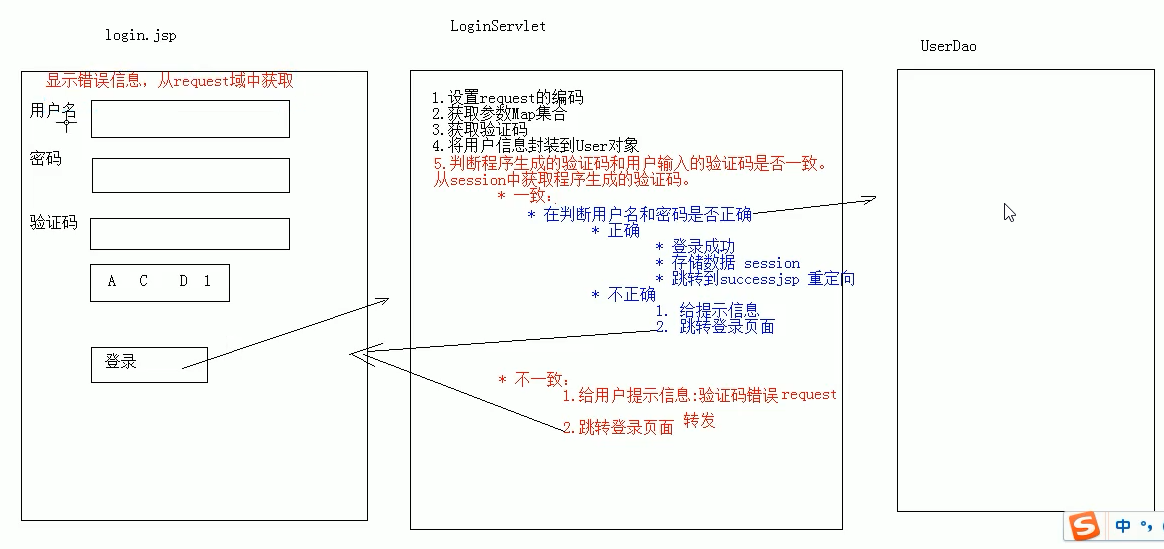
LoginServlet类
@WebServlet("/loginServlet")

public class LoginServlet extends HttpServlet {

    protected void doPost(HttpServletRequest request, HttpServletResponse response) throws ServletException, IOException {

        //设置request编码

        request.setCharacterEncoding("utf-8");

        //获取参数

        String username = request.getParameter("username");

        String password = request.getParameter("password");

        String checkcode = request.getParameter("checkcode");

        //判断验证码是否正确

        HttpSession session = request.getSession();

        //获取验证码的值

        String checkCode_session = (String) session.getAttribute("checkCode");

        //一获取完,就立马删除,以保证验证码的一次性

        session.removeAttribute("checkCode");

        if (checkCode_session!=null&&checkCode_session.equalsIgnoreCase(checkcode)){//忽略大小写比较

            //验证码正确

            //1.判断验证码和密码是否一致

            if ("zhangsan".equals(username)&&"123".equals(password)){//完善是需要调用userDao查询数据库的

                //登陆成功

                //1.存储用户信息

                session.setAttribute("user",username);

                //2.重定向success.jsp

                response.sendRedirect(request.getContextPath()+"/success.jsp");

            }else {

                //登陆失败

                //1.存储信息到request域中

                request.setAttribute("login_error","用户名或密码 不正确");

                //2.转发

                request.getRequestDispatcher("/login.jsp").forward(request,response);

            }

        }else {

            //验证码不正确

            //1.存储信息到request域中

            request.setAttribute("cc_error","验证码不正确");

            //2.转发

            request.getRequestDispatcher("/login.jsp").forward(request,response);

        }

    }

    protected void doGet(HttpServletRequest request, HttpServletResponse response) throws ServletException, IOException {

        this.doPost(request, response);

    }

}
验证码类Servlet
@WebServlet("/checkCodeServlet")

public class CheckCodeServlet extends HttpServlet {

    protected void doPost(HttpServletRequest request, HttpServletResponse response) throws ServletException, IOException {

        int width=100;

        int height=50;

        BufferedImage image=new BufferedImage(width,height,BufferedImage.TYPE_INT_RGB);

        Graphics g = image.getGraphics();

        g.setColor(Color.green);

        g.drawRect(0,0,width,height);

        g.setColor(Color.yellow);

        g.fillRect(0,0,width-1,height-1);

        String str="abcdefghijklmnopqrstuvwxyzABCDEFGHIJKLMNOPQRSTUVWXYZ0123456789";

        Random random=new Random();

        g.setColor(Color.magenta);

        StringBuilder sb = new StringBuilder();

        for (int i=1;i<=4;i++){

            int index = random.nextInt(str.length());

            char ch=str.charAt(index);

            g.drawString(ch+"",i*width/5,height/2);

            sb.append(ch);

        }

        String checkCode_session = sb.toString();

        HttpSession session=request.getSession();

        session.setAttribute("checkCode",checkCode_session);

        System.out.println("验证码是   :  " + checkCode_session);

        //画干扰线

        g.setColor(Color.green);

        for (int i = 0; i < 16; i++) {

            int x1=random.nextInt(width);

            int x2=random.nextInt(width);

            int y1=random.nextInt(height);

            int y2=random.nextInt(height);

            g.drawLine(x1,y1,x2,y2);

        }

        ImageIO.write(image,"jpg",response.getOutputStream());

    }

    protected void doGet(HttpServletRequest request, HttpServletResponse response) throws ServletException, IOException {

        this.doPost(request, response);

    }

}
login.jsp
<%@ page contentType="text/html;charset=UTF-8" language="java" %>

<html>

<head>

    <title>login</title>

    <script>

        window.onload=function () {

            var img = document.getElementById('img');

            img.onclick=function () {

                var date=new Date().getTime();

                // img.src="/session/checkCodeServlet?"+date

                this.src="/session/checkCodeServlet?time="+date

            }

        }

    </script>

    <style>

        div{

            color: red;

        }

    </style>

</head>

<body>

    <form action="/session/loginServlet">

        <table>

            <tr>

                <td>用户名</td>

                <td><input type="text" name="username"></td>

            </tr>

            <tr>

                <td>密码</td>

                <td><input type="password" name="password"></td>

            </tr>

            <tr>

                <td>验证码</td>

                <td><input type="text" name="checkcode"></td>

            </tr>

            <tr>

                <td colspan="2"><img id="img" src="/session/checkCodeServlet"></td>

            </tr>

            <tr>

                <td colspan="2"><input type="submit" value="登录"></td>

            </tr>

        </table>

    </form>

    <div><%= request.getAttribute("login_error")==null?"":request.getAttribute("login_error")%></div>

    <div><%= request.getAttribute("cc_error")==null?"":request.getAttribute("cc_error")%></div>

</body>

</html>
success.jsp
<%@ page contentType="text/html;charset=UTF-8" language="java" %>

<html>

<head>

    <title>登录成功</title>

</head>

<body>

欢迎登录,<h1><%=request.getSession().getAttribute("user") %></h1>

</body>

</html>
session+验证码 学习的更多相关文章
- 网站启动SSL, http变为https后,session验证码错误解决方法
网站启动SSL, http变为https后,session验证码错误解决方法 最近公司需要后台启动安全证书,证书安装完毕后,后台老提示 验证码错误,经过几天的研究,此问题已经得到有效解决,现把方法 ...
- django学习之- 动态验证码学习
实例:通过前台和后台,实现用户登录页面动态图片验证码校验,图片验证码部分使用Pillow模块实现,作为单独学习部分记录. 前端: <!DOCTYPE html> <html lang ...
- ASP.NET图片验证码学习!
1. 新建一个Validate.aspx,然后在Validate.aspx.cs编写代码: using System; using System.Collections; using System.C ...
- .Net Core Session验证码
1.验证码帮助类 namespace IdeaCore.Services.Common { public class ValidateCodeService : IValidateCodeServic ...
- node(4)express 框架 EJS模板,cookie, session的学习
一.EJS 概述:前端咱们使用过的一个模板套路,是underscore的套路.接下来EJS它属于后台工程师人的模板. https://www.npmjs.com/package/ejs 官网地址 特点 ...
- think php 登录 (session+验证码)
..........表单页面 <!DOCTYPE html> {__NOLAYOUT__} <html lang="en"> <head> &l ...
- php,session验证码不一致慢半拍
这种问题遇到过一次,后来忘了怎么解决了,所以做下笔记 输出的$_SESSION['code']之所以比图片慢了‘一帧’,这也纯属正常情况因为输出的图片是一个连接一次调用,而echo $_SESSION ...
- 会话控制:cookie和session基础学习笔记
在多次HTTP连接间维护用户与同一用户发出的不同请求之间关联的情况称为维护一个会话(session) 我们可以简单理解为浏览器的开关. 其实对cookie和session也是主要为curd操作 coo ...
- 一个简单的session传值学习
a.html <!DOCTYPE html> <html lang="en"> <head> <meta charset="UT ...
随机推荐
- C语言博客作业00
对网络专业的了解 我一直觉得计算机是个很神奇的东西,就像大脑中有思想一样,在一个有形的芯片中能储存着无形的数据.它们的存储方式是什么?读取方式又是什么?为什么2个数字能产生如此巨大的信息?为什么点击鼠 ...
- D建立app项目(mui)
参考 http://dev.dcloud.net.cn/mui/getting-started/ 1.ios需要下载iTunes,确保手机能连上电脑 2.mui可参考手册 http://dev.dcl ...
- HearthBuddy的plugin加载
// Hearthbuddy.Windows.MainWindow // Token: 0x060001FF RID: 511 RVA: 0x0008951C File Offset: 0x00087 ...
- Jenkins Publish FTP远程部署过程
步骤: 1.安装FileZilla FTP Server 2.添加FTP账号: 1.Edit——Users——Add 2.Edit——Users——Shared folders 3.下载FileZil ...
- regsvr32 错误解决方案
regsvr32对dll进行注册时报错,0x80070005表示权限不够,虽然是以管理员身份登录,但是仍然需要如下操作: 在运行命令提示符的时候,请右击 命令提示符 选 以管理身份运行.
- Apache POI读取Excel
1.pom.xml配置文件 <!-- 配置Apache POI --> <dependency> <groupId>org.apache.poi</group ...
- yum安装epel源
国内yum源的安装(163,阿里云,epel) 国内yum源的安装(163,阿里云,epel) ----阿里云镜像源 1.备份 mv /etc/yum.repos.d/CentOS-Base.re ...
- ExtJs6.2环境配置
http://extjs.org.cn/node/831 注意环境变量就是把 创建的项目文件放在C盘中
- 【.NET】Browser Link: Failed to deserialize JSON in Browser Link call
问题 VS2013中调试程序发现,在浏览器控制台输出如下截图代码:
- 04 npm 命令大全
一.npm简介 npm(Node Package Manager)是随同node.js 一起安装的包管理工具,为了解决nodejs代码部署上的很多问题,常用以下场景: 允许用户从npm服务器下载别 ...