
ASP.NET图片验证码学习!
1. 新建一个Validate.aspx,然后在Validate.aspx.cs编写代码:
using System;

using System.Collections;

using System.ComponentModel;

using System.Data;

using System.Web;

using System.Drawing;

using System.Web.SessionState;

using System.Web.UI;

using System.Web.UI.WebControls;

using System.Web.UI.HtmlControls;

using System.Drawing.Imaging;

using System.IO;


public partial class Validate : System.Web.UI.Page

{

      protected void Page_Load(object sender, EventArgs e)

      {

      this.CreateCheckCodeImage(RndNum());

      }

      private string RndNum()

      {

      int number;

      char code;

      string checkCode = String.Empty;

      System.Random random = new Random();

      for (int i = 0; i < 4; i++)

      {

         number = random.Next();

         if (number % 2 == 0)

            code = (char)('0' + (char)(number % 10));

         else

            code = (char)('A' + (char)(number % 26));

         checkCode += code.ToString();

      }

      Session["CheckCode"] = checkCode;

      return checkCode;

      }

      private void CreateCheckCodeImage(string checkCode)

      {

      if (checkCode == null || checkCode.Trim() == String.Empty)

         return;

      System.Drawing.Bitmap image = new System.Drawing.Bitmap((int)Math.Ceiling((checkCode.Length * 12.5)), 22);

      Graphics g = Graphics.FromImage(image);

      try

      {

         // 生成随机生成器

         Random random = new Random();

         // 清空图片背景色

         g.Clear(Color.White);

         // 画图片的背景噪音线

         for (int i = 0; i < 25; i++)

         {

            int x1 = random.Next(image.Width);

            int x2 = random.Next(image.Width);

            int y1 = random.Next(image.Height);

                        int y2 = random.Next(image.Height);

                        g.DrawLine(new Pen(Color.Silver), x1, y1, x2, y2);

                  }

                  Font font = new System.Drawing.Font("Arial", 12, (System.Drawing.FontStyle.Bold | System.Drawing.FontStyle.Italic));

                  System.Drawing.Drawing2D.LinearGradientBrush brush = new System.Drawing.Drawing2D.LinearGradientBrush(new Rectangle(0, 0, image.Width, image           .Height), Color.Blue, Color.DarkRed, 1.2f, true);

                  g.DrawString(checkCode, font, brush, 2, 2);

         // 画图片的前景噪音点

         for (int i = 0; i < 100; i++)

         {

            int x = random.Next(image.Width);

            int y = random.Next(image.Height);

                        image.SetPixel(x, y, Color.FromArgb(random.Next()));

                  }

                  //画图片的边框线

                  g.DrawRectangle(new Pen(Color.Silver), 0, 0, image.Width - 1, image.Height - 1);

                  System.IO.MemoryStream ms = new System.IO.MemoryStream();

                  image.Save(ms, System.Drawing.Imaging.ImageFormat.Gif);

                  Response.ClearContent();

                  Response.ContentType = "image/Gif";

                  Response.BinaryWrite(ms.ToArray());

            }

            finally

            {

                  g.Dispose();

                  image.Dispose();

            }

      }

}
2. 在前台你想添加的页面添加这段代码:(我这里假设是在登录页面Login.aspx中添加图片验证码)
<img id="ImageCode" src="../Validate.aspx" style="cursor:pointer" onmouseup="RefreshImage()" alt="点击重刷新"/>
还需要在<head>...</head>之间添加这段代码:
<script language ="javascript" type="text/javascript" >

          function RefreshImage()

   {

                var img = document.getElementById("ImageCode"); // 这里的ImageCode就是上面你取图片的Id名字,这里要一致!

                img.src = img.src + '?';

          }

     </script>
3. 在后台Login.aspx.cs中添加实现代码:
引用......

public partial class Login : System.Web.UI.Page

{

      protected void Page_Load(object sender, EventArgs e)

      {

      }

      // 登录按钮点击事件处理

      protected void btnLogin_Click(object sender, ImageClickEventArgs e)

      {

            User user = new User();

            user.LoginId = this.txt_LoginId.Text.Trim();

            user.LoginPwd = this.txt_LoginPwd.Text.Trim();

            if (this.txtCode.Text.ToLower() == Session["CheckCode"].ToString().ToLower())

            {

                  Response.Redirect("Index.aspx");

                  else

                  {

                        Session["user"] = null;

                        this.Page.ClientScript.RegisterStartupScript(this.GetType(), "str", "<script>alert(\"登录失败!!\")</script>");

                  }

            }

            else

            {

                  this.Page.ClientScript.RegisterStartupScript(this.GetType(), "str", "<script>alert(\"验证码错误!!\")</script>");

            }

      }

      // 新用户注册按钮点击事件处理

      protected void btn_Register_Click(object sender, ImageClickEventArgs e)

      {

            Response.Redirect("Register.aspx");

      }

}
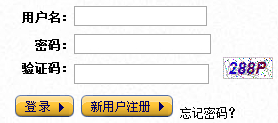
最后运行出来的验证码就是这个样子的~~
当然如果你想实现在其他页面上代码会有些小的变动,但是基本代码就这些~~
Thanks~~
ASP.NET图片验证码学习!的更多相关文章
- ASP.NET图片验证码
1. 新建一个Validate.aspx,然后在Validate.aspx.cs编写代码: using System; using System.Collections; using System.C ...
- Java图片验证码学习
- asp.net web api实现图片点击式图片验证码
现在验证码的形式越来越丰富,今天要实现的是在点击图片中的文字来进行校验的验证码,如图 这种验证码验证是验证鼠标是否选中了图片中文字的位置,以及选择的顺序,产生验证码的时候可以提供一组底图,然后随机获取 ...
- SpringBoot + Spring Security 学习笔记(三)实现图片验证码认证
整体实现逻辑 前端在登录页面时,自动从后台获取最新的验证码图片 服务器接收获取生成验证码请求,生成验证码和对应的图片,图片响应回前端,验证码保存一份到服务器的 session 中 前端用户登录时携带当 ...
- ASP.NET中图片验证码与js获取验证码的值
现在的程序中,为了防止用户恶意点击,我们一般都会加上验证,现在比较普遍的是加上图片验证码或者手机短信验证.验证码一般都是防机器不防人,有效的防止了恶意点击. 那么在webform中如何生成动态的图片验 ...
- ASP.NET MVC 模块与组件(二)——定制图片验证码
本着简洁直接,我们就直奔主题吧! 下面是一个生成数字和字母随机组合的验证码类源代码: using System; using System.Drawing; using System.Drawing ...
- asp.net core 图片验证码,后台验证
验证方法: public static string VerificationCodeCacheFormat="vcode_cache_{0}"; public IActionRe ...
- ThinkPHP学习(五)图片验证码
今天用到图片验证码的功能,在网上找到ThinkPHP的下面代码: Public function verify(){ import('think.Image'); Image::buildImageV ...
- [Asp.Net Core] 为什么选择 Blazor Server Side (一) 快速实现图片验证码
关于Blazor 由于在国内, Blazor一点都不普及, 建议读者翻看我之前写的随笔, 了解Blazor Server Side的特点. 在一段时间内, 我会写一些解说分析型的 "为什么选 ...
随机推荐
- 强制不使用“兼容性视图”的HTML代码(转)
在IE8浏览器以后版本,都有一个“兼容性视图”,让不少新技术无法使用.那么如何禁止浏览器自动选择“兼容性视图”,强制IE以最高级别的可用模式显示内容呢?下面就介绍一段HTML代码. X-UA-Comp ...
- cadence遇到的问题(持续更新)
1.画了DB9的封装,共十一个焊盘,其中两个是机械焊盘,在绘制PCB板时,想要将其接地,但无法连接,如图所示 因为是机械焊盘,所以无法用更改logic的方法进行网络更改,现在只发现一个办法,就是更改封 ...
- LINUX单网卡绑定多个IP
在linux下,我们有时候需要给单网卡设置不同的IP地址,这样就涉及到单网卡绑定多个IP地址的情况.使用本方法可以方便的为单网卡绑定多个IP地址.笔者使用的环境是centos5.6,应该在fedora ...
- 开发人员应关注的20个jQuery网站/博客
http://blog.jobbole.com/1466/ 2. 10个优秀的移动Web应用开发框架 http://blog.jobbole.com/1436/ 3. 介绍jQ Mobile ht ...
- 转: 静态模式makefile中$(cobjs): $(obj)/%.o: $(src)/%.c
4.12 静态模式静态模式规则是这样一个规则:规则存在多个目标,并且不同的目标可以根据目标文件的名字来自动构造出依赖文件.静态模式规则比多目标规则更通用,它不需要多个目标具有相同的依赖.但是静态模式规 ...
- Spring 配置自动扫描spring bean配置
<beans xmlns="http://www.springframework.org/schema/beans" xmlns:xsi="http://www.w ...
- LINUX-LXC要好好关注下
因为我觉得轻量极虚拟化可能是云的另一个发展方向. 至少,腾讯的WEB云引擎是以此为基础. LXC结合DOCKER.相信是快速云的另一种实现. 余下的,只是结合生产系统围绕这一中心进行的的二次开了. I ...
- Delphi下的RTTI函数大全
http://ljz9425.blog.163.com/blog/static/369148572008111635253858/ Delphi下的RTTI(下) 2008-12-16 15:52:5 ...
- android利用反射通过代码收缩通知栏
最近有个需求,点击通知栏RemoteView中的按钮后要收起通知栏,系统默认是不自动收起的,不过没有找到公开的API可以控制通知栏. 在android.app.StatusBarManager里提供了 ...
- 【HDOJ】3419 The Three Groups
记忆化搜索. /* 3419 */ #include <cstdio> #include <cstring> #include <cstdlib> #define ...