
Android项目实战(十九):Android Studio 优秀插件: Parcelable Code Generator
Android Studio 优秀插件系列:
Android Studio 优秀插件(一):GsonFormat
Android Studio 优秀插件(二): Parcelable Code Generator
-----------------------------------------------------------------------------
Parcelable , 这个词大家应该不陌生吧,用于序列化对象的一个接口
不清楚的可以看一下这篇博客:Intent传递对象的两种方法
-----------------------------------------------------------------------------
这里假设我们已经会使用 Parcelable 序列化一个对象了~~
那么大家会发现 Parcelable 使用起来有些复杂,因为我们要自己复写 几个方法,而且当类的属性比较多的时候,我们就会难受了,又要注意不写错属性名,又要注意写对属性的类型,又要花不少的时间做重复的事情。
那么因为 Parcelable 有使用它的优势,我们又不能放弃,那该怎么办么?
Android Studio 提供给了我们 一个插件用来简化 给一个类 实现 Parcelable 接口的流程。
-----------------------------------------------------------------------------
现在学习下如何使用这个插件:
1、Android Studio 打开一个项目,点击左上角 File -->Settings... 进行设置
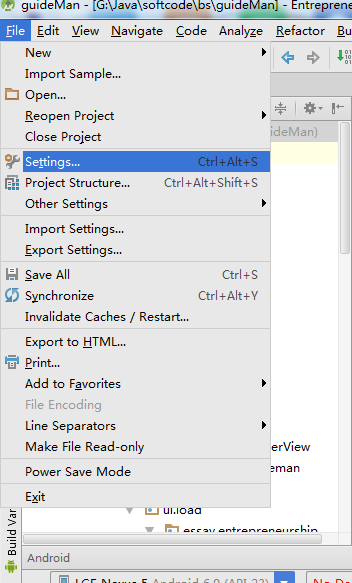
2、选择插件Plugins , 搜索Parcel,如果你没有下载过这个插件,那么搜索框下面会显示“Nothing to show.Click Browse to....”
3、那就点击蓝色字体的 Browse 吧 ,这个时候会出现如下图的界面,我们只需要在左边选中arcel然后点击右面 绿色按钮 "Install plugin" 就可以了
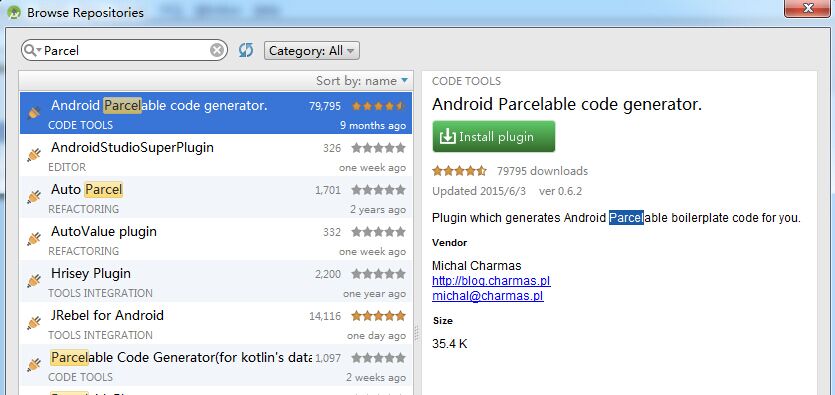
4、完成了上面三个步骤,就可以使用Parcelable Code Generator插件了
怎么用呢,
(1)创建一个类文件,类名是看你需求自定义写的,添加上你需要的属性
(2)快捷键 alt+insert ,会出现如下选择框,选择Parcelable 即可
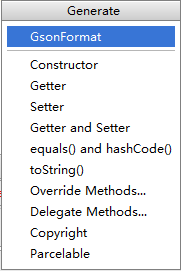
然后我们就看到代码,是不是比我们手动写要快的许多
public class People implements Parcelable {

    private int id;

    private String url;

    private int width;

    private int height;

    private int likeCount;

    private String description;

    private int time;

    private int replyCount;

    private int floorCount;

    private int likeUserCount;

    private int age;

    private String name;

    private String school;

    private int type;

    private String sax;

    private int userid;

    @Override

    public int describeContents() {

        return ;

    }

    @Override

    public void writeToParcel(Parcel dest, int flags) {

        dest.writeInt(this.id);

        dest.writeString(this.url);

        dest.writeInt(this.width);

        dest.writeInt(this.height);

        dest.writeInt(this.likeCount);

        dest.writeString(this.description);

        dest.writeInt(this.time);

        dest.writeInt(this.replyCount);

        dest.writeInt(this.floorCount);

        dest.writeInt(this.likeUserCount);

        dest.writeInt(this.age);

        dest.writeString(this.name);

        dest.writeString(this.school);

        dest.writeInt(this.type);

        dest.writeString(this.sax);

        dest.writeInt(this.userid);

    }

    public People() {

    }

    protected People(Parcel in) {

        this.id = in.readInt();

        this.url = in.readString();

        this.width = in.readInt();

        this.height = in.readInt();

        this.likeCount = in.readInt();

        this.description = in.readString();

        this.time = in.readInt();

        this.replyCount = in.readInt();

        this.floorCount = in.readInt();

        this.likeUserCount = in.readInt();

        this.age = in.readInt();

        this.name = in.readString();

        this.school = in.readString();

        this.type = in.readInt();

        this.sax = in.readString();

        this.userid = in.readInt();

    }

    public static final Parcelable.Creator<People> CREATOR = new Parcelable.Creator<People>() {

        public People createFromParcel(Parcel source) {

            return new People(source);

        }

        public People[] newArray(int size) {

            return new People[size];

        }

    };

}
Android项目实战(十九):Android Studio 优秀插件: Parcelable Code Generator的更多相关文章
- Android项目实战(九):CustomShapeImageView 自定义形状的ImageView
一个两年前出来的第三方类库,具有不限于圆形ImageView的多种形状ImageView,项目开发必备 github下载地址:https://github.com/MostafaGazar/Custo ...
- Android开发实战(十八):Android Studio 优秀插件:GsonFormat
Android Studio 优秀插件系列: Android Studio 优秀插件(一):GsonFormat Android Studio 优秀插件(二): Parcelable Code Gen ...
- Android项目实战(四十九):Andoird 7.0+相机适配
解决方案类似: Android项目实战(四十):Andoird 7.0+ 安装APK适配 解决方法: 一.在AndroidManifest.xml 文件中添加 四大组件之一的 <provider ...
- Android项目实战(二十九):酒店预定日期选择
先看需求效果图: 几个需求点: 1.显示当月以及下个月的日历 (可自行拓展更多月份) 2.首次点击选择"开始日期",再次点击选择"结束日期" (1).如果&qu ...
- (转载)Android项目实战(三十二):圆角对话框Dialog
Android项目实战(三十二):圆角对话框Dialog 前言: 项目中多处用到对话框,用系统对话框太难看,就自己写一个自定义对话框. 对话框包括:1.圆角 2.app图标 , 提示文本,关闭对话 ...
- (转载)Android项目实战(二十八):Zxing二维码实现及优化
Android项目实战(二十八):Zxing二维码实现及优化 前言: 多年之前接触过zxing实现二维码,没想到今日项目中再此使用竟然使用的还是zxing,百度之,竟是如此牛的玩意. 当然,项目中 ...
- (转载)Android项目实战(二十八):使用Zxing实现二维码及优化实例
Android项目实战(二十八):使用Zxing实现二维码及优化实例 作者:听着music睡 字体:[增加 减小] 类型:转载 时间:2016-11-21我要评论 这篇文章主要介绍了Android项目 ...
- Android项目实战(四十四):Zxing二维码切换横屏扫描
原文:Android项目实战(四十四):Zxing二维码切换横屏扫描 Demo链接 默认是竖屏扫描,但是当我们在清单文件中配置横屏显示的时候: <activity android:name=&q ...
- Android项目实战(四十):在线生成按钮Shape的网站
原文:Android项目实战(四十):在线生成按钮Shape的网站 AndroidButton Make 右侧设置按钮的属性,可以即时看到效果,并即时生成对应的.xml 代码,非常高效(当然熟练的话 ...
随机推荐
- Azure ARM (7) ARM Template - 使用Visual Studio编辑
<Windows Azure Platform 系列文章目录> 之前介绍的ARM Template,都是使用文本编辑器来编辑JSON文件的. 文本讲介绍如何使用Visual Studio, ...
- JAVA 设计模式 适配器模式
用途 适配器模式 (Adapter) 将一个类的接口转换成客户希望的另外一个接口. Adapter模式使得原本由于接口不兼容而不能一起工作的那些类可以一起工作. 适配器模式是一种结构型模式. 结构
- JS的一些日期操作
以下语句,作者都亲自整理,并调试过,转载请注明出处 var nowDate = new Date(); nowDate.getYear(); //获取当前年份(2位) nowDate.getFullY ...
- PLT:说说Evaluation strategy
Brief 在学习方法/函数时,我们总会接触到 按值传值 和 引用传值 两个概念.像C#是按值传值,但参数列表添加了ref/out后则是引用传值,但奇怪的事出现了 namespace Foo{ cla ...
- 《ASP.NET SignalR系列》第三课 SignalR的支持平台
从现在开始相关文章请到: http://lko2o.com/moon 接着第二课:<ASP.NET SignalR系列>第二课 SignalR的使用说明 一.服务器系统要求 SignalR ...
- EasyUI使用tree方法生成树形结构加载两次的问题
html代码中利用class声明了easyui-tree,导致easyUI解析class代码的时候先解析class声明中的easyui-tree这样组件就请求了一次url:然后又调用js初始化代码请求 ...
- 【Java每日一题】20161109
package Nov2016; import java.lang.reflect.Method; public class Ques1109 { public static void main(St ...
- [范例] Firemonkey TForm 实现 OnMouseLeave 事件 (適用 Win & OS X)
在 Firemonkey 的 TForm 并没有提供 OnMouseLeave 的事件,不过可以透过 OnMouseMove 来达到相同效果,请见代码: uses FMX.Consts; proced ...
- 初识orcl
一.介绍基本数据库的端口号. SQLServer 端口号:1433 MySql 端口号:3306 Oracle ...
- IClient for js开发之地图的加载
进行web开发之前首先需要安装IServer以及iClient for JavaScript的开发包.在这两中都具备的前提下进行第一步,如何调用IServer中发布的服务 调用iServer 中发布的 ...