
关于Http 传输二维json
传输一维的好说
    public static String  doPost(String url) {

        String result = new String();

        OutputStream out = null;

        InputStream in = null;

        try {

            URL realUrl = new URL(url);

            HttpURLConnection urlConnection = (HttpURLConnection) realUrl.openConnection();

            urlConnection.setConnectTimeout();//设置连接超时

            urlConnection.setReadTimeout();

//            urlConnection.setRequestProperty("ser-Agent", "Fiddler");

            urlConnection.setRequestProperty("connection", "Keep-Alive");

            //urlConnection.setRequestProperty("Content-Type", "application/x-www-form-urlencoded");

            //urlConnection.setRequestProperty("Content-Type", "text/html; charset=UTF-8");

            urlConnection.setRequestProperty("Content-Type",  "application/json");

            urlConnection.setRequestMethod("POST");

            // 发送POST请求必须设置如下两行

            urlConnection.setDoOutput(true);

            urlConnection.setDoInput(true);

            urlConnection.setChunkedStreamingMode();

            // 获取URLConnection对象对应的输出流

            out = new BufferedOutputStream(urlConnection.getOutputStream());

            // 发送请求参数

//            String postContent =

//                    URLEncoder.encode("userName", "UTF-8") + "=" +

//                    URLEncoder.encode("admin", "UTF-8") + "&" +

//                    URLEncoder.encode("passWord", "UTF-8") + "="+

//                    URLEncoder.encode("admin", "UTF-8") ;

            JSONObject jsonObject = new JSONObject();

            jsonObject.put("cmd","mobile");

            jsonObject.put("param","00000000000");

            Data  = jsonObject.toString();

            //String json = java.net.URLEncoder.encode(jsonObject.toString(), "utf-8");

            Log.e("数据", Data );

//            String  postContent ="cmd="

//                    +URLEncoder.encode("check_mobile", "utf-8") + "&" +

//                    "mobile="+

//                    URLEncoder.encode("18363890557", "utf-8");

            //Log.e("err",postContent);

            out.write(Data.getBytes());

            out.flush();

            out.close();

            if (urlConnection.getResponseCode() == ) {

                InputStreamReader inputStreamReader = new InputStreamReader(urlConnection.getInputStream(),"UTF-8");

                BufferedReader bufferedReader = new BufferedReader(inputStreamReader);

                String ee=null;

                while ((ee = bufferedReader.readLine())!=null)

                {

                    result = ee;

                    Log.e("err","接收到数据="+result);

                }

            }else {

                result = null;

            }

        } catch (Exception e) {

            Log.e("err",e+"");

        } finally {//使用finally块来关闭输出流、输入流

            try {

                if (out != null) {

                    out.close();

                }

                if (in != null) {

                    in.close();

                }

            } catch (IOException ex) {

                ex.printStackTrace();

            }

        }

        return result;

    }
然后直接用任务
new Thread(new Runnable() {

            @Override

            public void run () {

                String sss = doPost("http://具体的地址");

                //Log.e("err","Read="+sss);

            }

        }).start();
现在说二维的
假设要封装成这样
{ "cmd":"check_mobile", "param":{ "mobile":"" } }
后面的是一个二维的json
一开始我以为
JSONObject jsonObject1 = new JSONObject();

            jsonObject1.put("mobile","");

            String str = jsonObject1.toString();

            JSONObject jsonObject = new JSONObject();

            jsonObject.put("cmd","check_mobile");

            jsonObject.put("param",str);

            Data  = jsonObject.toString();
不可以....发现数据是这样的

然后就在想是不是 String str = jsonObject1.toString(); jsonObject.put("param",str); 不应该这样
所以
            JSONObject jsonObject1 = new JSONObject();

            jsonObject1.put("mobile","");

            //String str = jsonObject1.toString();

            JSONObject jsonObject = new JSONObject();

            jsonObject.put("cmd","check_mobile");

            jsonObject.put("param",jsonObject1);

            Data  = jsonObject.toString();
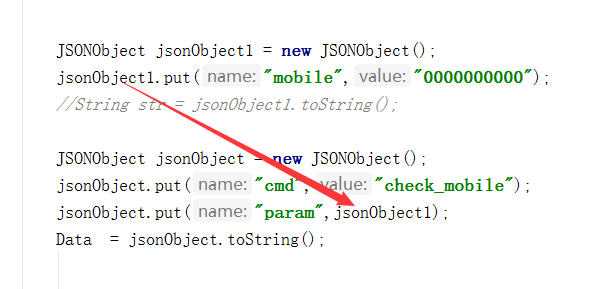
这样就可以了
后来尝试了其它各种方式
发现用Map也是可以的
Map map1 = new HashMap<String,String>();

            map1.put("mobile","");

            Map map2 = new HashMap<String,Object>();

            map2.put("cmd","check_mobile");

            map2.put("param",map1);

            String Data = new JSONObject(map2).toString();
晚安
关于Http 传输二维json的更多相关文章
- json 拼二维json数组
js声明数组 以及向数组中添加as移除json数据 JavaScript声明JSON数组的方法: //部分条件,在数据渲上数据要求是数组格式而非json数组格式,取arrayJson.dataList ...
- ASP.NET实现二维码 ASP.Net上传文件 SQL基础语法 C# 动态创建数据库三(MySQL) Net Core 实现谷歌翻译ApI 免费版 C#发布和调试WebService ajax调用WebService实现数据库操作 C# 实体类转json数据过滤掉字段为null的字段
ASP.NET实现二维码 using System;using System.Collections.Generic;using System.Drawing;using System.Linq;us ...
- jquery解析php通过ajax传过来的json二维数组对象
ajax获得php传过来的json二维数组对象,jquery解析 php代码: <?php $news = array( '武汉'=>array(1,2,3), '广州'=>arra ...
- ***php解析JSON二维数组字符串(json_decode函数第二个参数True和False的区别)
客户端的请求体中的数据:[{"msg_id": 1, "msg_status": "HAS_READ" }, { "msg_id& ...
- 二维数组的传输 (host <-> device)
前言 本文的目的很明确:介绍如何将二维数组传递进显存,以及如何将二维数组从显存传递回主机端. 实现步骤 1. 在显存中为二维数组开辟空间 2. 获取该二维数组在显存中的 pitch 值 (cudaMa ...
- dbda封装类(包括:返回二维数组、Ajax调用返回字符串、Ajax调用返回JSON)
<?php class DBDA { public $host = "localhost"; public $uid = "root"; public $ ...
- 第六篇:二维数组的传输 (host <-> device)
前言 本文的目的很明确:介绍如何将二维数组传递进显存,以及如何将二维数组从显存传递回主机端. 实现步骤 1. 在显存中为二维数组开辟空间 2. 获取该二维数组在显存中的 pitch 值 (cudaMa ...
- json-lib解析json之二维JSONArray
在接口测试中,不管是接口的请求报文还是接口的响应报文,数据全部使用json,在工作中避免不了去解析响应报文以获取某个键的值,解析josn有两种方式,一种是利用jackson,还有一种就是利用json- ...
- HTML-DEV-ToolLink(常用的在线字符串编解码、代码压缩、美化、JSON格式化、正则表达式、时间转换工具、二维码生成与解码等工具,支持在线搜索和Chrome插件。)
HTML-DEV-ToolLink:https://github.com/easonjim/HTML-DEV-ToolLink 常用的在线字符串编解码.代码压缩.美化.JSON格式化.正则表达式.时间 ...
随机推荐
- 【代码笔记】Web-HTML-链接
一,效果图. 二,代码. <!DOCTYPE html> <html> <head> <meta charset="utf-8"> ...
- Ansible--原理
什么是Ansible Ansible是一种IT自动化运维工具,它可以配置系统,部署软件以及协调更高级的IT任务,例如持续部署或者是零停机滚动更新Ansible是新出现的自动化运维工具,基于Python ...
- 【转】MySQL:日期函数、时间函数总结(MySQL 5.X)
转自:http://www.cnblogs.com/she27/articles/1377089.html 一.MySQL 获得当前日期时间 函数1.1 获得当前日期+时间(date + time)函 ...
- Login case
第一步:画UI,代码如下: <LinearLayout xmlns:android="http://schemas.android.com/apk/res/android" ...
- 浅谈 Mysql 中的索引
文章归属:http://feiyan.info/16.html,我想自己去写了,但是发现此君总结的非常详细.直接搬过来了 关于MySQL索引的好处,如果正确合理设计并且使用索引的MySQL是一辆兰博基 ...
- springboot 升级到2.0后 context-path 配置 不起作用,不生效 不管用 皆是因为版本改动导致的在这里记录一下
不知不觉,新的项目已经将springboot升级为2.0版本了.刚开始没有配置server.contextpath,默认的“/”,然后今天放到自己的服务器上,所以就要规范名称. 结果,失败了,无论我 ...
- EntityFramework Code-First 简易教程(八)-------一对一
配置一对一(One-to-One)关系: 两个实体中,如果一个实体的一个实例与另一个实体相关,则我们就叫做一对一关系 查看如下代码: public class Student { public Stu ...
- fedora 28 , firewalld 防火墙控制,firewall-cmd 管理防火墙规则
今天,在使用fedora时,需要修改防火墙规则,一时间忘记了命令是什么,这里进行记录一下. 目前 fedora 28/ centos 7 使用 firewalld 作为防火墙软件:下面我就怎么简单管理 ...
- 第七章 鼠标(CHECKER2)
CHECKER2程序包含一个键盘接口,内容与CHECKER1完全相同.利用←.→.↑.↓四个方向键可以在25个矩形之间移动鼠标指针.Home键把鼠标指针移动到左上角的矩形:End键使鼠标指针落到右下角 ...
- shell基本语法记录
Shell 是一个用 C 语言编写的程序,它是用户使用 Linux 的桥梁.Shell 既是一种命令语言,又是一种程序设计语言. Shell 是指一种应用程序,这个应用程序提供了一个界面,用户通过这个 ...