
TRIO-basic指令--FLEXLINK
Type:
Axis Command
Syntax:
FLEXLINK(base_dist, excite_dist, link_dist, base_in, base_out, excite_acc, excite_dec, link_axis, options, start_pos)
Description
The FLEXLINK command is used to generate movement of an axis according to a defined profile. The motion is linked to the measured motion of another axis. The profile is made up of 2 parts, the base move and the excitation move both of which are specified in the parameters. The base move is a constant speed movement. The excitation movement uses sinusoidal profile and is applied on top of the base movement.
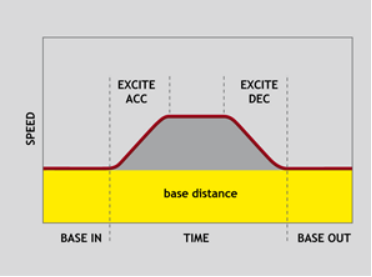
FLEXLINK命令用于根据定义的轮廓生成一个轴运动,本运动跟另一轴的测量相关。轮廓由“基本位移”与“激波位移”二部分组成,同时二者都可以在参数中配置。“基本位移”是一个恒速运动,“激波位移”采用正弦曲线而且居于“基本位移”的上部。
Parameters:
|
base_dist: |
The distance the axis should move at a constant speed |
||
|
excite_dist: |
The distance the axis should perform the profiled move |
||
|
link_dist: |
The distance the link axis should move while the FLEXLINK profile executes |
||
|
base_in: |
The percentage of the base move time that completes before the excitation move starts |
||
|
base_out: |
The percentage of the base move time that completes after the excitation move completes. |
||
|
excite_acc: |
The percentage of the excitation move time used for acceleration |
||
|
excite_dec: |
The percentage of the excitation move time used for deceleration. |
||
|
link_axis: |
The axis to link to. |
||
|
link_options: |
Bit value options to customize how your FLEXLINK operates |
||
|
Bit 0 |
1 |
link commences exactly when registration event MARK occurs on link axis |
|
|
Bit 1 |
2 |
link commences at an absolute position on link axis (see link_pos for start position) |
|
|
Bit 2 |
4 |
FLEXLINK repeats automatically and bi-directionally when this bit is set. (This mode can be cleared by setting bit 1 of the REP_OPTION axis parameter) |
|
|
Bit 5 |
32 |
Link is only active during a positive move on the link axis |
|
|
Bit 8 |
256 |
link commences exactly when registration event MARKB occurs on link axis |
|
|
Bit 9 |
512 |
link commences exactly when registration event R_MARK occurs on link axis. (see link_pos for channel number) |
|
|
link_pos: |
link_option bit 1 - the absolute position on the link axis in user UNITS where the FLEXLINK is to start. link_option bit 9 – the registration channel to start the movement on |
||
|
base_dist: |
轴在恒速移动的距离段(上图黄色区域) |
||
|
excite_dist: |
轴在异形段移动的距离区间(上图灰色部分) |
||
|
link_dist: |
在执行flexlink轮廓时,连接轴将要移动的距离 |
||
|
base_in: |
在“激波位移”启动之前,完成的“基本位移”时间百分比 (相当于在同步区域,主轴和从轴) |
||
|
base_out: |
在“激波位移”完成后,须完成的“基本位移”时间百分比(相当于在同步区域,主轴和从轴) |
||
|
excite_acc: |
在“激波位移”执行时,加速度区间占用的时间百分比 |
||
|
excite_dec: |
在“激波位移”执行时,减速度区间占用的时间百分比 |
||
|
link_axis: |
联接的轴号 |
||
|
link_options: |
根据Bit值的选项来定制MOVELINK的运动 |
||
|
Bit 0 |
1 |
联接开始,当注册事件(Mark)发生在联接轴上时 |
|
|
Bit 1 |
2 |
联接开始,指定联接轴的绝对位置(link_pos起始位置) |
|
|
Bit 2 |
4 |
FLEXLINK自动重复双向运行(REP_OPTION=1关闭此模式) |
|
|
Bit 5 |
32 |
在联接轴的正移动过程中(加计数状态),联接才有效 |
|
|
Bit 8 |
256 |
联接开始,当注册事件(MarkB)发生在联接轴上时 |
|
|
Bit 9 |
512 |
联接开始,当注册事件(R_Mark)发生在联接轴上时(见link_pos的通道数) |
|
|
link_pos: |
link_option bit 1:联接轴上指定的绝对位置启动FLEXLINK(使用的是用户单位) link_option bit 9:开始运动的注册通道 |
||
The link_dist is in the user units of the link axis and should always be specified as a positive distance.
该link_dist是联接轴的用户单位,总是应该指定一个正的距离值。
The link options for start (bits 1, 2, 8 and 9) may be combined with the link options for repeat (bits 4 and 8) and direction.
启动为link options (bits 1, 2, 8 and 9),也可以结合link options中重复的 (bits 4 and 8)和方向
start_pos cannot be at or within one servo period’s worth of movement of the REP_DIST position.
start_pos不能在一个伺服周期内从REP_DIST位置中取得有意义的运动
Examples:
Example 1:
Suppose you want a smooth curve for 40% of a cycle and to remain stationary for the remainder:
FLEXLINK(0,10000,20000,60,0,50,50,1)
In this example the move length is 10000 and this is linked to 20000 distance on the link axis (1). The axis is stationary for 60% of the cycle and the move is 50% accel/50% decel.
Example 2:
Suppose you want a 1:1 background link but to advance 500 using a smooth curve between 80% and 95% of a cycle:
FLEXLINK(10000,500,10000,80,5,50,50,1)
In this example the base move length is 10000 and this is linked to 10000 distance on the link axis (1). The excite distance is 500 and this starts after 80% of the cycle, with 5% at the end also clear of excitation. The “excite” move is 50% accel/50% decel.
自己总结:
这是一条运动指令,在工业项目中的轮切,飞剪等一些项目的应用。
看上面描述的图片理解:
黄色区域 = 主轴运动的曲线
红色的曲线 = 跟随轴的曲线
BASE IN 是同步区域,BASE OUT 是同步区域
EXCITE ACC EXCITE DEC 是可以通过参数来修改加速和减速的曲线
下一期我会针对这条指令的应用,给出一些实例,包括曲线,参数,一直注意的事项。
TRIO-basic指令--FLEXLINK的更多相关文章
- 杂项-软件: VBA(Visual Basic for Applications)
ylbtech-杂项-软件: VBA(Visual Basic for Applications) VBA (Visual Basic宏语言) Visual Basic for Application ...
- Nginx模块参考手册:HTTP核心模块
FROM: http://blog.chinaunix.net/xmlrpc.php?r=blog/article&uid=17238776&id=2982697 这些模块默认会全部编 ...
- nginx 参数详解
nginx的http web功能 必须使用虚拟机来配置站点:每个虚拟主机使用一个server{}段来配置 非虚拟主机的配置.公共选项,需要定义在server之外,http之内 ...
- 我在知乎上关于Laser200/310电脑的文章。
我是30年前从Laser-310起步的,我来回答这个问题. 主要硬件规格: CPU:Z-80A/4.7MHz主频 16K RAM + 2K Video RAM 16K ROM 磁带输出:波特率300 ...
- Nginx HTTP 核心模块
原文链接:http://blog.chinaunix.net/xmlrpc.php?r=blog/article&uid=17238776&id=2982697aio 语法:aio [ ...
- TRIO-basic指令--函数FUNCTION
TRIO-basic支持函数(强类型)编程,与PLC来相比较的话类似于定义的功能块可以重复调用,和C,C#......等一些高级的编程语言的函数类似.上一次的demo中决定尝试TRIO的函数来做一些例 ...
- IL指令详细表
名称 说明 Add 将两个值相加并将结果推送到计算堆栈上. Add.Ovf 将两个整数相加,执行溢出检查,并且将结果推送到计算堆栈上. Add.Ovf.Un 将两个无符号整数值相加,执行溢出检查,并且 ...
- IL指令汇总
名称 说明 名称 说明 Add 将两个值相加并将结果推送到计算堆栈上. Ldelem.I1 将位于指定数组索引处的 int8 类型的元素作为 int32 加载到计算堆栈的顶部. Add.Ovf ...
- [.NET逆向] .net IL 指令速查(net破解必备)
.net的破解比较特殊,很多人看见IL就头疼,最近在研究的时候发现了这个东东 相信对广大学习net破解的人一定有帮助 .对上指令表一查,跟读原代码没什么区别了, 名称 说明 Add 将两个值相加并将结 ...
随机推荐
- Docker容器服务发现方案
一. 目的 在服务在容器中部署时,外部调用服务需要知道服务接口ip及端口号,这样导致部署时需要配置,从而增加部署的困难.本文档主要介绍如何使用ningx反向代理和consul进行自动化服务发 ...
- Apache与Tomcat有什么关系和区别
Apache 和 Tomcat 都是web网络服务器,两者既有联系又有区别,在进行HTML.PHP.JSP.Perl等开发过程中,需要准确掌握其各自特点,选择最佳的服务器配置. Apache是web服 ...
- web开发中遇到的乱码问题
相信大家在web开发中会遇到乱码问题,有页面乱码,请求乱码,数据库乱码等等,下面我这边列举一下针对不同情况的乱码的解决方案: 1.相应数据乱码: //只需要在后台接口方法里面的开头写上这样一句话指定响 ...
- Python实例---模拟微信网页登录(day3)
第四步: 扫码成功后获取最近联系人信息---day3代码 settings.py """ Django settings for weixin project. Gene ...
- Kibana中的Coordinate Map地图报索引错误的问题
今天做地图定位展示,展示的是ApacheWeb服务器的访问日志文件中的来源IP.但是中间出现了报错环节,说是索引不能匹配到geo_point类型,实在是不懂这是在说什么,后来在网站找了方法就解决了.主 ...
- SSM框架下使用websocket实现后端发送消息至前端
本篇文章本人是根据实际项目需求进行书写的第一版,里面有些内容对大家或许没有用,但是核心代码本人已对其做了红色标注.文章讲解我将从maven坐标.HTML页面.js文件及后端代码一起书写. 一.mave ...
- 【软件工程1916|W(福州大学)_助教博客】团队第四次作业(第7次)成绩公示
1. 作业链接: https://edu.cnblogs.com/campus/fzu/SoftwareEngineering1916W/homework/2874 2. 评分准则: 本次作业评分分为 ...
- Java实现数据库的读写分离
引言 1.读写分离:可以通过Spring提供的AbstractRoutingDataSource类,重写determineCurrentLookupKey方法,实现动态切换数据源的功能:读写分离可以有 ...
- go标准库的学习-time
参考https://studygolang.com/pkgdoc 导入形式: import "time" time包提供了时间的显示和测量用的函数.日历的计算采用的是公历. 1&g ...
- Oracle 11g中的snapshot standby特性
在Oracle 11g中,data guard最吸引人的,除了active data guard的实时查询特性(即可以以只读方式打开物理standby数据库的同时MRP进程能继续做recover),快 ...