
[Docker] Running Multiple Containers for an Angular, Node project
The code is from Plusight course, github link is here.
In this post, we will give a overview about how to setup Docker for a Angular, Node application, of course, you can replace Angular with any other FEF, the concept should be the same.
We have a normal Angular CLI generated structure:
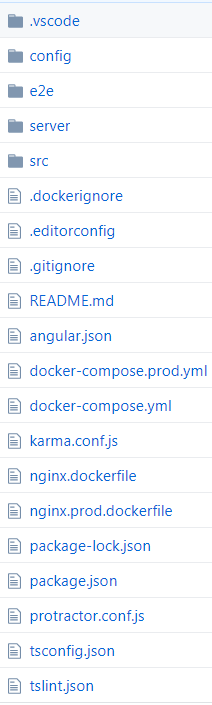
Some differences that we add a 'server' folder and 'config' folder.
In serve folder, there is a docker file for Node.js:
// node.dockerfile

FROM node:alpine

LABEL author="Dan Wahlin"

WORKDIR /var/www/angular-node-service

COPY package.json package.json

RUN npm install

COPY . .

EXPOSE

ENTRYPOINT ["node", "server.js"]
For 'config' folder, we have a nginx.conf file:
server {

    listen 0.0.0.0:;

    listen [::]:;

    default_type application/octet-stream;

    gzip                    on;

    gzip_comp_level         ;

    gzip_vary               on;

    gzip_min_length         ;

    gzip_proxied            any;

    gzip_types              text/plain text/css application/json application/x-javascript text/xml application/xml application/xml+rss text/javascript;

    gzip_buffers             8k;

    client_max_body_size    256M;

    root /usr/share/nginx/html;

    location / {

        try_files $uri $uri/ /index.html =;

    }

}
Mainly for handling FE Routing case.
The most important file is docker-compose.yml file:
# This can be used to run a development version of the Angular and Node containers

# See the readme.md for details on changes that are required in the Angular service

# Run docker-compose build

# Run docker-compose up

# Live long and prosper

version: '3.1'

services:

  nginx:

    container_name: nginx-angular

    image: nginx-angular

    build:

      context: .

      dockerfile: nginx.dockerfile

    volumes:

      - ./dist:/usr/share/nginx/html

    ports:

      - "80:80"

      - "443:443"

    depends_on:

      - node

    networks:

      - app-network

  node:

    container_name: angular-node-service

    image: angular-node-service

    build:

      context: ./server

      dockerfile: node.dockerfile

    environment:

      - NODE_ENV=development

    ports:

      - "3000:3000"

    networks:

      - app-network

  cadvisor:

    container_name: cadvisor

    image: google/cadvisor

    volumes:

      - /:/rootfs:ro

      - /var/run:/var/run:rw

      - /sys:/sys:ro

      - /var/lib/docker/:/var/lib/docker:ro

    ports:

      - "8080:8080"

    networks:

      - app-network

networks:

  app-network:

    driver: bridge
It defines 'nginx-angular', 'node' and 'cadvisor' (optional).
We have docker file for production:
# This can be used to run a production version of the Angular and Node containers

# See the readme.md for details on changes that are required in the Angular service

# Run docker-compose -f docker-compose.prod.yml build

# Run docker-compose up

# Live long and prosper

version: '3.1'

services:

  nginx:

    container_name: nginx-angular

    image: nginx-angular

    build:

      context: .

      dockerfile: nginx.prod.dockerfile

    ports:

      - "80:80"

      - "443:443"

    depends_on:

      - node

    networks:

      - app-network

  node:

    container_name: angular-node-service

    image: angular-node-service

    build:

      context: ./server

      dockerfile: node.dockerfile

    environment:

      - NODE_ENV=production

    ports:

      - "3000:3000"

    networks:

      - app-network

  cadvisor:

    container_name: cadvisor

    image: google/cadvisor

    volumes:

      - /:/rootfs:ro

      - /var/run:/var/run:rw

      - /sys:/sys:ro

      - /var/lib/docker/:/var/lib/docker:ro

    ports:

      - "8080:8080"

    networks:

      - app-network

networks:

  app-network:

    driver: bridge
The way to run it is a bit different:
docker-compose -f docker-compose.prod.yml build
[Docker] Running Multiple Containers for an Angular, Node project的更多相关文章
- [NPM] Use a shorthand syntax for running multiple npm scripts with npm-run-all
Running multiple scripts in series or in parallel can become very verbose. Using a tool such as npm- ...
- Errors running builder "Integrated External Tool Builder" on project
Errors during build.Errors running builder "Integrated External Tool Builder" on project p ...
- eclipse中报错:Errors running builder “Integrated External Tool Builder” on project
在eclipse构建项目的时候,一直报如下错误: Errors during build. Errors running builder "Integrated External Tool ...
- [转]How to Add Bootstrap to an Angular CLI project
本文转自:https://loiane.com/2017/08/how-to-add-bootstrap-to-an-angular-cli-project/ In this article we w ...
- (转)Docker - 创建 Docker overlay network (containers 通信)
原文链接: http://www.cnblogs.com/AlanWalkOn/p/6101875.html --- 创建基于Key-Value的Docker overlay network. 这样运 ...
- Docker指定multiple Insecure registry的方法
Docker如果需要从非SSL源管理镜像,需要配置Docker配置文件的insecury-registry参数,一般在如下位置修改其配置文件: * /etc/sysconfig/docker * /e ...
- Running multiple instances of Xamarin Studio on a Mac
I love developing software on my MacBook Air! I got the latest version with the maximum possible spe ...
- ASP.NET Core 2.0 in Docker on Windows Containers
安装Docker for Windows https://store.docker.com/editions/community/docker-ce-desktop-windows 要想将一个ASP. ...
- NET Core 2.0 in Docker on Windows Containers
安装Docker for Windows https://store.docker.com/editions/community/docker-ce-desktop-windows 要想将一个ASP. ...
随机推荐
- TopCoder SRM500 Div1 1000 其他
原文链接https://www.cnblogs.com/zhouzhendong/p/SRM500-1000.html SRM500 Div1 1000 设 \(v_1,v_2,\cdots ,v_9 ...
- BZOJ2119 股市的预测 字符串 SA ST表
原文链接https://www.cnblogs.com/zhouzhendong/p/9069171.html 题目传送门 - BZOJ2119 题意 给定一个股票连续$n$个时间点的价位,问有多少段 ...
- Python 2 和 3 的区别记录
Python 2 和 3 的区别记录 print 2:关键字,可以 print a,也可以 print(a) 3:内置函数,必须带(),print(a) reload() 2:内置函数,可以直接使用 ...
- JavaEE 之 log4j
1.log4j a.概念:一个非常优秀的开源日志记录工具 b.配置: ①src同目录下建立log4j.properties文件,书写: log4j.rootLogger=debug,appender1 ...
- 多媒体开发(8):调试FFmpeg
编译FFmpeg得到二进制文件,之后就是对二进制库的调用,这时FFmpeg就像一个黑盒子.作为程序员,难道不想研究一下FFmpeg的具体实现?比如是怎么拿到歌曲信息的.怎么解码的.怎么推流的,等等. ...
- SpringMVC框架01——使用IDEA搭建SpringMVC环境
1.Spring MVC 入门 1.1.Spring MVC 简介 把Web应用程序分为三层,分别是: 控制器(Controller):负责接收并处理请求,响应客户端: 模型(Model):模型数据, ...
- linux 学习笔记三
用户管理篇章 useradd 建立用户 一般用法 #useradd mysql 含义 创建 mysql用户 特殊用户 > #useradd -d /usr/cjh -m cjh 含义 创建 cj ...
- 大数据环境完全分布式搭建hbase-0.96.2-hadoop2
1.上传hbase安装包 2.解压 3.配置hbase集群,要修改3个文件 (首先zookeeper集群已经安装好了 并且启动 hadoop启动) 注意:要把hadoop的hdfs-site.xml和 ...
- BZOJ.4513.[SDOI2016]储能表(数位DP)
BZOJ 洛谷 切了一道简单的数位DP,终于有些没白做题的感觉了...(然而mjt更强没做过这类的题也切了orz) 看部分分,如果\(k=0\),就是求\(\sum_{i=0}^n\sum_{j=0} ...
- 潭州课堂25班:Ph201805201 django 项目 第二十七课 docker简介,配置文件 (课堂笔记)
新闻搜索功能实现 一.docker介绍 1.什么是docker? 使用容器让创建.部署.运行应用程序更简单的一个工具 让应用所需的库和依赖环境打包 有一点点像虚拟机 2.为什么使用docker? 3. ...