
Android动态添加Fragment
效果图如下:
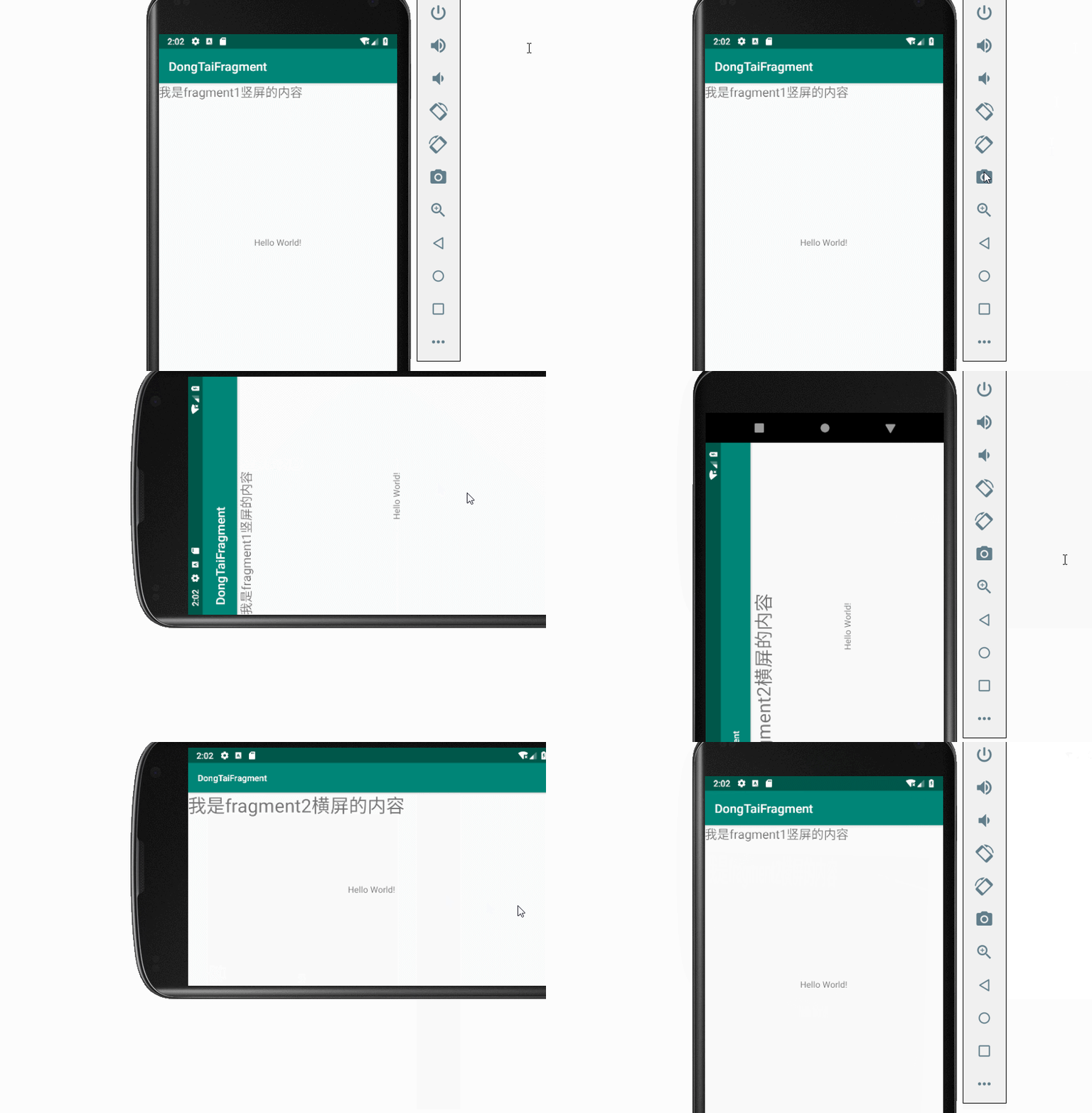
项目结构图如下:

Fragment1:
package com.demo.dongtaifragment;

import android.app.Fragment;

import android.os.Bundle;

import android.support.annotation.NonNull;

import android.support.annotation.Nullable;

import android.view.LayoutInflater;

import android.view.View;

import android.view.ViewGroup;

public class Fragment2 extends Fragment {

    //显示faragemnt1 自己要显示的内容

    @Nullable

    @Override

    public View onCreateView(@NonNull LayoutInflater inflater, @Nullable ViewGroup container, @Nullable Bundle savedInstanceState) {

        View view = inflater.inflate(R.layout.fragemnt2, null);

        return view;

    }

}
Fragment2:
package com.demo.dongtaifragment;

import android.app.Fragment;

import android.os.Bundle;

import android.support.annotation.NonNull;

import android.support.annotation.Nullable;

import android.view.LayoutInflater;

import android.view.View;

import android.view.ViewGroup;

public class Fragment2 extends Fragment {

    //显示faragemnt1 自己要显示的内容

    @Nullable

    @Override

    public View onCreateView(@NonNull LayoutInflater inflater, @Nullable ViewGroup container, @Nullable Bundle savedInstanceState) {

        View view = inflater.inflate(R.layout.fragemnt2, null);

        return view;

    }

}
MainActivity:
package com.demo.dongtaifragment;

import android.app.FragmentManager;

import android.app.FragmentTransaction;

import android.support.v7.app.AppCompatActivity;

import android.os.Bundle;

import android.view.WindowManager;

public class MainActivity extends AppCompatActivity {

    @Override

    protected void onCreate(Bundle savedInstanceState) {

        super.onCreate(savedInstanceState);

        setContentView(R.layout.activity_main);

        //[1]获取手机的分辨率

        WindowManager wm = (WindowManager) getSystemService(WINDOW_SERVICE);

        int width = wm.getDefaultDisplay().getWidth();

        int height = wm.getDefaultDisplay().getHeight();

        FragmentManager fragmentManager  = getFragmentManager();

        //开启事务

        FragmentTransaction beginTransaction = fragmentManager.beginTransaction();

        Fragment1 fragment1 = new Fragment1();

        //判断横竖

        if(height>width){

            //说明是竖屏  加载一个fragment

           beginTransaction.replace(android.R.id.content, new Fragment1());

        }else{

            //说明是横屏

            beginTransaction.replace(android.R.id.content, new Fragment2());

        }

        //最后一步 记得commit

        beginTransaction.commit();

    }

}
fragemnt1.xml:
<?xml version="1.0" encoding="utf-8"?>

<android.support.constraint.ConstraintLayout

    xmlns:android="http://schemas.android.com/apk/res/android" android:layout_width="match_parent"

    android:layout_height="match_parent">

    <TextView

        android:layout_width="wrap_content"

        android:layout_height="match_parent"

        android:text="我是fragment1竖屏的内容"

        android:textSize="20sp"

        />

</android.support.constraint.ConstraintLayout>
fragemnt2.xml:
<?xml version="1.0" encoding="utf-8"?>

<android.support.constraint.ConstraintLayout

    xmlns:android="http://schemas.android.com/apk/res/android" android:layout_width="match_parent"

    android:layout_height="match_parent">

    <TextView

        android:layout_width="wrap_content"

        android:layout_height="match_parent"

        android:text="我是fragment2横屏的内容"

        android:textSize="30sp"

        />

</android.support.constraint.ConstraintLayout>
Android动态添加Fragment的更多相关文章
- Android Fragment用法详解(2)--动态添加Fragment
在上一篇文章<Android Fragment用法详解(1)--静态使用Fragment>我们讲解了Fragment的最简单的用法.这次我们来说一说Fragment复杂一丢丢的用法.在代码 ...
- 使用Fragment 实现动态UI 和 动态添加Fragment
首先写好每个Fragment: 1.在第一个Fragment写一个按钮,使其加载下一个Fragment 布局: <LinearLayout xmlns:android="http:// ...
- Android动态添加Device Admin权限
/********************************************************************** * Android动态添加Device Admin权限 ...
- Android 动态创建Fragment
Fragment是activity的界面中的一部分或一种行为.可以把多个Fragment组合到一个activity中来创建一个多界面并且可以在多个activity中重用一个Fragment.可以把Fr ...
- 动态添加Fragment
在Fragment简单用法的基础上做修改 一.新建:another_right_fragment.xml <LinearLayout xmlns:android="http://sch ...
- Android动态添加碎片
我们编写一个能够用过按钮动态更替碎片的APP,首先在主页上显示第一个碎片,点击按钮后可以替换到第二个碎片,或者删除已经替换掉的第二个碎片. 一.MainActivity.java import and ...
- Android 动态添加Spinner(.java文件内实现) 实现 改变spinner 内文字属性
动态添加spinner 控件 Spinner s = new Spinner(this); String []items={"自己定义的要显示的数组"}; my_SpinnerAd ...
- Android动态添加和移除布局
package com.hyang.administrator.studentproject; import android.os.Bundle; import android.support.v7. ...
- Android — — —动态添加碎片
<?xml version="1.0" encoding="utf-8"?><LinearLayout xmlns:android=" ...
随机推荐
- 【收藏】UICrawler
基于 Appium 的 App UI 遍历 & Monkey 工具 (支持操作步骤回放) UICrawler https://github.com/lgxqf/UICrawler 基于Appi ...
- python import hashllb
http://www.cnblogs.com/alex3714/articles/5161349.html 用于加密相关的操作,3.x里代替了md5模块和sha模块,主要提供 SHA1, SHA224 ...
- vue.$nextTick 解决了哪些问题
转载:https://www.cnblogs.com/xuewuhen/p/7860989.html $nextTick 是在下次 DOM 更新循环结束之后执行延迟回调,在修改数据之后使用 $next ...
- Windows7 VS2015 下编译 PythonQt3.2
本文在使用vs2015编译python3.6.7源代码后,编译的PythonQt3.2.如果使用python二进制文件进行安装,注意python的路径即可 本机环境: 1.win7 64 旗舰版 2. ...
- boost的下载和安装(windows版)
1 简介 boost是一个准C++标准库,相当于STL的延续和扩充,它的设计理念和STL比较接近,都是利用泛型让复用达到最大化. boost主要包含以下几个大类: 字符串及文本处理.容器.迭代器(it ...
- cpp 区块链模拟示例(六) 交易
交易(transaction)是比特币的核心所在,而区块链的唯一目的,也正是为了能够安全可靠地存储交易.在区块链中,交易一旦被创建,就没有任何人能够再去修改或是删除它.在今天的文章中,我们会实现交易的 ...
- servlet跨域
后台代码 package edu.nf.ch01.server; import javax.servlet.ServletException; import javax.servlet.annotat ...
- VS2015 类模板保存位置
如果安装在C盘,则是如下位置: C:\Program Files (x86)\Microsoft Visual Studio 14.0\Common7\IDE\ItemTemplates\CSharp ...
- 《pyhton语言程序设计》_第一章笔记
章1.62 (1).python区分大小写. (2).python忽略在符号#之后的同行的内容 (3).python和matlab很相似(个人感觉) (4).章节1.91: >>>i ...
- 深度搜索优先(全排列)//本内容来自《啊哈!算法》或者英文名《Aha!Algorithms》)
package Mypackage; import java.util.Scanner; public class 全排列{ static int a[]=new int[10]; static ...