
Android动态添加Fragment
效果图如下:
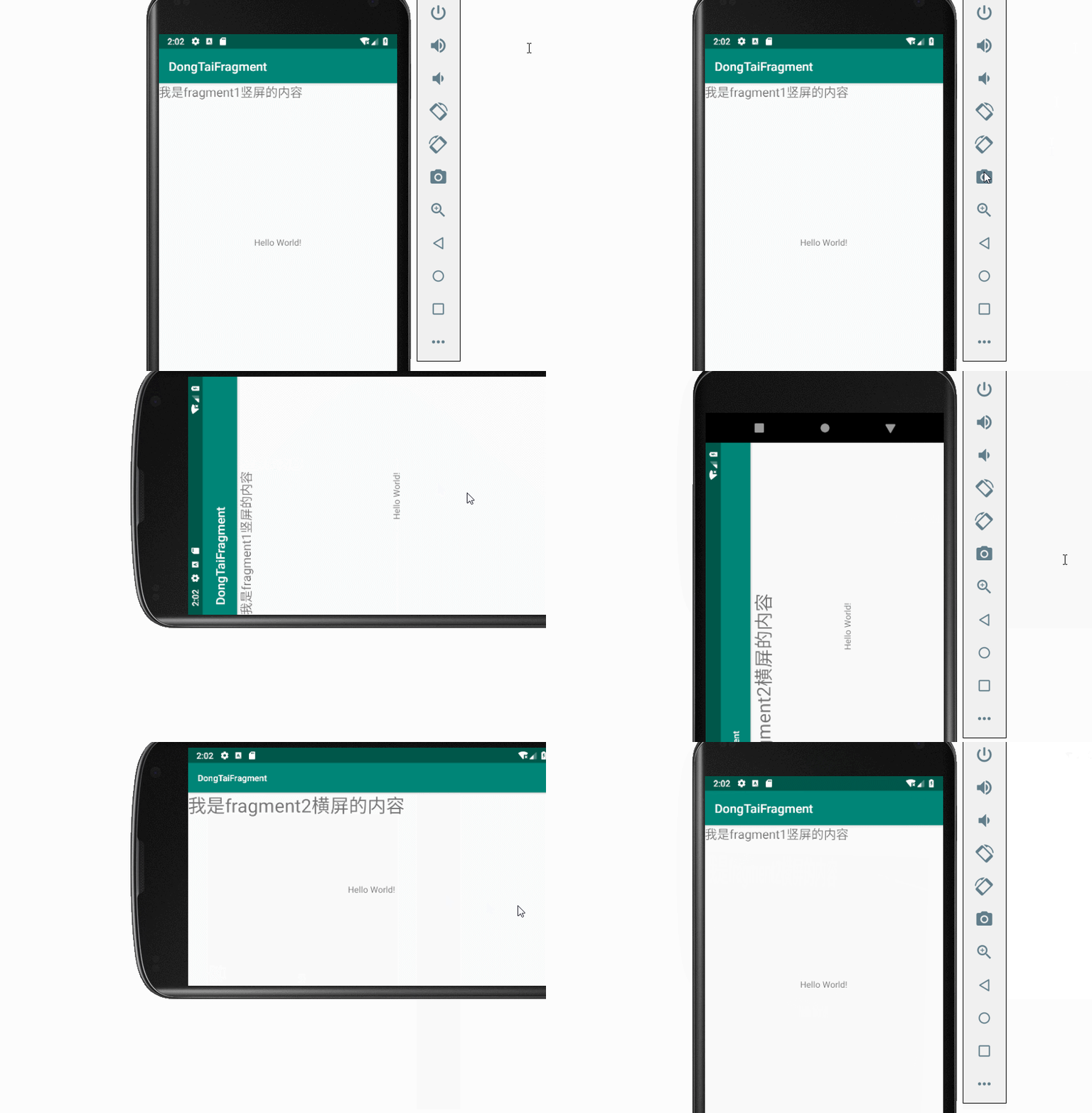
项目结构图如下:

Fragment1:
package com.demo.dongtaifragment;

import android.app.Fragment;

import android.os.Bundle;

import android.support.annotation.NonNull;

import android.support.annotation.Nullable;

import android.view.LayoutInflater;

import android.view.View;

import android.view.ViewGroup;

public class Fragment2 extends Fragment {

    //显示faragemnt1 自己要显示的内容

    @Nullable

    @Override

    public View onCreateView(@NonNull LayoutInflater inflater, @Nullable ViewGroup container, @Nullable Bundle savedInstanceState) {

        View view = inflater.inflate(R.layout.fragemnt2, null);

        return view;

    }

}
Fragment2:
package com.demo.dongtaifragment;

import android.app.Fragment;

import android.os.Bundle;

import android.support.annotation.NonNull;

import android.support.annotation.Nullable;

import android.view.LayoutInflater;

import android.view.View;

import android.view.ViewGroup;

public class Fragment2 extends Fragment {

    //显示faragemnt1 自己要显示的内容

    @Nullable

    @Override

    public View onCreateView(@NonNull LayoutInflater inflater, @Nullable ViewGroup container, @Nullable Bundle savedInstanceState) {

        View view = inflater.inflate(R.layout.fragemnt2, null);

        return view;

    }

}
MainActivity:
package com.demo.dongtaifragment;

import android.app.FragmentManager;

import android.app.FragmentTransaction;

import android.support.v7.app.AppCompatActivity;

import android.os.Bundle;

import android.view.WindowManager;

public class MainActivity extends AppCompatActivity {

    @Override

    protected void onCreate(Bundle savedInstanceState) {

        super.onCreate(savedInstanceState);

        setContentView(R.layout.activity_main);

        //[1]获取手机的分辨率

        WindowManager wm = (WindowManager) getSystemService(WINDOW_SERVICE);

        int width = wm.getDefaultDisplay().getWidth();

        int height = wm.getDefaultDisplay().getHeight();

        FragmentManager fragmentManager  = getFragmentManager();

        //开启事务

        FragmentTransaction beginTransaction = fragmentManager.beginTransaction();

        Fragment1 fragment1 = new Fragment1();

        //判断横竖

        if(height>width){

            //说明是竖屏  加载一个fragment

           beginTransaction.replace(android.R.id.content, new Fragment1());

        }else{

            //说明是横屏

            beginTransaction.replace(android.R.id.content, new Fragment2());

        }

        //最后一步 记得commit

        beginTransaction.commit();

    }

}
fragemnt1.xml:
<?xml version="1.0" encoding="utf-8"?>

<android.support.constraint.ConstraintLayout

    xmlns:android="http://schemas.android.com/apk/res/android" android:layout_width="match_parent"

    android:layout_height="match_parent">

    <TextView

        android:layout_width="wrap_content"

        android:layout_height="match_parent"

        android:text="我是fragment1竖屏的内容"

        android:textSize="20sp"

        />

</android.support.constraint.ConstraintLayout>
fragemnt2.xml:
<?xml version="1.0" encoding="utf-8"?>

<android.support.constraint.ConstraintLayout

    xmlns:android="http://schemas.android.com/apk/res/android" android:layout_width="match_parent"

    android:layout_height="match_parent">

    <TextView

        android:layout_width="wrap_content"

        android:layout_height="match_parent"

        android:text="我是fragment2横屏的内容"

        android:textSize="30sp"

        />

</android.support.constraint.ConstraintLayout>
Android动态添加Fragment的更多相关文章
- Android Fragment用法详解(2)--动态添加Fragment
在上一篇文章<Android Fragment用法详解(1)--静态使用Fragment>我们讲解了Fragment的最简单的用法.这次我们来说一说Fragment复杂一丢丢的用法.在代码 ...
- 使用Fragment 实现动态UI 和 动态添加Fragment
首先写好每个Fragment: 1.在第一个Fragment写一个按钮,使其加载下一个Fragment 布局: <LinearLayout xmlns:android="http:// ...
- Android动态添加Device Admin权限
/********************************************************************** * Android动态添加Device Admin权限 ...
- Android 动态创建Fragment
Fragment是activity的界面中的一部分或一种行为.可以把多个Fragment组合到一个activity中来创建一个多界面并且可以在多个activity中重用一个Fragment.可以把Fr ...
- 动态添加Fragment
在Fragment简单用法的基础上做修改 一.新建:another_right_fragment.xml <LinearLayout xmlns:android="http://sch ...
- Android动态添加碎片
我们编写一个能够用过按钮动态更替碎片的APP,首先在主页上显示第一个碎片,点击按钮后可以替换到第二个碎片,或者删除已经替换掉的第二个碎片. 一.MainActivity.java import and ...
- Android 动态添加Spinner(.java文件内实现) 实现 改变spinner 内文字属性
动态添加spinner 控件 Spinner s = new Spinner(this); String []items={"自己定义的要显示的数组"}; my_SpinnerAd ...
- Android动态添加和移除布局
package com.hyang.administrator.studentproject; import android.os.Bundle; import android.support.v7. ...
- Android — — —动态添加碎片
<?xml version="1.0" encoding="utf-8"?><LinearLayout xmlns:android=" ...
随机推荐
- D. Kilani and the Game(多源BFS)
题目来源:http://codeforces.com/contest/1105/problem/D 题意:编号为1-k的点在一张n*m的表格中依次扩散,每个结点有各自的扩散速度且只可以往上下左右四个方 ...
- osg探究补充:Node::accept(NodeVisitor& nv)及NodeVisitor简介
前言 在前几节中,我自己觉得讲的比较粗糙,因为实在是时间上不是很充足,今天我想弥补一下,希望不是亡羊补牢.我们在osgViewer::Viewer::eventTraversal()函数中经常看到这么 ...
- FT_ND_API.dll
ePass1000ND https://blog.csdn.net/li34442779/article/details/44276989 https://www.cnblogs.com/lidabo ...
- sqlserver 通过日志恢复误删的数据
转载地址:https://www.cnblogs.com/mrzl/p/4043313.html
- [uboot] (第五章)uboot流程——uboot启动流程
http://blog.csdn.net/ooonebook/article/details/53070065 以下例子都以project X项目tiny210(s5pv210平台,armv7架构)为 ...
- HTTP协议简单认识
一.HTTP协议简介 HTTP超文本传输协议是一种用于分布式,协作式和超媒体信息系统的应用层协议 二.HTTP协议概述 HTTP是一个客户端和服务端请求和响应的标准 三.HTTP协议工作步骤 1.客户 ...
- hdu-1878(欧拉回路)
题目链接:传送门 思路:就是判断无向图的欧拉回路的两个条件:(1)连通性(2)点的度数是偶数 注意:两个条件一同时满足才行. #include<iostream> #include< ...
- ABP框架系列之四十四:(OWIN)
If you are using both of ASP.NET MVC and ASP.NET Web API in your application, you need to add Abp.Ow ...
- 14.2.4HTML5约束API验证
<body> <form> <!-- required属性在提交表单时不能空着 这个属性适用于<input> <textarea> <sel ...
- Mysql中比较常用的两种存储引擎和事务
存储引擎:引擎(类似汽车上的发动机)决定了数据库的快慢,MySql中有20多个引擎,不同的存储引擎提供不同的存储机制.索引技巧.锁定水平.MYISAM存储引擎,INNODB存储引擎最出名.数据库的核心 ...