
Spring Jdbc 框架整合的第一天
Spring Jdbc的概述
它是Spring框架的持久层子框架。用于对数据库的操作
什么是数据库的操作?
答:对数据库的增删改查
在使用Spring Jdbc框架,要用到一个类---->JdbcTemplate,他是spring jdbc 子框架中提供的一个操作类,用于对原始jabc API的简单封装
那么如何创建Template呢?
首先看一下它的源码:
public JdbcTemplate() {

}

/**

 * Construct a new JdbcTemplate, given a DataSource to obtain connections from.

 * <p>Note: This will not trigger initialization of the exception translator.

 * @param dataSource the JDBC DataSource to obtain connections from

 */

public JdbcTemplate(DataSource dataSource) {

setDataSource(dataSource);

afterPropertiesSet();

}

/**

 * Construct a new JdbcTemplate, given a DataSource to obtain connections from.

 * <p>Note: Depending on the "lazyInit" flag, initialization of the exception translator

 * will be triggered.

 * @param dataSource the JDBC DataSource to obtain connections from

 * @param lazyInit whether to lazily initialize the SQLExceptionTranslator

 */

public JdbcTemplate(DataSource dataSource, boolean lazyInit) {

setDataSource(dataSource);

setLazyInit(lazyInit);

afterPropertiesSet();

}
在此段代码中我们可以看出要创建一个jdbcTemplate 对象,需要获得一个数据库连接的数据源
如何获得一个数据库连接的数据源呢?

org.springframework.jdbc.datasource.DriverManagerDataSource,这个路径位于jdbc驱动包中
再配置springjdbc的四要素:
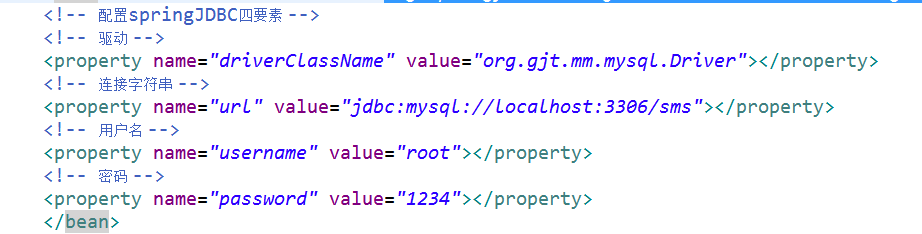
实现代码:
配置文件代码:
<?xml version="1.0" encoding="UTF-8"?>

<beans xmlns="http://www.springframework.org/schema/beans"

    xmlns:xsi="http://www.w3.org/2001/XMLSchema-instance"

    xmlns:context="http://www.springframework.org/schema/context"

    xsi:schemaLocation="http://www.springframework.org/schema/beans http://www.springframework.org/schema/beans/spring-beans-4.3.xsd

        http://www.springframework.org/schema/context http://www.springframework.org/schema/context/spring-context-4.3.xsd">

    <!--配置一个数据源

        由于jjabc模块提供的DriverManagerDataSource数据源,是一个直连数据源,

        所以每次访问数据库,都要去打开连接才能访问,效率不高!

        所以引入了连接池的概念。。。

        连接池中的四个重要属性

        1.最大超时毫秒数

        2.最大连接数

        3.最小连接数

        4.最大空闲时间

        destroy-method:在连接池对象注销之前,先关闭数据库(关闭连接池)

    -->

    <!-- 数据源的作用:获得数据库的链接,从而引出springJDBC的四要素 -->

    <bean name="dataSource" class="org.apache.commons.dbcp2.BasicDataSource" destroy-method="close">

    <!-- 配置springJDBC四要素 -->

    <!-- 驱动 -->

    <property name="driverClassName" value="org.gjt.mm.mysql.Driver"></property>

    <!-- 连接字符串 -->

    <property name="url" value="jdbc:mysql://localhost:3306/sms"></property>

    <!-- 用户名 -->

    <property name="username" value="root"></property>

    <!-- 密码 -->

    <property name="password" value="1234"></property>

    <!-- 最大超时毫秒数 -->

    <property name="maxWaitMillis" value="30000"></property>

    <!-- 最大连接数 -->

    <property name="maxTotal" value="100"></property>

    <!-- 最小连接数 -->

    <property name="initialSize" value="50"></property>

    <!-- 最大空闲连接 -->

    <property name="maxIdle" value="55"></property>

    </bean>

    <!-- 获得JDBCTemplate操作对象 -->

    <bean name="jdbcTemplate" class="org.springframework.jdbc.core.JdbcTemplate">

    <!-- 设置 -->

    <property name="dataSource" ref="dataSource"></property>

    </bean>

    <!-- 配置dao -->

    <bean name="studentDAO" class="cn.gzsxt.dao.StudentDAO">

    <property name="jdbcTemplate" ref="jdbcTemplate"></property>

    </bean>

</beans>
dao层:
package cn.gzsxt.dao;

import org.springframework.jdbc.core.JdbcTemplate;

import cn.gzsxt.pojo.Student;

public class StudentDAO implements DAO<Student>{

    private JdbcTemplate JdbcTemplate;

    public void setJdbcTemplate(JdbcTemplate jdbcTemplate) {

        JdbcTemplate = jdbcTemplate;

    }

    @Override

    public int insert(Student entity) {

        // TODO Auto-generated method stub

        //事物的操作(增删改)都可以是update方法

        Object [] objects = {entity.getStuName(),entity.getStuPwd()};

        int update = JdbcTemplate.update("INSERT INTO t_student(stuName,stuPwd) VALUES(?,?)", objects);

        return update;

    }

}
pojo层
package cn.gzsxt.pojo;

import java.io.Serializable;

public class Student implements Serializable{

    /**什么是序列化?

     * 将对象通过流的形式写出去

     * 反序列化

     * 读取流形式的数据

     *

     */

    private static final long serialVersionUID = 114525114257637298L;

    private int stuId;

    private String stuName;

    private String stuPwd;

    public int getStuId() {

        return stuId;

    }

    public void setStuId(int stuId) {

        this.stuId = stuId;

    }

    public String getStuName() {

        return stuName;

    }

    public void setStuName(String stuName) {

        this.stuName = stuName;

    }

    public String getStuPwd() {

        return stuPwd;

    }

    public void setStuPwd(String stuPwd) {

        this.stuPwd = stuPwd;

    }

    public Student(int stuId, String stuName, String stuPwd) {

        super();

        this.stuId = stuId;

        this.stuName = stuName;

        this.stuPwd = stuPwd;

    }

    public Student() {

        super();

        // TODO Auto-generated constructor stub

    }

}
测试代码:
package cn.gzsxt.test;

import org.junit.After;

import org.junit.Before;

import org.junit.Test;

import org.springframework.context.support.ClassPathXmlApplicationContext;

import cn.gzsxt.dao.StudentDAO;

import cn.gzsxt.pojo.Student;

public class ApplicationContextTest {

    private StudentDAO studentDAO;

    private ClassPathXmlApplicationContext conn;

    @Before

    public void Before(){

        conn = new ClassPathXmlApplicationContext("classpath:applicationContext.xml");

        //获得数据源对象

        studentDAO = conn.getBean(StudentDAO.class);

    }

    @After

    public void after(){

        conn.close();

    }

    /**

     * junit代替main方法,使得类能同时有多个main方法的功能

     * 使用时要注意,返回值必须为空,为void

     */

//    @Test

//    public void dataSource(){

//        //通过配置文件创建容器

//        ClassPathXmlApplicationContext conn = new ClassPathXmlApplicationContext("classpath:applicationContext.xml");

//

//        //获取数据源对象

//        DataSource dataSource = conn.getBean(DataSource.class);

//

//        try {

//            //打印数据库链接地址,测试连接是否成功

//            System.out.println(dataSource.getConnection());

//        } catch (SQLException e) {

//            // TODO Auto-generated catch block

//            e.printStackTrace();

//        }

//

//    }

    @Test

    public void insert(){

            Student entity = new Student();

            entity.setStuName("王八");

            studentDAO.insert(entity);

    }

}
spring jdbc 的优化!
由于jdbc模块提供的DriverManagerDataSource数据源,是一个直连数据源,所以每次访问数据库,都要去打开连接才能访问,效率不高,所以引入了连接池的概念,连接池的四个重要属性:
1.最大超时毫秒数
2.最大连接数
3.最小连接数
4.最大空闲时间

如何关闭连接池呢?
destroy-method:在连接池对象注销之前,先关闭数据库(关闭连接池)
Spring Jdbc 框架整合的第一天的更多相关文章
- RabbitMQ与Spring的框架整合之Spring Boot实战
1.RabbitMQ与Spring的框架整合之Spring Boot实战. 首先创建maven项目的RabbitMQ的消息生产者rabbitmq-springboot-provider项目,配置pom ...
- Spring JDBC 框架使用JdbcTemplate 类的一个实例
JDBC 框架概述 在使用普通的 JDBC 数据库时,就会很麻烦的写不必要的代码来处理异常,打开和关闭数据库连接等.但 Spring JDBC 框架负责所有的低层细节,从开始打开连接,准备和执行 SQ ...
- struts2 + spring + mybatis 框架整合详细介绍
struts2 + spring + mybatis 框架整合详细介绍 参考地址: https://blog.csdn.net/qq_22028771/article/details/5149898 ...
- ref:Spring JDBC框架
ref:https://blog.csdn.net/u011054333/article/details/54772491 Spring JDBC简介 先来看看一个JDBC的例子.我们可以看到为了执行 ...
- spring boot 学习(二)spring boot 框架整合 thymeleaf
spring boot 框架整合 thymeleaf spring boot 的官方文档中建议开发者使用模板引擎,避免使用 JSP.因为若一定要使用 JSP 将无法使用. 注意:本文主要参考学习了大神 ...
- 11.Spring——JDBC框架
1.DBC 框架概述 2.Spring JDBC 示例 3.Spring 中 SQL 的存储过程 1.DBC 框架概述 在使用普通的 JDBC 数据库时,就会很麻烦的写不必要的代码来处理异常,打开和关 ...
- Spring JDBC 框架 简介
在使用普通的 JDBC 数据库时,就会很麻烦的写不必要的代码来处理异常,打开和关闭数据库连接等. 但 Spring JDBC 框架负责所有的低层细节,从开始打开连接,准备和执行 SQL 语句,处理异常 ...
- spring三大框架整合
Spring概述 Spring介绍 Spring它是一个一站式的分层轻量级框架. Spring体系结构 1. core container a) beans与core ...
- SSM框架-----------SpringMVC+Spring+Mybatis框架整合详细教程
1.基本概念 1.1.Spring Spring是一个开源框架,Spring是于2003 年兴起的一个轻量级的Java 开发框架,由Rod Johnson 在其著作Expert One-On-One ...
随机推荐
- vim资源
1.http://vimcasts.org vim技巧,还有一个高达120美元的课程 目前,正在看http://vimcasts.org/blog/2013/02/habit-breaking-hab ...
- Unity StreamingMipmaps 简单测试
StreamingMipmaps是Unity2018.2中加入的新功能,意指通过CPU控制,只加载部分Mipmap图片以节省更多的内存及显存空间. 我测试时遇到了问题,后来发现必须打包出来测才有效(注 ...
- ios调试-查看日志
连上mac,然后打开“console.app”, 左侧设备里选这个设备.
- MySQL字符集详解
Reference: https://www.cnblogs.com/wcwen1990/p/6917109.html MySQL字符集详解 一.字符集和校验规则 字符集是一套符合和编码,校验规 ...
- [C++]深入解析结构化异常处理(SEH)
http://www.cppblog.com/weiym/archive/2015/02/27/209884.html 尽管以前写过一篇SEH相关的文章<关于SEH的简单总结>, 但那真的 ...
- win8.1系统出现C0000034正在应用更新操作怎么办
说来也奇怪,笔者Dell台式机前几天系统提示有更新,笔者对系统进行了更新,可昨天开机后,就出现了C0000034正在应用更新操作的情况,且电脑一直没反应,上网搜了一下帖子,发现复制粘贴的帖子好多,基本 ...
- 第四百一十六节,Tensorflow简介与安装
第四百一十六节,Tensorflow简介与安装 TensorFlow是什么 Tensorflow是一个Google开发的第二代机器学习系统,克服了第一代系统DistBelief仅能开发神经网络算法.难 ...
- MySQL server has gone away
场景: 批量写入数据时,MySQL server has gone away 解决方法: 在 my.ini 中 将 max_allowed_packet 参数设置大一点 show global va ...
- SQL 问题记录
今天在处理SQL的时候遇到几个问题: 1.如果指定了 SELECT DISTINCT,那么 ORDER BY 子句中的项就必须出现在选择列表中 select distinct id from 收费站 ...
- Python的安装以及编译器的安装
首先要想写python语言,要安装并配置python的环境,点击python下载即可,当然需要看下自己电脑适合下载的版本,64位还是32位的即可. 安装一般情况安装在C盘即可,选择添加变量的配置,完成 ...