
Hadoop基础-配置历史服务器
Hadoop基础-配置历史服务器
作者:尹正杰
版权声明:原创作品,谢绝转载!否则将追究法律责任。
Hadoop自带了一个历史服务器,可以通过历史服务器查看已经运行完的Mapreduce作业记录,比如用了多少个Map、用了多少个Reduce、作业提交时间、作业启动时间、作业完成时间等信息。默认情况下,Hadoop历史服务器是没有启动的,我们可以通过Hadoop自带的命令(mr-jobhistory-daemon.sh)来启动Hadoop历史服务器。
一.yarn上运行mr程序
1>.启动集群
[yinzhengjie@s101 ~]$ xcall.sh jps

============= s101 jps ============

 ResourceManager

 NameNode

 Jps

 DFSZKFailoverController

命令执行成功

============= s102 jps ============

 DataNode

 JournalNode

 NodeManager

 Jps

 QuorumPeerMain

命令执行成功

============= s103 jps ============

 DataNode

 JournalNode

 NodeManager

 QuorumPeerMain

 Jps

命令执行成功

============= s104 jps ============

 NodeManager

 Jps

 QuorumPeerMain

 DataNode

 JournalNode

命令执行成功

============= s105 jps ============

 Jps

 NameNode

 DFSZKFailoverController

命令执行成功

[yinzhengjie@s101 ~]$
2>.在yarn上执行MapReduce程序
[yinzhengjie@s101 ~]$ hadoop jar /soft/hadoop/share/hadoop/mapreduce/hadoop-mapreduce-examples-2.7..jar wordcount /yinzhengjie/data/ /yinzhengjie/data/output

// :: INFO client.RMProxy: Connecting to ResourceManager at s101/172.30.1.101:

// :: INFO input.FileInputFormat: Total input paths to process :

// :: INFO mapreduce.JobSubmitter: number of splits:

// :: INFO mapreduce.JobSubmitter: Submitting tokens for job: job_1534851274873_0001

// :: INFO impl.YarnClientImpl: Submitted application application_1534851274873_0001

// :: INFO mapreduce.Job: The url to track the job: http://s101:8088/proxy/application_1534851274873_0001/

// :: INFO mapreduce.Job: Running job: job_1534851274873_0001

// :: INFO mapreduce.Job: Job job_1534851274873_0001 running in uber mode : false

// :: INFO mapreduce.Job:  map % reduce %

// :: INFO mapreduce.Job:  map % reduce %

// :: INFO mapreduce.Job:  map % reduce %

// :: INFO mapreduce.Job: Job job_1534851274873_0001 completed successfully

// :: INFO mapreduce.Job: Counters:

    File System Counters

        FILE: Number of bytes read=

        FILE: Number of bytes written=

        FILE: Number of read operations=

        FILE: Number of large read operations=

        FILE: Number of write operations=

        HDFS: Number of bytes read=

        HDFS: Number of bytes written=

        HDFS: Number of read operations=

        HDFS: Number of large read operations=

        HDFS: Number of write operations=

    Job Counters

        Launched map tasks=

        Launched reduce tasks=

        Data-local map tasks=

        Total time spent by all maps in occupied slots (ms)=

        Total time spent by all reduces in occupied slots (ms)=

        Total time spent by all map tasks (ms)=

        Total time spent by all reduce tasks (ms)=

        Total vcore-milliseconds taken by all map tasks=

        Total vcore-milliseconds taken by all reduce tasks=

        Total megabyte-milliseconds taken by all map tasks=

        Total megabyte-milliseconds taken by all reduce tasks=

    Map-Reduce Framework

        Map input records=

        Map output records=

        Map output bytes=

        Map output materialized bytes=

        Input split bytes=

        Combine input records=

        Combine output records=

        Reduce input groups=

        Reduce shuffle bytes=

        Reduce input records=

        Reduce output records=

        Spilled Records=

        Shuffled Maps =

        Failed Shuffles=

        Merged Map outputs=

        GC time elapsed (ms)=

        CPU time spent (ms)=

        Physical memory (bytes) snapshot=

        Virtual memory (bytes) snapshot=

        Total committed heap usage (bytes)=

    Shuffle Errors

        BAD_ID=

        CONNECTION=

        IO_ERROR=

        WRONG_LENGTH=

        WRONG_MAP=

        WRONG_REDUCE=

    File Input Format Counters

        Bytes Read=

    File Output Format Counters

        Bytes Written=

[yinzhengjie@s101 ~]$
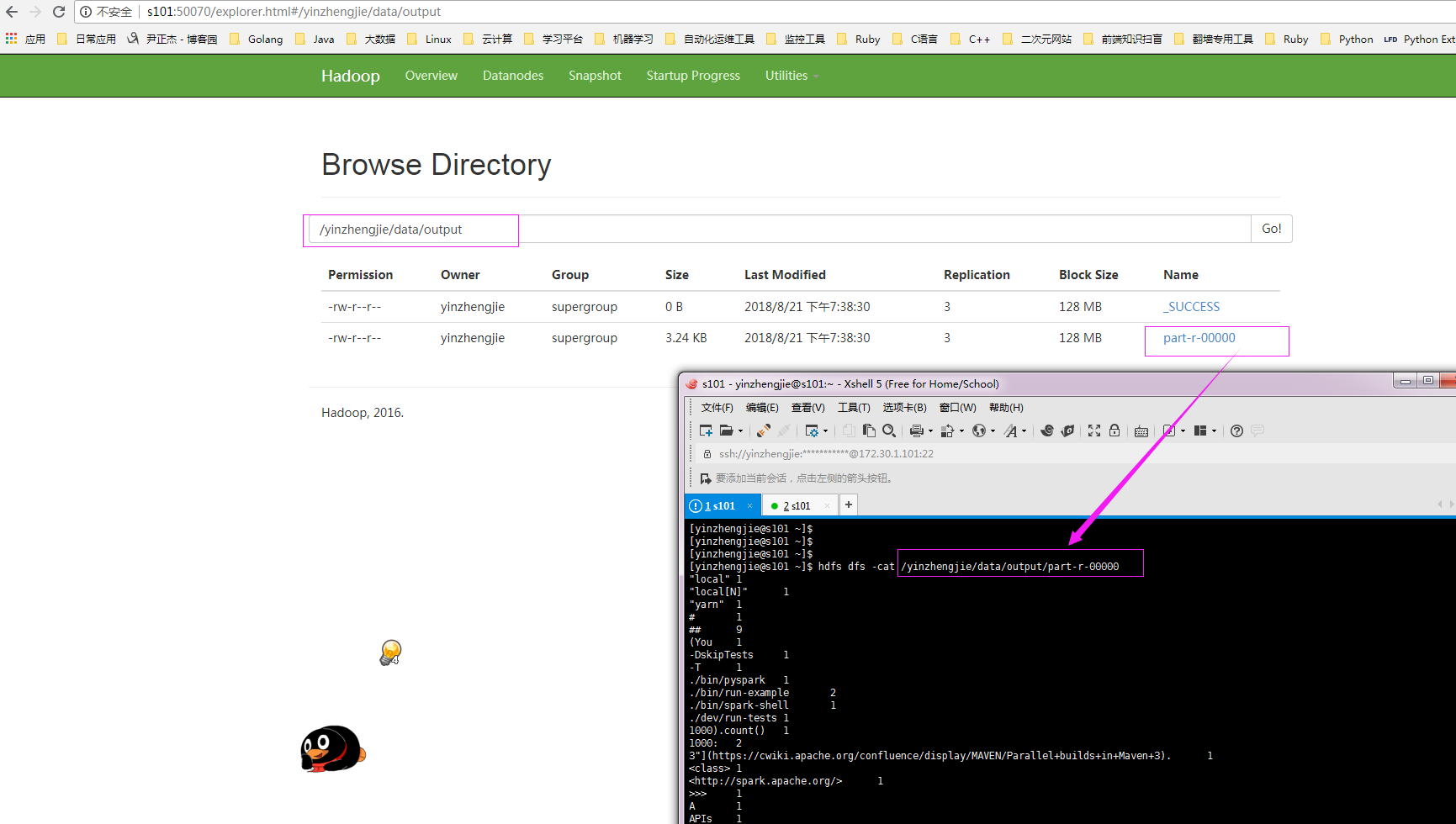
3>.通过webUI查看hdfs是否有数据产生
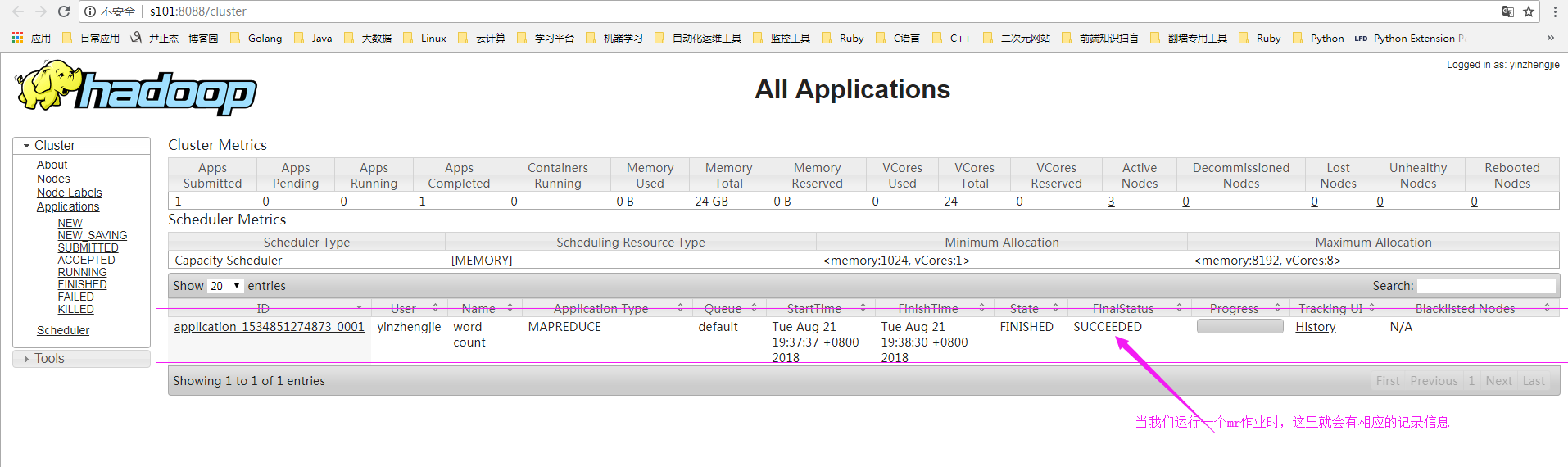
4>.查看yarn的记录信息
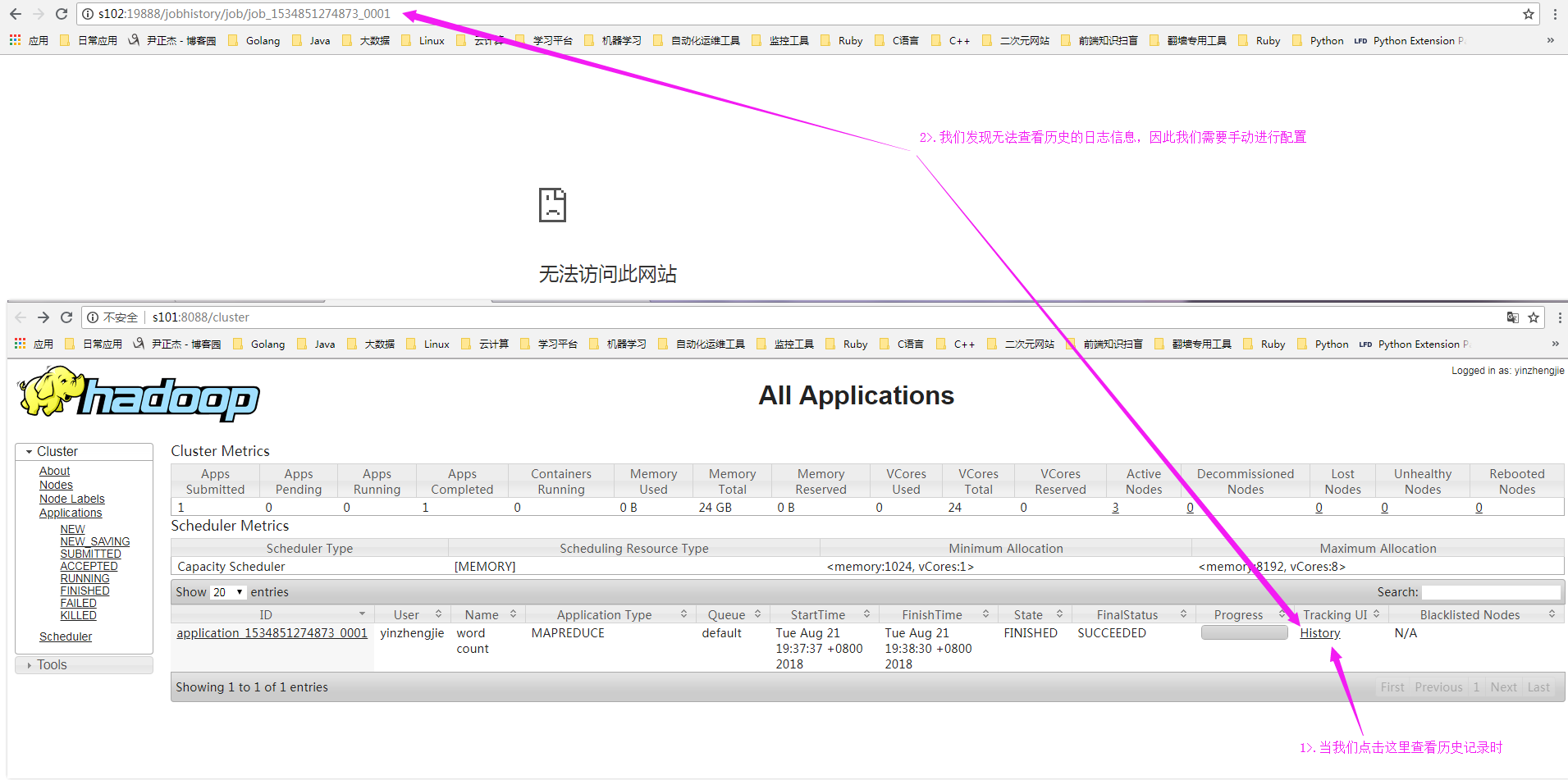
5>.查看历史日志,发现无法访问
二.配置yarn历史服务器
1>.修改“mapred-site.xml”配置文件
 [yinzhengjie@s101 ~]$ more /soft/hadoop/etc/hadoop/mapred-site.xml

 <?xml version="1.0"?>

 <?xml-stylesheet type="text/xsl" href="configuration.xsl"?>

 <configuration>

         <property>

                 <name>mapreduce.framework.name</name>

                 <value>yarn</value>

         </property>

     <property>

         <name>mapreduce.jobhistory.address</name>

         <value>s101:10020</value>

     </property>

     <property>

             <name>mapreduce.jobhistory.webapp.address</name>

             <value>s101:19888</value>

     </property>

     <property>

           <name>mapreduce.jobhistory.done-dir</name>

         <value>${yarn.app.mapreduce.am.staging-dir}/done</value>

     </property>

     <property>

             <name>mapreduce.jobhistory.intermediate-done-dir</name>

             <value>${yarn.app.mapreduce.am.staging-dir}/done_intermediate</value>

     </property>

     <property>

             <name>yarn.app.mapreduce.am.staging-dir</name>

             <value>/yinzhengjie/logs/hdfs/history</value>

     </property>

 </configuration>

 <!--

 mapred-site.xml 配置文件的作用:

         #HDFS的相关设定,如reduce任务的默认个数、任务所能够使用内存

 的默认上下限等,此中的参数定义会覆盖mapred-default.xml文件中的

 默认配置.

 mapreduce.framework.name 参数的作用:

         #指定MapReduce的计算框架,有三种可选,第一种:local(本地),第

 二种是classic(hadoop一代执行框架),第三种是yarn(二代执行框架),我

 们这里配置用目前版本最新的计算框架yarn即可。

 mapreduce.jobhistory.address 参数的作用:

     #指定job的历史服务器

 mapreduce.jobhistory.webapp.address 参数的作用:

     #指定日志服务器的web访问端口

 mapreduce.jobhistory.done-dir 参数的作用:

     #指定存放已经运行完的Hadoop作业记录

 mapreduce.jobhistory.intermediate-done-dir 参数的作用:

     #指定正在运行的Hadoop作业记录

 yarn.app.mapreduce.am.staging-dir 参数的作用:

     #指定applicationID以及需要的jar包文件等

 -->

 [yinzhengjie@s101 ~]$
2>.启动历史服务器服务
[yinzhengjie@s101 ~]$ hdfs dfs -mkdir /yinzhengjie/logs/hdfs/history      #创建存放历史日志的路径

[yinzhengjie@s101 ~]$

[yinzhengjie@s101 ~]$ mr-jobhistory-daemon.sh start historyserver      #启动历史服务

starting historyserver, logging to /soft/hadoop-2.7./logs/mapred-yinzhengjie-historyserver-s101.out

[yinzhengjie@s101 ~]$

[yinzhengjie@s101 ~]$ jps

 ResourceManager

 JobHistoryServer        #注意,这个进程就是历史服务进程

 NameNode

 Jps

 DFSZKFailoverController

[yinzhengjie@s101 ~]$
3>.在yarn上执行MapReduce程序
[yinzhengjie@s101 ~]$ hdfs dfs -rm -R /yinzhengjie/data/output        #删除之前的输出路径

// :: INFO fs.TrashPolicyDefault: Namenode trash configuration: Deletion interval =  minutes, Emptier interval =  minutes.

Deleted /yinzhengjie/data/output

[yinzhengjie@s101 ~]$

[yinzhengjie@s101 ~]$ hadoop jar /soft/hadoop/share/hadoop/mapreduce/hadoop-mapreduce-examples-2.7..jar wordcount /yinzhengjie/data/input  /yinzhengjie/data/output

// :: INFO client.RMProxy: Connecting to ResourceManager at s101/172.30.1.101:

// :: INFO input.FileInputFormat: Total input paths to process :

// :: INFO mapreduce.JobSubmitter: number of splits:

// :: INFO mapreduce.JobSubmitter: Submitting tokens for job: job_1534851274873_0002

// :: INFO impl.YarnClientImpl: Submitted application application_1534851274873_0002

// :: INFO mapreduce.Job: The url to track the job: http://s101:8088/proxy/application_1534851274873_0002/

// :: INFO mapreduce.Job: Running job: job_1534851274873_0002

// :: INFO mapreduce.Job: Job job_1534851274873_0002 running in uber mode : false

// :: INFO mapreduce.Job:  map % reduce %

// :: INFO mapreduce.Job:  map % reduce %

// :: INFO mapreduce.Job:  map % reduce %

// :: INFO mapreduce.Job: Job job_1534851274873_0002 completed successfully

// :: INFO mapreduce.Job: Counters:

    File System Counters

        FILE: Number of bytes read=

        FILE: Number of bytes written=

        FILE: Number of read operations=

        FILE: Number of large read operations=

        FILE: Number of write operations=

        HDFS: Number of bytes read=

        HDFS: Number of bytes written=

        HDFS: Number of read operations=

        HDFS: Number of large read operations=

        HDFS: Number of write operations=

    Job Counters

        Launched map tasks=

        Launched reduce tasks=

        Data-local map tasks=

        Total time spent by all maps in occupied slots (ms)=

        Total time spent by all reduces in occupied slots (ms)=

        Total time spent by all map tasks (ms)=

        Total time spent by all reduce tasks (ms)=

        Total vcore-milliseconds taken by all map tasks=

        Total vcore-milliseconds taken by all reduce tasks=

        Total megabyte-milliseconds taken by all map tasks=

        Total megabyte-milliseconds taken by all reduce tasks=

    Map-Reduce Framework

        Map input records=

        Map output records=

        Map output bytes=

        Map output materialized bytes=

        Input split bytes=

        Combine input records=

        Combine output records=

        Reduce input groups=

        Reduce shuffle bytes=

        Reduce input records=

        Reduce output records=

        Spilled Records=

        Shuffled Maps =

        Failed Shuffles=

        Merged Map outputs=

        GC time elapsed (ms)=

        CPU time spent (ms)=

        Physical memory (bytes) snapshot=

        Virtual memory (bytes) snapshot=

        Total committed heap usage (bytes)=

    Shuffle Errors

        BAD_ID=

        CONNECTION=

        IO_ERROR=

        WRONG_LENGTH=

        WRONG_MAP=

        WRONG_REDUCE=

    File Input Format Counters

        Bytes Read=

    File Output Format Counters

        Bytes Written=

[yinzhengjie@s101 ~]$
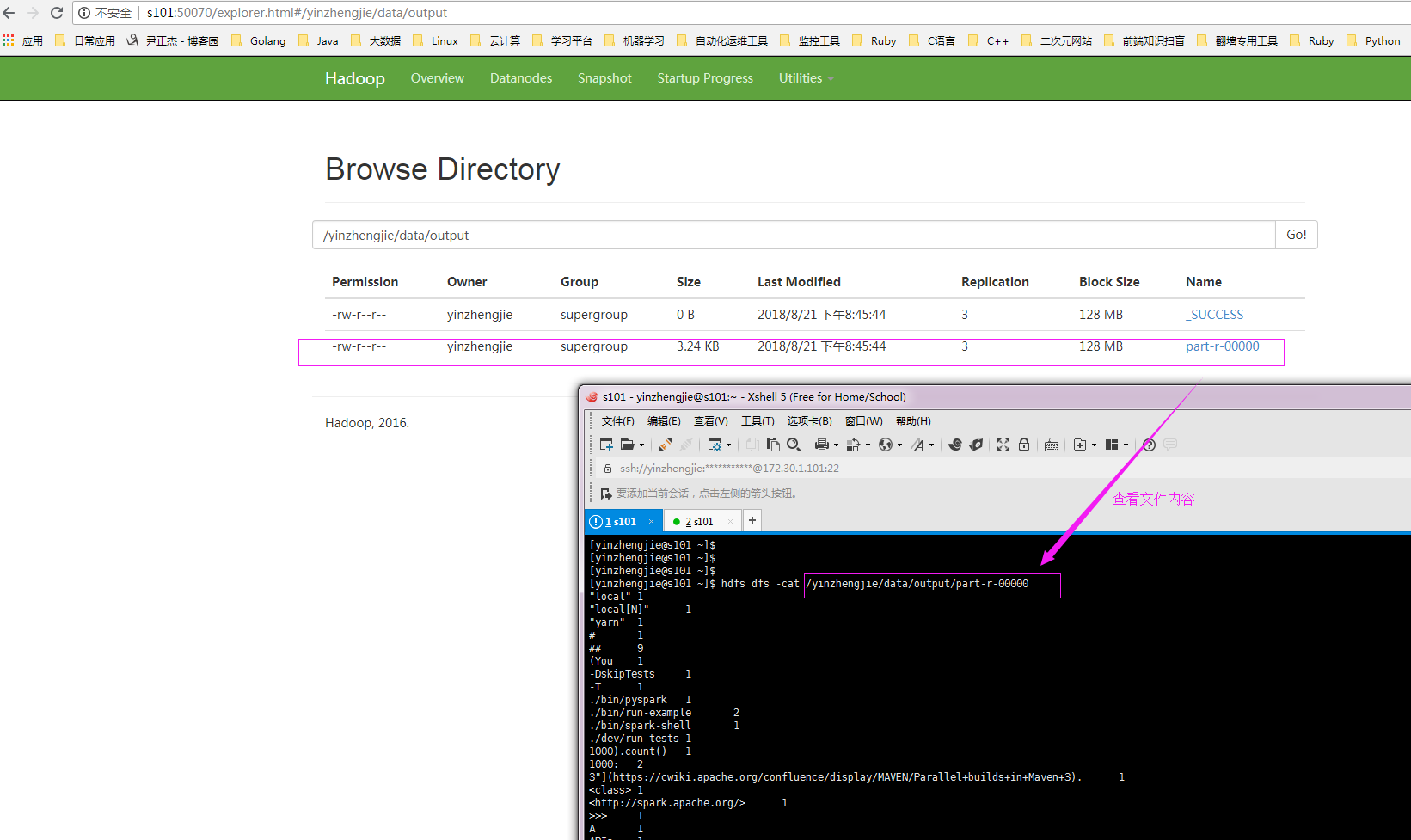
4>.通过webUI查看hdfs是否有数据产生
5>.查看yarn的webUI的历史任务

6>.查看历史记录
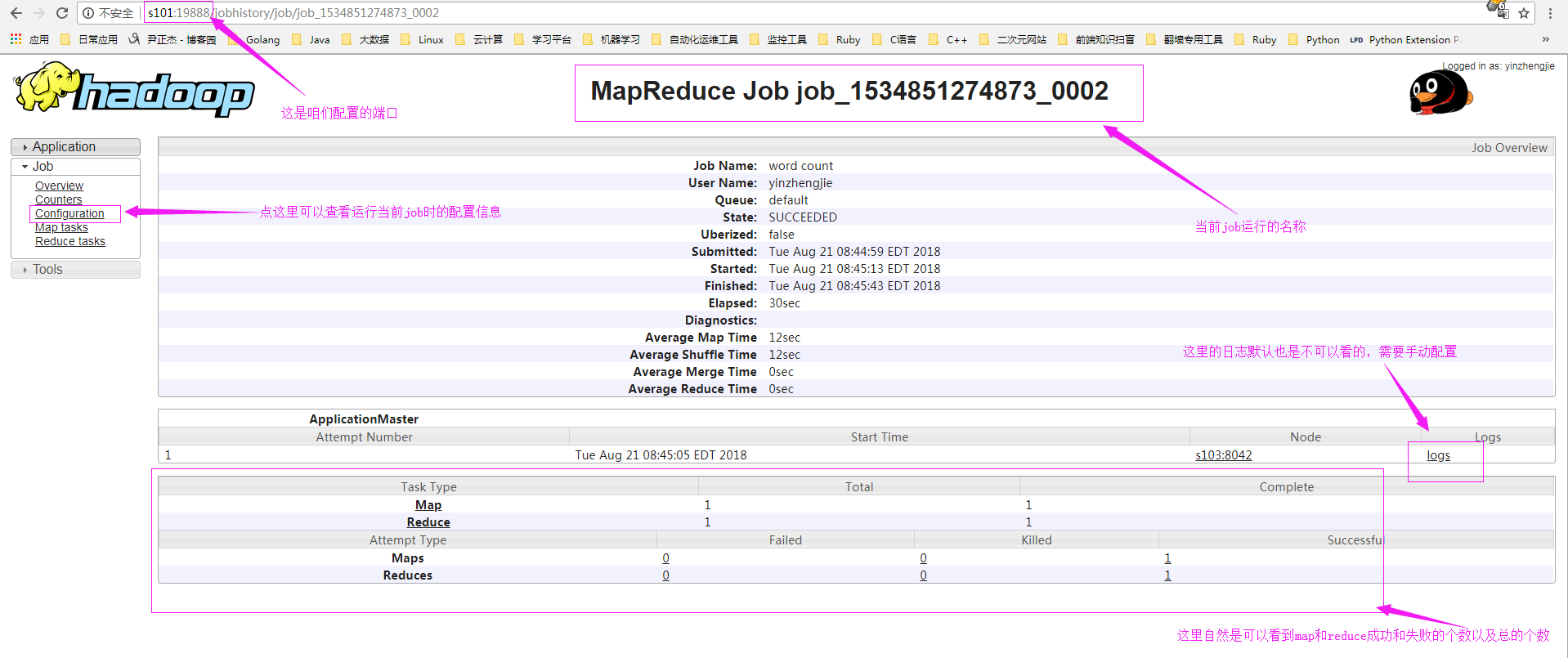
7>.配置日志聚集功能
详情请参考:https://www.cnblogs.com/yinzhengjie/p/9471921.html
Hadoop基础-配置历史服务器的更多相关文章
- hadoop配置历史服务器&&配置日志聚集
配置历史服务器 1.在mapred-site.xml中写入一下配置 <property> <name>mapreduce.jobhistory.address</name ...
- hadoop配置历史服务器
此文档不建议当教程,仅供参考 配置历史服务器 我是在hadoop1机器上配置的 配置mapred-site.xml <property> <name>mapreduce.job ...
- hadoop 3.x 配置历史服务器
修改$HADOOP_HOME/etc/hadoop/mapred-site.xml,加入以下配置(修改主机名为你自己的主机或IP,尽量不要使用中文注释) <!--history address- ...
- 零基础配置Linux服务器环境
详细步骤请走官方通道 over!over!over!
- Hadoop jobhistory历史服务器
Hadoop自带了一个历史服务器,可以通过历史服务器查看已经运行完的Mapreduce作业记录,比如用了多少个Map.用了多少个Reduce.作业提交时间.作业启动时间.作业完成时间等信息.默认情况下 ...
- 【转载】Hadoop历史服务器详解
免责声明: 本文转自网络文章,转载此文章仅为个人收藏,分享知识,如有侵权,请联系博主进行删除. 原文作者:过往记忆(http://www.iteblog.com/) 原文地址: ...
- linux系统ansible一键完成三大服务器基础配置(剧本)
ansible自动化管理剧本方式一键完成三大服务器基础配置 环境准备:五台服务器:管理机m01:172.16.1.61,两台web服务器172.16.1.7,172.16.1.8,nfs存储服务器17 ...
- hadoop中的Jobhistory历史服务器
1. 启动脚本 mr-jobhistory-daemon.sh start historyserver 2. 配置说明 jobhistory用于查询每个job运行完以后的历史日志信息,是作为一台单独 ...
- 大数据专栏 - 基础1 Hadoop安装配置
Hadoop安装配置 环境 1, JDK8 --> 位置: /opt/jdk8 2, Hadoop2.10: --> 位置: /opt/bigdata/hadoop210 3, CentO ...
随机推荐
- 趟坑:使用pip安装TensorFlow
这几天在安装TensorFlow,看了很多教程,方法也试了几种. 最后还是用pip安装成功的,过程如下. 1.安装ubuntu后在 系统设置-软件与更新-附加驱动 里,更新N卡驱动. (N卡官网下载 ...
- 学习github心得
Git 是 Linux 的创始人 Linus Torvalds 开发的开源和免费的版本管理系统,利用底层文件系统原理进行版本控制的工具.Git是目前为止最著名运用最好最受欢迎的分布式的配置管理工具. ...
- 爬虫时http错误提示
在爬虫,请求网站的时候,有时候出现域名报错,所出现的代码所对应的意思:
- [转帖] 从零开始编写自己的C#框架(27)——什么是开发框架
从零开始编写自己的C#框架(27)——什么是开发框架 http://www.cnblogs.com/EmptyFS/p/4105713.html 没写过代码 一直不清楚 框架的含义 不过看了一遍 也没 ...
- PLSQL 使用技巧汇总贴(一个坑)
PLSQL是一款非常强大的工具, 只不过自己不会使用.. 1.记住密码: 首先 工具->首选项 打开 在 oracle 选项下的 登录 历史 定义 带密码存储--勾选 2. 关键字高亮 -- ...
- shell 学习笔记二
一.break命令 break命令允许跳出所有循环(终止执行后面的所有循环). 下面的例子中,脚本进入死循环直至用户输入数字大于5.要跳出这个循环,返回到shell提示符下,就要使用break命令. ...
- ZooKeeper客户端 zkCli.sh 节点的增删改查
zkCli.sh 在 bin 目录下的 zkCli.sh 就是ZooKeeper客户端 ./zkCli.sh -timeout 5000 -server 127.0.0.1:2181 客户端与 ...
- POJ2492-A Bug's Life-并查集扩展应用
维护一个relation数组,保留着此元素和根元素之间的性别关系.之后就可以判断gay了. #include <cstdio> #include <algorithm> #in ...
- 2017ACM/ICPC亚洲区沈阳站-重现赛
HDU 6222 Heron and His Triangle 链接:http://acm.hdu.edu.cn/showproblem.php?pid=6222 思路: 打表找规律+大数运算 首先我 ...
- 自学Python2.8-条件(if、if...else)
自学Python之路 自学Python2.8-条件(if.if...else) 1.if 判断语句 if语句是用来进行判断的,其使用格式如下: if 要判断的条件: 条件成立时,要做的事情 当“判断 ...