
react组件通信那些事儿
父组件是调用组件的组件。
现在看来,感觉父组件就是一个壳子,定义好壳子里面会有什么,而子组件是一个具体的实现,说明,会用到什么东西,如果有这些东西,会进行什么操作。总之,父组件是材料,有水和泥,子组件告诉你,怎么制作水泥。
父组件给子组件输入什么,子组件就是什么。不同的父组件调用,或许可以呈现不同的输出,前提是在子组件里面要定义不同的接口,属性方法,供不同的父组件使用。
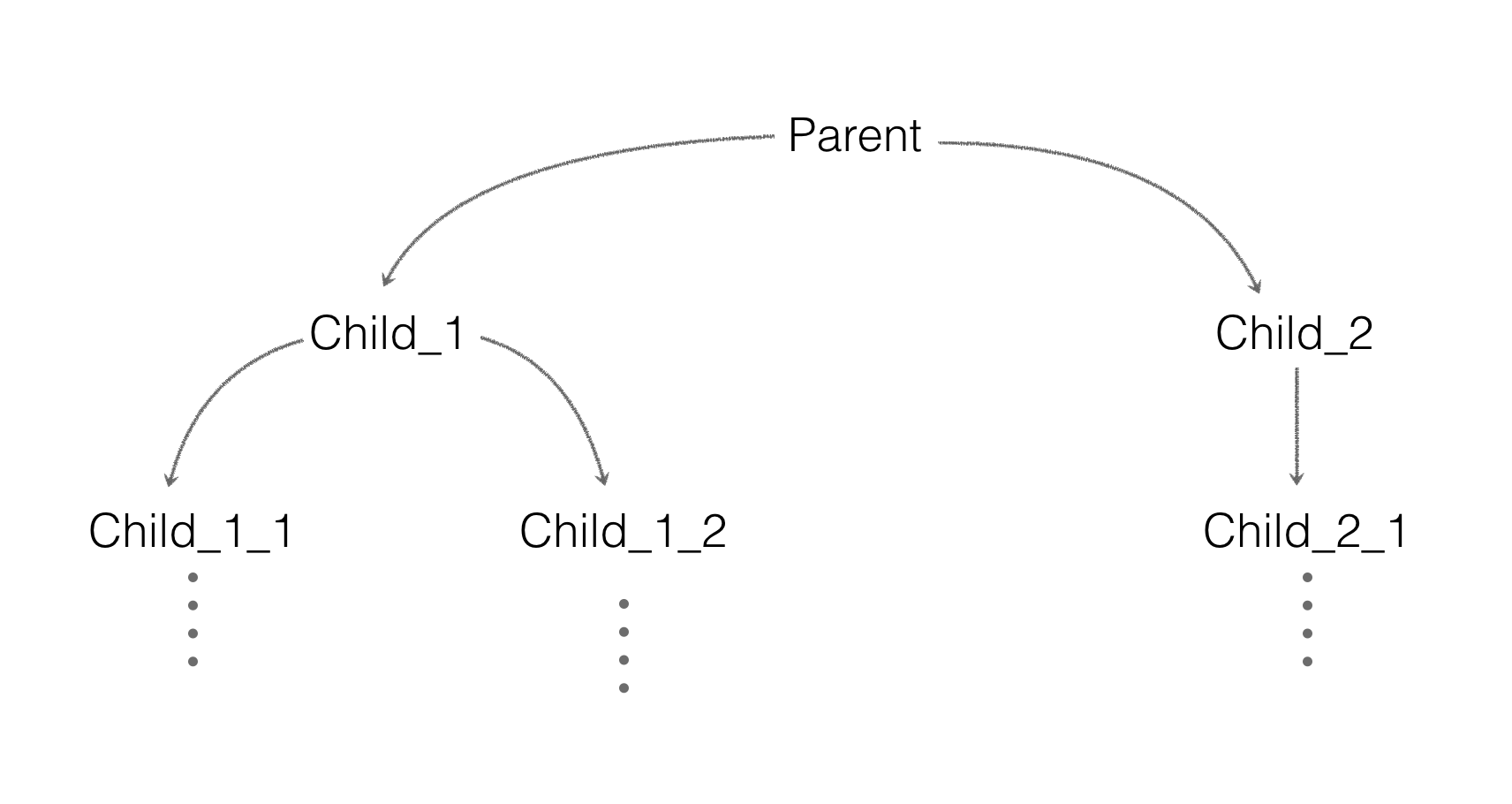
class Parent extends React.Component {
    state = {
        msg: 'start'
    };

    componentDidMount() {
        setTimeout(() => {
            this.setState({
                msg: 'end'
            });
        }, 1000);
    }

    render() {
        return <Child_1 msg={this.state.msg} />;
    }
}

class Child_1 extends React.Component {
    render() {
        return <p>{this.props.msg}</p>;
    }
}
class Parent extends React.Component {
    state = {
        msg: 'start'
    };

    fMsg(msg) {
        this.setState({
            msg
        });
    }

    render() {
        return (
            <div>
                <p>child msg: {this.state.msg}</p>
                <Child_1 transferMsg={msg => this.fMsg(msg)} />
            </div>
        );
    }
}

class Child_1 extends React.Component {
    componentDidMount() {
        setTimeout(() => {
            this.props.transferMsg('end');
        }, 1000);
    }

    render() {
        return (
            <div>
                <p>child_1 component</p>
            </div>
        );
    }
}
class Parent extends React.Component {
    state = {
        msg: 'start'
    };

    fMsg(msg) {
        this.setState({
            msg
        });
    }

    componentDidUpdate() {
        console.log('Parent update');
    }

    render() {
        return (
            <div>
                <Child_1 transferMsg={msg => this.fMsg(msg)} />
                <Child_2 msg={this.state.msg} />
            </div>
        );
    }
}

class Child_1 extends React.Component {
    componentDidMount() {
        setTimeout(() => {
            this.props.transferMsg('end');
        }, 1000);
    }

    componentDidUpdate() {
        console.log('Child_1 update');
    }

    render() {
        return (
            <div>
                <p>child_1 component</p>
            </div>
        )
    }
}

class Child_2 extends React.Component {
    componentDidUpdate() {
        console.log('Child_2 update');
    }

    render() {
        return (
            <div>
                <p>child_2 component: {this.props.msg}</p>
            </div>
        )
    }
}
import eventProxy from '../eventProxy';

class Parent extends React.Component {
    render() {
        return (
            <div>
                <Child_1 />
                <Child_2 />
            </div>
        );
    }
}

class Child_1 extends React.Component {
    componentDidMount() {
        setTimeout(() => {
            // 发布者,发布msg事件
            eventProxy.trigger('msg', 'end');
        }, 1000);
    }
}

class Child_2 extends React.Component {
    state = {
        msg: 'start'
    };

    componentDidMount() {
        // 订阅者,监听msg事件
        eventProxy.on('msg', (msg) => {
            this.setState({
                msg
            });
        });
    }

    render() {
        return (
            <div>
                <p>child_2 component: {this.state.msg}</p>
            </div>
        )
    }
}
// 通过...运算符向Child_1_1传递Parent组件的信息
class Child_1 extends React.Component {
    render() {
        return (
            <div>
                <p>{this.props.msg}</p>
                <Child_1_1 {...this.props} />
            </div>
        )
    }
}

class Child_1_1 extends React.Component {
    render() {
        return <p>{this.props.msg}</p>;
    }
}
class Parent extends React.Component {
    getChildContext() {
        return {
            color: 'red',
            cbFun: this.fCallback.bind(this)
        };
    }

    fCallback(msg) {
        console.log(msg);
    }

    render() {
        return <Child_1 />;
    }
}

Parent.childContextTypes = {
    color: PropTypes.string,
    cbFun: PropTypes.func
}

class Child_1 extends React.Component {
    render() {
        return <Child_1_1 />;
    }
}

class Child_1_1 extends React.Component {
    static contextTypes = {
        color: PropTypes.string,
        cbFun: PropTypes.func
    }

    render() {
        const styles = { color: this.context.color };
        const cb = (msg) => {
            return () => {
                this.context.cbFun(msg);
            }
        }
        return (
            <button style={styles} onClick={cb('子组件向父组件传数据。')}>点击</button>
        )
    }
}
class Parent extends React.Component {
    constructor(props) {
        super(props);
        this.state = {
            color: "red"
        }
    }

    getChildContext() {
        return {
            color: this.state.color,
            cbFun: this.fCallback.bind(this)
        };
    }

    fCallback(color) {
        this.setState({color});
    }

    render() {
        return <Child_1 />;
    }
}

Parent.childContextTypes = {
    color: PropTypes.string,
    cbFun: PropTypes.func
}
class Child_1 extends React.Component {
    render() {
        return <Child_1_1 />;
    }
}

class Child_1_1 extends React.Component {
    static contextTypes = {
        color: PropTypes.string,
        cbFun: PropTypes.func
    }

    render() {
        const styles = { color: this.context.color };
        const cb = (msg) => {
            return () => {
                this.context.cbFun(msg);
            }
        }
        return (
            <button style={styles} onClick={cb('blue')}>点击</button>
        )
    }
}
react组件通信那些事儿的更多相关文章
- react第六单元(react组件通信-父子组件通信-子父组件通信-跨级组件的传参方式-context方式的传参)
第六单元(react组件通信-父子组件通信-子父组件通信-跨级组件的传参方式-context方式的传参) #课程目标 1.梳理react组件之间的关系 2.掌握父子传值的方法 3.掌握子父传值的方法 ...
- 21.react 组件通信
状态属性可以修改 this.setState()中可以写对象,也可以写方法 <script type="text/babel"> class Test extends ...
- React/组件通信
组件通信可以分为以下几种: 父组件向子组件通信 子组件向父组件通信 跨级组件的通信及context 没有嵌套关系的组件通信 父组件向子组件通信 父组件通过props向子组件传递需要的信息. 子 ...
- vue组件通信那些事儿
一.说说通信 通信,简言之,交流信息.交流结束后,把信息放在哪里,这是一个值得思考的问题.vue中保存状态有2种方式,组件内的data属性和组件外的vuex的state属性. 1.用state的场景 ...
- React组件通信技巧
效果图 communication.gif 点击查看Github完整源码 1.父向子通信 直接标签中插入参数即可 //number只是个例子 let _number = this.state.numb ...
- React组件通信
1.父子通信 父 -> 子 props子 -> 父 回调函数,父组件通过props向子组件传递一个函数,子组件调用函数,父组件在回调函数中用setState改变自身状态 2.跨层级通信 1 ...
- 使用reflux进行react组件之间的通信
前言 组件之间为什么要通信?因为有依赖. 那么,作为React组件,怎么通信? React官网说, 进行 父-子 通信,可以直接pass props. 进行 子-父 通信,往父组件传给子组件的函数注入 ...
- React之组件通信
组件通信无外乎,下面这三种父子组件,子父组件,平行组件(也叫兄弟组件)间的数据传输.下面我们来分别说一下: 父子组件: var Demo=React.createClass({ getInitialS ...
- 【JAVASCRIPT】React学习- 数据流(组件通信)
摘要 react 学习包括几个部分: 文本渲染 JSX 语法 组件化思想 数据流 一 组件通信如何实现 父子组件之间不存在继承关系 1.1 父=>子通信 父组件可以通过 this.refs.xx ...
随机推荐
- 第十六单元 yum管理RPM包
yum的功能 本地yum配置 光盘挂载和镜像挂载 本地yum配置 网络yum配置 网络yum配置 Yum命令的使用 使用yum安装软件 使用yum删除软件 安装组件 删除组件 清除缓存 查询 课后作业 ...
- LeetCode(84): 柱状图中最大的矩形
Hard! 题目描述: 给定 n 个非负整数,用来表示柱状图中各个柱子的高度.每个柱子彼此相邻,且宽度为 1 . 求在该柱状图中,能够勾勒出来的矩形的最大面积. 以上是柱状图的示例,其中每个柱子的宽度 ...
- Python之argv简明详解
今日看到argv 度娘查找一番,基本都是转载的同一篇文章,总体字数不少但看了之后感觉还是稀里糊涂,自己尝试了一番简单总结如下 当我们需要在命令行执行脚本并需要在执行脚本的同时传入参数给脚本使用,那我们 ...
- String 类的实现(2)引用计数与写时拷贝
1.引用计数 我们知道在C++中动态开辟空间时是用字符new和delete的.其中使用new test[N]方式开辟空间时实际上是开辟了(N*sizeof(test)+4)字节的空间.如图示其中保存N ...
- urls.py的配置[路由配置]
urls.py的配置[路由配置] Get请求与Post请求的方式 get请求: (1)地址栏输入url (2)<a href="请求url">点击</a> ...
- 从零开始学C#——数据类型(三)
C#数据类型 在C#中,变量分为以下几种类型: 值类型 引用类型 指针类型 值类型 值类型变量可以直接分配给一个值,他们是从类System.ValucTpyc中派生. 值类型直接包含数据,比如int. ...
- Asp.NetCore 读取配置文件帮助类
/// <summary> /// 读取配置文件信息 /// </summary> public class ConfigExtensions { public static ...
- C#线性表
线性表是线性结构的抽象 线性结构的特点是结构中的数据元素之间存在一对一的线性关系 一对一的关系指的是数据元素之间的位置关系 (1)除第一个位置的数据元素外,其它数据元素位置的前面都只有一个数据元素 ( ...
- Codechef STMINCUT S-T Mincut (CodeChef May Challenge 2018) kruskal
原文链接http://www.cnblogs.com/zhouzhendong/p/9010945.html 题目传送门 - Codechef STMINCUT 题意 在一个有边权的无向图中,我们定义 ...
- BZOJ4003 [JLOI2015]城池攻占 左偏树 可并堆
欢迎访问~原文出处——博客园-zhouzhendong 去博客园看该题解 题目传送门 - BZOJ4003 题意概括 题意有点复杂,直接放原题了. 小铭铭最近获得了一副新的桌游,游戏中需要用 m 个骑 ...