
hadoop: hdfs API示例
利用hdfs的api,可以实现向hdfs的文件、目录读写,利用这一套API可以设计一个简易的山寨版云盘,见下图:
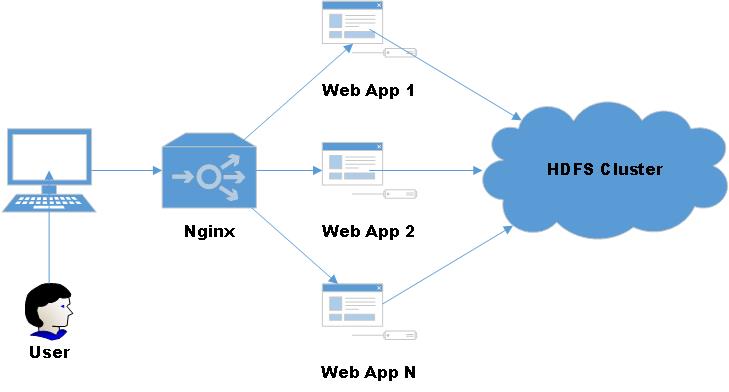
为了方便操作,将常用的文件读写操作封装了一个工具类:
 import org.apache.hadoop.conf.Configuration;

 import org.apache.hadoop.fs.*;

 import org.apache.hadoop.io.IOUtils;

 import java.io.ByteArrayOutputStream;

 import java.io.IOException;

 import java.io.InputStream;

 import java.io.OutputStream;

 /**

  * HDFS工具类

  * Author: 菩提树下的杨过(http://yjmyzz.cnblogs.com)

  * Since: 2015-05-21

  */

 public class HDFSUtil {

     private HDFSUtil() {

     }

     /**

      * 判断路径是否存在

      *

      * @param conf

      * @param path

      * @return

      * @throws IOException

      */

     public static boolean exits(Configuration conf, String path) throws IOException {

         FileSystem fs = FileSystem.get(conf);

         return fs.exists(new Path(path));

     }

     /**

      * 创建文件

      *

      * @param conf

      * @param filePath

      * @param contents

      * @throws IOException

      */

     public static void createFile(Configuration conf, String filePath, byte[] contents) throws IOException {

         FileSystem fs = FileSystem.get(conf);

         Path path = new Path(filePath);

         FSDataOutputStream outputStream = fs.create(path);

         outputStream.write(contents);

         outputStream.close();

         fs.close();

     }

     /**

      * 创建文件

      *

      * @param conf

      * @param filePath

      * @param fileContent

      * @throws IOException

      */

     public static void createFile(Configuration conf, String filePath, String fileContent) throws IOException {

         createFile(conf, filePath, fileContent.getBytes());

     }

     /**

      * @param conf

      * @param localFilePath

      * @param remoteFilePath

      * @throws IOException

      */

     public static void copyFromLocalFile(Configuration conf, String localFilePath, String remoteFilePath) throws IOException {

         FileSystem fs = FileSystem.get(conf);

         Path localPath = new Path(localFilePath);

         Path remotePath = new Path(remoteFilePath);

         fs.copyFromLocalFile(true, true, localPath, remotePath);

         fs.close();

     }

     /**

      * 删除目录或文件

      *

      * @param conf

      * @param remoteFilePath

      * @param recursive

      * @return

      * @throws IOException

      */

     public static boolean deleteFile(Configuration conf, String remoteFilePath, boolean recursive) throws IOException {

         FileSystem fs = FileSystem.get(conf);

         boolean result = fs.delete(new Path(remoteFilePath), recursive);

         fs.close();

         return result;

     }

     /**

      * 删除目录或文件(如果有子目录,则级联删除)

      *

      * @param conf

      * @param remoteFilePath

      * @return

      * @throws IOException

      */

     public static boolean deleteFile(Configuration conf, String remoteFilePath) throws IOException {

         return deleteFile(conf, remoteFilePath, true);

     }

     /**

      * 文件重命名

      *

      * @param conf

      * @param oldFileName

      * @param newFileName

      * @return

      * @throws IOException

      */

     public static boolean renameFile(Configuration conf, String oldFileName, String newFileName) throws IOException {

         FileSystem fs = FileSystem.get(conf);

         Path oldPath = new Path(oldFileName);

         Path newPath = new Path(newFileName);

         boolean result = fs.rename(oldPath, newPath);

         fs.close();

         return result;

     }

     /**

      * 创建目录

      *

      * @param conf

      * @param dirName

      * @return

      * @throws IOException

      */

     public static boolean createDirectory(Configuration conf, String dirName) throws IOException {

         FileSystem fs = FileSystem.get(conf);

         Path dir = new Path(dirName);

         boolean result = fs.mkdirs(dir);

         fs.close();

         return result;

     }

     /**

      * 列出指定路径下的所有文件(不包含目录)

      *

      * @param conf

      * @param basePath

      * @param recursive

      */

     public static RemoteIterator<LocatedFileStatus> listFiles(FileSystem fs, String basePath, boolean recursive) throws IOException {

         RemoteIterator<LocatedFileStatus> fileStatusRemoteIterator = fs.listFiles(new Path(basePath), recursive);

         return fileStatusRemoteIterator;

     }

     /**

      * 列出指定路径下的文件(非递归)

      *

      * @param conf

      * @param basePath

      * @return

      * @throws IOException

      */

     public static RemoteIterator<LocatedFileStatus> listFiles(Configuration conf, String basePath) throws IOException {

         FileSystem fs = FileSystem.get(conf);

         RemoteIterator<LocatedFileStatus> remoteIterator = fs.listFiles(new Path(basePath), false);

         fs.close();

         return remoteIterator;

     }

     /**

      * 列出指定目录下的文件\子目录信息(非递归)

      *

      * @param conf

      * @param dirPath

      * @return

      * @throws IOException

      */

     public static FileStatus[] listStatus(Configuration conf, String dirPath) throws IOException {

         FileSystem fs = FileSystem.get(conf);

         FileStatus[] fileStatuses = fs.listStatus(new Path(dirPath));

         fs.close();

         return fileStatuses;

     }

     /**

      * 读取文件内容

      *

      * @param conf

      * @param filePath

      * @return

      * @throws IOException

      */

     public static String readFile(Configuration conf, String filePath) throws IOException {

         String fileContent = null;

         FileSystem fs = FileSystem.get(conf);

         Path path = new Path(filePath);

         InputStream inputStream = null;

         ByteArrayOutputStream outputStream = null;

         try {

             inputStream = fs.open(path);

             outputStream = new ByteArrayOutputStream(inputStream.available());

             IOUtils.copyBytes(inputStream, outputStream, conf);

             fileContent = outputStream.toString();

         } finally {

             IOUtils.closeStream(inputStream);

             IOUtils.closeStream(outputStream);

             fs.close();

         }

         return fileContent;

     }

 }
简单的测试了一下:
     @Test

     public void test() throws IOException {

         Configuration conf = new Configuration();

         String newDir = "/test";

         //01.检测路径是否存在 测试

         if (HDFSUtil.exits(conf, newDir)) {

             System.out.println(newDir + " 已存在!");

         } else {

             //02.创建目录测试

             boolean result = HDFSUtil.createDirectory(conf, newDir);

             if (result) {

                 System.out.println(newDir + " 创建成功!");

             } else {

                 System.out.println(newDir + " 创建失败!");

             }

         }

         String fileContent = "Hi,hadoop. I love you";

         String newFileName = newDir + "/myfile.txt";

         //03.创建文件测试

         HDFSUtil.createFile(conf, newFileName, fileContent);

         System.out.println(newFileName + " 创建成功");

         //04.读取文件内容 测试

         System.out.println(newFileName + " 的内容为:\n" + HDFSUtil.readFile(conf, newFileName));

         //05. 测试获取所有目录信息

         FileStatus[] dirs = HDFSUtil.listStatus(conf, "/");

         System.out.println("--根目录下的所有子目录---");

         for (FileStatus s : dirs) {

             System.out.println(s);

         }

         //06. 测试获取所有文件

         FileSystem fs = FileSystem.get(conf);

         RemoteIterator<LocatedFileStatus> files = HDFSUtil.listFiles(fs, "/", true);

         System.out.println("--根目录下的所有文件---");

         while (files.hasNext()) {

             System.out.println(files.next());

         }

         fs.close();

         //删除文件测试

         boolean isDeleted = HDFSUtil.deleteFile(conf, newDir);

         System.out.println(newDir + " 已被删除");

     }
注:测试时,不要忘记了在resources目录下放置core-site.xml文件,不然IDE环境下,代码不知道去连哪里的HDFS
输出结果:
/test 已存在!
/test/myfile.txt 创建成功
/test/myfile.txt 的内容为:
Hi,hadoop. I love you
--根目录下的所有子目录---
FileStatus{path=hdfs://172.28.20.102:9000/jimmy; isDirectory=true; modification_time=1432176691550; access_time=0; owner=hadoop; group=supergroup; permission=rwxrwxrwx; isSymlink=false}
FileStatus{path=hdfs://172.28.20.102:9000/test; isDirectory=true; modification_time=1432181331362; access_time=0; owner=jimmy; group=supergroup; permission=rwxr-xr-x; isSymlink=false}
FileStatus{path=hdfs://172.28.20.102:9000/user; isDirectory=true; modification_time=1431931797244; access_time=0; owner=hadoop; group=supergroup; permission=rwxr-xr-x; isSymlink=false}
--根目录下的所有文件---
LocatedFileStatus{path=hdfs://172.28.20.102:9000/jimmy/input/README.txt; isDirectory=false; length=1366; replication=1; blocksize=134217728; modification_time=1431922483851; access_time=1432174134018; owner=hadoop; group=supergroup; permission=rw-r--r--; isSymlink=false}
LocatedFileStatus{path=hdfs://172.28.20.102:9000/jimmy/output/_SUCCESS; isDirectory=false; length=0; replication=3; blocksize=134217728; modification_time=1432176692454; access_time=1432176692448; owner=jimmy; group=supergroup; permission=rw-r--r--; isSymlink=false}
LocatedFileStatus{path=hdfs://172.28.20.102:9000/jimmy/output/part-r-00000; isDirectory=false; length=1306; replication=3; blocksize=134217728; modification_time=1432176692338; access_time=1432176692182; owner=jimmy; group=supergroup; permission=rw-r--r--; isSymlink=false}
LocatedFileStatus{path=hdfs://172.28.20.102:9000/test/myfile.txt; isDirectory=false; length=21; replication=3; blocksize=134217728; modification_time=1432181331601; access_time=1432181331362; owner=jimmy; group=supergroup; permission=rw-r--r--; isSymlink=false}
/test 已被删除
用spring-mvc结合hdfs api仿造hadoop的文件浏览管理界面,做了一个山寨版:(只完成了文件列表功能)
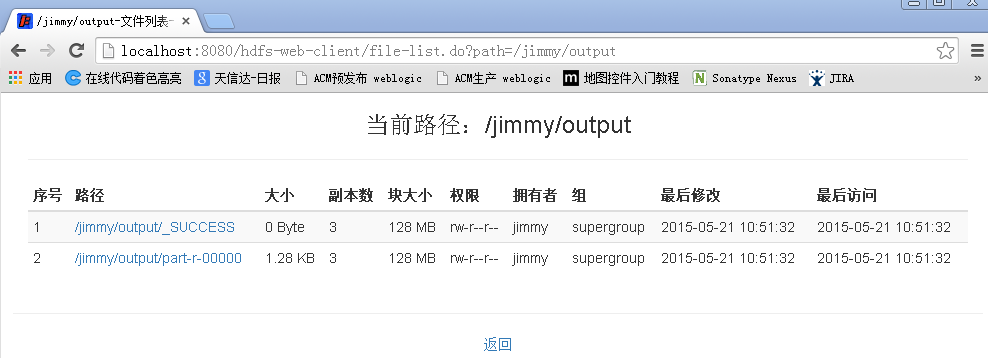
源代码托管在taobao开源平台上了,有需要的可以参考下:
http://code.taobao.org/p/hdfs-web-client/src/trunk/
hadoop: hdfs API示例的更多相关文章
- hadoop的API对HDFS上的文件访问
这篇文章主要介绍了使用hadoop的API对HDFS上的文件访问,其中包括上传文件到HDFS上.从HDFS上下载文件和删除HDFS上的文件,需要的朋友可以参考下hdfs文件操作操作示例,包括上传文件到 ...
- Hadoop学习之路(十)HDFS API的使用
HDFS API的高级编程 HDFS的API就两个:FileSystem 和Configuration 1.文件的上传和下载 package com.ghgj.hdfs.api; import org ...
- Hadoop 之 HDFS API操作
1. 文件上传 @Slf4j public class HDFSClient { @Test public void testCopyFromLocalFile() throws Exception{ ...
- Python API 操作Hadoop hdfs详解
1:安装 由于是windows环境(linux其实也一样),只要有pip或者setup_install安装起来都是很方便的 >pip install hdfs 2:Client——创建集群连接 ...
- Hadoop HDFS编程 API入门系列之HDFS_HA(五)
不多说,直接上代码. 代码 package zhouls.bigdata.myWholeHadoop.HDFS.hdfs3; import java.io.FileInputStream;import ...
- Hadoop HDFS编程 API入门系列之简单综合版本1(四)
不多说,直接上代码. 代码 package zhouls.bigdata.myWholeHadoop.HDFS.hdfs4; import java.io.IOException; import ja ...
- Hadoop 学习笔记(二) HDFS API
4.删除HDFS上的文件 package proj; import java.io.IOException; import org.apache.hadoop.conf.Configuration; ...
- hadoop学习笔记(七):Java HDFS API
一.使用HDFS FileSystem详解 HDFS依赖的第三方包: hadoop 1.x版本: commons-configuration-1.6.jar commons-lang-2.4.jar ...
- Python3调用Hadoop的API
前言: 上一篇文章 我学习使用pandas进行简单的数据分析,但是各位...... Pandas处理.分析不了TB级别数据的大数据,于是再看看Hadoop. 另附上人心不足蛇吞象 对故事一的感悟: ...
随机推荐
- Mac OS 下的解压缩软件——The Unarchiver
The Unarchiver 是 Mac 上最流行的解压软件,免费开源.操作方式与系统自带解压工具 Archive Utility.app 一样,双击自动解压.最爽的一点是把解压后原始文件直接仍进废纸 ...
- Git 的 .gitignore 配置
.gitignore 配置文件用于配置不需要加入版本管理的文件,配置好该文件可以为我们的版本管理带来很大的便利,以下是个人对于配置 .gitignore 的一些心得. 1.配置语法: 以斜杠“/”开头 ...
- 全面理解JavaScript中的闭包的含义及用法
1.什么是闭包 闭包:闭包就是能够读取其他函数内部变量的函数;闭包简单理解成“定义在一个函数内部的函数”. 闭包的形式:即内部函数能够使用它所在级别的外部函数的参数,属性或者内部函数等,并且能在包含它 ...
- ARC下的所有权修饰符
ARC有效时,id类型必须加上所有权修饰符 下面为三种等效的声明,为了便于和二级指针的情况联系起来,采用第一种. NSError * __weak error = nil; NSError __wea ...
- ORA-07445&ORA-00108错误案例
由于需要ORACLE的UAT测试环境,克隆了虚拟机后,修改IP地址后,启动实例遇到了ORA-07445 &ORA-00108错误. 案例环境: SQL> select * from ...
- MySQL substring:字符串截取 (转载)
MySQL 字符串截取函数:left(), right(), substring(), substring_index().还有 mid(), substr().其中,mid(), substr() ...
- 神奇的decimal,也许面试会问到哦~
这段时间忙的像狗一样,写博客的事情也就耽搁了,继续扯,为什么说decimal神奇呢,大家都知道decimal是基元类型,但是 这个decimal类型在IL中居然没有相应的IL指令,也就是说CLR根本不 ...
- 简述java序列化
1. 什么是Java对象序列化 Java平台允许我们在内存中创建可复用的Java对象,但一般情况下,只有当JVM处于运行时,这些对象才可能存在,即,这些对象的生命周期不会比JVM的生命周期 ...
- Servlet/JSP-07 Session应用
Session应用 一. 避免表单重复提交 1. 表单重复提交的情况 ①在表单提交到一个 Servlet,而 Servlet 又通过请求转发的方式响应了一个 JSP 或者 HTML 页面,此时浏览器地 ...
- python异常
Std 异常 异常名 描述 1 Exception 所有的异常 2 StopIteration 迭代器的next()方法不指向任何对象 3 SystemExit sys.exit() 函数执行 4 S ...