
python 操作消息队列
图示
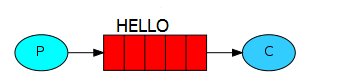
其中P指producer,即生产者;C指consumer,即消费者。中间的红色表示消息队列,实例中表现为HELLO队列。
往队列里插入数据前,查看消息队列
$sudo rabbitmqctl  list_queues

Listing queues ...

celeryev.db53a5e0-1e6a-4f06-a9f7-2c104c4612fb

...done.
插入消息队列代码
#in_queue.py
#coding=utf8

import pika

connection = pika.BlockingConnection(pika.ConnectionParameters('localhost'))

channel = connection.channel()

#声明队列,如果消息发送到不存在的队列,rabbitmq会自动清除这些消息

channel.queue_declare(queue='HELLO')

for i in range(10):

    #exchange表示交换器,可以精确的制定消息应发到哪个队列,route_key设置队列的名称,body表示发送的内容

    channel.basic_publish(exchange='', routing_key='HELLO', body='Hello World!' + str(i))

    print " [%d] Sent 'Hello World!'" % i

#关闭连接

connection.close()
执行结果
$python  in_queue.py

 [0] Sent 'Hello World!'

 [1] Sent 'Hello World!'

 [2] Sent 'Hello World!'

 [3] Sent 'Hello World!'

 [4] Sent 'Hello World!'

 [5] Sent 'Hello World!'

 [6] Sent 'Hello World!'

 [7] Sent 'Hello World!'

 [8] Sent 'Hello World!'

 [9] Sent 'Hello World!'
此时查看消息队列
$sudo rabbitmqctl  list_queues

Listing queues ...

HELLO    10

celeryev.db53a5e0-1e6a-4f06-a9f7-2c104c4612fb    0

...done.
可以看到队列HELLO里面有10条数据。
读取消息队列数据
#out_queue.py
#coding=utf8

import pika

connection = pika.BlockingConnection(pika.ConnectionParameters('localhost'))

channel = connection.channel()

channel.queue_declare(queue='HELLO')

def callback(ch, method, properties, body):

    print " [x] Received %r" % (body,)

channel.basic_consume(callback, queue='HELLO', no_ack=True)

print ' [*] Waiting for messages. To exit press CTRL+C'

channel.start_consuming()
执行结果
$python out_queue.py

 [*] Waiting for messages. To exit press CTRL+C

 [x] Received 'Hello World!0'

 [x] Received 'Hello World!1'

 [x] Received 'Hello World!2'

 [x] Received 'Hello World!3'

 [x] Received 'Hello World!4'

 [x] Received 'Hello World!5'

 [x] Received 'Hello World!6'

 [x] Received 'Hello World!7'

 [x] Received 'Hello World!8'

 [x] Received 'Hello World!9'
此时查看消息队列
$sudo rabbitmqctl  list_queues

Listing queues ...

HELLO    0

celeryev.db53a5e0-1e6a-4f06-a9f7-2c104c4612fb    0

...done.
可以看到队列HELLO中的数据被读走了,条数为0。
未完待续
http://www.01happy.com/ubuntu-rabbitmq-and-python-practice/
python 操作消息队列的更多相关文章
- rabbit mq的php使用 php-amqplib操作消息队列
rabbit mq的php使用 php-amqplib操作消息队列 有大神翻译的教程,非常清楚可以参考: https://xiaoxiami.gitbook.io/rabbitmq_into_chin ...
- python之消息队列
引言 你是否遇到过两个(多个)系统间需要通过定时任务来同步某些数据?你是否在为异构系统的不同进程间相互调用.通讯的问题而苦恼.挣扎?如果是,那么恭喜你,消息服务让你可以很轻松地解决这些问题.消息服务擅 ...
- Python RabbitMQ消息队列
python内的队列queue 线程 queue:不同线程交互,不能夸进程 进程 queue:只能用于父进程与子进程,或者同一父进程下的多个子进程,进行交互 注:不同的两个独立进程是不能交互的. ...
- 架构设计之NodeJS操作消息队列RabbitMQ
一. 什么是消息队列? 消息(Message)是指在应用间传送的数据.消息可以非常简单,比如只包含文本字符串,也可以更复杂,可能包含嵌入对象. 消息队列(Message Queue)是一种应用间的通信 ...
- python使用消息队列RabbitMq(入门)
windows平台开发和使用 安装 安装Erlang:https://pan.baidu.com/s/1QcZDaI205uaue7mMWh5cSA 安装RabbitMQ:https://pan.ba ...
- nodejs操作消息队列RabbitMQ
一. 什么是消息队列 消息队列(Message Queue,简称MQ),从字面意思上看,本质是个队列,FIFO先入先出,只不过队列中存放的内容是message而已.其主要用途:不同进程Process/ ...
- Python RabbitMQ 消息队列
RabbitMQ是一个在AMQP基础上完整的,可复用的企业消息系统.他遵循Mozilla Public License开源协议. MQ全称为Message Queue, 消息队列(MQ)是一种应用程序 ...
- python使用消息队列RabbitMq(进阶)
import pika connection = pika.BlockingConnection(pika.ConnectionParameters( 'localhost')) channel = ...
- php中对共享内存,消息队列的操作
http://www.cnblogs.com/fengwei/archive/2012/09/12/2682646.html php作为脚本程序,通常生命周期都很短,如在web应用中,一次请求就是ph ...
随机推荐
- viewpager 与 radiogroup 联动时的位置问题
public void onPageSelected(int position) {} 方法中得到radiobutton时,最好通过(RadioButton) this.radioGroup.find ...
- 洛谷 P1462 通往奥格瑞玛的道路 Label: 最小化最大值 && spfa (存多条边示例)
题目背景 在艾泽拉斯大陆上有一位名叫歪嘴哦的神奇术士,他是部落的中坚力量 有一天他醒来后发现自己居然到了联盟的主城暴风城 在被众多联盟的士兵攻击后,他决定逃回自己的家乡奥格瑞玛 题目描述 在艾泽拉斯, ...
- 洛谷 P1029 最大公约数和最小公倍数问题 Label:Water&&非学习区警告
题目描述 输入二个正整数x0,y0(2<=x0<100000,2<=y0<=1000000),求出满足下列条件的P,Q的个数 条件: 1.P,Q是正整数 2.要求P,Q以x0为 ...
- 【noiOJ】p8208
03:切分矩形组 查看 提交 统计 提问 总时间限制: 1000ms 内存限制: 65536kB 描述 给定若干个平行于坐标轴的互不重叠的矩形,矩形的顶点都是整点.要求画一根平行于y轴的直线x=k ...
- 如何将一个对象存到网页中并在js中使用
需求:希望在js中使用Controller传过来的对象,特别是对象里存有list的数据. 不希望循环使用隐藏域. 解决办法:在View中使用Json.Net序列化: @{ string jsonStr ...
- db2日常维护
一. DB2日常维护操作 1.数据库的启动.停止.激活 db2 list active databases db2 active db 数据库名 db2start --启动 db2stop [forc ...
- row_number() over order by与利用rownum查询分页效率分析
实际测试: 数据库:70万条数据 查询第10000页,每页10条.row_number() 耗时: 2.2秒rownum 耗时:1.3秒 查询第20000页,每页10条.row_number() 耗时 ...
- 终于懂浏览器里面的cookies和session了
在PHP开发中对比起Cookie,session 是存储在服务器端的会话,相对安全,并且不像 Cookie 那样有存储长度限制: (Php.Asp.Jsp)---: cookie(客户端)界面没有刷新 ...
- HashMap封装的数据用循环快速添加进list中产生的数据集全部相同的问题
一.问题概述 在一次使用SimpleAdapter时,Data需要使用传入一条数据(Image.Text),该数据条使用HashMap封装.在用HashMap封装的数据用循环快速添加进list中产生了 ...
- Python的缩进
关于python的缩进:如果要确认一个函数包含哪些内容,java或php可以使用大括号将函数内容包含起来,但python里没有那样的大括号,python靠“缩进”(四个空格)来确定语句块的始末. 这是 ...