
转一篇Unity的相机动画控制
最近真是忙,连研究细看的时间都没有了,原帖地址:https://alastaira.wordpress.com/2013/11/08/smooth-unity-camera-transitions-with-animation-curves/
先贴到这里
I’m creating a game in which I want to transition between two camera views – a top-down, overhead camera that gives a zoomed-out world view, and an over-the-shoulder style forward-facing camera to give a close-up view. Let’s say for the sake of discussion that these positions are defined relative to the player, as follows:
- Overview: Position x/y/z: (0, 100, 0). Rotation x/y/z: (-90, 0, 0) (60 units above, rotated straight down)
- Close-up: Position x/y/z: (0, 0, –0.5). Rotation x/y/z: (0, 0, 0) (0.5 units behind, aligned with player direction)
Rather than simply cut between the two camera views, or present the top-down view in a second minimap camera alongside the main game view, I want to use a single camera and transition smoothly between the two view locations. Initially, I tried to simply interpolate the position and rotation of the camera between the two locations (using lerp() for linear interpolation of the position vectors and slerp() for the rotation quaternions), based on a single zoom parameter:
transform.position = Vector3.Lerp(zoomstart.position, zoomend.position, zoom);transform.rotation = Quaternion.Slerp(zoomstart.rotation, zoomend.rotation, zoom); |
This gives:

However, this didn’t create the effect I wanted – I wanted to remain largely looking down as the camera zoomed in, and only pull up to match that player’s look vector at relatively close zoom levels, and also to ease the movement at both ends of the zoom.
My next thought was to ease in/out the camera motion using one of the functions described in this earlier post – perhaps a sigmoid curve, so that the rate of rotation was greatest at either extreme of the zoom spectrum. But I had trouble finding a function that exactly described the motion I wanted to create.
And then I discovered Unity’s AnimationCurves. I don’t know why they’re called animation curves, because they’re not specific to animations at all – they allow you to define custom curves based on an arbitrary number of control points (keys), and then evaluate the value of the function at any point along the curve.
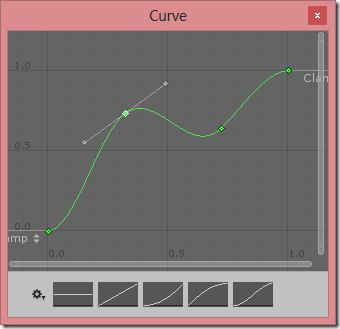
To look up the value at any point along the curve use the Evaluate() method. For example, in the curve above, the y value of the curve at x=0.5 is given by Curve.Evaluate(0.5) , which results in 0.692. Using this you can smoothly adjust any variable based on a single dimensional input.
Curves for Smooth Camera Movement
I have three camera transform parameters that change between my two camera locations – the offset position in y and z axes, and the rotation in the x axis. Since each animation curve can express only one dimension, I thought I might need to create three animation curves – one to describe each parameter that varies as the camera zooms in. However, on more thought I decided a better way: to have one curve to control the rotation around the x axis (i.e. adjusting the pitch of the camera), and then a second curve to set the distance which the camera should be offset back based on the forward direction of the camera at that point. Since the camera rotates about the x axis, translating back along its normal means that the second curve will govern both the height (y) and offset (z) in a single curve.
You can create animation curves in the inspector, but I initialised them in code as follos:
public class CameraScript : MonoBehaviour { // How camera pitch (i.e. rotation about x axis) should vary with zoom public AnimationCurve pitchCurve; // How far the camera should be placed back along the chosen pitch based on zoom public AnimationCurve distanceCurve; // Use this for initialization void Start () { // Create 'S' shaped curve to adjust pitch // Varies from 0 (looking forward) at 0, to 90 (looking straight down) at 1 pitchCurve = AnimationCurve.EaseInOut(0.0f, 0.0f, 1.0f, 90.0f); // Create exponential shaped curve to adjust distance // So zoom control will be more accurate at closer distances, and more coarse further away Keyframe[] ks = new Keyframe[2]; // At zoom=0, offset by 0.5 units ks[0] = new Keyframe(0, 0.5f); ks[0].outTangent = 0; // At zoom=1, offset by 60 units ks[1] = new Keyframe(1, 60); ks[1].inTangent = 90; distanceCurve = new AnimationCurve(ks); }} |
This generates the following curves:
| Pitch
|
Distance
|


I then evaluate the appropriate point from each curve based on the camera zoom level, as follows:
// Calculate the appropriate pitch (x rotation) for the camera based on current zoom float targetRotX = pitchCurve.Evaluate(zoom);// The desired yaw (y rotation) is to match that of the target objectfloat targetRotY = target.rotation.eulerAngles.y;// Create target rotation as quaternion// Set z to 0 as we don't want to roll the cameraQuaternion targetRot = Quaternion.Euler(targetRotX, targetRotY, 0.0f); // Calculate in world-aligned axis, how far back we want the camera to be based on current zoomVector3 offset = Vector3.forward * distanceCurve.Evaluate(zoom);// Then subtract this offset based on the current camera rotationVector3 targetPos = target.position - targetRot * offset; |

Finally, rather than setting the camera position/rotation directly, I lerp/slerp between the current transform.position/rotation towards the target position/rotation to smooth the movement and get the result as follows, which I’m pretty happy with (scene view on the left, resulting camera view on the right):
转一篇Unity的相机动画控制的更多相关文章
- 关于Unity中Mecanim动画的动画状态代码控制与代码生成动画控制器
对于多量的.复杂的.有规律的控制器使用代码生成 动画状态代码控制 1:每个动画状态,比如进入状态,离开状态, 等都有可能需要代码来参与和处理,比如,进入这个动画单元后做哪些事情,来开这个动画单元后做哪 ...
- unity 对Animator动画系统的研究
unity的新动画系统叫Mecanim,使用Animator来取代旧系统Animation,按Unity文档的惯例:知识点主要分2部分:unity manual和unity script,读者可以边看 ...
- Unity MegaFiers 顶点动画
使用 MegaFiers 插件,能够使得Unity支持顶点动画的播放. 官方视频教程例如以下: 在这里简单測试使用下,环境例如以下: Blender 2.72 Unity 4.5.4 Mega ...
- Unity正交相机智能包围物体(组)方案
Unity正交相机智能包围物体(组)方案 目录 Unity正交相机智能包围物体(组)方案 一.技术背景 二.相关概念 2.1 正交摄像机 2.2 正交相机的Size 2.3 相机的Aspect 2.4 ...
- 深入学习jQuery动画控制
× 目录 [1]动画状态 [2]停止动画 [3]动画延迟[4]全局控制 前面的话 jQuery动画可以使用fade.hide.slide等方法实现基本动画效果,可以使用animate实现自定义动画,甚 ...
- iOS开发Swift篇—(六)流程控制
iOS开发Swift篇—(六)流程控制 一.swift中的流程控制 Swift支持的流程结构如下: 循环结构:for.for-in.while.do-while 选择结构:if.switch 注意:这 ...
- i3D的一篇Unity教程中的笔记
原地址:http://blog.sina.com.cn/s/blog_72b936d80100wwej.html 以下是i3D的一篇Unity教程中的笔记. i3D的这篇教程是[i3D.Next-Ge ...
- Unity Shader序列帧动画学习笔记
Unity Shader序列帧动画学习笔记 关于无限播放序列帧动画的一点问题 在学shader的序列帧动画时,书上写了这样一段代码: fixed4 frag(v2f i){ // 获得整数时间 flo ...
- unity代码添加动画,并传参数
测试界面 button一个 sprite一个 测试代码 public class BgObject : MonoBehaviour { void Start() { List<string> ...
随机推荐
- SQL Server 2008 R2——VC++ ADO 操作 存储过程 向datetime类型参数传入空值
==================================声明================================== 本文原创,转载在正文中显要的注明作者和出处,并保证文章的完 ...
- 新手开发android容易出现的错误(不断更新中...)
才开始开发android app,因为以前一直是java开发,学习也比较容易. 记录下自己开发过程中出现的一些小问题: 静态变量 在开发中,因为习惯性的问题,经常将一些常用数据(如用户信息等)进行st ...
- WIN 下的超动态菜单(一)
WIN 下的超动态菜单(一)介绍 WIN 下的超动态菜单(二)用法 WIN 下的超动态菜单(三)代码 作者:黄山松,发表于博客园:http://www.cnblogs.com/tomview/ ...
- 构建 ARM Linux 4.7.3 嵌入式开发环境 —— BusyBox 构建 RootFS
上一篇我们已经成功将 ARM Linux 4.7.3 的内核利用 U-BOOT 引导了起来.但是细心的你会发现,引导到后面,系统无法启动,出现内核恐慌 (Kernel Panic). 原因是找不到文件 ...
- Linux vim(4)
vim相对于vi做了很多的提升: -VIM支持多集撤销 -VIM可以跨平台运行 —VIM支持语法高亮 -VIM支持图形界面 vim三大模式: command mode vi进入时的默认模式 esc进入 ...
- js实现打开网页自动弹出添加QQ好友邀请窗口
我们有时进一些网面或专题页面会自动弹出一个加为好友的对话框了,在研究了很久之后发现可以直接使用js来实现,下面我们一起来看js实现打开网页自动弹出添加QQ好友邀请窗口的方法. 第一步.JS脚本 这个是 ...
- POJ 1696 Space Ant 【极角排序】
题意:平面上有n个点,一只蚂蚁从最左下角的点出发,只能往逆时针方向走,走过的路线不能交叉,问最多能经过多少个点. 思路:每次都尽量往最外边走,每选取一个点后对剩余的点进行极角排序.(n个点必定能走完, ...
- poj2486Apple Tree[树形背包!!!]
Apple Tree Time Limit: 1000MS Memory Limit: 65536K Total Submissions: 9989 Accepted: 3324 Descri ...
- 关于using关键字
使用C#访问数据库资源需要如下几步: SqlConnection con=new SqlConnection(str); try { con.Open(); //略 } catch(Exception ...
- AC日记——找最大数序列 openjudge 1.9 10
10:找最大数序列 总时间限制: 1000ms 内存限制: 65536kB 描述 输入n行,每行不超过100个无符号整数,无符号数不超过4位.请输出最大整数以及最大整数所在的行号(行号从1开始). ...