
Android中ViewPager+Fragment取消(禁止)预加载延迟加载(懒加载)问题解决方案
转载请注明出处:http://blog.csdn.net/linglongxin24/article/details/53205878
本文出自【DylanAndroid的博客】
Android中ViewPager+Fragment取消(禁止)预加载延迟加载(懒加载)问题解决方案
在Android中我们经常会用到ViewPager+Fragment组合。然而,有一个很让人头疼的问题就是,我们去加载数据的时候由于ViewPager的内部机制所限制,所以它会默认至少预加载一个。这让人很郁闷,所以,我就想到要封装一个Fragment来解决这个问题。
这里还解决一个问题就是在Android酷炫欢迎页播放视频,仿蚂蜂窝自由行和慕课网
这里感谢有一位网友提出了bug,就是在播放视频的时候如果滑动到第二页和第三页,第一页的视频还在播放,这是个让人很头疼的问题,在这里也完美解决。
1.问题初探
文章开始已经说过ViewPager的预加载机制。那么,我们可不可以设置ViewPager的预加载为0,不就解决问题了吗?
vp.setOffscreenPageLimit(0);- 1
- 1
经过测试发现,根本不是这么回事,为什么呢?我们来看看Viewpager的setOffscreenPageLimit()方法的源码
   private static final int DEFAULT_OFFSCREEN_PAGES = 1;

    /**

     * Set the number of pages that should be retained to either side of the

     * current page in the view hierarchy in an idle state. Pages beyond this

     * limit will be recreated from the adapter when needed.

     *

     * <p>This is offered as an optimization. If you know in advance the number

     * of pages you will need to support or have lazy-loading mechanisms in place

     * on your pages, tweaking this setting can have benefits in perceived smoothness

     * of paging animations and interaction. If you have a small number of pages (3-4)

     * that you can keep active all at once, less time will be spent in layout for

     * newly created view subtrees as the user pages back and forth.</p>

     *

     * <p>You should keep this limit low, especially if your pages have complex layouts.

     * This setting defaults to 1.</p>

     *

     * @param limit How many pages will be kept offscreen in an idle state.

     */

    public void setOffscreenPageLimit(int limit) {

        if (limit < DEFAULT_OFFSCREEN_PAGES) {

            Log.w(TAG, "Requested offscreen page limit " + limit + " too small; defaulting to "

                    + DEFAULT_OFFSCREEN_PAGES);

            limit = DEFAULT_OFFSCREEN_PAGES;

        }

        if (limit != mOffscreenPageLimit) {

            mOffscreenPageLimit = limit;

            populate();

        }

}- 1
- 2
- 3
- 4
- 5
- 6
- 7
- 8
- 9
- 10
- 11
- 12
- 13
- 14
- 15
- 16
- 17
- 18
- 19
- 20
- 21
- 22
- 23
- 24
- 25
- 26
- 27
- 28
- 29
- 1
- 2
- 3
- 4
- 5
- 6
- 7
- 8
- 9
- 10
- 11
- 12
- 13
- 14
- 15
- 16
- 17
- 18
- 19
- 20
- 21
- 22
- 23
- 24
- 25
- 26
- 27
- 28
- 29
我们发现,即使你设置为0,那么还是会在里面判断后设为默认值1。所以这个方法是行不通的。
2.问题再探
我们发现Fragment中有一个setUserVisibleHint(boolean isVisibleToUser)方法,这个方法就是告诉用户,UI对用户是否可见,那么我们在这里去加载数据会怎么样呢? 
这又是为什么呢?
因为ViewPager会加载好多Fragment,为了节省内容等会在Fragment不可见的某个时候调用onDestroyView()将用户界面销毁掉但是Fragment的实例还在,所以可能第一次加载没有问题,
但是再次回到第一个Fragment再去加载的时候就会出现UI对用户可见但是视图还没有初始化。
3.最终解决方案
package cn.bluemobi.dylan.viewpagerfragmentlazyload;

import android.os.Bundle;

import android.support.annotation.Nullable;

import android.support.v4.app.Fragment;

import android.text.TextUtils;

import android.view.LayoutInflater;

import android.view.View;

import android.view.ViewGroup;

import android.widget.Toast;

/**

 * Fragment预加载问题的解决方案:

 * 1.可以懒加载的Fragment

 * 2.切换到其他页面时停止加载数据(可选)

 * Created by yuandl on 2016-11-17.

 * blog :http://blog.csdn.net/linglongxin24/article/details/53205878

 */

public abstract class LazyLoadFragment extends Fragment {

    /**

     * 视图是否已经初初始化

     */

    protected boolean isInit = false;

    protected boolean isLoad = false;

    protected final String TAG = "LazyLoadFragment";

    private View view;

    @Nullable

    @Override

    public View onCreateView(LayoutInflater inflater, @Nullable ViewGroup container, @Nullable Bundle savedInstanceState) {

        view = inflater.inflate(setContentView(), container, false);

        isInit = true;

        /**初始化的时候去加载数据**/

        isCanLoadData();

        return view;

    }

    /**

     * 视图是否已经对用户可见,系统的方法

     */

    @Override

    public void setUserVisibleHint(boolean isVisibleToUser) {

        super.setUserVisibleHint(isVisibleToUser);

        isCanLoadData();

    }

    /**

     * 是否可以加载数据

     * 可以加载数据的条件:

     * 1.视图已经初始化

     * 2.视图对用户可见

     */

    private void isCanLoadData() {

        if (!isInit) {

            return;

        }

        if (getUserVisibleHint()) {

            lazyLoad();

            isLoad = true;

        } else {

            if (isLoad) {

                stopLoad();

            }

        }

    }

    /**

     * 视图销毁的时候讲Fragment是否初始化的状态变为false

     */

    @Override

    public void onDestroyView() {

        super.onDestroyView();

        isInit = false;

        isLoad = false;

    }

    protected void showToast(String message) {

        if (!TextUtils.isEmpty(message)) {

            Toast.makeText(getContext(), message, Toast.LENGTH_SHORT).show();

        }

    }

    /**

     * 设置Fragment要显示的布局

     *

     * @return 布局的layoutId

     */

    protected abstract int setContentView();

    /**

     * 获取设置的布局

     *

     * @return

     */

    protected View getContentView() {

        return view;

    }

    /**

     * 找出对应的控件

     *

     * @param id

     * @param <T>

     * @return

     */

    protected <T extends View> T findViewById(int id) {

        return (T) getContentView().findViewById(id);

    }

    /**

     * 当视图初始化并且对用户可见的时候去真正的加载数据

     */

    protected abstract void lazyLoad();

    /**

     * 当视图已经对用户不可见并且加载过数据,如果需要在切换到其他页面时停止加载数据,可以覆写此方法

     */

    protected void stopLoad() {

    }

}

}
- 1
- 2
- 3
- 4
- 5
- 6
- 7
- 8
- 9
- 10
- 11
- 12
- 13
- 14
- 15
- 16
- 17
- 18
- 19
- 20
- 21
- 22
- 23
- 24
- 25
- 26
- 27
- 28
- 29
- 30
- 31
- 32
- 33
- 34
- 35
- 36
- 37
- 38
- 39
- 40
- 41
- 42
- 43
- 44
- 45
- 46
- 47
- 48
- 49
- 50
- 51
- 52
- 53
- 54
- 55
- 56
- 57
- 58
- 59
- 60
- 61
- 62
- 63
- 64
- 65
- 66
- 67
- 68
- 69
- 70
- 71
- 72
- 73
- 74
- 75
- 76
- 77
- 78
- 79
- 80
- 81
- 82
- 83
- 84
- 85
- 86
- 87
- 88
- 89
- 90
- 91
- 92
- 93
- 94
- 95
- 96
- 97
- 98
- 99
- 100
- 101
- 102
- 103
- 104
- 105
- 106
- 107
- 108
- 109
- 110
- 111
- 112
- 113
- 114
- 115
- 116
- 117
- 118
- 119
- 120
- 121
- 122
- 123
- 124
- 125
- 126
- 127
- 128
- 1
- 2
- 3
- 4
- 5
- 6
- 7
- 8
- 9
- 10
- 11
- 12
- 13
- 14
- 15
- 16
- 17
- 18
- 19
- 20
- 21
- 22
- 23
- 24
- 25
- 26
- 27
- 28
- 29
- 30
- 31
- 32
- 33
- 34
- 35
- 36
- 37
- 38
- 39
- 40
- 41
- 42
- 43
- 44
- 45
- 46
- 47
- 48
- 49
- 50
- 51
- 52
- 53
- 54
- 55
- 56
- 57
- 58
- 59
- 60
- 61
- 62
- 63
- 64
- 65
- 66
- 67
- 68
- 69
- 70
- 71
- 72
- 73
- 74
- 75
- 76
- 77
- 78
- 79
- 80
- 81
- 82
- 83
- 84
- 85
- 86
- 87
- 88
- 89
- 90
- 91
- 92
- 93
- 94
- 95
- 96
- 97
- 98
- 99
- 100
- 101
- 102
- 103
- 104
- 105
- 106
- 107
- 108
- 109
- 110
- 111
- 112
- 113
- 114
- 115
- 116
- 117
- 118
- 119
- 120
- 121
- 122
- 123
- 124
- 125
- 126
- 127
- 128
4.用法
LazyLoadFragment是一个抽象类,可以作为BaseFragment,继承它。
(1).用setContentView()方法去加载要显示的布局
(2).lazyLoad()方法去加载数据
(3).stopLoad()方法可选,当视图已经对用户不可见并且加载过数据,如果需要在切换到其他页面时停止加载数据,可以覆写此方法
package cn.bluemobi.dylan.viewpagerfragmentlazyload;

import android.util.Log;

/**

* Created by yuandl on 2016-11-17.

*/

public class Fragment1 extends LazyLoadFragment {

 @Override

 public int setContentView() {

     return R.layout.fm_layout1;

 }

 @Override

 protected void lazyLoad() {

     String message = "Fragment1" + (isInit ? "已经初始并已经显示给用户可以加载数据" : "没有初始化不能加载数据")+">>>>>>>>>>>>>>>>>>>";

     showToast(message);

     Log.d(TAG, message);

 }

 @Override

 protected void stopLoad() {

     Log.d(TAG, "Fragment1" + "已经对用户不可见,可以停止加载数据");

 }

}- 1
- 2
- 3
- 4
- 5
- 6
- 7
- 8
- 9
- 10
- 11
- 12
- 13
- 14
- 15
- 16
- 17
- 18
- 19
- 20
- 21
- 22
- 23
- 24
- 25
- 26
- 27
- 28
- 1
- 2
- 3
- 4
- 5
- 6
- 7
- 8
- 9
- 10
- 11
- 12
- 13
- 14
- 15
- 16
- 17
- 18
- 19
- 20
- 21
- 22
- 23
- 24
- 25
- 26
- 27
- 28
5.看效果界面
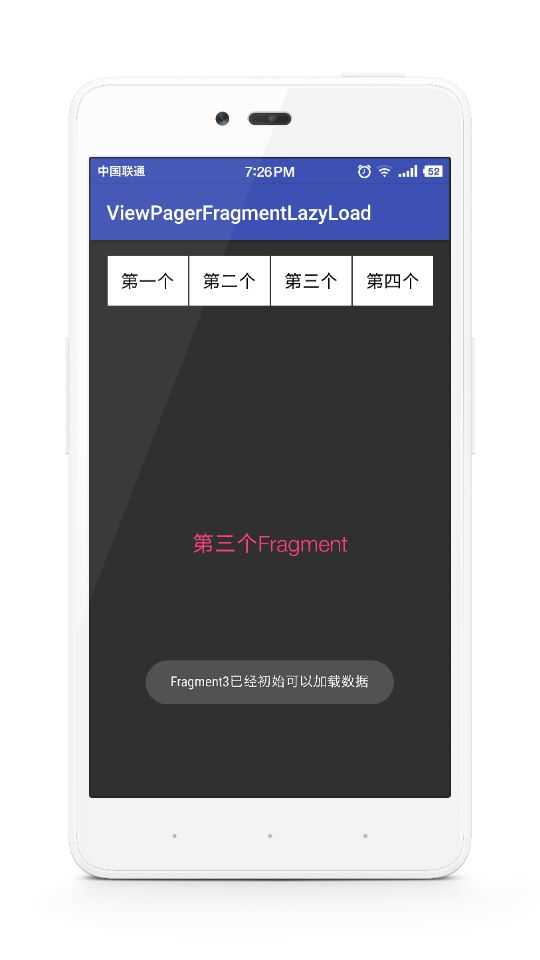

6.GitHub
Android中ViewPager+Fragment取消(禁止)预加载延迟加载(懒加载)问题解决方案的更多相关文章
- android中viewPager+fragment实现的屏幕左右切换(进阶篇)
Fragment支持在不同的Activity中使用并且可以处理自己的输入事件以及生命周期方法等.可以看做是一个子Activity. 先看一下布局: 1 <LinearLayout xmlns:a ...
- Android中ViewPager实现滑动条及与Fragment结合的实例教程
ViewPager类主要被用来实现可滑动的视图功能,这里我们就来共同学习Android中ViewPager实现滑动条及与Fragment结合的实例教程,需要的朋友可以参考下 自主实现滑动指示条先上一个 ...
- Android中viewPager的一两点使用
Android中viewPager的一两点使用 viewPager是谷歌官方提供的一种方便实现页面滑动效果的控件,可以直接使用也可以和fragment联合使用.这里只简单说下直接使用. 使用viewP ...
- js中的预加载与懒加载(延迟加载)
js中加载分两种:预加载与延迟加载 一. 预加载,增强用户的体验,但会加载服务器的负担.一般会使用多种 CSS(background).JS(Image).HTML(<img />) . ...
- Android中全屏 取消标题栏,TabHost中设置NoTitleBar的三种方法(转)
Android中全屏 取消标题栏,TabHost中设置NoTitleBar的三种方法http://www.cnblogs.com/zdz8207/archive/2013/02/27/android- ...
- jQuery延迟加载(懒加载)插件 – jquery.lazyload.js-Web前端(W3Cways.com) - Web前端学习之路
Lazy Load 是一个用 JavaScript 编写的 jQuery 插件. 它可以延迟加载长页面中的图片. 在浏览器可视区域外的图片不会被载入, 直到用户将页面滚动到它们所在的位置. 这与图片预 ...
- mybatis_12延时加载_懒加载
延时加载:也叫懒加载 2.1 延迟加载 延迟加载又叫懒加载,也叫按需加载.也就是说先加载主信息,在需要的时候,再去加载从信息. 在mybatis中,resultMap标签 的association标签 ...
- webpack v3 结合 react-router v4 做 dynamic import — 按需加载(懒加载)
为什么要做dynamic import? dynamic import不知道为什么有很多叫法,什么按需加载,懒加载,Code Splitting,代码分页等.总之,就是在SPA,把JS代码分成N个页面 ...
- ViewPager+Fragment取消预加载(延迟加载)(转)
原文:http://www.2cto.com/kf/201501/368954.html 在项目中,都或多或少地使用的Tab布局,所以大都会用到ViewPager+Fragment,但是Fragmen ...
随机推荐
- Solr集群常用的操作总结
之前搭建过SolrCloud和Solr单机版本,另外还有很多对Solr配置文件以及核心的操作,以下主要总结Solr集群中的常用操作,即在配置文件中正确设置ZK_HOST参数并且Zookeeper正确启 ...
- 【EM算法】EM(转)
Jensen不等式 http://www.cnblogs.com/jerrylead/archive/2011/04/06/2006936.html 回顾优化理论中的一些概念.设f是定义域为实数的函数 ...
- HDU 5752 Sqrt Bo (思维题) 2016杭电多校联合第三场
题目:传送门. 题意:一个很大的数n,最多开5次根号,问开几次根号可以得到1,如果5次还不能得到1就输出TAT. 题解:打表题,x1=1,x2=(x1+1)*(x1+1)-1,以此类推.x5是不超过l ...
- Sqlserver 创建到sqlserver 的链接服务器
exec sp_addlinkedserver 'SN_MASTER_SRV', '', 'SQLOLEDB ', '129.223.252.173' exec sp_addlinkedsrvlogi ...
- Caffe初试(一)win7_64bit+VS2013+Opencv2.4.10+CUDA6.5配置Caffe环境
折腾了几天,终于在windows系统上成功配置了Caffe环境,期间遇到了很多问题,每个问题的解决也都花了不少时间,查过挺多资料,感觉挺有意义,这里写篇博客记录一下. 原来我使用的CUDA版本是7.5 ...
- hdu 1279 验证角谷猜想
题目链接:http://acm.hdu.edu.cn/showproblem.php?pid=1279 #include<stdlib.h> #include<time.h> ...
- VGA信号一些分辨率的参数(摘抄)
摘抄自:http://group.chinaaet.com/273/4100029440 VGA的接口时序如图所示,场同步信号VSYNC在每帧(即送一次全屏的图像)开始的时候产生一个固定宽度的高脉冲, ...
- -A 解决数据库表太多,预读表时间很长
Reading table information for completion of table and column names You can turn off this feature to ...
- C#值类型与引用类型
值类型(Value Type),值类型实例通常分配在线程的堆栈(stack)上,并且不包含任何指向实例数据的指针,因为变量本身就包含了其实例数据.其在MSDN的定义为值类型直接包含它们的数据,值类型的 ...
- wifi diplasy流程介绍
转自:http://blog.csdn.net/dnfchan/article/details/8558552/ 另外一篇不错的参考文章:http://www.360doc.com/content/ ...