
webpack v3 结合 react-router v4 做 dynamic import — 按需加载(懒加载)
为什么要做dynamic import?
dynamic import不知道为什么有很多叫法,什么按需加载,懒加载,Code Splitting,代码分页等。
总之,就是在SPA,把JS代码分成N个页面份数的文件,不在用户刚进来就全部引入,而是等用户跳转路由的时候,再加载对应的JS文件。
这样做的好处就是加速首屏显示速度,同时也减少了资源的浪费。
为什么选择 webpack 3?
- 更高的性能
- 有scope hosting功能,不再需要rollup来处理代码冗余
- 可与react-router结合,更优雅的做dynamic import
- 最重要的一点是,我正经学webpack的时候3已结出了- -
完整的 react spa 项目地址
这个一个完整的项目,这节相关的内容可在router/routerMap.jsx中找到。
第一步:安装 babel-plugin-syntax-dynamic-import
babel用的是babel-env,使用方法可以去babel官方学习,实践可看我项目的源代码。
npm i -D babel-plugin-syntax-dynamic-import 以后, 在.babelrc文件的plungins中加上"syntax-dynamic-import"。
第二步:安装 react-loadable
npm i -S react-loadable 以后,我们就能愉快得做dynamic import了。
第三步: 编辑routerMap
import React from 'react';

import { HashRouter as Router, Route, Switch } from 'react-router-dom';

import createHistory from 'history/createBrowserHistory';

const history = createHistory();

import App from 'containers';

// 按路由拆分代码

import Loadable from 'react-loadable';

const MyLoadingComponent = ({ isLoading, error }) => {

    // Handle the loading state

    if (isLoading) {

        return <div>Loading...</div>;

    }

    // Handle the error state

    else if (error) {

        return <div>Sorry, there was a problem loading the page.</div>;

    }

    else {

        return null;

    }

};

const AsyncHome = Loadable({

    loader: () => import('../containers/Home'),

    loading: MyLoadingComponent

});

const AsyncCity = Loadable({

    loader: () => import('../containers/City'),

    loading: MyLoadingComponent

});

const AsyncDetail = Loadable({

    loader: () => import('../containers/Detail'),

    loading: MyLoadingComponent

});

const AsyncSearch = Loadable({

    loader: () => import('../containers/Search'),

    loading: MyLoadingComponent

});

const AsyncUser = Loadable({

    loader: () => import('../containers/User'),

    loading: MyLoadingComponent

});

const AsyncNotFound = Loadable({

    loader: () => import('../containers/404'),

    loading: MyLoadingComponent

});

// 路由配置

class RouteMap extends React.Component {

    render() {

        return (

            <Router history={history}>

                <App>

                    <Switch>

                        <Route path="/" exact component={AsyncHome} />

                        <Route path="/city" component={AsyncCity} />

                        <Route path="/search/:category/:keywords?" component={AsyncSearch} />

                        <Route path="/detail/:id" component={AsyncDetail} />

                        <Route path="/user" component={AsyncUser} />

                        <Route path="/empty" component={null} key="empty" />

                        <Route component={AsyncNotFound} />

                    </Switch>

                </App>

            </Router>

        );

        // 说明

        // empty Route

        // https://github.com/ReactTraining/react-router/issues/1982  解决人:PFight

        // 解决react-router v4改变查询参数并不会刷新或者说重载组件的问题

    }

}

export default RouteMap;
大功告成
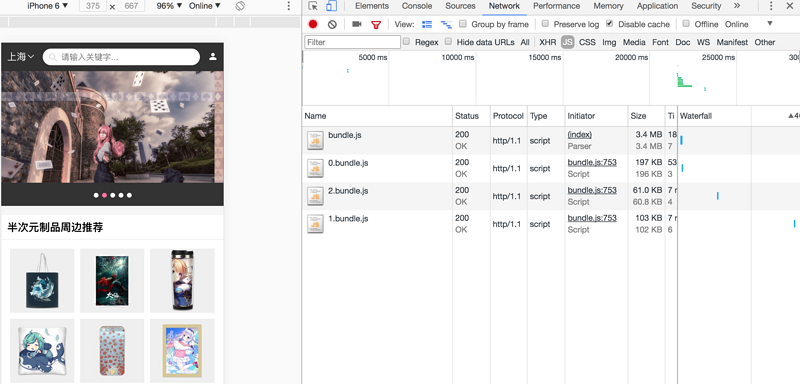
我们可以运行webpack,然后就能看到效果(图仅为dev环境,build才会再打包一个vendor.js,为什么要有vendor.js,请见devDependencies和dependencies的区别 >>)
参考文章
Code Splitting in Create React App
Q&A
有同学表示,我的方法做页面分离并没有什么好处,因为每个页面都依赖了三方库的代码,所以其实页面有很多冗余代码,能想到这点很棒,已经开始有架构思维了。不过,注意这个想法在dev环境下,这个同学是对的。
那到了build环境,或者说到了发布环境,又是怎么样的呢?的确,这篇文章我没有提到,请见我的另一篇文章devDependencies和dependencies的区别。这篇文章主要解释了npm的package.json中devDependencies和dependencies区别是什么。
看完以后,我们就可以知道,为什么我之前说“注意这个想法在dev环境下,这个同学是对的”了。因为,我们npm run build以后,webpack会把三方包打包到vendor.js文件,页面逻辑代码不会牵涉其中,每个页面都会引用vendor.js这个文件,这样的话,就不会出现重复引入冗余代码的情况了。
来源:https://segmentfault.com/a/1190000011128817
webpack v3 结合 react-router v4 做 dynamic import — 按需加载(懒加载)的更多相关文章
- [Web 前端] React Router v4 入坑指南
cp from : https://www.jianshu.com/p/6a45e2dfc9d9 万恶的根源 距离React Router v4 正式发布也已经过去三个月了,这周把一个React的架子 ...
- [React Router v4] Render Multiple Components for the Same Route
React Router v4 allows us to render Routes as components wherever we like in our components. This ca ...
- React Router V4发布
React Router V4 正式版发布,该版本相较于前面三个版本有根本性变化,遵循 Just Component 的 API 设计理念. 本次升级的主要变更有: 声明式 Declarative 可 ...
- [React Router v4] Intercept Route Changes
If a user has entered some input, or the current Route is in a “dirty” state and we want to confirm ...
- [React Router v4] Redirect to Another Page
Overriding a browser's current location without breaking the back button or causing an infinite redi ...
- [React Router v4] Conditionally Render a Route with the Switch Component
We often want to render a Route conditionally within our application. In React Router v4, the Route ...
- [React Router v4] Render Catch-All Routes with the Switch Component
There are many cases where we will need a catch-all route in our web applications. This can include ...
- [React Router v4] Render Nested Routes
With React Router v4 the entire library is built as a series of React components. That means that cr ...
- [React Router v4] Parse Query Parameters
React Router v4 ignores query parameters entirely. That means that it is up to you to parse them so ...
随机推荐
- 洛谷——P1825 [USACO11OPEN]玉米田迷宫Corn Maze
P1825 [USACO11OPEN]玉米田迷宫Corn Maze 题目描述 This past fall, Farmer John took the cows to visit a corn maz ...
- 邁向IT專家成功之路的三十則鐵律 鐵律二:IT專家專業之道–專精
在IT技術的領域當中有許多的類別,若要細分那可真是難以一一列舉,但常見的大致有軟體研發工程師.韌體研發工程師.系統分析師.網路工程師.系統工程師.維護工程師.動畫設計師.製圖工程師.以及各類別的專業電 ...
- SilverLight: 数据绑定(1)-绑定到数据对象
ylbtech-SilverLight-DataBinding: Binding to Data Objects(绑定到数据对象) 1.A, Building a Data Object(创建一个数 ...
- OpenGL中FBO的概念及其应用 [转]
http://www.cppblog.com/kongque/archive/2010/08/26/124754.html FBO一个最常见的应用就是:渲染到纹理(render to texture) ...
- 无法安装 golang.org/x/tools/的库
安装godep 官方的安装文档是使用go get github.com/tools/godep,很可惜,因为“网络”问题会报一个找不到golang.org/x/tools/go/vcs的错误. 而ht ...
- .net 反射访问私有变量和私有方法 如何创建C# Closure ? C# 批量生成随机密码,必须包含数字和字母,并用加密算法加密 C#中的foreach和yield 数组为什么可以使用linq查询 C#中的 具名参数 和 可选参数 显示实现接口 异步CTP(Async CTP)为什么那样工作? C#多线程基础,适合新手了解 C#加快Bitmap的访问速度 C#实现对图片文件的压
以下为本次实践代码: using System; using System.Collections.Generic; using System.ComponentModel; using System ...
- 华为P7电信4G版刷机包 EMUI2.3 官方B125 第3版 精简 ROOT
ROM介绍 基于底包至 B125 SP03解包制作 增加自己订制的超美丽EMUI 2.3专用的全局主题 自调刷机脚本,全部权限完美百分百与官方原版相贴合. 加入Root权限并使用SuperSU 2.0 ...
- 获取Android屏幕尺寸、控件尺寸、状态栏/通知栏高度、导航栏高度
1.获取Android屏幕尺寸 我们能够通过getSize()方法获得屏幕的尺寸 Display display = getWindowManager().getDefaultDisplay(); P ...
- Allegro基本操作——PCB布线
转:http://blog.sina.com.cn/s/blog_1538bc9470102vyyq.html http://www.elecfans.com/article/80/110/2010/ ...
- oracle [union.minus.intersect]
union 两张表的相同字段的数据[记录类型和列数要一致],合并,并且去重 can replace with "in" (但是如果是两个不同的表而且没什么关联的话必须要union了 ...