
iOS coredata 数据库升级 时报Can't find model for source store
在coredata 数据库结构被更改后,没根据要求立即建立新version,而是在原version上进行了小修改,之后才想起来建立新版本。并通过以下代码合并数据库,
 NSError *error = nil;

    NSDictionary *options = [NSDictionary dictionaryWithObjectsAndKeys:

                             [NSNumber numberWithBool:YES], NSMigratePersistentStoresAutomaticallyOption,

                             [NSNumber numberWithBool:YES], NSInferMappingModelAutomaticallyOption,NSFileProtectionComplete, NSPersistentStoreFileProtectionKey, nil];

    _persistentStoreCoordinator = [[NSPersistentStoreCoordinator alloc] initWithManagedObjectModel:[self managedObjectModel]];

    if (![_persistentStoreCoordinator addPersistentStoreWithType:NSSQLiteStoreType configuration:nil URL:storeURL options:options error:&error]) {

        NSLog(@"Unresolved error %@, %@", error, [error userInfo]);

        abort();

    }
结果出现了Can't find model for source store这个 bug。我们先看看stackoverflow上的答案
Your sqlite database's model hash MUST match one of the mom or momd created by your xcdatamodel when you build your app. You can see the hashes in the momd's VersionInfo.plist in the built app's bundle. See below for code to find your database's model hash.

So if you change your xcdatamodel instead of creating a new version under Xcode->Editor->Add Model Version... then your model's hash will be different, and addPersistentStoreWithType won't be able to use your old database, which used the old model. That's what causes the "Can't find model for source store" error.
我们根据这个答案去看看bundle 中的version 文件
更改前的截图
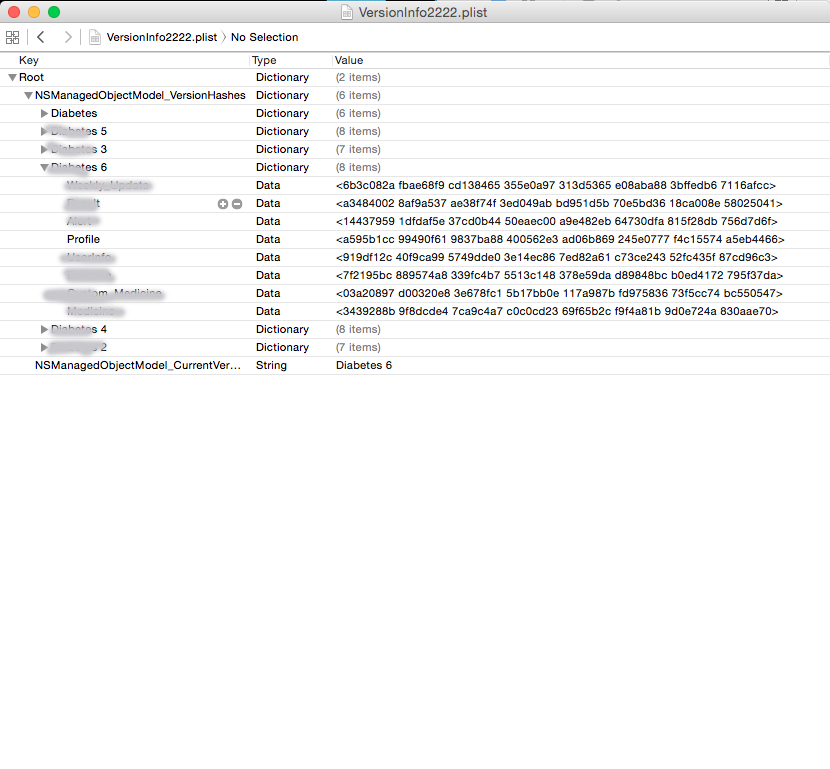
再看更改后的截图
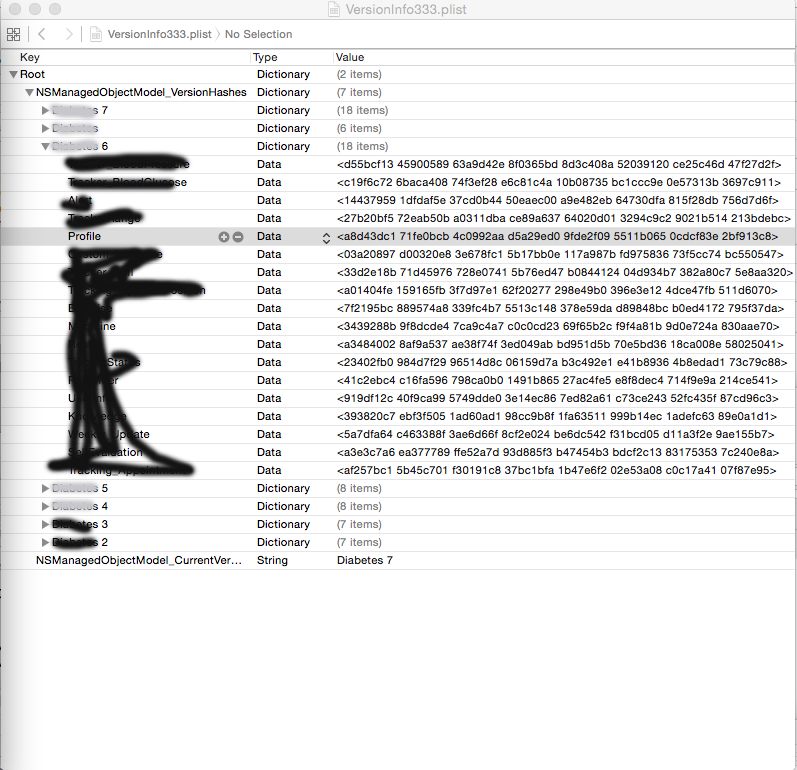
注意到 同样的version 6 中的profile model 的hash值不一致,程序会根据这个hash值来判断bundle中有无能在旧数据库上使用的mom文件,如果没有,就会报错。
为什么会crash呢,因为旧版更新为新版后,documents中的数据库是不变的,变化的是bundle中的.momd文件加中的mom文件和version的plist。新版本更新后,会参照新版本中包含的旧版的mom文件来读取旧版本数据库,向新版本迁移。如果旧的mom文件在新版本中更改了,程序就无法读取旧版本数据,就会抛出异常。
解决方法也很简单,找到上个版本使用的xxxx 6.xcdatamodel 文件,替换被错误更改的.xcdatamodel 文件。
iOS coredata 数据库升级 时报Can't find model for source store的更多相关文章
- CoreData数据库升级
如果IOS App 使用到CoreData,并且在上一个版本上有数据库更新(新增表.字段等操作),那在覆盖安装程序时就要进行CoreData数据库的迁移,具体操作如下: 1.选中你的mydata.xc ...
- iOS - CoreData 数据库存储
1.CoreData 数据库 CoreData 是 iOS SDK 里的一个很强大的框架,允许程序员以面向对象的方式储存和管理数据.使用 CoreData 框架,程序员可以很轻松有效地通过面向对象的接 ...
- iOS:CoreData数据库的使用四(数据库和UITableViewController以及NSFetchedResultsController一起使用)
CoreData数据库虽然可以和tableview或者UITableViewController一起使用将数据显示在表格上,但是在准备数据的时候,这种方式需要用一个可变数组来装从数据库一次性取出来的所 ...
- iOS:CoreData数据库的使用三(数据库和tableView表格一起使用)
CoreData数据库是用来持久性存储数据的,那么,我们再从该数据库中取出数据干什么呢?明显的是为了对数据做操作,这个过程中可以将它们直观的显示出来,即通过表格的形式显示出来.CoreData配合ta ...
- iOS:CoreData数据库的使用一(创建单个数据库表)
CoreData数据库框架:mac系统自带的数据库,它是苹果公司对sqlite进行封装而来的,既提供了对数据库的主要操作,也提供了具体的视图关系模型. 需要用到三个对象: 1•Managed Obje ...
- coredata 数据库升级
在真实开发中,因为需求是不断变化的,说不定什么时候就需要往模型里添加新的字段,添加新的模型,甚至是大规模的重构:所以数据的迁移就显得尤为重要了. CoreData 中,数据迁移本质就是把旧的 SQLi ...
- iOS coredata 数据库的加密(待研究)
https://github.com/project-imas/encrypted-core-data 使用起来很方便,底层还是使用了SQLCipher,有时间要研究一下! 数据库的密码不能用固定字符 ...
- CoreData 数据库
封装CoreManager类 @implementation CoreDataManager { //上下文 NSManagedObjectContext *_ctx; } //单例 +(instan ...
- CoreData(数据库升级 )版本迁移-iOS App升级安装
版权声明:本文为博主原创文章,未经博主允许不得转载. 如果IOS App 使用到CoreData,并且在上一个版本上有数据库更新(新增表.字段等操作),那在覆盖安装程序时就要进行CoreData数据库 ...
随机推荐
- 缺少索引导致的服务器和MYSQL故障。
故障现象: 网站访问缓慢. 数据库RDS: CPU满,连接数满,其他值都是空闲. apache服务器:CPU正常,IO正常,流量报警,内存爆满. 解决思路: 一.没遇到过此情况,一脸懵逼. 二.请教大 ...
- PHPstorm设置连接FTP,进行文件上传、下载、比较
内容转载自:http://www.cnblogs.com/jikey/p/3486621.html 如何在 ...
- axure新手入门教程
首先做个声明:此次教程里为了快速完成,借用了一些网上已有教程的图文,不是剽窃,只图方便.另外,因为汉化版本可能功能名称等略有差别,请自行理解. 名词解释: 线框图:一般就是指产品原型,比如:把线框图尽 ...
- iOS开发 关于SEL的简单总结
SEL就是对方法的一种包装.包装的SEL类型数据它对应相应的方法地址,找到方法地址就可以调用方法.在内存中每个类的方法都存储在类对象中,每个方法都有一个与之对应的SEL类型的数据,根据一个SEL数据就 ...
- [CentOs]ip操作
摘要 在虚机里面安装好centos之后,需要知道centos的ip,方便以后连接时使用. 查看ip命令 命令 ifconfig 能查看到信息,说明已经配置过了,如果没配置过,可以通过下面的方式进行配置 ...
- 卸载金山猎豹免费WIfi后,上不了网的解决办法
进入网络和共享中心,打开网络适配器,右键无线连接,属性,就在打开属性的那个页面,在靠上的位置有个LieBao xxx Driver,卸载. 然后,打开浏览器,试试这个链接:www.baidu.com. ...
- oracle中一些用法总结
1. case用法: --简单case函数 case sex when '1' then 'boy' when '2' then 'girl' else '其他' end; --case搜索函数 ca ...
- spring缓存Ehcache(入门2)
使用Ehcache缓存工具类. 一.由于使用了maven,所以需要引入依赖包: <dependency> <groupId>net.sf.ehcache</groupId ...
- 基于iSCSI的SQL Server 2012群集测试(三)--SQL Server 2012群集安装总结
5.SQL Server 2012群集安装总结 5.1 群集与非群集的安装区别总结 SQL Server虚拟名称: 非群集环境下,本地服务器的名称就是SQL Server服务器名称:但在群集环境下,由 ...
- 求方程式ax^2+bx+c=0的根。
#include <stdio.h>#include <stdlib.h>#include<math.h>int main(){ int a,b,c,d; doub ...