
maven总结三: 常用插件
本文为博主原创,转载请注明出处:
目录:
1. maven-release-plugin
2. maven-compiler-plugin
3. maven-assembly-plugin
4. spring-boot-maven-plugin
5. maven-resources-plugin
6. maven-dependency-plugin
1.maven -release-plugin
提供自动化发布功能,自动升级版本,并将代码提交git服务器
<plugin>

    <groupId>org.apache.maven.plugins</groupId>

    <artifactId>maven-release-plugin</artifactId>

    <version>2.5.3</version>

    <configuration>

        <tagBase>http://git.spt.com/team/supply.git</tagBase>

        <connectionUrl>http://git.spt.com/team/supply.git</connectionUrl>

        <useReleaseProfile>false</useReleaseProfile>

        <autoVersionSubmodules>true</autoVersionSubmodules>

        <preparationGoals>clean deploy</preparationGoals>

      <!--git用户名-->

        <username>xxxxx@aikucun.com</username>

        <!--git密码-->

        <password>xxxx</password>

    </configuration>

</plugin>
2.maven-compiler-plugin
指定maven 编译的jdk 版本及编译时的配置。以下为简约配置。通过指定maven 中jdk 编译的版本,可以避免代码工具的jdk 版本变更后,项目编译出现问题
<plugin>

    <groupId>org.apache.maven.plugins</groupId>

    <artifactId>maven-compiler-plugin</artifactId>

    <version>3.8.0</version>

    <configuration>

        <!-- 一般而言,target与source是保持一致 -->

        <source>1.8</source> <!-- 源代码使用的JDK版本 -->

        <target>1.8</target> <!-- 需要生成的目标class文件的编译版本 -->

        <encoding>UTF-8</encoding><!-- 字符集编码,防止中文乱码 -->

        <skipTests>true</skipTests><!-- 跳过测试 -->

        <verbose>true</verbose>

        <showWarnings>true</showWarnings>

    </configuration>

</plugin>
3.maven-assembly-plugin
在Maven中,主要有3个插件可以用来打包:
- maven-jar-plugin,默认的打包插件,用来打普通的project JAR包;
- maven-shade-plugin,用来打可执行JAR包,也就是所谓的fat JAR包;
- maven-assembly-plugin,支持自定义的打包结构,也可以定制依赖项等。
我们日常使用的以maven-assembly-plugin为最多,因为大数据项目中往往有很多shell脚本、SQL脚本、.properties及.xml配置项等,采用assembly插件可以让输出的结构清晰而标准化。
示例:
    <build>

        <plugins>

            <plugin>

                <groupId>org.apache.maven.plugins</groupId>

                <artifactId>maven-assembly-plugin</artifactId>

                <version>${maven-assembly-plugin.version}<version>

                <executions>

                    <execution>

                        <id>make-assembly</id>

                        <!-- 绑定到package生命周期 -->

                        <phase>package</phase>

                        <goals>

                            <!-- 只运行一次 -->

                            <goal>single</goal>

                        </goals>

                    </execution>

                </executions>

                <configuration>

                    <!-- 配置描述符文件 -->

                    <descriptor>src/main/assembly/assembly.xml</descriptor>

                    <!-- 也可以使用Maven预配置的描述符

                    <descriptorRefs>

                        <descriptorRef>jar-with-dependencies</descriptorRef>

                    </descriptorRefs> -->

                </configuration>

            </plugin>

        </plugins>

    </build>
assembly插件的打包方式是通过descriptor(描述符)来定义的。
Maven预先定义好的描述符有bin,src,project,jar-with-dependencies等。比较常用的是jar-with-dependencies,它是将所有外部依赖JAR都加入生成的JAR包中,比较傻瓜化。
但要真正达到自定义打包的效果,就需要自己写描述符文件,格式为XML。下面是我们的项目中常用的一种配置。
<assembly>

    <id>assembly</id>

    <formats>

        <format>tar.gz</format>

    </formats>

    <includeBaseDirectory>true</includeBaseDirectory>

    <fileSets>

        <fileSet>

            <directory>src/main/bin</directory>

            <includes>

                <include>*.sh</include>

            </includes>

            <outputDirectory>bin</outputDirectory>

            <fileMode>0755</fileMode>

        </fileSet>

        <fileSet>

            <directory>src/main/conf</directory>

            <outputDirectory>conf</outputDirectory>

        </fileSet>

        <fileSet>

            <directory>src/main/sql</directory>

            <includes>

                <include>*.sql</include>

            </includes>

            <outputDirectory>sql</outputDirectory>

        </fileSet>

        <fileSet>

            <directory>target/classes/</directory>

            <includes>

                <include>*.properties</include>

                <include>*.xml</include>

                <include>*.txt</include>

            </includes>

            <outputDirectory>conf</outputDirectory>

        </fileSet>

    </fileSets>

    <files>

        <file>

            <source>target/${project.artifactId}-${project.version}.jar</source>

            <outputDirectory>.</outputDirectory>

        </file>

    </files>

    <dependencySets>

        <dependencySet>

            <unpack>false</unpack>

            <scope>runtime</scope>

            <outputDirectory>lib</outputDirectory>

        </dependencySet>

    </dependencySets>

</assembly>
id与formats
formats是assembly插件支持的打包文件格式,有zip、tar、tar.gz、tar.bz2、jar、war。可以同时定义多个format。
id则是添加到打包文件名的标识符,用来做后缀。
也就是说,如果按上面的配置,生成的文件就是 a r t i f a c t I d − {artifactId}-artifactId−{version}-assembly.tar.gz。
fileSets/fileSet
用来设置一组文件在打包时的属性。
directory:源目录的路径。
includes/excludes:设定包含或排除哪些文件,支持通配符。
fileMode:指定该目录下的文件属性,采用Unix八进制描述法,默认值是0644。
outputDirectory:生成目录的路径。
files/file
与fileSets大致相同,不过是指定单个文件,并且还可以通过destName属性来设置与源文件不同的名称。
dependencySets/dependencySet
用来设置工程依赖文件在打包时的属性。也与fileSets大致相同,不过还有两个特殊的配置:
unpack:布尔值,false表示将依赖以原来的JAR形式打包,true则表示将依赖解成*.class文件的目录结构打包。
scope:表示符合哪个作用范围的依赖会被打包进去。compile与provided都不用管,一般是写runtime。
按照以上配置打包好后,将.tar.gz文件上传到服务器,解压之后就会得到bin、conf、lib等规范化的目录结构,十分方便。
4.spring-boot-maven-plugin
能够以Maven的方式为应用提供Spring Boot的支持,即为Spring Boot应用提供了执行Maven操作的可能。
Spring Boot Maven plugin的5个Goals
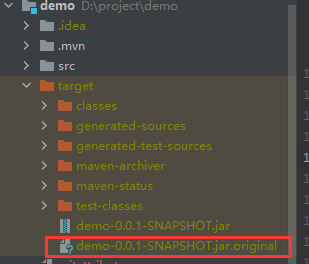
- spring-boot:repackage,默认goal。在mvn package之后,再次打包可执行的jar/war,同时保留mvn package生成的jar/war为.origin
- spring-boot:run,运行Spring Boot应用
- spring-boot:start,在mvn integration-test阶段,进行Spring Boot应用生命周期的管理
- spring-boot:stop,在mvn integration-test阶段,进行Spring Boot应用生命周期的管理
- spring-boot:build-info,生成Actuator使用的构建信息文件build-info.properties
配置pom.xml文件
<build>

        <plugins>

            <plugin>

                <groupId>org.springframework.boot</groupId>

                <artifactId>spring-boot-maven-plugin</artifactId>

                <version>2.0.1.RELEASE</version>

                <executions>

                    <execution>

                        <goals>

                            <goal>repackage</goal>

                        </goals>

                    </execution>

                </executions>

            </plugin>

        </plugins>

    </build>
使用该插件打包之后,会生成一个 以 original 的软件包:
5. maven-resources-plugin
Resources插件负责处理项目资源文件并拷贝到输出目录。Maven将main resources和test resources分开,一般main resources关联main source code,而test resources关联test source code。
Resources插件目标有三个:
- resources:resources,拷贝main resources到main output directory。它绑定了process-resources生命周期阶段,当执行Compiler:compile插件目标前就会执行此阶段。
- resources:testResources,拷贝test resources到test output directory。它绑定了process-test-resources生命周期阶段,当执行surefire:test插件目标前就会执行此阶段。
- resources:copy-resources,手动拷贝资源到输出目录
pom 简约配置示例:
<build>

    <plugins>

        <plugin>

            <artifactId>maven-resources-plugin</artifactId>

            <version>3.0.2</version>

            <configuration>

                <encoding>UTF-8</encoding>

            </configuration>

        </plugin>

    </plugins>

</build>
可能用到的配置:
<plugin>

    <groupId>org.apache.maven.plugins</groupId>

    <artifactId>maven-resources-plugin</artifactId>

    <version>2.6</version>

    <executions>

        <!-- 一个execution就是一个目标输入位置,如果想把各种资源拆开放的话,就

        可以创建多个execution,一个资源文件可以被拷贝多份 -->

        <execution>

            <id>copy-resources</id>

            <phase>package</phase>

            <goals>

                <goal>copy-resources</goal>

            </goals>

            <configuration>

                <encoding>UTF-8</encoding>

                <!-- 资源文件的输出目录 -->

                <outputDirectory>{project.build.directory}/config</outputDirectory>

                <resources>

                    <!-- 资源文件的原始目录,有多个的话就多配几个 -->

                    <resource>

                        <!-- 原始目录 -->

                        <directory>src/main/resources</directory>

                        <!-- 是否使用过滤器,如果是的话,需要配置一下才行

                        这个后续再研究,这边没有使用到 -->

                        <filtering>true</filtering>

                        <!-- 包含哪些文件以及去除调哪些文件等等 -->

                        <includes>

                            <include>**/*.*</include>

                        </includes>

                        <excludes>

                            <exclude>**/*.json</exclude>

                        </excludes>

                    </resource>

                </resources>

            </configuration>

        </execution>

    </executions>

</plugin>
6. maven-dependency-plugin
用来拷贝项目所有依赖,可能会用到的一些配置如下:
<plugin>

    <groupId>org.apache.maven.plugins</groupId>

    <artifactId>maven-dependency-plugin</artifactId>

    <executions>

        <execution>

            <id>copy-dependencies</id>

            <phase>package</phase>

            <goals>

                <goal>copy-dependencies</goal>

            </goals>

            <configuration>

                <!-- 拷贝项目依赖包到lib/目录下 -->

                <outputDirectory>${project.build.directory}/lib</outputDirectory>

                <!-- 间接依赖也拷贝 -->

                <excludeTransitive>false</excludeTransitive>

                <!-- 带上版本号 -->

                <stripVersion>false</stripVersion>

            </configuration>

        </execution>

    </executions>

</plugin>
maven总结三: 常用插件的更多相关文章
- (三)Maven基本概念——常用插件的配置
看注释———— pom.xml <project xmlns="http://maven.apache.org/POM/4.0.0" xmlns:xsi="http ...
- maven入门与常用插件使用
maven不仅仅是一款管理jar包的工具,还可以
- 【编程工具】Sublime Text3的安装和常用插件推荐
本人刚刚学习 HTML,曾经上网找过一些编写 HTML 的软件,但感觉都不太好,经过三挑四选下,最终我决定选择 Sublime Text3 这款软件来作为学习工具,上网找到了许多实用的插件,在这里给大 ...
- maven常用插件配置详解
常用插件配置详解Java代码 <!-- 全局属性配置 --> <properties> <project.build.name>tools</proje ...
- (六)maven之常用插件
一.maven的插件 maven官方插件:http://maven.apache.org/plugins/index.html 二.常用插件之:javadoc 作用:生成代码文档 2.1 编写代码,并 ...
- Maven常用插件
maven利用各种插件来管理构建项目,本文记录下工作中常用到的插件及使用方法.每个插件都会提供多个目标(goal),用于标示任务.各插件配置在pom.xml里,如下: <build> [. ...
- maven常用插件pom配置
一.问题描述: 部署一个maven打包项目时,jar包,依赖lib包全部手动上传至服务器,然后用maven部署报错:Exception in thread "main" java. ...
- maven常用插件总结
maven本质上是一个插件框架,几乎所有的功能都是通过各种各样的插件来实现的.maven默认会依据项目类型自动把构建时的各阶段(Lifecycle和phase)自动绑定(Lifecycle Mappi ...
- Maven系列学习(三)Maven生命周期和插件
Maven生命周期和插件 Maven另外的两个核心概念就是生命周期和插件,Maven的生命周期都是抽象的,其实实际行为都是由插件来完成的,生命周期和插件两者协同工作 1.生命周期 Maven的生命周期 ...
- maven 常用插件总结
maven-javadoc-plugin (1) 说明:该插件生成项目的javadoc.对于构建jar目标,javadoc会首先生成并打包放入jar文件中. (2) 默认用法: pom.xml配置 & ...
随机推荐
- 流畅的orm让我发现我抵触的是mybatis而不是java
流畅的orm让我发现我抵触的是mybatis而不是java 背景介绍 开发.net 也快10年了,到第三年的时候我已经渐渐瓶颈了,于是我在网上找各种资料但是大部分c#资料全是皮毛资料,稍微深一点点就再 ...
- Sql整理
1:数据库 数据库是以某种有组织的方式存储的数据集合. 保存有组织数据的容器,通常是一个文件或者一组文件. SQL 是Structured Query Language (结构化查询语言)的缩写. 2 ...
- 【C#】【DateTime】获取当前时间的前一天或者后一天方法学习
假期懈怠了一阵子,因为工作环境没有网络,随即记录下当时的问题: 1.关于DateTime.Now(2023/10/07)的前一天的时间(2023/10/06),想要通过ToString转换成字符串后除 ...
- 现代 CSS 解决方案:文字颜色自动适配背景色!
在 23 年的 CSS 新特性中,有一个非常重要的功能更新 -- 相对颜色. 简单而言,相对颜色的功能,让我们在 CSS 中,对颜色有了更为强大的掌控能力. 其核心功能就是,让我们能够基于一个现有颜色 ...
- Java 新技术:虚拟线程使用指南(二)
虚拟线程是在 Java 21 版本中实现的一种轻量级线程.它由 JVM 进行创建以及管理.虚拟线程和传统线程(我们称之为平台线程)之间的主要区别在于,我们可以轻松地在一个 Java 程序中运行大量.甚 ...
- 一个小巧、快速、轻量级的 .NET NoSQL 嵌入式数据库
前言 今天给大家分享一个小巧.快速.轻量级的 .NET NoSQL 嵌入式数据库:LiteDB.本篇文章主要是介绍LiteDB和在.NET中如何使用. LiteDB介绍 LiteDB 是一个小巧.快速 ...
- 聊一聊如何整合Microsoft.Extensions.DependencyInjection和Castle.Core(三)
前言 今天的第三篇,感觉没啥人看呀,难道没有兄弟跟我有同样的整合需求吗???手动 , 本文会简短一些,介绍下 CastleCore 作为代理库的一些缺点甚至是硬伤 异步支持 先上代码 /// < ...
- 文心一言 VS 讯飞星火 VS chatgpt (25)-- 算法导论4.2 7题
七.设计算法,仅使用三次实数乘法即可完成复数 a+bi和c+di 相乘.算法需接收a.b.c和d 为输入,分别生成实部 ac-bd 和虚部ad+bc. 文心一言: 可以使用如下算法来计算复数 a+bi ...
- 华为云API Explorer重磅推出API编排,开发者0代码高效构建工作流
本文分享自华为云社区<华为云API Explorer重磅推出API编排,开发者0代码高效构建工作流(体验用户招募中)>,作者:华为云PaaS服务小智. 打破传统开发模式,API编排应运而生 ...
- Kafka 源码解析:Server 端的运行过程
摘要:Kafka网络模块之Server端,介绍Server端启动.接收请求和处理请求的过程. 本文分享自华为云社区<Kafka网络模块-Server端>,原文作者:中间件小哥 . Sock ...