
Neural Style学习3——操作
Basic usage:
th neural_style.lua -style_image <image.jpg> -content_image <image.jpg>
OpenCL usage with NIN Model (This requires you download the NIN Imagenet model files as described above):
th neural_style.lua -style_image examples/inputs/picasso_selfport1907.jpg -content_image examples/inputs/brad_pitt.jpg -output_image profile.png -model_file models/nin_imagenet_conv.caffemodel -proto_file models/train_val.prototxt -gpu 0 -backend clnn -num_iterations 1000 -seed 123 -content_layers relu0,relu3,relu7,relu12 -style_layers relu0,relu3,relu7,relu12 -content_weight 10 -style_weight 1000 -image_size 512 -optimizer adam
To use multiple style images, pass a comma-separated list like this:
-style_image starry_night.jpg,the_scream.jpg.
Note that paths to images should not contain the ~ character to represent your home directory; you should instead use a relative
path or a full absolute path.
Options:
-image_size: Maximum side length (in pixels) of of the generated image. Default is 512.-style_blend_weights: The weight for blending the style of multiple style images, as a
comma-separated list, such as-style_blend_weights 3,7. By default all style images
are equally weighted.-gpu: Zero-indexed ID of the GPU to use; for CPU mode set-gputo -1.
Optimization options:
-content_weight: How much to weight the content reconstruction term. Default is 5e0.-style_weight: How much to weight the style reconstruction term. Default is 1e2.-tv_weight: Weight of total-variation (TV) regularization; this helps to smooth the image.
Default is 1e-3. Set to 0 to disable TV regularization.-num_iterations: Default is 1000.-init: Method for generating the generated image; one ofrandomorimage.
Default israndomwhich uses a noise initialization as in the paper;image
initializes with the content image.-optimizer: The optimization algorithm to use; eitherlbfgsoradam; default islbfgs.
L-BFGS tends to give better results, but uses more memory. Switching to ADAM will reduce memory usage;
when using ADAM you will probably need to play with other parameters to get good results, especially
the style weight, content weight, and learning rate; you may also want to normalize gradients when
using ADAM.-learning_rate: Learning rate to use with the ADAM optimizer. Default is 1e1.-normalize_gradients: If this flag is present, style and content gradients from each layer will be
L1 normalized. Idea from andersbll/neural_artistic_style.
Output options:
-output_image: Name of the output image. Default isout.png.-print_iter: Print progress everyprint_iteriterations. Set to 0 to disable printing.-save_iter: Save the image everysave_iteriterations. Set to 0 to disable saving intermediate results.
Layer options:
-content_layers: Comma-separated list of layer names to use for content reconstruction.
Default isrelu4_2.-style_layers: Comma-separated list of layer names to use for style reconstruction.
Default isrelu1_1,relu2_1,relu3_1,relu4_1,relu5_1.
Other options:
-style_scale: Scale at which to extract features from the style image. Default is 1.0.-original_colors: If you set this to 1, then the output image will keep the colors of the content image.-proto_file: Path to thedeploy.txtfile for the VGG Caffe model.-model_file: Path to the.caffemodelfile for the VGG Caffe model.
Default is the original VGG-19 model; you can also try the normalized VGG-19 model used in the paper.-pooling: The type of pooling layers to use; one ofmaxoravg. Default ismax.
The VGG-19 models uses max pooling layers, but the paper mentions that replacing these layers with average
pooling layers can improve the results. I haven't been able to get good results using average pooling, but
the option is here.-backend:nn,cudnn, orclnn. Default isnn.cudnnrequires
cudnn.torch and may reduce memory usage.
clnnrequires cltorch and clnn-cudnn_autotune: When using the cuDNN backend, pass this flag to use the built-in cuDNN autotuner to select
the best convolution algorithms for your architecture. This will make the first iteration a bit slower and can
take a bit more memory, but may significantly speed up the cuDNN backend.
Frequently Asked Questions
Problem: Generated image has saturation artifacts:

Solution: Update the image packge to the latest version: luarocks install image
Problem: Running without a GPU gives an error message complaining about cutorch not found
Solution:
Pass the flag -gpu -1 when running in CPU-only mode
Problem: The program runs out of memory and dies
Solution: Try reducing the image size: -image_size 256 (or lower). Note that different image sizes will likely
require non-default values for -style_weight and -content_weight for optimal results.
If you are running on a GPU, you can also try running with -backend cudnn to reduce memory usage.
Problem: Get the following error message:
models/VGG_ILSVRC_19_layers_deploy.prototxt.cpu.lua:7: attempt to call method 'ceil' (a nil value)
Solution: Update nn package to the latest version: luarocks install nn
Problem: Get an error message complaining about paths.extname
Solution: Update torch.paths package to the latest version: luarocks install paths
Problem: NIN Imagenet model is not giving good results.
Solution: Make sure the correct -proto_file is selected. Also make sure the correct parameters for -content_layers and -style_layers are set. (See OpenCL usage example above.)
Problem: -backend cudnn is slower than default NN backend
Solution: Add the flag -cudnn_autotune; this will use the built-in cuDNN autotuner to select the best convolution algorithms.
Memory Usage
By default, neural-style uses the nn backend for convolutions and L-BFGS for optimization.
These give good results, but can both use a lot of memory. You can reduce memory usage with the following:
- Use cuDNN: Add the flag
-backend cudnnto use the cuDNN backend. This will only work in GPU mode. - Use ADAM: Add the flag
-optimizer adamto use ADAM instead of L-BFGS. This should significantly
reduce memory usage, but may require tuning of other parameters for good results; in particular you should
play with the learning rate, content weight, style weight, and also consider using gradient normalization.
This should work in both CPU and GPU modes. - Reduce image size: If the above tricks are not enough, you can reduce the size of the generated image;
pass the flag-image_size 256to generate an image at half the default size.
With the default settings, neural-style uses about 3.5GB of GPU memory on my system;
switching to ADAM and cuDNN reduces the GPU memory footprint to about 1GB.
Speed
Speed can vary a lot depending on the backend and the optimizer.
Here are some times for running 500 iterations with -image_size=512 on a Maxwell Titan X with different settings:
-backend nn -optimizer lbfgs: 62 seconds-backend nn -optimizer adam: 49 seconds-backend cudnn -optimizer lbfgs: 79 seconds-backend cudnn -cudnn_autotune -optimizer lbfgs: 58 seconds-backend cudnn -cudnn_autotune -optimizer adam: 44 seconds-backend clnn -optimizer lbfgs: 169 seconds-backend clnn -optimizer adam: 106 seconds
Here are the same benchmarks on a Pascal Titan X with cuDNN 5.0 on CUDA 8.0 RC:
-backend nn -optimizer lbfgs: 43 seconds-backend nn -optimizer adam: 36 seconds-backend cudnn -optimizer lbfgs: 45 seconds-backend cudnn -cudnn_autotune -optimizer lbfgs: 30 seconds-backend cudnn -cudnn_autotune -optimizer adam: 22 seconds
Multi-GPU scaling
You can use multiple GPUs to process images at higher resolutions; different layers of the network will be
computed on different GPUs. You can control which GPUs are used with the -gpu flag, and you can control
how to split layers across GPUs using the -multigpu_strategy flag.
For example in a server with four GPUs, you can give the flag -gpu 0,1,2,3 to process on GPUs 0, 1, 2, and
3 in that order; by also giving the flag -multigpu_strategy 3,6,12 you indicate that the first two layers
should be computed on GPU 0, layers 3 to 5 should be computed on GPU 1, layers 6 to 11 should be computed on
GPU 2, and the remaining layers should be computed on GPU 3. You will need to tune the -multigpu_strategy
for your setup in order to achieve maximal resolution.
We can achieve very high quality results at high resolution by combining multi-GPU processing with multiscale
generation as described in the paper
Controlling Perceptual Factors in Neural Style Transfer by Leon A. Gatys,
Alexander S. Ecker, Matthias Bethge, Aaron Hertzmann and Eli Shechtman.
Here is a 3620 x 1905 image generated on a server with four Pascal Titan X GPUs:
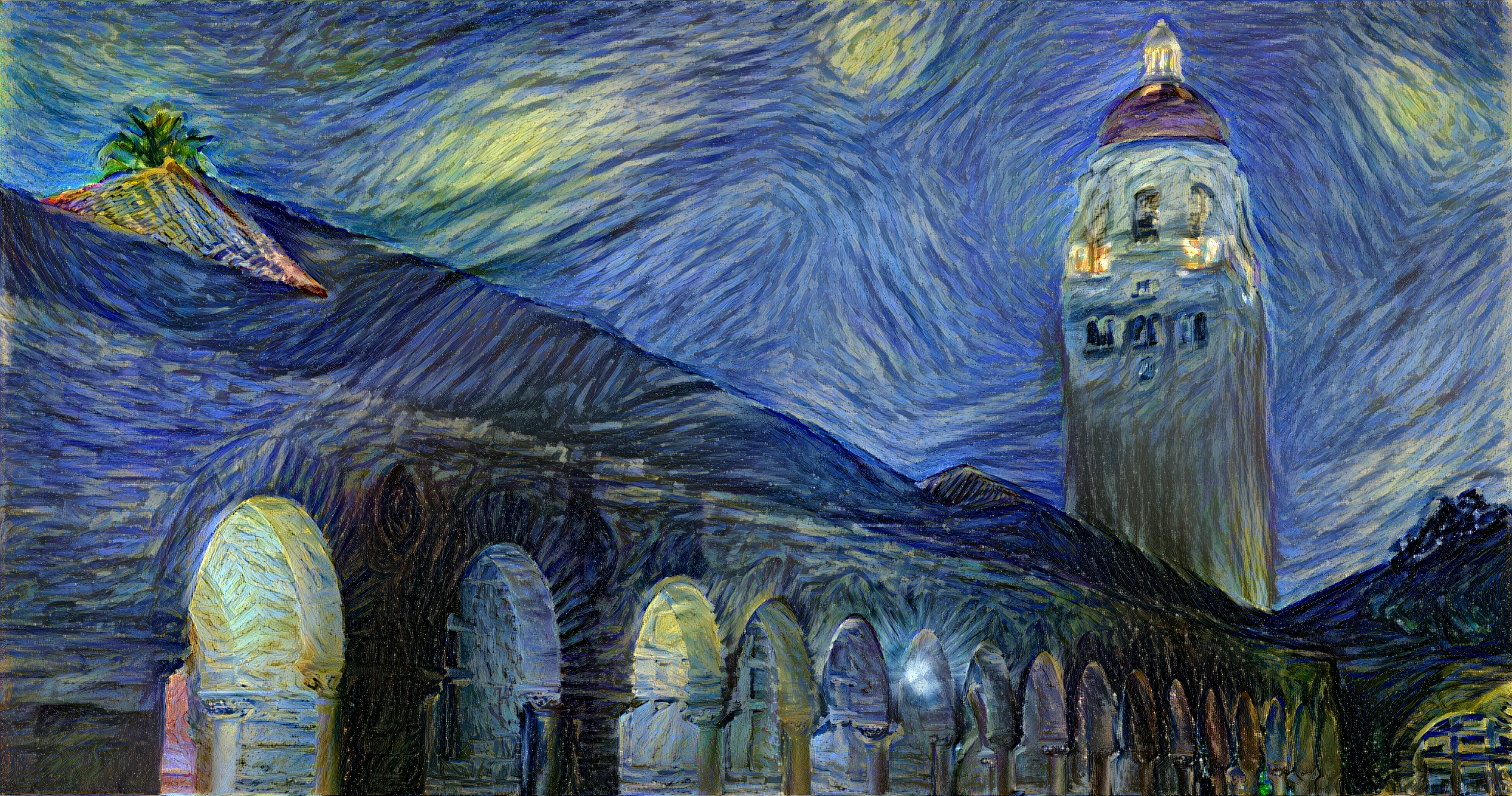
The script used to generate this image can be found here.
Neural Style学习3——操作的更多相关文章
- Neural Style学习2——环境安装
neural-style Installation This guide will walk you through the setup for neural-style on Ubuntu. Ste ...
- Neural Style学习1——简介
该项目是Github上面的一个开源项目,其利用卷积神经网络的理论,参照论文A Neural Algorithm of Artistic Style,可以实现一种效果:两张图片,一张取其内容,另一张取其 ...
- 课程四(Convolutional Neural Networks),第四 周(Special applications: Face recognition & Neural style transfer) —— 2.Programming assignments:Art generation with Neural Style Transfer
Deep Learning & Art: Neural Style Transfer Welcome to the second assignment of this week. In thi ...
- Neural Style论文笔记+源码解析
引言 前面在Ubuntu16.04+GTX1080配置TensorFlow并实现图像风格转换中介绍了TensorFlow的配置过程,以及运用TensorFlow实现图像风格转换,主要是使用了文章A N ...
- [C4W4] Convolutional Neural Networks - Special applications: Face recognition & Neural style transfer
第四周:Special applications: Face recognition & Neural style transfer 什么是人脸识别?(What is face recogni ...
- 【原创】梵高油画用深度卷积神经网络迭代十万次是什么效果? A neural style of convolutional neural networks
作为一个脱离了低级趣味的码农,春节假期闲来无事,决定做一些有意思的事情打发时间,碰巧看到这篇论文: A neural style of convolutional neural networks,译作 ...
- 项目总结四:神经风格迁移项目(Art generation with Neural Style Transfer)
1.项目介绍 神经风格转换 (NST) 是深部学习中最有趣的技术之一.它合并两个图像, 即 内容图像 C(content image) 和 样式图像S(style image), 以生成图像 G(ge ...
- 【原创】梵高油画用深度卷积神经网络迭代10万次是什么效果? A neural style of convolutional neural networks
作为一个脱离了低级趣味的码农,春节假期闲来无事,决定做一些有意思的事情打发时间,碰巧看到这篇论文: A neural style of convolutional neural networks,译作 ...
- fast neural style transfer图像风格迁移基于tensorflow实现
引自:深度学习实践:使用Tensorflow实现快速风格迁移 一.风格迁移简介 风格迁移(Style Transfer)是深度学习众多应用中非常有趣的一种,如图,我们可以使用这种方法把一张图片的风格“ ...
随机推荐
- spring-boot 热部署 intellij IDE
1.使用springloadded插件: 如何使用: a.先在ide里面部署好你的service,( mvn spring-boot:run) b.修改代码, c.command+F9(或build- ...
- iOS--xuer(registration)
这个登录页面包含了自适应屏幕的大小,数字用户登录键盘是数字键盘.隐藏键盘.隐藏密码等等. ViewController.h #import <UIKit/UIKit.h> #import ...
- MySQL 的相关语句(增删改查)(SQLyog软件实现)
-- 创建雇员表:emp CREATE TABLE emp( empno INT, -- 员工编号 ename ), -- 员工姓名 job ), -- 员工工作 mgr INT, -- 领导编号 h ...
- xp_sendmail: 由于邮件错误 0x80004005 而失败
今天收到一封邮件说我们的一台SQL SERVER 2000服务器发送邮件有问题.我测试中发现了如下错误: exec xp_sendmail 'Konglb@esquel.com','hello, 12 ...
- Android使用HttpURLConnection通过POST方式发送java序列化对象
使用HttpURLConnection类不仅可以向WebService发送字符串,还可以发送序列化的java对象,实现Android手机和服务器之间的数据交互. Android端代码: public ...
- android Bundle savedInstanceState用途
经常会出现用户按到home键,退出了界面,或者安卓系统意外回收了应用的进程,这种情况下,使用Bundle savedInstanceState就可以用户再次打开应用的时候恢复的原来的状态 (以下转自: ...
- WIN7下django1.8下载安装
前言:公司电脑上django是在pycharm上下载自动安装的,家里电脑没安pycharm,所以自己手动安装. django下载地址:https://www.djangoproject.com/dow ...
- 关于Hadoop的集群环境下虚拟机采用NAT方式连不上网的解决
使用虚拟机搭建hadoop集群的时候采用的是NAT方式联网,但是会出现时常掉网的现象,查看后排查了很久也没有发现什么问题. 很可能是Windows下的NAT服务没有开启,这时候尽管虚拟机和主机是在一个 ...
- Spring中的cglib动态代理
Spring中的cglib动态代理 cglib:Code Generation library, 基于ASM(java字节码操作码)的高性能代码生成包 被许多AOP框架使用 区别于JDK动态代理,cg ...
- intel和AMD CPU性能对比(2016年CPU天梯图)组装电脑必读!
http://www.365pcbuy.com/article-411.html 特别提示:此文已经于2016年10月12日更新!内容变动较大,请细细品鉴! 如何为客户推荐高性价比机型是我站的重要工作 ...