
winform——windows 服务的安装 卸载 启动 停止
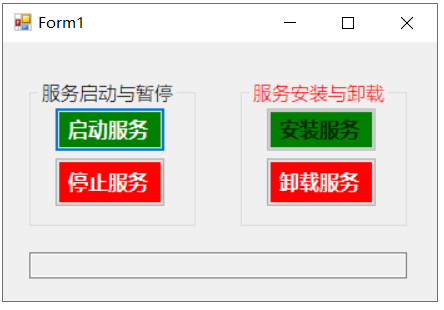
 private string excuteCmd(string strCMD)

        {

            Process p = new Process();

            p.StartInfo.FileName = "cmd.exe";

            p.StartInfo.UseShellExecute = false;//是否使用操作系统shell启动

            p.StartInfo.RedirectStandardInput = true;//接受来自调用程序的输入信息

            p.StartInfo.RedirectStandardOutput = true;//由调用程序获取输出信息

            p.StartInfo.RedirectStandardError = true;//重定向标准错误输出

            //这里根据需要安装服务的框架版本不同,路径也不同,我的是.net3.5的

            p.StartInfo.WorkingDirectory = @"C:\Windows\Microsoft.NET\Framework\v2.0.50727";

            //p.StartInfo.CreateNoWindow = true;

            //p.StartInfo.WindowStyle = ProcessWindowStyle.Normal;

            p.Start();//启动程序

            p.StandardInput.WriteLine(strCMD);

            p.StandardInput.AutoFlush = true;

            p.StandardInput.WriteLine(" exit");

            p.StandardInput.AutoFlush = true;

            //获取cmd窗口的输出信息

            string output = p.StandardOutput.ReadToEnd();

            //等待程序执行完退出进程

            p.WaitForExit();

            p.Close();

            return output;

        }


private string excuteCmd(string strCMD)

        {

            Process p = new Process();

            p.StartInfo.FileName = "cmd.exe";

            p.StartInfo.UseShellExecute = false;//是否使用操作系统shell启动

            p.StartInfo.RedirectStandardInput = true;//接受来自调用程序的输入信息

            p.StartInfo.RedirectStandardOutput = true;//由调用程序获取输出信息

            p.StartInfo.RedirectStandardError = true;//重定向标准错误输出

            //这里根据需要安装服务的框架版本不同,路径也不同,我的是.net3.5的

            p.StartInfo.WorkingDirectory = @"C:\Windows\Microsoft.NET\Framework\v2.0.50727";

            //p.StartInfo.CreateNoWindow = true;

            //p.StartInfo.WindowStyle = ProcessWindowStyle.Normal;

            p.Start();//启动程序

            p.StandardInput.WriteLine(strCMD);

            p.StandardInput.AutoFlush = true;

            p.StandardInput.WriteLine(" exit");

            p.StandardInput.AutoFlush = true;

            //获取cmd窗口的输出信息

            string output = p.StandardOutput.ReadToEnd();

            //等待程序执行完退出进程

            p.WaitForExit();

            p.Close();

            return output;

        }

在给个启动服务的代码:

   private void btn_startService_Click(object sender, EventArgs e)

        {

            if (!IsServerExists(serviceName))

            {

                MessageBox.Show("未找到配置文件写的服务:" + serviceName);

                return;

            }

            bool isStarted = false;

            ServiceController star_service = new ServiceController(serviceName);

            if (star_service.Status != ServiceControllerStatus.Running &&

star_service.Status != ServiceControllerStatus.StartPending)

            {

                star_service.Start();

//这里是看80s内,服务是否启动完毕

                for (int i = 0; i < 80; i++)

                {

                    star_service.Refresh();

                    System.Threading.Thread.Sleep(1000);

                    if (star_service.Status == ServiceControllerStatus.Running)

                    {

                        isStarted = true;

                        break;

                    }

                    if (i == 79)

                    {

                        isStarted = false;

                    }

                }

            }

            else

            {

                MessageBox.Show("服务已经启动或被暂停");

                return;

            }

            if (isStarted)

            {

                MessageBox.Show("服务启动完成!");

            }

            else

            {

                MessageBox.Show("服务未在80秒内启动起来,请到服务里去手动启动");

            }

        }
string strCMD = @"InstallUtil.exe " + txt_filePath.Text;
string output = excuteCmd(strCMD);
代码下载
winform——windows 服务的安装 卸载 启动 停止的更多相关文章
- 通过批处理进行Windows服务的安装/卸载&启动/停止
安装服务 @echo off set checked=2 set PATHS=%~sdp0 echo 按任意键执行安装……? pause>nul if %checked% EQU 2 ( %PA ...
- Windows服务的安装卸载及错误查找
@echo off echo 清理原有服务项. . . %SystemRoot%\Microsoft.NET\Framework\v4.0.30319\installutil /U D:\abc\te ...
- windows 服务的安装、启动、状态查询、停止操作c++实现
具体的自己看看代码 粘贴复制即可使用 卸载也很简单自己查看MSDN 加上就是 #ifndef __SERVICEMANAGE_H__ #define __SERVICEMANAGE_H__ #incl ...
- windows服务,安装、启动、停止,配置,一个批处理文件搞定
相对而言,还是比较通用的吧,如果哪位仁兄有更好的实现方式,或者发现有不足之处,还请多多指教. @echo off echo.------------------------------------- ...
- WCF 下的windows服务的安装卸载
安装:启动vs2010(如果是win2008要以管理员来启动)命令:installutil demo.exe 卸载:先在服务里停止这个服务,然后启动vs2010(如果是win2008要以管理员来启动) ...
- C# Windows服务创建安装卸载
一.创建Windows服务 使用VS创建一个新的windows服务应用程序 创建完成之后 二.相关配置 修改Service1名称为StartService(可以不改,自行选择) 添加安装程序并修改配置 ...
- C#操作windows服务,安装、卸载、停止、启动
public class ServiceUtil { private string _ServiceName = string.Empty; private string _AppName = str ...
- windows操作系统中安装、启动和卸载memcached
今天总结一下如何在Windows操作系统中安装.启动和卸载memcached:下载地址: http://download.csdn.net/download/wangshuxuncom/8249501 ...
- 使用InstallUtil对Windows服务进行安装与卸载
关于Visual Studio 2012中使用InstallUtil对Windows服务进行安装与卸载的文章,在MSDN中的http://msdn.microsoft.com/en-us/librar ...
- Windows Service的安装卸载 和 Service控制(转)
Windows Service的安装卸载 和 Service控制 原文地址:http://www.cnblogs.com/Peter-Zhang/archive/2011/10/15/2212663. ...
随机推荐
- Python smtp发送邮件怎么设置抄送人
设置抄送人,非常简单,只需要添加一条信息就可以了,例: cc_list = ['xx@xxx.cn', 'xx@xxx.cn'] msg['Cc'] = ','.join(cc_list) smtp. ...
- IP路由的工作原理
一.路由 路由在网络中起到什么作用? • 路由器负责将数据报文在IP网段之间进行转发 • 路由是指导路由器如何进行数据转发的路径信息 IP之间连通的前提是什么? • 沿途的每台路由器上都有到达目的网段 ...
- C++ 递归与面向对象编程基础
C++ 递归 递归是一种使函数调用自身的技术.这种技术提供了一种将复杂问题分解为简单问题的方法,从而更容易解决问题. 递归可能有点难以理解.理解其工作原理的最佳方法是通过实验来尝试. 递归示例 将两个 ...
- 用fpga实现1G Eth TCP&UDP硬件协议栈
用fpga实现的1G 以太网硬件协议栈,属于轻的协议栈
- 【GDKOI 2024 TG Day2】染色(set) 题解
发现我们给一个点染上色后有: 我们称这是一个大小为 1 的十字. 进一步地,我们给这 5 个点再次染上色后有: 我们称这是一个大小为 2 的十字. 同理可得,我们给这 5 个点染上相同的大小为 2 的 ...
- 力扣38(java)-外观数列(中等)
题目: 给定一个正整数 n ,输出外观数列的第 n 项. 「外观数列」是一个整数序列,从数字 1 开始,序列中的每一项都是对前一项的描述. 你可以将其视作是由递归公式定义的数字字符串序列: count ...
- 首次公开!阿里云开源PolarDB总体架构和企业级特性
简介:在3月2日的阿里云开源 PolarDB 企业级架构发布会上,阿里云 PolarDB 内核技术专家北侠带来了主题为<PolarDB 总体架构设计和企业级特性>的精彩演讲. 在3月2日 ...
- 编码原则 : DRY, KISS, YAGNI, S.O.L.I.D
Dont Repeat Yourself. Keep is Simple, Stupid. You Ain't Gonna Need It. 你不需要它 ( 不试图添加你认为以后可能需要的代码,适可 ...
- [Nova] belongsTo, belongsToMany 当前页动态 dependsOn 其它 fields, nova-belongs-to-dependency, belongs-to-many-field-nova
nova-belongs-to-dependency 例子: use Manmohanjit\BelongsToDependency\BelongsToDependency; ... return [ ...
- 011_元件封装FootPrint处理
011_元件封装FootPrint处理 原理图的引脚与PCB的引脚数量一一对应,IC的PCB Foot Print属性添加好属性,后面就不用一个个添加了.