
python管理Windows服务
上一篇介绍了pywin32模块,它的win32service子模块提供了对服务管理API的包装,相关API如下:
ChangeServiceConfig

ChangeServiceConfig2

CloseServiceHandle

ControlService

CreateDesktop

CreateService

CreateWindowStation

DeleteService

EnumDependentServices

EnumServicesStatus

EnumServicesStatusEx

EnumWindowStations

GetProcessWindowStation

GetServiceDisplayName

GetServiceKeyName

GetThreadDesktop

GetUserObjectInformation

LockServiceDatabase

OpenDesktop

OpenInputDesktop

OpenSCManager

OpenService

OpenWindowStation

QueryServiceConfig

QueryServiceConfig2

QueryServiceLockStatus

QueryServiceObjectSecurity

QueryServiceStatus

QueryServiceStatusEx

SetServiceObjectSecurity

SetServiceStatus

SetUserObjectInformation

StartService

UnlockServiceDatabase
有了这些API,完成一些服务的基本操作,比如安装服务、停止服务、启动服务等完全不在话下,只不过都是直接调用API而已。
不过pywin32还有一个对win32service模块的包装,叫做 win32serviceutil,使用它可以更方便地对服务进行控制。
InstallService(pythonClassString, serviceName, displayName, startType = None,

    errorControl = None, bRunInteractive = 0, serviceDeps = None, userName = None,

    password = None, exeName = None, perfMonIni = None,perfMonDll = None,

    exeArgs = None,description = None, delayedstart = None)  #安装服务

ChangeServiceConfig(pythonClassString, serviceName, startType = None,

    errorControl = None, bRunInteractive = 0, serviceDeps = None,

    userName = None, password = None,exeName = None, displayName = None,

    perfMonIni = None, perfMonDll = None,exeArgs = None,

    description = None, delayedstart = None)  #更改服务设置

#以上两个函数的第一个参数pythonClassString是为Python编写的Windows服务准备的,非Python服务则不需要,直接填None即可

RemoveService(serviceName)  #删除服务

ControlService(serviceName, code, machine = None)  #控制服务,code的具体定义参考MSDN的对ControlService的介绍

StopService(serviceName, machine = None) #停止服务

StartService(serviceName, args = None, machine = None) #启动服务

RestartService(serviceName, args = None, waitSeconds = 30, machine = None) #重启服务

QueryServiceStatus(serviceName, machine=None)  #查询服务状态
大部分API只需要提供服务名称就可以了,调用起来非常简单。
比如 win32serviceutil.StopService("Spooler") 就可以停止Spooler服务了。
对于 win32serviceutil.QueryServiceStatus()这个函数,它实际返回的是win32service.QueryServiceStatus的返回结果。
从MSDN和pywin32的帮助文件可知,win32service.QueryServiceStatus的返回值是一个元组,如下:
SERVICE_STATUS Object

A Win32 service status object is represented by a tuple:

Items

[0] int : serviceType

The type of service.

[1] int : serviceState

The current state of the service.

[2] int : controlsAccepted

The controls the service accepts.

[3] int : win32ExitCode

The win32 error code for the service.

[4] int : serviceSpecificErrorCode

The service specific error code.

[5] int : checkPoint

The checkpoint reported by the service.

[6] int : waitHint

The wait hint reported by the service
服务状态实际上是第1个元素(从0开始计数)
写个函数包装一下,并附带上控制功能:
import win32service

import win32serviceutil

import win32api

def GetSvcStatus(svcname):

    svcstatusdic = {

    #The service continue is pending.

    win32service.SERVICE_CONTINUE_PENDING:"continue pending",

    #The service pause is pending.

    win32service.SERVICE_PAUSE_PENDING:"pause pending",

    #The service is paused.

    win32service.SERVICE_PAUSED:"paused" ,

    #The service is running.

    win32service.SERVICE_RUNNING:"running",

    #The service is starting.

    win32service.SERVICE_START_PENDING:"start pending",

    # The service is stopping.

    win32service.SERVICE_STOP_PENDING:"stop pending" ,

    #The service is not running.

    win32service.SERVICE_STOPPED:"stoped"

    }

    status = win32serviceutil.QueryServiceStatus(svcname)

    if status:

        return svcstatusdic.get(status[1],"unknown")

    else:

        return "error"

svcname = "Spooler"

status = GetSvcStatus(svcname)

print("{} current status : {}".format(svcname,status))

if status == "running":

    win32serviceutil.StopService(svcname)

else:

    win32serviceutil.StartService(svcname)

win32api.Sleep(1000)

status = GetSvcStatus(svcname)

print("After Control,{} current status : {}".format(svcname,status))
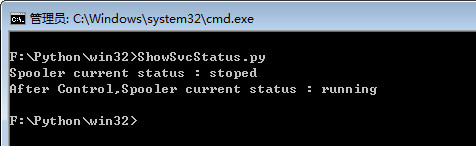
输出结果如下:
掌握该模块的使用,对Windows平台的运维管理还是有相当帮助的。
python管理Windows服务的更多相关文章
- Python做windows服务
Python做windows服务(多进程服务),并结束多进程 Python中_,__,__xx__的区别 在注册MyWinService服务时,再使用 "sc delete 服务器名称&qu ...
- 用python写windows服务
用python写windows服务(1) 以python2.5 为例需要软件 * python 2.5 * pywin32(与2.5 版本相匹配的) Service Control Ma ...
- 玩转Windows服务系列——命令行管理Windows服务
说到Windows服务的管理就不得不说通过命令行的方式管理Windows服务,因为无论是系统管理员,还是通过编程的方式调用cmd命令,命令行都是非常方便以及强大的工具. 接下来就看一下如何通过cmd命 ...
- 玩转Windows服务系列——命令行管理Windows服务
原文:玩转Windows服务系列——命令行管理Windows服务 说到Windows服务的管理就不得不说通过命令行的方式管理Windows服务,因为无论是系统管理员,还是通过编程的方式调用cmd命令, ...
- [转]玩转Windows服务系列——命令行管理Windows服务
本文转自:http://www.cnblogs.com/hbccdf/p/managewindowsservicewithcmd.html 说到Windows服务的管理就不得不说通过命令行的方式管理W ...
- 如何使用PowerShell管理Windows服务
[TechTarget中国原创] 作为一名系统管理员,最常见的任务之一就是学会管理Windows服务,这是保证Windows服务器和客户端正常运行的重要内容. 许多操作系统和应用程序都依赖于这些服务. ...
- 【python】使用python写windows服务
背景 运维windows服务器的同学都知道,windows服务器进行批量管理的时候非常麻烦,没有比较顺手的工具,虽然saltstack和ansible都能够支持windows操作,但是使用起来总感觉不 ...
- Python-windows服务-重启自动化
一. 前言 有了上一篇的“python初学”的基础,咱们就有了python的开发包,有了开发环境IDE,那我们就可以干活了.我的第一个选题就是让我们的windows服务可以按照我们的意愿进行自动重启. ...
- 第十三篇 一个安装、管理windows服务的桌面程序
在网上看到一个修改程序入口的程序去把windows 服务修改成控制台的程序,然后利用控制台的程序把服务安装和管理,也想起自己原来也写了一个对windows 报务管理的程序,不过是winform的. ...
随机推荐
- Notepad++集成Subversion SVN插件
点击Plugin –> Plugin Manager –> Show Plugin Manager 打开后,在“Available”页找到“Subversion”,然后点击“Install ...
- 关于msbuild 编译.net 4.5新语法错误的解决方法
.net4.5以前msbuild 是在%windir%/Microsoft.NET/FrameworkXX/vXX目录下,如:C:\Windows\Microsoft.NET\Framework64\ ...
- Ubuntu 14.04下单节点Ceph安装(by quqi99)
作者:张华 发表于:2014-06-23版权声明:能够随意转载,转载时请务必以超链接形式标明文章原始出处和作者信息及本版权声明 (http://blog.csdn.net/quqi99 ) Ceph ...
- iOS 使用 Core Plot 绘制统计图表入门
本文转载至 http://blog.csdn.net/zhibudefeng/article/details/7677457 iOS(iPhone/iPad) 下图形组件有两个有名的,s7gra ...
- IE浏览器的判断
function compatibleIE8(){ var browser = navigator.appName; var b_version = navigator.appVersion; if( ...
- ftl总结
当前项目前端是用freemarker,是第一次使用这种页面,一般语法不介绍,这里只是记录工作中遇到的问题 ---------2016.6.25-------------- 1.关于ftl字符串的问题 ...
- Java for LeetCode 099 Recover Binary Search Tree
Two elements of a binary search tree (BST) are swapped by mistake. Recover the tree without changing ...
- requests不加代理
requests里的proxies不加代理可以设置为空,就会使用本机IP proxies={}
- SQL Server分区表,能否按照多个列作为分区函数的分区依据(转载)
问: Hi, I have a table workcachedetail with 40 million rows which has 8 columns.We decided to partiti ...
- 剑指Offer:链表中环的入口节点【23】
剑指Offer:链表中环的入口节点[23] 题目描述 给一个链表,若其中包含环,请找出该链表的环的入口结点,否则,输出null. 题目分析 第一步确定链表中是否包含环,怎么确定呢?我们定义两个指针橙和 ...