
10 Vue 学习 shortList页面
1: shortList页面代码如下:
<template>
<div class="fillcontain">
<head-top></head-top>
<div class="table_container">
<el-table
:data="tableData"
style="width: 100%">
<el-table-column type="expand">
<template scope="props">
<el-form label-position="left" inline class="demo-table-expand">
<el-form-item label="店铺名称">
<span>{{ props.row.name }}</span>
</el-form-item>
<el-form-item label="店铺地址">
<span>{{ props.row.address }}</span>
</el-form-item>
<el-form-item label="店铺介绍">
<span>{{ props.row.description }}</span>
</el-form-item>
<el-form-item label="店铺 ID">
<span>{{ props.row.id }}</span>
</el-form-item>
<el-form-item label="联系电话">
<span>{{ props.row.phone }}</span>
</el-form-item>
<el-form-item label="评分">
<span>{{ props.row.rating }}</span>
</el-form-item>
<el-form-item label="销售量">
<span>{{ props.row.recent_order_num }}</span>
</el-form-item>
<el-form-item label="分类">
<span>{{ props.row.category }}</span>
</el-form-item>
</el-form>
</template>
</el-table-column>
<el-table-column
label="店铺名称"
prop="name">
</el-table-column>
<el-table-column
label="店铺地址"
prop="address">
</el-table-column>
<el-table-column
label="店铺介绍"
prop="description">
</el-table-column>
<el-table-column label="操作" width="200">
<template scope="scope">
<el-button
size="mini"
@click="handleEdit(scope.$index, scope.row)">编辑</el-button>
<el-button
size="mini"
type="Success"
@click="addFood(scope.$index, scope.row)">添加食品</el-button>
<el-button
size="mini"
type="danger"
@click="handleDelete(scope.$index, scope.row)">删除</el-button>
</template>
</el-table-column>
</el-table>
<div class="Pagination">
<el-pagination
@size-change="handleSizeChange"
@current-change="handleCurrentChange"
:current-page="currentPage"
:page-size="20"
layout="total, prev, pager, next"
:total="count">
</el-pagination>
</div>
<el-dialog title="修改店铺信息" v-model="dialogFormVisible">
<el-form :model="selectTable">
<el-form-item label="店铺名称" label-width="100px">
<el-input v-model="selectTable.name" auto-complete="off"></el-input>
</el-form-item>
<el-form-item label="详细地址" label-width="100px">
<el-autocomplete
v-model="address.address"
:fetch-suggestions="querySearchAsync"
placeholder="请输入地址"
style="width: 100%;"
@select="addressSelect"
></el-autocomplete>
<span>当前城市:{{city.name}}</span>
</el-form-item>
<el-form-item label="店铺介绍" label-width="100px">
<el-input v-model="selectTable.description"></el-input>
</el-form-item>
<el-form-item label="联系电话" label-width="100px">
<el-input v-model="selectTable.phone"></el-input>
</el-form-item>
<el-form-item label="店铺分类" label-width="100px">
<el-cascader
:options="categoryOptions"
v-model="selectedCategory"
change-on-select
></el-cascader>
</el-form-item>
<el-form-item label="商铺图片" label-width="100px">
<el-upload
class="avatar-uploader"
:action="baseUrl + '/v1/addimg/shop'"
:show-file-list="false"
:on-success="handleServiceAvatarScucess"
:before-upload="beforeAvatarUpload">
<img v-if="selectTable.image_path" :src="baseImgPath + selectTable.image_path" class="avatar">
<i v-else class="el-icon-plus avatar-uploader-icon"></i>
</el-upload>
</el-form-item>
</el-form>
<div slot="footer" class="dialog-footer">
<el-button @click="dialogFormVisible = false">取 消</el-button>
<el-button type="primary" @click="updateShop">确 定</el-button>
</div>
</el-dialog>
</div>
</div>
</template> <script>
import headTop from '../components/headTop'
import {baseUrl, baseImgPath} from '@/config/env'
import {cityGuess, getResturants, getResturantsCount, foodCategory, updateResturant, searchplace, deleteResturant} from '@/api/getData'
export default {
data(){
return {
baseUrl,
baseImgPath,
city: {},
offset: 0,
limit: 20,
count: 0,
tableData: [],
currentPage: 1,
selectTable: {},
dialogFormVisible: false,
categoryOptions: [],
selectedCategory: [],
address: {},
}
},
created(){
this.initData();
},
components: {
headTop,
},
methods: {
async initData(){
try{
this.city = await cityGuess();
const countData = await getResturantsCount();
if (countData.status == 1) {
this.count = countData.count;
}else{
throw new Error('获取数据失败');
}
this.getResturants();
}catch(err){
console.log('获取数据失败', err);
}
},
async getCategory(){
try{
const categories = await foodCategory();
categories.forEach(item => {
if (item.sub_categories.length) {
const addnew = {
value: item.name,
label: item.name,
children: []
}
item.sub_categories.forEach((subitem, index) => {
if (index == 0) {
return
}
addnew.children.push({
value: subitem.name,
label: subitem.name,
})
})
this.categoryOptions.push(addnew)
}
})
}catch(err){
console.log('获取商铺种类失败', err);
}
},
async getResturants(){
const {latitude, longitude} = this.city;
const restaurants = await getResturants({latitude, longitude, offset: this.offset, limit: this.limit});
this.tableData = [];
restaurants.forEach(item => {
const tableData = {};
tableData.name = item.name;
tableData.address = item.address;
tableData.description = item.description;
tableData.id = item.id;
tableData.phone = item.phone;
tableData.rating = item.rating;
tableData.recent_order_num = item.recent_order_num;
tableData.category = item.category;
tableData.image_path = item.image_path;
this.tableData.push(tableData);
})
},
handleSizeChange(val) {
console.log(`每页 ${val} 条`);
},
handleCurrentChange(val) {
this.currentPage = val;
this.offset = (val - 1)*this.limit;
this.getResturants()
},
handleEdit(index, row) {
this.selectTable = row;
this.address.address = row.address;
this.dialogFormVisible = true;
this.selectedCategory = row.category.split('/');
if (!this.categoryOptions.length) {
this.getCategory();
}
},
addFood(index, row){
this.$router.push({ path: 'addGoods', query: { restaurant_id: row.id }})
},
async handleDelete(index, row) {
try{
const res = await deleteResturant(row.id);
if (res.status == 1) {
this.$message({
type: 'success',
message: '删除店铺成功'
});
this.tableData.splice(index, 1);
}else{
throw new Error(res.message)
}
}catch(err){
this.$message({
type: 'error',
message: err.message
});
console.log('删除店铺失败')
}
},
async querySearchAsync(queryString, cb) {
if (queryString) {
try{
const cityList = await searchplace(this.city.id, queryString);
if (cityList instanceof Array) {
cityList.map(item => {
item.value = item.address;
return item;
})
cb(cityList)
}
}catch(err){
console.log(err)
}
}
},
addressSelect(vale){
const {address, latitude, longitude} = vale;
this.address = {address, latitude, longitude};
},
handleServiceAvatarScucess(res, file) {
if (res.status == 1) {
this.selectTable.image_path = res.image_path;
}else{
this.$message.error('上传图片失败!');
}
},
beforeAvatarUpload(file) {
const isRightType = (file.type === 'image/jpeg') || (file.type === 'image/png');
const isLt2M = file.size / 1024 / 1024 < 2; if (!isRightType) {
this.$message.error('上传头像图片只能是 JPG 格式!');
}
if (!isLt2M) {
this.$message.error('上传头像图片大小不能超过 2MB!');
}
return isRightType && isLt2M;
},
async updateShop(){
this.dialogFormVisible = false;
try{
Object.assign(this.selectTable, this.address);
this.selectTable.category = this.selectedCategory.join('/');
const res = await updateResturant(this.selectTable)
if (res.status == 1) {
this.$message({
type: 'success',
message: '更新店铺信息成功'
});
this.getResturants();
}else{
this.$message({
type: 'error',
message: res.message
});
}
}catch(err){
console.log('更新餐馆信息失败', err);
}
},
},
}
</script> <style lang="less">
@import '../style/mixin';
.demo-table-expand {
font-size: 0;
}
.demo-table-expand label {
width: 90px;
color: #99a9bf;
}
.demo-table-expand .el-form-item {
margin-right: 0;
margin-bottom: 0;
width: 50%;
}
.table_container{
padding: 20px;
}
.Pagination{
display: flex;
justify-content: flex-start;
margin-top: 8px;
}
.avatar-uploader .el-upload {
border: 1px dashed #d9d9d9;
border-radius: 6px;
cursor: pointer;
position: relative;
overflow: hidden;
}
.avatar-uploader .el-upload:hover {
border-color: #20a0ff;
}
.avatar-uploader-icon {
font-size: 28px;
color: #8c939d;
width: 120px;
height: 120px;
line-height: 120px;
text-align: center;
}
.avatar {
width: 120px;
height: 120px;
display: block;
}
</style>
el-table:
data = "tableData": table和这个tableData绑定。
el-table-column:
        <el-table-column
          label="店铺名称"    // 列名称
          prop="name">       // 和tableData.name绑定
理解vue中的scope的使用:
  这里scope的位置是el-table-column, 所以它绑定的是一行的值。 并且值是 {"row":{"name":"XXXX","address":"XXXX","ID":"XXX"},"$index":0}
下面看点击“编辑”弹出框的功能:
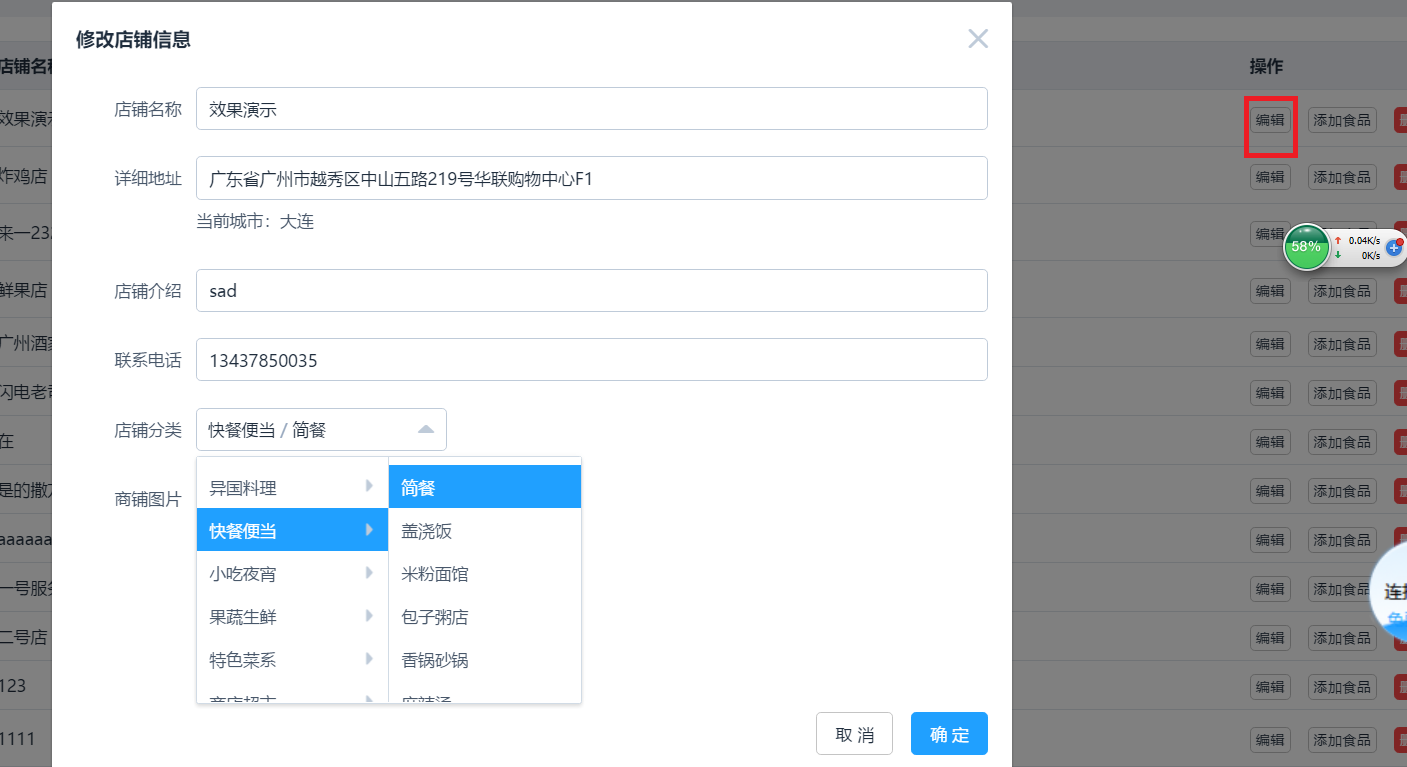
el-dialog:用v-model来控制dialog的显示和隐藏。
<el-dialog title="修改店铺信息" v-model="dialogFormVisible">
el-autocomplete
          详细地址有输入时自动补全的功能,用这个el-autocomplete
el-cascader : 商铺分类的选择列表功能用这个控件。
created(){                          // 页面还没渲染的时候执行,取得数据
    this.initData();
},
el-pagination :   分页相关的控件

点击 “添加食品” 的时候:跳转到 addGoods页面,还要传递参数,这个是如何实现的?

   页面跳转之前把restaurant_id: row.id放到query中,然后跳转过去;
addFood(index, row){
       this.$router.push({ path: 'addGoods', query: { restaurant_id: row.id }})
   },

    在新页面渲染之前,从this.$route.query中可以得到参数。
  created(){
   if (this.$route.query.restaurant_id) {
      this.restaurant_id = this.$route.query.restaurant_id;
10 Vue 学习 shortList页面的更多相关文章
- 10.VUE学习之使用lodash库减少watch对后台请求的压力
问题描述 使用watch监听库里word的值的变化,获取新值后,用oxios发送的ajax异步请求, 此时会多次发送请求,浪费服务器资料. 解决办法 使用lodash库里的_.debounce函数延缓 ...
- 九 Vue学习 manager页面布局
1: 登录后系统页面如下: 对应代码: <template> <div class="manage_page fillcontain"> <el-r ...
- vue学习【三】vue-router路由显示多页面
大家好,我是一叶,今天是七夕,单身狗的我还在这里写踩坑文.在这里还是要祝大家早日脱单(能不能脱单自己心里没个数吗).本篇继续踩坑,在单页面上展示多页的内容,大家的想法是什么,估计大家第一印象会是ifr ...
- 后端开发者的Vue学习之路(一)
目录 前言: iview组件库示例 element组件库示例 Vue的介绍 兼容性: 学习Vue需要的前置知识: MVVM模型 补充: 安装/导入 导入Vue 安装 两种方式的区别: HelloWor ...
- day 81 Vue学习一之vue初识
Vue学习一之vue初识 本节目录 一 Vue初识 二 ES6的基本语法 三 Vue的基本用法 四 xxx 五 xxx 六 xxx 七 xxx 八 xxx 一 vue初识 vue称为渐进式js ...
- VUE学习总结
VUE学习总结 文档:https://cn.vuejs.org/v2/guide/ Webstorm的一些常用快捷键:1. ctrl + shift + n: 打开工程中的文件,目的是打开当前工程下任 ...
- vue学习【二】vue结合axios动态引用echarts
大家好,我是一叶,本篇是vue学习的第二篇,本篇将要讲述vue结合axios动态引用echarts. 在vue中,异步刷新使用的是axios,类似于大家常用的ajax,其实axios已经是vue的第二 ...
- day 83 Vue学习之五DIY脚手架、webpack使用、vue-cli的使用、element-ui
Vue学习之五DIY脚手架.webpack使用.vue-cli的使用.element-ui 本节目录 一 vue获取原生DOM的方式 二 DIY脚手架 三 vue-cli脚手架的使用 四 we ...
- day 83 Vue学习四之过滤器、钩子函数、路由、全家桶等
Vue学习四之过滤器.钩子函数.路由.全家桶等 本节目录 一 vue过滤器 二 生命周期的钩子函数 三 vue的全家桶 四 xxx 五 xxx 六 xxx 七 xxx 八 xxx 一 Vue的过滤 ...
随机推荐
- MySQL CREATE TRIGGER (1)
CREATE TRIGGER语法 CREATE TRIGGER trigger_name trigger_time trigger_event ON tbl_name FOR EACH ROW ...
- 九度OJ 1022:游船出租 (统计)
时间限制:1 秒 内存限制:32 兆 特殊判题:否 提交:3670 解决:1444 题目描述: 现有公园游船租赁处请你编写一个租船管理系统.当游客租船时,管理员输入船号并按下S键,系统开始计时 ...
- Open-sourcing LogDevice, a distributed data store for sequential data
https://logdevice.io/blog/2018/09/12/open-sourcing-announcement.html September 12, 2018 We are exc ...
- iOS 蓝牙开发之(mutipeerConnectivity)
蓝牙 mutipeerConnectivity iOS7 引入的一个全新框架 替代GameKit框架 多用于文件传输 iOS设备不联网也能给附近的人聊天 搜索和传输的方式 * 双方WIFI和蓝牙都没有 ...
- 性能测试--Jmeter录制、回放
Jmeter录制.回放 在jmeter2.1版本之前,jmeter应该是不支持录制和回放功能的,那时候如果需要录制jmeter的性能测试脚本的话,就需要使用第三方工具——badboy.现在jmeter ...
- StackOver上的一个wx刷新显示的例子
import wx class MyFrame(wx.Frame): def __init__(self): wx.Frame.__init__(self, None) self.panel = wx ...
- SAP增强 和VA01相关增强点介绍
-转 sap寻找用户出口方法 sap的用户出口总共有三代: 一.User EXIT 第一代的用户出口,它们include在SAP标准程序的源代码里,可以说他们是源代码的一部分,你改了这种出口就相当于改 ...
- <J2EE学习笔记>关于Servlet的讲义
题外话:接触java又是半年之前的事情了,当初好好学了java却把cpp给忘了,到现在又把手里发热的cpp给放下重新捡起来java,究竟这两种OOP语言我能不能清晰分开记住呢 以下全部课件来自于同济大 ...
- 《机器学习实战》学习笔记第七章 —— AdaBoost元算法
主要内容: 一.提升方法与AdaBoost算法的简介 二.AdaBoost算法 三.代码解释 一.提升方法与AdaBoost算法的简介 1.提升方法:从弱学习算法出发,反复学习,得到一系列弱分类器(又 ...
- Spring Boot2.0之 jar打包方式
Jar类型打包方式 1.使用mvn celan package 打包 2.使用java –jar 包名 war类型打包方式 1.使用mvn celan package 打包 2.使用java –ja ...