
vue教程6-图表
引入
cnpm install echarts --save

#在vue项目目录下安装echarts
静态折线图

linechart.js
import echarts from 'echarts'

export const option = {

  // backgroundColor: 'rgba(57,64,86,0.02)',

  // 标题

  title: {

    text: '在线人数曲线图',

    x: 'center',

    textStyle: {

      fontWeight: 'normal',

      fontSize: 20,

      color: '#7a8ff3'

    }

  },

  // 鼠标悬浮提示框

  tooltip: {

    trigger: 'axis'

  },

  // 图示

  legend: {

    data: ['今日', '昨日', '上周'],

    right: '4%'

  },

  // 边框栅格

  grid: {

    top: 100,

    left: '2%',

    right: '2%',

    bottom: '2%',

    containLabel: true

  },

  // X轴

  xAxis: [{

    type: 'category',

    boundaryGap: false,

    data: ['13:00', '13:05', '13:10', '13:15', '13:20', '13:25', '13:30', '13:35', '13:40', '13:45', '13:50', '13:55']

  }],

  // Y轴

  yAxis: [{

    type: 'value',

    name: '人数',

    axisTick: {

      show: false

    },

    axisLabel: {

      margin: 10,

      textStyle: {

        fontSize: 14

      }

    }

  }],

  // 图示数据

  series: [{

    name: '今日',

    type: 'line',

    smooth: true,

    symbol: 'circle',

    symbolSize: 5,

    showSymbol: false,

    areaStyle: {

      normal: {

        color: new echarts.graphic.LinearGradient(0, 0, 0, 1, [{

          offset: 0,

          color: 'rgba(137, 189, 27, 0.3)'

        }, {

          offset: 0.8,

          color: 'rgba(137, 189, 27, 0)'

        }], false),

        shadowColor: 'rgba(0, 0, 0, 0.1)',

        shadowBlur: 10

      }

    },

    itemStyle: {

      normal: {

        color: 'rgb(137,189,27)',

        borderColor: 'rgba(137,189,2,0.27)',

        borderWidth: 12

      }

    },

    data: []

  }, {

    name: '昨日',

    type: 'line',

    smooth: true,

    symbol: 'circle',

    symbolSize: 5,

    showSymbol: false,

    lineStyle: {

      normal: {

        width: 1

      }

    },

    areaStyle: {

      normal: {

        color: new echarts.graphic.LinearGradient(0, 0, 0, 1, [{

          offset: 0,

          color: 'rgba(0, 136, 212, 0.3)'

        }, {

          offset: 0.8,

          color: 'rgba(0, 136, 212, 0)'

        }], false),

        shadowColor: 'rgba(0, 0, 0, 0.1)',

        shadowBlur: 10

      }

    },

    itemStyle: {

      normal: {

        color: 'rgb(0,136,212)',

        borderColor: 'rgba(0,136,212,0.2)',

        borderWidth: 12

      }

    },

    data: []

  }, {

    name: '上周',

    type: 'line',

    smooth: true,

    symbol: 'circle',

    symbolSize: 5,

    showSymbol: false,

    lineStyle: {

      normal: {

        width: 1

      }

    },

    areaStyle: {

      normal: {

        color: new echarts.graphic.LinearGradient(0, 0, 0, 1, [{

          offset: 0,

          color: 'rgba(219, 50, 51, 0.3)'

        }, {

          offset: 0.8,

          color: 'rgba(219, 50, 51, 0)'

        }], false),

        shadowColor: 'rgba(0, 0, 0, 0.1)',

        shadowBlur: 10

      }

    },

    itemStyle: {

      normal: {

        color: 'rgb(219,50,51)',

        borderColor: 'rgba(219,50,51,0.2)',

        borderWidth: 12

      }

    },

    data: []

  }]

}
chart.vue
<template>

  <div class="chart-container">

    <!--创建一个echarts的容器,给定高宽-->

    <div id="gamechart" style="width:100%; height:100%"/>

  </div>

</template>

<script>

// 安装echarts后,直接引入

import echarts from 'echarts'

import { option } from './linechart'

export default {

  data() {

    return {

      chart: {},

      option: option

    }

  },

  created() {

    this.fetchData()

  },

  // 挂载图表函数

  mounted() {

    this.initChart()

  },

  methods: {

    fetchData() {

      this.chart = {

        today: [220, 182, 191, 134, 150, 120, 110, 125, 145, 122, 165, 122],

        lastday: [120, 110, 125, 145, 122, 165, 122, 220, 182, 191, 134, 150],

        lastweek: [220, 182, 125, 145, 122, 191, 134, 150, 120, 110, 165, 122]

      }

      this.option.series[0].data = this.chart.today

      this.option.series[1].data = this.chart.lastday

      this.option.series[2].data = this.chart.lastweek

    },

    initChart() {

      // 将chart初始化的实例绑定到一个DOM

      this.chart = echarts.init(document.getElementById('gamechart'))

      this.chart.setOption(this.option)

    }

  }

}

</script>

<style scoped>

  .chart-container{

    position: relative;

    width: 100%;

    height: calc(100vh - 84px);

  }

</style>
从后台获取数据
- echarts的时间戳格式是13位,精确到毫秒
- 后台给出的时间戳是变化的,所以在图表上,会展示最新时间的数据
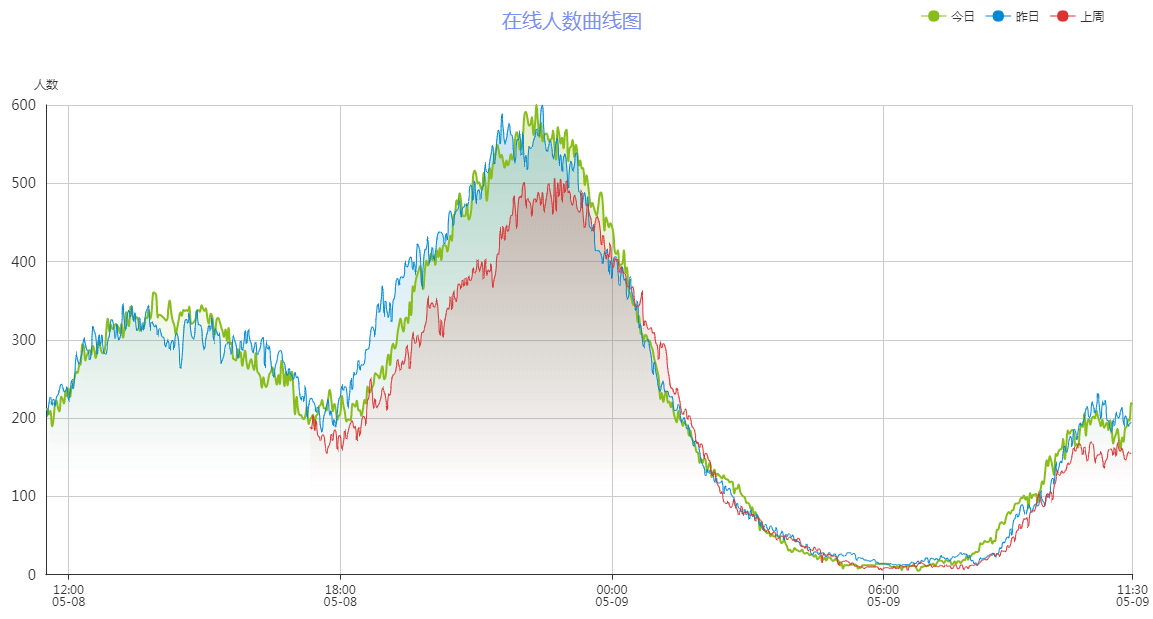
[[[1557309121000,5901],[1557309241000,5962],[1557309361000,5992],[1557309480000,5983],[1557309600000,5949],[1557309720000,6047]]

#这是后台给出的api数据

#echarts可以从后台获取包含时间戳和数据的二维数组
  methods: {

    fetchData() {

      getGameChart(this.gameid).then(response => {

        this.option.series[0].data = response.today

        this.option.series[1].data = response.lastday

        this.option.series[2].data = response.lastweek

        this.chart.setOption(this.option)

        this.chart.hideLoading()

      }).catch(error => {

        this.$message.error('图表请求数据失败啦!')

        console.log(error)

      })

    },

    initChart() {

      // 将chart初始化的实例绑定到一个DOM

      this.chart = echarts.init(document.getElementById('gamechart'))

      this.chart.showLoading({

        text: '正在努力的读取数据中...'

      })

    }

  }

#在vue中请求后台api,然后将返回的数据赋值给this.option.series的几个数组
vue教程6-图表的更多相关文章
- 网页图表Highcharts实践教程之图表代码构成
网页图表Highcharts实践教程之图表代码构成 Highcharts第一个实例 下面我们来实现本书的第一个Highcharts实例. [实例1-1]下面来制作北京连续一周最高温度折线图.操作过程如 ...
- vue教程3-05 vue组件数据传递、父子组件数据获取,slot,router路由
vue教程3-05 vue组件数据传递 一.vue默认情况下,子组件也没法访问父组件数据 <!DOCTYPE html> <html lang="en"> ...
- vue教程3-04 vue.js vue-devtools 调试工具的下载安装和使用
vue教程3-04 vue.js vue-devtools vue调试工具的安装和使用 一.vue-devtools 下载与安装 1.需要 fan qiang 2.打开谷歌浏览器设置--->扩展 ...
- vue教程3-03 vue组件,定义全局、局部组件,配合模板,动态组件
vue教程3-03 vue组件,定义全局.局部组件,配合模板,动态组件 一.定义一个组件 定义一个组件: 1. 全局组件 var Aaa=Vue.extend({ template:'<h3&g ...
- vue教程3-02 vue动画
vue教程3-02 vue动画 以下代码,已经用包管理器下载好vue,animate <!DOCTYPE html> <html lang="en"> &l ...
- vue教程3-01 路由、组件、bower包管理器使用
vue教程3-01 路由.组件.包管理器 以下操作前提是 已经安装好node.js npm bower-> (前端)包管理器 下载: npm install bower -g 验证: bower ...
- vue教程2-08 自定义键盘信息、监听数据变化vm.$watch
vue教程2-08 自定义键盘信息 @keydown.up @keydown.enter @keydown.a/b/c.... 自定义键盘信息: Vue.directive('on').keyCode ...
- vue教程2-07 自定义指令
vue教程2-07 自定义指令 自定义指令: 一.属性: Vue.directive(指令名称,function(参数){ this.el -> 原生DOM元素 }); <div v-re ...
- vue教程2-07 微博评论功能
vue教程2-07 微博评论功能 <!doctype html> <html> <head> <meta charset="utf-8"& ...
- vue教程2-06 过滤器
vue教程2-06 过滤器 过滤器: vue提供过滤器: capitalize uppercase currency.... <div id="box"> {{msg| ...
随机推荐
- Storm worker 并行度等理解
Storm 调优是非常重要的, 仅次于写出正确的代码, 好在Storm官网上有关于worker executors tasks的介绍, http://storm.incubator.apache.or ...
- marlab之rangesearch()函数
rangesearch()函数:查找某个点周围指定距离内的所有邻居. rng('default') % for reproducibility X = randn(,); Y = randn(,); ...
- 基于KD-Tree的最近邻搜索
目标:查询目标点附近的10个最近邻邻居. load fisheriris x = meas(:,:); figure(); g1=gscatter(x(:,),x(:,),species); %spe ...
- tensorflow knn mnist
# MNIST Digit Prediction with k-Nearest Neighbors #----------------------------------------------- # ...
- bzoj 2251: 外星联络 后缀Trie
题目大意 http://www.lydsy.com/JudgeOnline/problem.php?id=2251 题解 本来以为这道题应该从01序列的性质入手 结果就想歪了 等自己跳出了01序列这个 ...
- 基于bootsplash的嵌入式linux启动画面定制
来源: ChinaUnix博客 作者: ChinaUnix博客 发布时间:2007-01-01 16:29:00 摘 要:在基于linux的嵌入式仿真平台研发中,利用开源工具bootsplash能够定 ...
- vmware ubuntu14.04 忘记密码
重置root密码 启动系统,一直点击esc键盘,出现如下界面,选择Advanced options for Ubuntu 按回车键确认: 选择recovery mode,按 e : 到 linux / ...
- ng2父子模块数据交互
一.父模块向子模块传值 //父html <my-child [childdata]="parentdata"></my-child> 其中,my-child ...
- François Hollande’s&…
EVER since President François Hollande was elected last May, things have not gone right for him. He ...
- eclipse必备快捷键
1.[ Ctrl + Shift+ P ],查找括号的开始和闭合 2.[ALT+/],这个快捷键应该没有人不知道 3.[Ctrl+O],显示类中方法和属性的大纲,能快速定位类的方法和属性,在查找Bu ...