
SpringMVC+Thymeleaf 简单使用
一、简介
1、Thymeleaf 在有网络和无网络的环境下皆可运行,而且完全不需启动WEB应用,即它可以让美工在浏览器查看页面的静态效果,也可以让程序员在服务器查看带数据的动态页面效果。浏览器解释 html 时会忽略未定义的标签属性,所以 thymeleaf 的模板可以静态地运行;当有数据返回到页面时,Thymeleaf 标签会动态地替换掉静态内容,使页面动态显示。
2、Thymeleaf 开箱即用的特性。它提供标准和spring标准两种方言,可以直接套用模板实现JSTL、 OGNL表达式效果,避免每天套模板、该jstl、改标签的困扰。同时开发人员也可以扩展和创建自定义的方言。
3、Thymeleaf 提供spring标准方言和一个与 SpringMVC 完美集成的可选模块,可以快速的实现表单绑定、属性编辑器、国际
化等功能。
二、目的
为了修改样式的时候不需要启动服务器。直接打开html。
三、解析器
Thymeleaf模板视图解析器配置步骤:模板解析器->模板引擎->视图解析器,注释掉的代码为个人JSP、Tiles视图解析器的测试代码,与本例无关。
四、SpringMVC+Thymeleaf
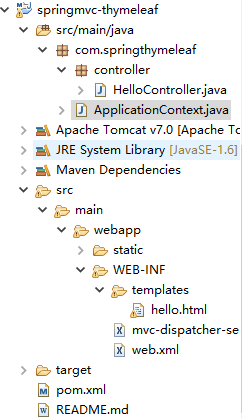
Pom.xml
<project xmlns="http://maven.apache.org/POM/4.0.0"

xmlns:xsi="http://www.w3.org/2001/XMLSchema-instance"

xsi:schemaLocation="http://maven.apache.org/POM/4.0.0 http://maven.apache.org/maven-v4_0_0.xsd">

    <modelVersion>4.0.0</modelVersion>

    <groupId>com.springthymeleaf</groupId>

    <artifactId>springmvc-thymeleaf</artifactId>

    <packaging>war</packaging>

    <version>1.0-SNAPSHOT</version>

    <name>Spring Thymeleaf Example</name>

    <url>http://maven.apache.org</url>

    <properties>

        <spring.version>4.1.3.RELEASE</spring.version>

        <thymeleaf.version>2.1.2.RELEASE</thymeleaf.version>

    </properties>

    <dependencies>

        <dependency>

            <groupId>org.springframework</groupId>

            <artifactId>spring-core</artifactId>

            <version>${spring.version}</version>

        </dependency>

        <dependency>

            <groupId>org.springframework</groupId>

            <artifactId>spring-web</artifactId>

            <version>${spring.version}</version>

        </dependency>

        <!-- <dependency>

            <groupId>javax.servlet</groupId>

            <artifactId>servlet-api</artifactId>

            <version>2.5</version>

            <scope>provided</scope>

        </dependency> -->

        <dependency>

            <groupId>org.springframework</groupId>

            <artifactId>spring-webmvc</artifactId>

            <version>${spring.version}</version>

        </dependency>

        <dependency>

            <groupId>org.springframework</groupId>

            <artifactId>spring-beans</artifactId>

            <version>${spring.version}</version>

        </dependency>

        <dependency>

            <groupId>org.thymeleaf</groupId>

            <artifactId>thymeleaf-spring4</artifactId>

            <version>${thymeleaf.version}</version>

        </dependency>

        <dependency>

            <groupId>org.thymeleaf</groupId>

            <artifactId>thymeleaf</artifactId>

            <version>${thymeleaf.version}</version>

        </dependency>

    </dependencies>

    <build>

        <outputDirectory>src/main/webapp/WEB-INF/classes</outputDirectory>

        <plugins>

            <plugin>

                <artifactId>maven-compiler-plugin</artifactId>

                <configuration>

                    <source>1.6</source>

                    <target>1.6</target>

                </configuration>

            </plugin>

        </plugins>

    </build>

</project>
Web.xml
<web-app id="WebApp_ID" version="2.4" xmlns="http://java.sun.com/xml/ns/j2ee" xmlns:xsi="http://www.w3.org/2001/XMLSchema-instance" xsi:schemaLocation="http://java.sun.com/xml/ns/j2ee

    http://java.sun.com/xml/ns/j2ee/web-app_2_4.xsd">

    <display-name>springmvc thymeleaf</display-name>

    <servlet>

        <servlet-name>mvc-dispatcher</servlet-name>

        <servlet-class>org.springframework.web.servlet.DispatcherServlet</servlet-class>

        <load-on-startup>1</load-on-startup>

    </servlet>

    <servlet-mapping>

        <servlet-name>mvc-dispatcher</servlet-name>

        <url-pattern>/</url-pattern>

    </servlet-mapping>

    <context-param>

        <param-name>contextConfigLocation</param-name>

        <param-value>/WEB-INF/mvc-dispatcher-servlet.xml</param-value>

    </context-param>

    <listener>

        <listener-class>org.springframework.web.context.ContextLoaderListener</listener-class>

    </listener>

</web-app>
mvc-dispatcher-servlet.xml
注:可以深入了解thymeleef 模板解析器的源码,生命周期等
<beans xmlns="http://www.springframework.org/schema/beans" xmlns:context="http://www.springframework.org/schema/context" xmlns:mvc="http://www.springframework.org/schema/mvc" xmlns:xsi="http://www.w3.org/2001/XMLSchema-instance"

    xsi:schemaLocation="

        http://www.springframework.org/schema/beans

        http://www.springframework.org/schema/beans/spring-beans-3.0.xsd

        http://www.springframework.org/schema/context

        http://www.springframework.org/schema/context/spring-context-3.0.xsd

        http://www.springframework.org/schema/mvc

        http://www.springframework.org/schema/mvc/spring-mvc-3.0.xsd">

    <context:component-scan base-package="com.springthymeleaf"/>

    <mvc:annotation-driven />

    <mvc:resources location="/static/" mapping="/static/**" />

    <!-- 模板解析器  -->

    <bean id="templateResolver" class="org.thymeleaf.templateresolver.ServletContextTemplateResolver">

        <property name="prefix" value="/WEB-INF/templates/" />

        <property name="suffix" value=".html" />

        <property name="templateMode" value="HTML5" />

        <property name="cacheable" value="false" />

        <property name="characterEncoding" value="UTF-8"/>

    </bean>

    <bean id="templateEngine" class="org.thymeleaf.spring4.SpringTemplateEngine">

        <property name="templateResolver" ref="templateResolver" />

    </bean>

    <bean class="org.thymeleaf.spring4.view.ThymeleafViewResolver">

        <property name="templateEngine" ref="templateEngine" />

        <property name="characterEncoding"  value="UTF-8" />

    </bean>

</beans>
hello.html
 <html  xmlns:th="http://www.thymeleaf.org" >

<head>

<meta charset="UTF-8" />

<script type="text/javascript" src="static/js/jquery-1.10.2.min.js" th:src="@{/static/js/jquery-1.10.2.min.js}" ></script>

<script th:inline="javascript">

  $(function(){

   var _ctx = [[${application.ctx}]];

    alert("Project ContextPath:"+_ctx);

    alert("路径:"+$("#ctx").val());

  });

</script>

<title>Spring MVC + Thymeleaf Example</title>

</head>

<body>

    <!-- Project ContextPath -->

    <input type="hidden" id="ctx" th:value="${application.ctx}" /> Hello,

    <span th:text="${name}" />!

    <br /> Hello,

    <span th:text="${query}" />!

    <br /> Hello,

    <span th:text="${submit}" />!

    <br />

    <a th:href="@{/query?name=a_href}"> query</a>

    <br />

    <form th:action="@{/submit}">

        <input type="text" name="name" />

        <button type="submit">submit</button>

    </form>

</body>

</html>
HelloController.java
package com.springthymeleaf.controller;

import org.springframework.stereotype.Controller;

import org.springframework.ui.ModelMap;

import org.springframework.web.bind.annotation.PathVariable;

import org.springframework.web.bind.annotation.RequestMapping;

import org.springframework.web.bind.annotation.RequestMethod;

import org.springframework.web.bind.annotation.RequestParam;

@Controller

@RequestMapping("/")

public class HelloController {

    @RequestMapping(value = "/{name}", method = RequestMethod.GET)

    public String getMovie(@PathVariable String name, ModelMap model) {

        model.addAttribute("name", name);

        model.addAttribute("query", "");

        model.addAttribute("submit", "");

        return "hello";

    }

    @RequestMapping(value = "/query", method = RequestMethod.GET)

    public String query(@RequestParam("name") String name, ModelMap model) {

        model.addAttribute("name", "");

        model.addAttribute("query", name);

        model.addAttribute("submit", "");

        return "hello";

    }

    @RequestMapping(value = "/submit", method = RequestMethod.GET)

    public String submit(@RequestParam("name") String name, ModelMap model) {

        model.addAttribute("name", "");

        model.addAttribute("query", "");

        model.addAttribute("submit", name);

        return "hello";

    }

}
ApplicationContext.java
package com.springthymeleaf;

import javax.servlet.ServletContext;

import org.springframework.stereotype.Component;

import org.springframework.web.context.ServletContextAware;

/**

 * 将ContextPath写入application中,给静态文件引用时用、及URL链接地址用

 */

@Component

public class ApplicationContext implements ServletContextAware {

    @Override

    public void setServletContext(ServletContext context) {

        String ctx = context.getContextPath();

        System.out.println("ctx=" + ctx);

        context.setAttribute("ctx", ctx);

    }

}
五、参考链接:
thymeleaf 模板语言简介 http://blog.csdn.net/mlin_123/article/details/51816533
org.thymeleaf.spring4.templateresolver模板视图解析器 http://http://blog.csdn.net/mayi92/article/details/77720663
SpringMVC+Thymeleaf 简单使用的更多相关文章
- springboot+thymeleaf简单使用
关于springboot想必很多人都在使用,由于公司项目一直使用的是SpringMVC,所以自己抽空体验了一下springboot的简单使用. 环境搭建 springbooot的环境搭建可以说很灵活, ...
- 第6章—渲染web视图—SpringMVC+Thymeleaf 处理表单提交
SpringMVC+Thymeleaf 处理表单提交 thymleaf处理表单提交的方式和jsp有些类似,也有点不同之处,这里操作一个小Demo,并说明: 1.demo的结构图如下所示: pom.xm ...
- SpringMvc+thymeleaf+HTML5中文乱码问题
SpringMvc+thymeleaf+HTML5环境下遇到中文乱码...... 按照以往经验逐个排查,开发环境统一为utf-8编码,服务器也配置了编码过滤器,tomcat也是utf-8编码.前台页面 ...
- SpringMVC之简单的增删改查示例(SSM整合)
本篇文章主要介绍了SpringMVC之简单的增删改查示例(SSM整合),这个例子是基于SpringMVC+Spring+Mybatis实现的.有兴趣的可以了解一下. 虽然已经在做关于SpringMVC ...
- spring+springMVC+mybatis简单整合
spring+springMVC+mybatis简单整合, springMVC框架是spring的子项目,所以框架的整合方式为,spring+Mybatis或springMVC+mybatis. 三大 ...
- springmvc springJDBC 简单实训银行账户管理系统
springmvc springJDBC 简单实训银行账户管理系统 1.简单介绍一下,在校时每周结束都会有一次学习总结,简称“实训”,这次实训内容是spring,因为是最近热门框架,我就先从基础方面开 ...
- Maven+SpringMVC+Dubbo 简单的入门demo配置
转载自:https://cloud.tencent.com/developer/article/1010636 之前一直听说dubbo,是一个很厉害的分布式服务框架,而且巴巴将其开源,这对于咱们广大程 ...
- SpringMVC+Thymeleaf +HTML的简单框架
一.问题 项目中需要公众号开发,移动端使用的是H5,但是如果不用前端框架的话,只能考虑JS前端用ajax解析JSON字符串了.今天我们就简单的说下前端框架Thymeleaf如何解决这个问题的: 二.开 ...
- Spring+SpringMVC+Hibernate简单整合(转)
SpringMVC又一个漂亮的web框架,他与Struts2并驾齐驱,Struts出世早而占据了一定优势,下面同样做一个简单的应用实例,介绍SpringMVC的基本用法,接下来的博客也将梳理一下Str ...
随机推荐
- InformationSecurity:template
ylbtech-InformationSecurity: 1.返回顶部 2.返回顶部 3.返回顶部 4.返回顶部 5.返回顶部 6.返回顶部 作者:ylbtech出处:ht ...
- raid0和raid5的 实验过程
raid:独立的磁盘冗余阵列 创建raid0: 环境准备:准备三块大小相同的磁盘或分区,此处要特别注意:红色字体 [root@localhost6 home]#fdisk /dev/sdd ##对/d ...
- [poj1741]Tree(点分治+容斥原理)
题意:求树中点对距离<=k的无序点对个数. 解题关键:树上点分治,这个分治并没有传统分治的合并过程,只是分成各个小问题,并将各个小问题的答案相加即可,也就是每层的复杂度并不在合并的过程,是在每层 ...
- WPF访问UserControl的自定义属性和事件
要实现外部窗体能直接访问UserControl的属性必须把UserControl的属性定义为依赖属性: 一,在UserControl.cs中为TextBox控件的Text建立依赖属性,输入" ...
- repackage android application
decompile the application file apktool d -o dianping/ dianping.apk modify the resources / smali asse ...
- starUML建立时序图
对于经常看项目代码或者写项目的人.时序图可以帮助理解.记录项目.设计项目等用途. 1.starUml下载安装比较简单,这里不再赘述.打开starUml 2. 在Model Explorer 中,在Un ...
- ZOJ 3512 Financial Fraud (左偏树)
题意:给定一个序列,求另一个不递减序列,使得Abs(bi - ai) 和最小. 析:首先是在每个相同的区间中,中位数是最优的,然后由于要合并,和维护中位数,所以我们选用左偏树来维护,当然也可以用划分树 ...
- MS SQL Server的COALESCE函数
MS SQL Server的COALESCE函数是从一系列表达式中返回第一个NOT NULL的值. 检查[B],[Q],[S],[T],[U]的值: 检查顺序[B]->[Q]->[S]-& ...
- 修改mac host文件绑定域名
打开终端在终端terminal中输入 sudo vi /etc/hosts 上一步输入完成之后按enter回车键,如果当前用户账号有密码,则在按完之后会提示输入密码,此时输入当前账户密码后继续按ert ...
- python3 Flask安装
虚拟环境 建议在开发环境和生产环境下都使用虚拟环境来管理项目的依赖. 为什么要使用虚拟环境?随着你的 Python 项目越来越多,你会发现不同的项目会需要 不同的版本的 Python 库.同一个 Py ...