
使用HtmlAgilityPack爬取网站信息并存储到mysql
前言:打算做一个药材价格查询的功能,但刚开始一点数据都没有靠自己找信息录入的话很麻烦的,所以只有先到其它网站抓取存到数据库再开始做这个了。
HtmlAgilityPack在c#里应该很多人用吧,简单又强大。之前也用它做过几个爬取信息的小工具。不过很久了源代码都没有了,都忘了怎么用了,这次也是一点一点找资料慢慢做出来的!
(不过最麻烦的是将数据存到mysql,.net数据库我一直用的都是mssql,所以第一次做连接mysql遇到了好多问题。)
1、使用HtmlAgilityPack
- 下载HtmlAgilityPack类库,并引用到你的项目
我这里使用的控制台项目
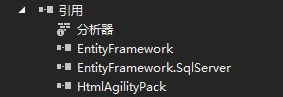
项目添加引用
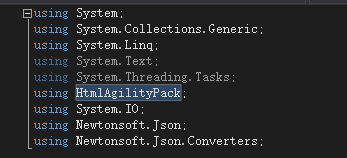
代码里添加引用
2、分析网页
- 网页地址:http://www.zyctd.com/jiage/1-0-0-0.html
首先看每一页的url变化,观察后发现这个很简单:
第一页就是:1-0-0或者1-0-0-1表示第一页
第二页就是:1-0-0-2一次类推
- 然后再分析他的源代码
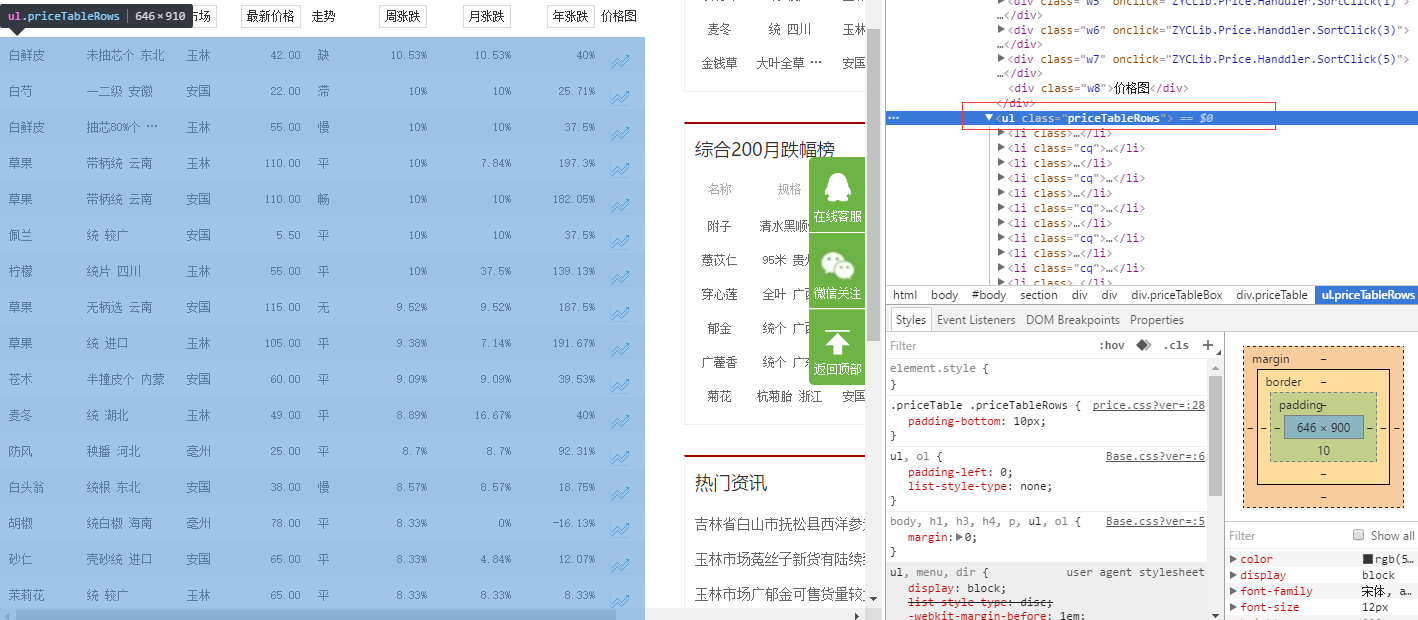
很明显这一页的数据都放在了ul标签里了,而且还有类名:<ul class="priceTableRows">,
然后再看下ul下的li标签,li标签里的html写的也都相同,然后就可以开始写代码抓取了。
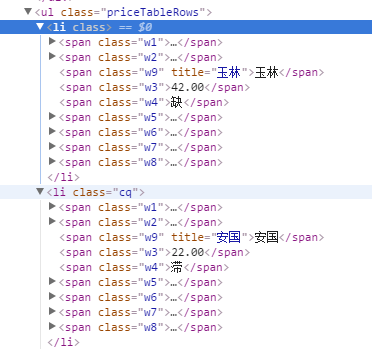
3、抓取信息
- 首先新建一个类文件,来存储抓取的信息。因为我是直接存到数据库用的是ado.net实体数据模型生成的文件。
- 下面是ado.net实体数据模型生成的文件:
//------------------------------------------------------------------------------

// <auto-generated>

//     此代码已从模板生成。

//

//     手动更改此文件可能导致应用程序出现意外的行为。

//     如果重新生成代码,将覆盖对此文件的手动更改。

// </auto-generated>

//------------------------------------------------------------------------------

namespace 测试项目1

{

    using System;

    using System.Collections.Generic;

    public partial class C33hao_price

    {

        public long ID { get; set; }

        public string Name { get; set; }

        public string Guige { get; set; }

        public string Shichang { get; set; }

        public decimal Price { get; set; }

        public string Zoushi { get; set; }

        public decimal Zhouzd { get; set; }

        public decimal Yuezd { get; set; }

        public decimal Nianzd { get; set; }

        public int editDate { get; set; }

        public string other { get; set; }

    }

}
- 下面这个是刚开始测试存到本地时写的类:
using System;

using System.Collections.Generic;

using System.Linq;

using System.Text;

using System.Threading.Tasks;

namespace 测试项目1

{

    public class Product

    {

        /// <summary>

        /// 品名

        /// </summary>

        public string Name { get; set; }

        /// <summary>

        /// 规格

        /// </summary>

        public string Guige { get; set; }

        /// <summary>

        /// 市场

        /// </summary>

        public string Shichang { get; set; }

        /// <summary>

        /// 最新价格

        /// </summary>

        public string Price { get; set; }

        /// <summary>

        /// 走势

        /// </summary>

        public string Zoushi { get; set; }

        /// <summary>

        /// 周涨跌

        /// </summary>

        public string Zhouzd { get; set; }

        /// <summary>

        /// 月涨跌

        /// </summary>

        public string Yuezd { get; set; }

        /// <summary>

        /// 年涨跌

        /// </summary>

        public string Nianzt { get; set; }

    }

}
下面是主要的处理代码
using System;

using System.Collections.Generic;

using System.Linq;

using System.Text;

using System.Threading.Tasks;

using HtmlAgilityPack;

using System.IO;

using Newtonsoft.Json;

using Newtonsoft.Json.Converters;

namespace 测试项目1

{

    public class Program

    {

        /// <summary>

        /// 本地测试信息类

        /// </summary>

        static List<Product> ProductList = new List<Product>();

        /// <summary>

        /// 数据库生成的信息类

        /// </summary>

        static List<C33hao_price> PriceList = new List<C33hao_price>();

        public static void Main(string[] args)

        {

            int start = ;//开始页数

            int end = ;//结束页数

            Console.WriteLine("请输入开始和结束页数例如1-100,默认为1-10");

            string index = Console.ReadLine();//获取用户输入的页数

            if(index != "")

            {

                //分割页数

                string[] stt = index.Split('-');

                start = Int32.Parse(stt[]);

                end = Int32.Parse(stt[]);

            }

            //循环抓取

            for(int i = start; i<= end; i++)

            {

                string url = string.Format("http://www.zyctd.com/jiage/1-0-0-{0}.html", i);

            HtmlWeb web = new HtmlWeb();

            HtmlDocument doc = web.Load(url);//获取网页

            HtmlNode node = doc.DocumentNode;

            string xpathstring = "//ul[@class='priceTableRows']/li";//路径

            HtmlNodeCollection aa = node.SelectNodes(xpathstring);//获取每一页ul下的所有li标签里的html

                if (aa == null)

                {

                    Console.WriteLine("出错:当前页为{0}", i.ToString());

                    continue;

                }

            foreach(var item in aa)

            {

                //处理li标签信息添加到集合

                string cc = item.InnerHtml;

                test(cc);

            }

            }

            //写入json并存到本地

            //string path = "json/test.json";

            //using(StreamWriter sw = new StreamWriter(path))

            //{

            //    try

            //    {

            //        JsonSerializer serializer = new JsonSerializer();

            //        serializer.Converters.Add(new JavaScriptDateTimeConverter());

            //        serializer.NullValueHandling = NullValueHandling.Ignore;

            //        //构建Json.net的写入流

            //        JsonWriter writer = new JsonTextWriter(sw);

            //        //把模型数据序列化并写入Json.net的JsonWriter流中

            //        serializer.Serialize(writer,ProductList);

            //        //ser.Serialize(writer, ht);

            //        writer.Close();

            //        sw.Close();

            //    }

            //    catch (Exception ex)

            //    {

            //        string error = ex.Message.ToString();

            //        Console.WriteLine(error);

            //    }

            //}

            int count = PriceList.Count();//抓取到的信息条数

            Console.WriteLine("获取信息{0}条", count);

            Console.WriteLine("开始添加到数据库");

            Insert();//插入到数据库

            Console.WriteLine("数据添加完毕");

            Console.ReadLine();

        }

        /// <summary>

        /// 处理信息并添加到集合中

        /// </summary>

        /// <param name="str">li标签的html内容</param>

        static void test(string str)

        {

            //Product product = new Product();

            C33hao_price Price = new C33hao_price();

            HtmlDocument doc = new HtmlDocument();

            doc.LoadHtml(str);

            HtmlNode node = doc.DocumentNode;

            //获取药材名称

            string namepath = "//span[@class='w1']/a[1]";//名称路径

            HtmlNodeCollection DomNode = node.SelectNodes(namepath);//根据路径获取内容

            //product.Name = DomNode[0].InnerText;

            Price.Name = DomNode[].InnerText;//将内容添加到对象中

            //获取规格

            string GuigePath = "//span[@class='w2']/a[1]";

            DomNode = node.SelectNodes(GuigePath);

            //product

            Price.Guige = DomNode[].InnerText;

            //获取市场名称

            string adsPath = "//span[@class='w9']";

            DomNode = node.SelectNodes(adsPath);

            Price.Shichang = DomNode[].InnerText;

            //获取最新价格

            string pricePath = "//span[@class='w3']";

            DomNode = node.SelectNodes(pricePath);

            Price.Price = decimal.Parse(DomNode[].InnerText);

            //获取走势

            string zoushiPath = "//span[@class='w4']";

            DomNode = node.SelectNodes(zoushiPath);

            Price.Zoushi = DomNode[].InnerText;

            //获取周涨跌

            string zhouzdPath = "//span[@class='w5']/em[1]";

            DomNode = node.SelectNodes(zhouzdPath);

            Price.Zhouzd = decimal.Parse(GetZD(DomNode[].InnerText));

            //获取月涨跌

            string yuezdPath = "//span[@class='w6']/em[1]";

            DomNode = node.SelectNodes(yuezdPath);

            Price.Yuezd = decimal.Parse(GetZD(DomNode[].InnerText));

            //获取年涨跌

            string nianzdPath = "//span[@class='w7']/em[1]";

            DomNode = node.SelectNodes(nianzdPath);

            Price.Nianzd = decimal.Parse(GetZD(DomNode[].InnerText));

            //添加时间

            Price.editDate = Int32.Parse(GetTimeStamp());//转换为时间戳格式,方便php使用

            //ProductList.Add(product);

            PriceList.Add(Price);//添加到对象集合

        }

        //查询

        static void Query()

        {

            var context = new mallEntities();

            var member = from e in context.member select e;

            foreach(var u in member)

            {

                Console.WriteLine(u.member_name);

                Console.WriteLine(u.member_mobile);

            }

            Console.ReadLine();

        }

        //插入

        static void Insert()

        {

            var context = new mallEntities();

            C33hao_price Price = new C33hao_price();

            int i = ;

            foreach (C33hao_price item in PriceList)

            {

                context.C33hao_price.Add(item);

                context.SaveChanges();

                i++;

                Console.WriteLine("{0}/{1}", i, PriceList.Count);

            }

        }

        /// <summary>

        /// 获取时间戳

        /// </summary>

        /// <returns></returns>

        public static string GetTimeStamp()

        {

            TimeSpan ts = DateTime.UtcNow - new DateTime(, , , , , , );

            return Convert.ToInt64(ts.TotalSeconds).ToString();

        }

        /// <summary>

        /// 去除字符串中的百分比

        /// </summary>

        /// <param name="str">处理的字符串</param>

        /// <returns></returns>

        public static string GetZD(string str)

        {

            string st = str.Substring(, str.Length - );

            return st;

        }

    }

}- 以上代码主要是存到数据库,下面说下怎么存到本地。
4、存储到本地
存储到本地只需要把test方法里的Price对象改为Product类型,然后再add到ProductList集合里,再把注释的//写入json并存到本地//方法取消注释就好了。
- 5、连接到mysql
待续。。。。。。。。。。
使用HtmlAgilityPack爬取网站信息并存储到mysql的更多相关文章
- java爬取网站信息和url实例
https://blog.csdn.net/weixin_38409425/article/details/78616688(出自此為博主) 具體代碼如下: import java.io.Buffer ...
- PHP 结合前端 ajax 爬取网站信息后, 向指定用户发送指定短信;
<?php /** * Description * @authors Your Name (you@example.org) * # 根据时时彩的最新一期的号码, 判断如果为首尾同号则发送短信 ...
- python爬取网页数据并存储到mysql数据库
#python 3.5 from urllib.request import urlopen from urllib.request import urlretrieve from bs4 impor ...
- Python爬取招聘信息,并且存储到MySQL数据库中
前面一篇文章主要讲述,如何通过Python爬取招聘信息,且爬取的日期为前一天的,同时将爬取的内容保存到数据库中:这篇文章主要讲述如何将python文件压缩成exe可执行文件,供后面的操作. 这系列文章 ...
- [python] 常用正则表达式爬取网页信息及分析HTML标签总结【转】
[python] 常用正则表达式爬取网页信息及分析HTML标签总结 转http://blog.csdn.net/Eastmount/article/details/51082253 标签: pytho ...
- Python 利用 BeautifulSoup 爬取网站获取新闻流
0. 引言 介绍下 Python 用 Beautiful Soup 周期性爬取 xxx 网站获取新闻流: 图 1 项目介绍 1. 开发环境 Python: 3.6.3 BeautifulSoup: ...
- Python爬取网页信息
Python爬取网页信息的步骤 以爬取英文名字网站(https://nameberry.com/)中每个名字的评论内容,包括英文名,用户名,评论的时间和评论的内容为例. 1.确认网址 在浏览器中输入初 ...
- 使用scrapy爬取网站的商品数据
目标是爬取网站http://www.muyingzhijia.com/上全部的商品数据信息,包括商品的一级类别,二级类别,商品title,品牌,价格. 搜索了一下,python的scrapy是一个不错 ...
- 利用linux curl爬取网站数据
看到一个看球网站的以下截图红色框数据,想爬取下来,通常爬取网站数据一般都会从java或者python爬取,但本人这两个都不会,只会shell脚本,于是硬着头皮试一下用shell爬取,方法很笨重,但旨在 ...
随机推荐
- 给Number类型增加加法、减、乘、除函数,解决float相加结果精度错乱的问题
<!DOCTYPE html> <html xmlns="http://www.w3.org/1999/xhtml"> <head> <m ...
- 卖萌的极致!脸部捕捉软件FaceRig让你化身萌宠
FaceRig是一款以摄像头为跟踪设备捕捉用户脸部动作并转化为数据套用在其他动画模型上的一款软件,能够应用于一些日常的视频社交软件或网站,比如视频通话软件Skype和直播网站Twitch.FaceRi ...
- C# 向Http服务器送出 POST 请求
//向Http服务器送出 POST 请求 public string m_PostSubmit(string strUrl,string strParam) { string strResult = ...
- 修改windows密码后ssrs报错
昨夜修改了windows的登录密码,第二日发现ssrs全部无法访问.显示filenotfound等错误.细想一下,应该是修改了windows的密码导致ssrs权限验证失败. 因此将ssrs的服务帐号修 ...
- 查看kernel log命令
adb shell "cat /dev/kmsg | grep -Ei "gesture""
- [转]优秀Python学习资源收集汇总
Python是一种面向对象.直译式计算机程序设计语言.它的语法简捷和清晰,尽量使用无异义的英语单词,与其它大多数程序设计语言使用大括号不一样,它使用縮进来定义语句块.与Scheme.Ruby.Perl ...
- C# 开发者代码审查清单【转】
这是为C#开发者准备的通用性代码审查清单,可以当做开发过程中的参考.这是为了确保在编码过程中,大部分通用编码指导原则都能注意到.对于新手和缺乏经验(0到3年工作经验)的开发者,参考这份清单编码会很帮助 ...
- MemCached用法
所需要的jar包: com.danga.MemCached.MemCachedClient com.danga.MemCached.SockIOPool 自行下载/** * 缓存服务器集群,提供缓存连 ...
- 安卓开发笔记——深入Activity
在上一篇文章<安卓开发笔记——重识Activity >中,我们了解了Activity生命周期的执行顺序和一些基本的数据保存操作,但如果只知道这些是对于我们的开发需求来说是远远不够的,今天我 ...
- google全球地址大全
https://github.com/justjavac/Google-IPs http://www.aol.com/依托于google的一个搜索,通过这个搜索