
使用HtmlAgilityPack爬取网站信息并存储到mysql
前言:打算做一个药材价格查询的功能,但刚开始一点数据都没有靠自己找信息录入的话很麻烦的,所以只有先到其它网站抓取存到数据库再开始做这个了。
HtmlAgilityPack在c#里应该很多人用吧,简单又强大。之前也用它做过几个爬取信息的小工具。不过很久了源代码都没有了,都忘了怎么用了,这次也是一点一点找资料慢慢做出来的!
(不过最麻烦的是将数据存到mysql,.net数据库我一直用的都是mssql,所以第一次做连接mysql遇到了好多问题。)
1、使用HtmlAgilityPack
- 下载HtmlAgilityPack类库,并引用到你的项目
我这里使用的控制台项目
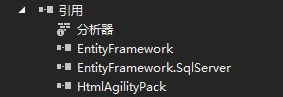
项目添加引用
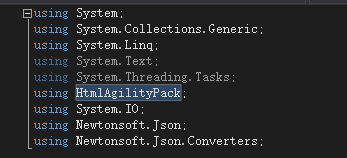
代码里添加引用
2、分析网页
- 网页地址:http://www.zyctd.com/jiage/1-0-0-0.html
首先看每一页的url变化,观察后发现这个很简单:
第一页就是:1-0-0或者1-0-0-1表示第一页
第二页就是:1-0-0-2一次类推
- 然后再分析他的源代码
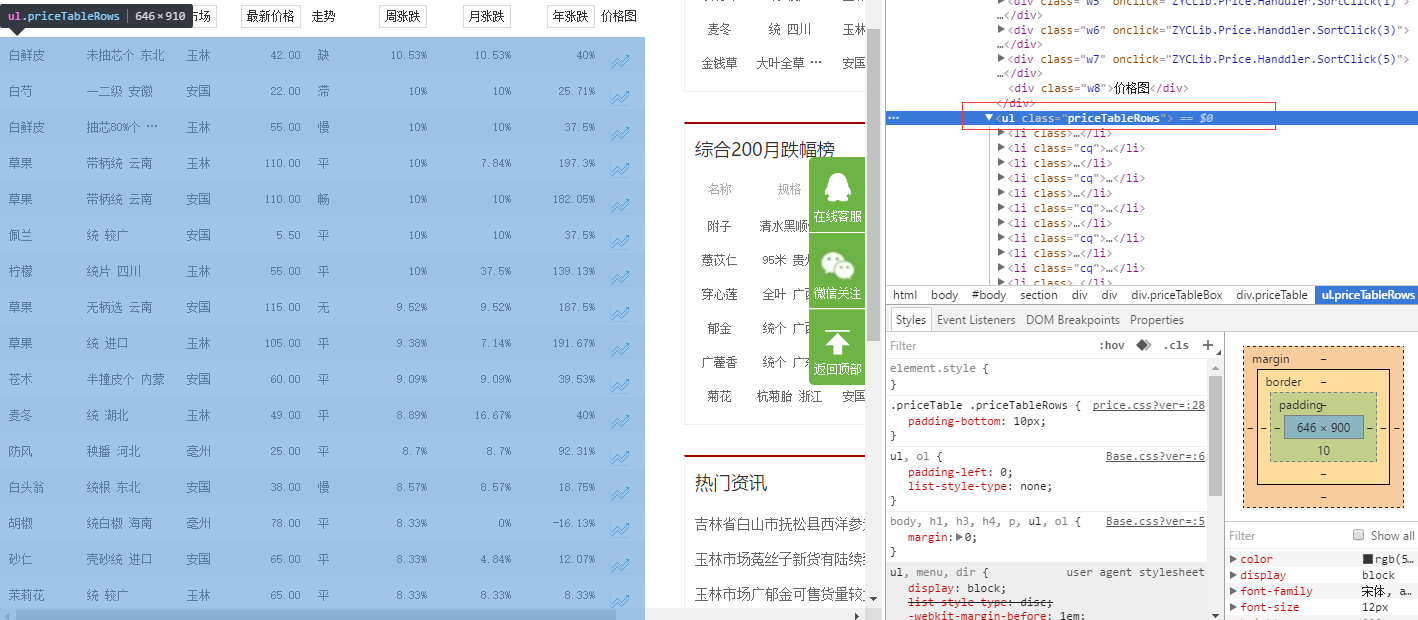
很明显这一页的数据都放在了ul标签里了,而且还有类名:<ul class="priceTableRows">,
然后再看下ul下的li标签,li标签里的html写的也都相同,然后就可以开始写代码抓取了。
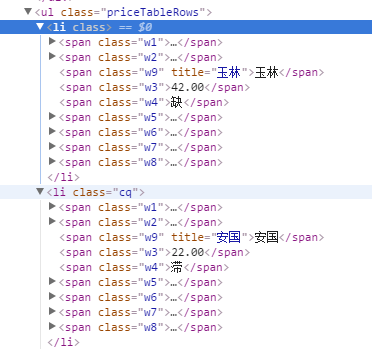
3、抓取信息
- 首先新建一个类文件,来存储抓取的信息。因为我是直接存到数据库用的是ado.net实体数据模型生成的文件。
- 下面是ado.net实体数据模型生成的文件:
//------------------------------------------------------------------------------

// <auto-generated>

//     此代码已从模板生成。

//

//     手动更改此文件可能导致应用程序出现意外的行为。

//     如果重新生成代码,将覆盖对此文件的手动更改。

// </auto-generated>

//------------------------------------------------------------------------------

namespace 测试项目1

{

    using System;

    using System.Collections.Generic;

    public partial class C33hao_price

    {

        public long ID { get; set; }

        public string Name { get; set; }

        public string Guige { get; set; }

        public string Shichang { get; set; }

        public decimal Price { get; set; }

        public string Zoushi { get; set; }

        public decimal Zhouzd { get; set; }

        public decimal Yuezd { get; set; }

        public decimal Nianzd { get; set; }

        public int editDate { get; set; }

        public string other { get; set; }

    }

}
- 下面这个是刚开始测试存到本地时写的类:
using System;

using System.Collections.Generic;

using System.Linq;

using System.Text;

using System.Threading.Tasks;

namespace 测试项目1

{

    public class Product

    {

        /// <summary>

        /// 品名

        /// </summary>

        public string Name { get; set; }

        /// <summary>

        /// 规格

        /// </summary>

        public string Guige { get; set; }

        /// <summary>

        /// 市场

        /// </summary>

        public string Shichang { get; set; }

        /// <summary>

        /// 最新价格

        /// </summary>

        public string Price { get; set; }

        /// <summary>

        /// 走势

        /// </summary>

        public string Zoushi { get; set; }

        /// <summary>

        /// 周涨跌

        /// </summary>

        public string Zhouzd { get; set; }

        /// <summary>

        /// 月涨跌

        /// </summary>

        public string Yuezd { get; set; }

        /// <summary>

        /// 年涨跌

        /// </summary>

        public string Nianzt { get; set; }

    }

}
下面是主要的处理代码
using System;

using System.Collections.Generic;

using System.Linq;

using System.Text;

using System.Threading.Tasks;

using HtmlAgilityPack;

using System.IO;

using Newtonsoft.Json;

using Newtonsoft.Json.Converters;

namespace 测试项目1

{

    public class Program

    {

        /// <summary>

        /// 本地测试信息类

        /// </summary>

        static List<Product> ProductList = new List<Product>();

        /// <summary>

        /// 数据库生成的信息类

        /// </summary>

        static List<C33hao_price> PriceList = new List<C33hao_price>();

        public static void Main(string[] args)

        {

            int start = ;//开始页数

            int end = ;//结束页数

            Console.WriteLine("请输入开始和结束页数例如1-100,默认为1-10");

            string index = Console.ReadLine();//获取用户输入的页数

            if(index != "")

            {

                //分割页数

                string[] stt = index.Split('-');

                start = Int32.Parse(stt[]);

                end = Int32.Parse(stt[]);

            }

            //循环抓取

            for(int i = start; i<= end; i++)

            {

                string url = string.Format("http://www.zyctd.com/jiage/1-0-0-{0}.html", i);

            HtmlWeb web = new HtmlWeb();

            HtmlDocument doc = web.Load(url);//获取网页

            HtmlNode node = doc.DocumentNode;

            string xpathstring = "//ul[@class='priceTableRows']/li";//路径

            HtmlNodeCollection aa = node.SelectNodes(xpathstring);//获取每一页ul下的所有li标签里的html

                if (aa == null)

                {

                    Console.WriteLine("出错:当前页为{0}", i.ToString());

                    continue;

                }

            foreach(var item in aa)

            {

                //处理li标签信息添加到集合

                string cc = item.InnerHtml;

                test(cc);

            }

            }

            //写入json并存到本地

            //string path = "json/test.json";

            //using(StreamWriter sw = new StreamWriter(path))

            //{

            //    try

            //    {

            //        JsonSerializer serializer = new JsonSerializer();

            //        serializer.Converters.Add(new JavaScriptDateTimeConverter());

            //        serializer.NullValueHandling = NullValueHandling.Ignore;

            //        //构建Json.net的写入流

            //        JsonWriter writer = new JsonTextWriter(sw);

            //        //把模型数据序列化并写入Json.net的JsonWriter流中

            //        serializer.Serialize(writer,ProductList);

            //        //ser.Serialize(writer, ht);

            //        writer.Close();

            //        sw.Close();

            //    }

            //    catch (Exception ex)

            //    {

            //        string error = ex.Message.ToString();

            //        Console.WriteLine(error);

            //    }

            //}

            int count = PriceList.Count();//抓取到的信息条数

            Console.WriteLine("获取信息{0}条", count);

            Console.WriteLine("开始添加到数据库");

            Insert();//插入到数据库

            Console.WriteLine("数据添加完毕");

            Console.ReadLine();

        }

        /// <summary>

        /// 处理信息并添加到集合中

        /// </summary>

        /// <param name="str">li标签的html内容</param>

        static void test(string str)

        {

            //Product product = new Product();

            C33hao_price Price = new C33hao_price();

            HtmlDocument doc = new HtmlDocument();

            doc.LoadHtml(str);

            HtmlNode node = doc.DocumentNode;

            //获取药材名称

            string namepath = "//span[@class='w1']/a[1]";//名称路径

            HtmlNodeCollection DomNode = node.SelectNodes(namepath);//根据路径获取内容

            //product.Name = DomNode[0].InnerText;

            Price.Name = DomNode[].InnerText;//将内容添加到对象中

            //获取规格

            string GuigePath = "//span[@class='w2']/a[1]";

            DomNode = node.SelectNodes(GuigePath);

            //product

            Price.Guige = DomNode[].InnerText;

            //获取市场名称

            string adsPath = "//span[@class='w9']";

            DomNode = node.SelectNodes(adsPath);

            Price.Shichang = DomNode[].InnerText;

            //获取最新价格

            string pricePath = "//span[@class='w3']";

            DomNode = node.SelectNodes(pricePath);

            Price.Price = decimal.Parse(DomNode[].InnerText);

            //获取走势

            string zoushiPath = "//span[@class='w4']";

            DomNode = node.SelectNodes(zoushiPath);

            Price.Zoushi = DomNode[].InnerText;

            //获取周涨跌

            string zhouzdPath = "//span[@class='w5']/em[1]";

            DomNode = node.SelectNodes(zhouzdPath);

            Price.Zhouzd = decimal.Parse(GetZD(DomNode[].InnerText));

            //获取月涨跌

            string yuezdPath = "//span[@class='w6']/em[1]";

            DomNode = node.SelectNodes(yuezdPath);

            Price.Yuezd = decimal.Parse(GetZD(DomNode[].InnerText));

            //获取年涨跌

            string nianzdPath = "//span[@class='w7']/em[1]";

            DomNode = node.SelectNodes(nianzdPath);

            Price.Nianzd = decimal.Parse(GetZD(DomNode[].InnerText));

            //添加时间

            Price.editDate = Int32.Parse(GetTimeStamp());//转换为时间戳格式,方便php使用

            //ProductList.Add(product);

            PriceList.Add(Price);//添加到对象集合

        }

        //查询

        static void Query()

        {

            var context = new mallEntities();

            var member = from e in context.member select e;

            foreach(var u in member)

            {

                Console.WriteLine(u.member_name);

                Console.WriteLine(u.member_mobile);

            }

            Console.ReadLine();

        }

        //插入

        static void Insert()

        {

            var context = new mallEntities();

            C33hao_price Price = new C33hao_price();

            int i = ;

            foreach (C33hao_price item in PriceList)

            {

                context.C33hao_price.Add(item);

                context.SaveChanges();

                i++;

                Console.WriteLine("{0}/{1}", i, PriceList.Count);

            }

        }

        /// <summary>

        /// 获取时间戳

        /// </summary>

        /// <returns></returns>

        public static string GetTimeStamp()

        {

            TimeSpan ts = DateTime.UtcNow - new DateTime(, , , , , , );

            return Convert.ToInt64(ts.TotalSeconds).ToString();

        }

        /// <summary>

        /// 去除字符串中的百分比

        /// </summary>

        /// <param name="str">处理的字符串</param>

        /// <returns></returns>

        public static string GetZD(string str)

        {

            string st = str.Substring(, str.Length - );

            return st;

        }

    }

}- 以上代码主要是存到数据库,下面说下怎么存到本地。
4、存储到本地
存储到本地只需要把test方法里的Price对象改为Product类型,然后再add到ProductList集合里,再把注释的//写入json并存到本地//方法取消注释就好了。
- 5、连接到mysql
待续。。。。。。。。。。
使用HtmlAgilityPack爬取网站信息并存储到mysql的更多相关文章
- java爬取网站信息和url实例
https://blog.csdn.net/weixin_38409425/article/details/78616688(出自此為博主) 具體代碼如下: import java.io.Buffer ...
- PHP 结合前端 ajax 爬取网站信息后, 向指定用户发送指定短信;
<?php /** * Description * @authors Your Name (you@example.org) * # 根据时时彩的最新一期的号码, 判断如果为首尾同号则发送短信 ...
- python爬取网页数据并存储到mysql数据库
#python 3.5 from urllib.request import urlopen from urllib.request import urlretrieve from bs4 impor ...
- Python爬取招聘信息,并且存储到MySQL数据库中
前面一篇文章主要讲述,如何通过Python爬取招聘信息,且爬取的日期为前一天的,同时将爬取的内容保存到数据库中:这篇文章主要讲述如何将python文件压缩成exe可执行文件,供后面的操作. 这系列文章 ...
- [python] 常用正则表达式爬取网页信息及分析HTML标签总结【转】
[python] 常用正则表达式爬取网页信息及分析HTML标签总结 转http://blog.csdn.net/Eastmount/article/details/51082253 标签: pytho ...
- Python 利用 BeautifulSoup 爬取网站获取新闻流
0. 引言 介绍下 Python 用 Beautiful Soup 周期性爬取 xxx 网站获取新闻流: 图 1 项目介绍 1. 开发环境 Python: 3.6.3 BeautifulSoup: ...
- Python爬取网页信息
Python爬取网页信息的步骤 以爬取英文名字网站(https://nameberry.com/)中每个名字的评论内容,包括英文名,用户名,评论的时间和评论的内容为例. 1.确认网址 在浏览器中输入初 ...
- 使用scrapy爬取网站的商品数据
目标是爬取网站http://www.muyingzhijia.com/上全部的商品数据信息,包括商品的一级类别,二级类别,商品title,品牌,价格. 搜索了一下,python的scrapy是一个不错 ...
- 利用linux curl爬取网站数据
看到一个看球网站的以下截图红色框数据,想爬取下来,通常爬取网站数据一般都会从java或者python爬取,但本人这两个都不会,只会shell脚本,于是硬着头皮试一下用shell爬取,方法很笨重,但旨在 ...
随机推荐
- 将w3cplus网站中的文章页面提取并导出为pdf文档
最近在看一些关于CSS3方面的知识,主要是平时看到网页中有很多用CSS3实现的很炫的效果,所以就打算系统的学习一下.在网上找到很多的文章,但都没有一个好的整理性,比较凌乱.昨天看到w3cplus网站中 ...
- 使用 DJ Java Decompiler 将整个jar包反编译成源文件
使用 DJ Java Decompiler 将整个jar包反编译成源文件 所使用的软件是 DJ Java Decompiler 3.9. 下面是一个有用的参考文档,说明如何批量编译 http://ww ...
- Navi.Soft30.框架.WinForm.开发手册
阅读导航 Navi.Soft30.Core类库.开发手册 http://www.cnblogs.com/xiyang1011/p/5709489.html Navi.Soft30.框架.WinForm ...
- Lua截取utf-8编码的中英文混合字符串
参考博客:UTF8字符串在lua的截取和字数统计[转载] 需求 按字面个数来截取子字符串 函数(字符串, 开始位置, 截取长度) utf8sub(,) = 好1世界哈 utf8sub(,) = 你好1 ...
- ffrpc的php客户端lib
摘要: ffrpc 是c++异步通讯库,使用ffrpc可以非常容易的构建服务器程序.为了使用方便,ffrpc提供了python.php的客户端lib,这样使用php于c++构建的server也是顺手拈 ...
- 一致性哈希算法(consistent hashing)【转】
一致性哈希算法 来自:http://blog.csdn.net/cywosp/article/details/23397179 一致性哈希算法在1997年由麻省理工学院提出的一种分布式哈希 ...
- 入手Cubieboard2之制作最小Linux系统
前言 昨天终于入手了一块Cubieboard2板子,今年4月入职从事的就是与之相关的工作,因此趁现在有时间就好好熟悉一下. 一.主机环境 1.PC主机WIN 7旗舰版 1.虚拟机VM7.0 2.ubu ...
- SQL Server 数据库操作类
/// <summary> /// SQLServerHelper的摘要说明. /// </summary> public class SQLServerHelper { pu ...
- 关于STM8空间不足的解决方法
STM8虽然功能齐全,但是空间不足也是经常出来的情况.要么.text overflow,要么.bss overflow,让人头疼.这里把一些优化方案列出来,让空间得到充分利用: 1.在Project ...
- MyEclipse从数据库反向生成实体类之Hibernate方式 反向工程
前文: hibernate带给我们的O/RMapping思想是很正确的,即从面相对象的角度来设计工程中的实体对象,建立pojo,然后在编写hbm.xml映射文件来生成数据表.但是在实际开发中,往往我们 ...