
我的NopCommerce之旅(6): 应用启动
一、基础介绍
Global.asax 文件(也称为 ASP.NET 应用程序文件)是一个可选文件,该文件包含响应 ASP.NET 或 HTTP 模块所引发的应用程序级别和会话级别事件的代码。
Application_Start是其中一个事件,在HttpApplication 类的第一个实例被创建时,该事件被触发它允许你创建可以由所有HttpApplication 实例访问的对象。
简单来说,Application_Start()就是一个ASP.NET应用程序启动时执行的方法,可以理解为应用程序入口。
二、代码分析Application_Start()
1.出于安全考虑,去除X-AspNetMvc-Version头
2.初始化上下文
3.判断是否初始化数据库
3.1 加载配置文件~/App_Data/Settings.txt
3.2 读取内容,若存在连接字符串则说明已初始化数据库
4.清空视图引擎,添加自定义视图引擎ThemeableRazorViewEngine,支持前台和后台页面分离,及主题适配。
5.增加一些功能性的元数据
6.注册常见的MVC物件,包括Area,Route
7.关闭MVC默认的标注特性Model验证,添加FluentValidation(一种验证组件)
8.启动定时任务
8.1 初始化所有创建的定时任务
8.2 启动定时任务线程
9.根据配置,是否启动MiniProfiler(ASP.NET MVC的性能分析工具,监控网站性能)
9.1 安装时默认为false,并配置在[dbo].[Setting]表,Name为storeinformationsettings.displayminiprofilerinpublicstore
9.2 配置方法
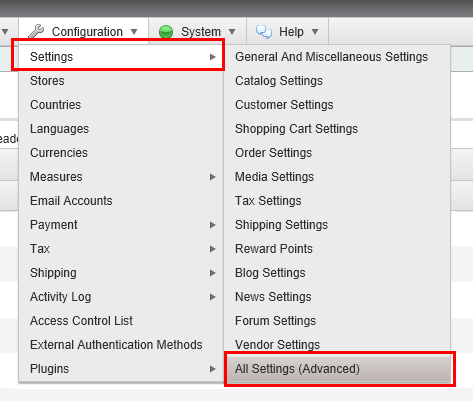
9.2.1 进入管理页面,进入配置菜单
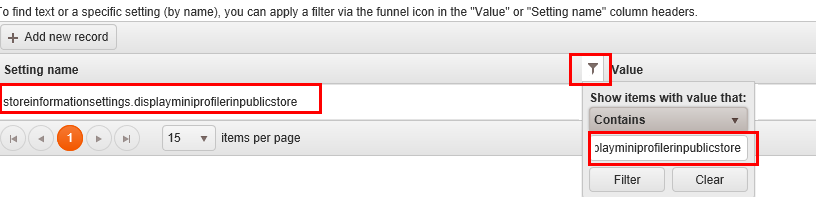
9.2.2 检索storeinformationsettings.displayminiprofilerinpublicstore,定位该条目,修改Value值
9.2.3 启动效果,在页面左上角可看到该页面执行时间,参考MiniProfiler相关资料

10.记录应用启动日志
10.1 通过依赖注入实例化
10.2 日志写入数据库,表[dbo].[Log]
11.代码如下
         protected void Application_Start()

         {

             //disable "X-AspNetMvc-Version" header name

             MvcHandler.DisableMvcResponseHeader = true;

             //initialize engine context

             EngineContext.Initialize(false);

             bool databaseInstalled = DataSettingsHelper.DatabaseIsInstalled();

             if (databaseInstalled)

             {

                 //remove all view engines

                 ViewEngines.Engines.Clear();

                 //except the themeable razor view engine we use

                 ViewEngines.Engines.Add(new ThemeableRazorViewEngine());

             }

             //Add some functionality on top of the default ModelMetadataProvider

             ModelMetadataProviders.Current = new NopMetadataProvider();

             //Registering some regular mvc stuff

             AreaRegistration.RegisterAllAreas();

             RegisterRoutes(RouteTable.Routes);

             //fluent validation

             DataAnnotationsModelValidatorProvider.AddImplicitRequiredAttributeForValueTypes = false;

             ModelValidatorProviders.Providers.Add(new FluentValidationModelValidatorProvider(new NopValidatorFactory()));

             //start scheduled tasks

             if (databaseInstalled)

             {

                 TaskManager.Instance.Initialize();

                 TaskManager.Instance.Start();

             }

             //miniprofiler

             if (databaseInstalled)

             {

                 if (EngineContext.Current.Resolve<StoreInformationSettings>().DisplayMiniProfilerInPublicStore)

                 {

                     GlobalFilters.Filters.Add(new ProfilingActionFilter());

                 }

             }

             //log application start

             if (databaseInstalled)

             {

                 try

                 {

                     //log

                     var logger = EngineContext.Current.Resolve<ILogger>();

                     logger.Information("Application started", null, null);

                 }

                 catch (Exception)

                 {

                     //don't throw new exception if occurs

                 }

             }

         }
我的NopCommerce之旅(6): 应用启动的更多相关文章
- [转]NopCommerce之旅: 应用启动
本文转自:http://www.cnblogs.com/devilsky/p/5359881.html 我的NopCommerce之旅(6): 应用启动 一.基础介绍 Global.asax 文件 ...
- 我的NopCommerce之旅(8): 路由分析
一.导图和基础介绍 本文主要介绍NopCommerce的路由机制,网上有一篇不错的文章,有兴趣的可以看看NopCommerce源码架构详解--对seo友好Url的路由机制实现源码分析 SEO,Sear ...
- 我的NopCommerce之旅(7): 依赖注入(IOC/DI)
一.基础介绍 依赖注入,Dependency Injection,权威解释及说明请自己查阅资料. 这里简单说一下常见使用:在mvc的controller的构造方法中定义参数,如ICountryServ ...
- 我的NopCommerce之旅(9): 编写Plugin实例
一.基础介绍 ——In computing, a plug-in (or plugin) is a set of software components that add specific abili ...
- 我的NopCommerce之旅(5): 缓存
一.基础介绍 1.什么是cache Web缓存是指一个Web资源(如html页面,图片,js,数据等)存在于Web服务器和客户端(浏览器)之间的副本. 2.为什么要用cache 即 ...
- 我的NopCommerce之旅(4): 定时任务之邮件
一.功能简介 用户购买物品生成订单后,系统将发送邮件提醒给用户 二.操作步骤 后台配置一个系统的默认发送邮箱 启动定时任务,这里包括多个任务,只需要启动邮件任务 查看邮件发送情况 三.数据库分析 [d ...
- 我的NopCommerce之旅(1): 系统综述
一.概述 NopCommerce是一个开源的购物网站,它的特点是Pluggable modular/layered architecture(可插拔模块分层架构) 二.功能特色介绍 1.适配手机端 2 ...
- 我的NopCommerce之旅(3): 系统代码结构分析
一.概述 基于MVC 二.详细描述 \Libraries\Nop.Core 核心类,包括缓存.事件.帮助类.业务对象(订单.客户实体) \Libraries\Nop.Data 数据访问层,采用Enti ...
- 我的NopCommerce之旅(2): 系统环境及技术分析
一.系统环境 IIS7.0 or above ASP.NET 4.5(MVC 5.0) .NET Framework 4.5.1 or above VS 2012 or above 二.架构设计 Pl ...
随机推荐
- chrome修改UserAgent,调试
chrome浏览器模拟 UserAgent,调试手机环境. https://chrome.google.com/webstore/detail/user-agent-switcher-for-c/dj ...
- 购买SSL证书到部署网站遇到的若干问题
作为一个菜鸟,对于SSL证书,我了解不多,只知道用了它网站更安全,所以这次使用SSL证书途中遇到了各方面的各种问题,到今天为止终于全部解决. 一.证书格式 前两天在那什么云上面买了个SSL证书,是Wo ...
- 重新想象 Windows 8.1 Store Apps (72) - 新增控件: AppBar, CommandBar
[源码下载] 重新想象 Windows 8.1 Store Apps (72) - 新增控件: AppBar, CommandBar 作者:webabcd 介绍重新想象 Windows 8.1 Sto ...
- C#初入串口通信(串行通信)总结
使用WinFrom来实现: 首先要知道串口通信协议以及原理 原理大概提一下:要自己翻阅看.(http://book.51cto.com/art/200911/162532.htm或者http://hi ...
- 遇上了artTemplate做的东西
js现在最牛的地方是 有了Node.js后,前后端的界限几乎都消失了,围绕着它,出现了一整套生态体系. 在生态方面,比php好太多了.
- c++之函数重载(函数匹配)
Case void f(); void f(int); void f(int, int); void f(double, double = 3.14); 匹配原则: 1)其形参数量与本次调用提供的实参 ...
- .net aes加密视频等文件
公司学习平台在app端下载下来的视频需要加密 随查找资料参考一些写法 写了aes的加密方法 记录防止忘记 using System; using System.Collections.Generic; ...
- 使用 Canvas 和 JavaScript 创建逼真的下雨效果
HTML5 规范引进了很多新特性,其中最令人期待的之一就是 Canvas 元素,HTML5 Canvas 提供了通过 JavaScript 绘制图形的方法,非常强大.这里向大家展示一个使用 Canva ...
- javascript宿主对象之window.frames
window.frames属性是当前页面所有框架的集合.要注意的事,这里并没有frame和iframe做出区分.而且,无论页面存不存在框架,window.frames属性总是存在的,并总是指向wind ...
- 详解Paint的各种set方法
一.前言 我们用set方法来设置画笔的样式,类似于我们挑选画笔画画的过程.由于上面有些方法不支持硬件加速,所以在高版本系统中可能会没有效果.因此,我们首先来看看官方废弃的方法. 下图来自:https: ...