
Eclipse+maven 构建第一个简单的springmvc项目
先给出项目的目录:

在eclipse下使用maven构建第一个springmvc项目步骤如下:
1.创建maven project(此处默认你已了解maven),此处需要注意以下两点
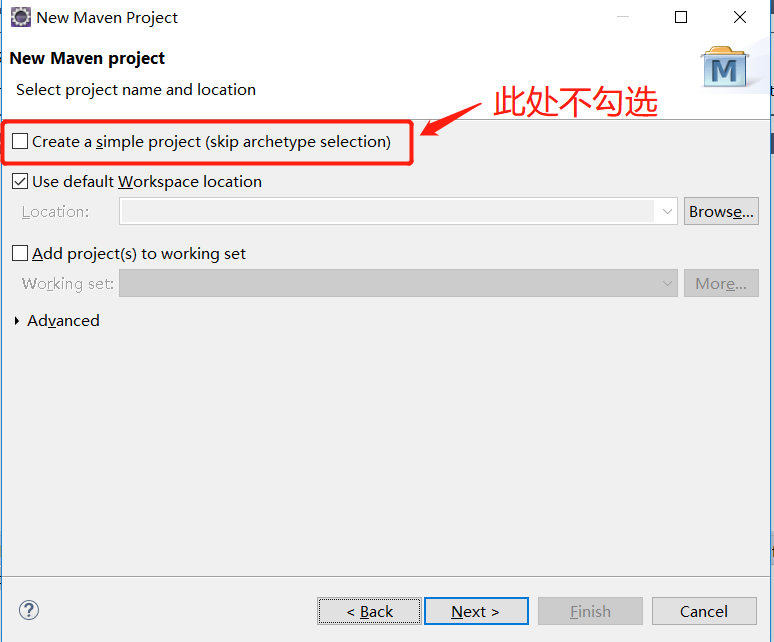
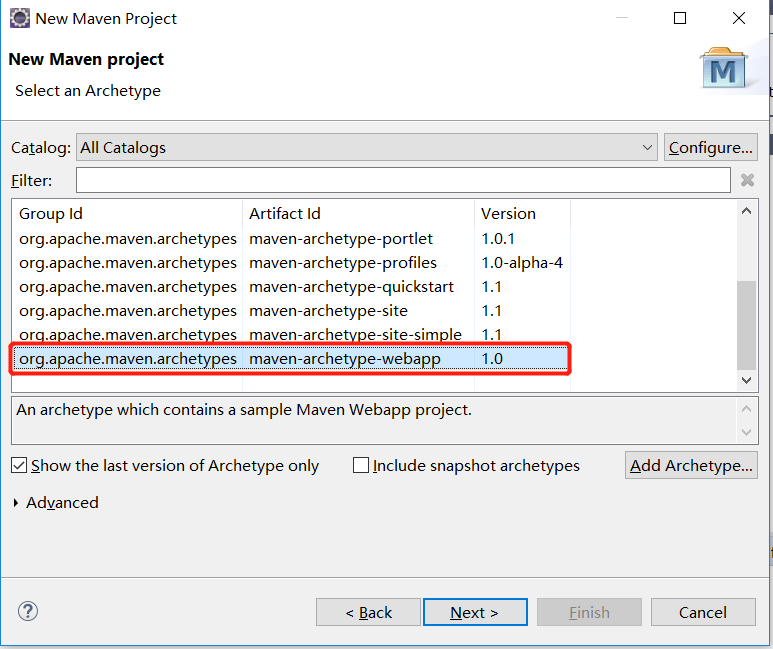
2.创建完毕后会看到一个 pom.xml的配置文件,此时需要引入spring web mvc的相关maven依赖,具体版本请看:MVNRepository ,一般,在这里,你可以搜索相关的maven依赖,copy到pom.xml文件即可
(copy保存后就会下载相关的包了)
我的pom.xml如下:
 <project xmlns="http://maven.apache.org/POM/4.0.0"

     xmlns:xsi="http://www.w3.org/2001/XMLSchema-instance"

     xsi:schemaLocation="http://maven.apache.org/POM/4.0.0 http://maven.apache.org/maven-v4_0_0.xsd">

     <modelVersion>4.0.0</modelVersion>

     <groupId>com.example</groupId>

     <artifactId>springmvc-maven</artifactId>

     <packaging>war</packaging>  <!-- 使用的是war包 -->

     <version>0.0.1-SNAPSHOT</version>

     <name>springmvc-maven Maven Webapp</name>

     <url>http://maven.apache.org</url>

     <dependencies>

         <dependency>

             <groupId>junit</groupId>

             <artifactId>junit</artifactId>

             <version>3.8.1</version>

             <scope>test</scope>

         </dependency>

         <dependency>

             <groupId>javax.servlet</groupId>

             <artifactId>javax.servlet-api</artifactId>

             <version>4.0.1</version>

             <scope>provided</scope>

         </dependency>

         <!-- https://mvnrepository.com/artifact/org.springframework/spring-webmvc -->

         <!-- 导入springmvc的相关依赖,RELEASE是稳定版 -->

         <dependency>

             <groupId>org.springframework</groupId>

             <artifactId>spring-webmvc</artifactId>

             <version>5.1.5.RELEASE</version>

         </dependency>

     </dependencies>

     <!-- 配置maven插件 -->

     <build>

         <!-- java编译插件 -->

         <!-- eclipse默认使用的jdk是1.5的 -->

         <plugins>

             <plugin>

                 <groupId>org.apache.maven.plugins</groupId>

                 <artifactId>maven-compiler-plugin</artifactId>

                 <version>3.2</version>

                 <configuration>

                     <source>1.8</source>

                     <target>1.8</target>

                     <encoding>UTF-8</encoding>

                 </configuration>

             </plugin>

         </plugins>

     </build>

     <!-- <build>

         <finalName>springmvc-maven</finalName>

     </build> -->

 </project>
3.配置web.xml文件,此时的web.xml在WEB-INF 目录下,在本例子中web.xml主要是servlet的基本配置。如下:
 <!DOCTYPE web-app PUBLIC

  "-//Sun Microsystems, Inc.//DTD Web Application 2.3//EN"

  "http://java.sun.com/dtd/web-app_2_3.dtd" >

 <web-app>

     <display-name>Archetype Created Web Application</display-name>

     <context-param>

         <param-name>contextConfigLocation</param-name>

         <param-value>classpath:example-servlet.xml</param-value>

     </context-param>

     <!--  Could not open ServletContext resource [/WEB-INF/example-servlet.xml] -->

     <!-- 不过这个貌似不是必须的?只要下面那个就可以?虽然会waring? -->

     <!-- servlet的配置 -->

     <servlet>

         <servlet-name>example</servlet-name>

         <servlet-class>org.springframework.web.servlet.DispatcherServlet</servlet-class>

         <!-- 在web.xml里配置需要加载的spring配置文件。 如果要装入多个配置文件,在<param-value>标记中用逗号作分隔符即可。 -->

         <init-param>

             <param-name>contextConfigLocation</param-name>

             <param-value>classpath:example-servlet.xml</param-value>

         </init-param>

         <load-on-startup>1</load-on-startup>  <!-- 配置servlet的启动时刻 -->

     </servlet>

     <servlet-mapping>

         <servlet-name>example</servlet-name>

         <url-pattern>/</url-pattern>  <!-- 系统中的请求经过的 -->

     </servlet-mapping>

 </web-app>
解析一下上面代码:
第16行,建立一个名为example的servlet,根据官方文档,你要建立一个与之对应的example-servlet.xml(记住这点)
第24行,好像是决定servlet的启动时刻,是随着服务器启动还是等请求到来才启动,上面的设置是随着服务器启动而启动(这点不是很确定)
第8-11行和19-22行结合使用,因为此时使用的是maven来管理项目,它有个专门存放资源文件的目录 src/main/resources,上面数说的建立的example-servlet.xml不是很往常一样,直接放在WEB-INF目录下,而是放在src/main/resources下,这两部分是为了避免出现<!-- Could not open ServletContext resource [/WEB-INF/example-servlet.xml] --> 这个错误(建议读一下官方文档)

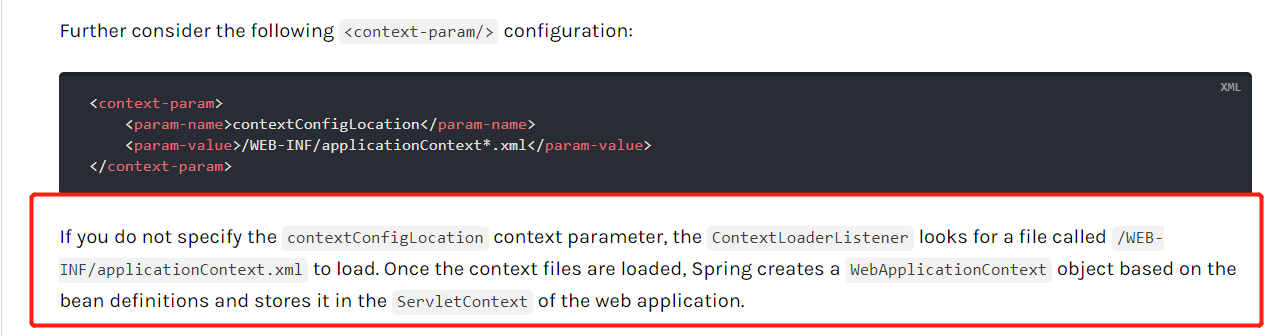
4.接着就是在src/main/resources目录下建立example-servlet.xml配置文件,并进行以下的配置
 <?xml version="1.0" encoding="UTF-8"?>

 <beans xmlns="http://www.springframework.org/schema/beans"

     xmlns:xsi="http://www.w3.org/2001/XMLSchema-instance"

     xmlns:p="http://www.springframework.org/schema/p"

     xmlns:context="http://www.springframework.org/schema/context"

     xsi:schemaLocation="

         http://www.springframework.org/schema/beans

         https://www.springframework.org/schema/beans/spring-beans.xsd

         http://www.springframework.org/schema/context

         https://www.springframework.org/schema/context/spring-context.xsd">

     <!-- 配置controller层路径扫描与视图解析器 -->

     <!--扫描controller所在的包 -->

     <context:component-scan

         base-package="com.example.springweb.mvc" />

     <!-- 视图解析器 -->

     <bean

         class="org.springframework.web.servlet.view.InternalResourceViewResolver">

         <property name="prefix" value="/WEB-INF/jsp/" />  <!--前缀-->

         <property name="suffix" value=".jsp" />     <!-- 后缀 -->

     </bean>

     <!-- ... -->

 </beans>
上面的xml中,12行-22行是新增的配置,剩余部分都是基本的,其实这部分你可以在官网找到的
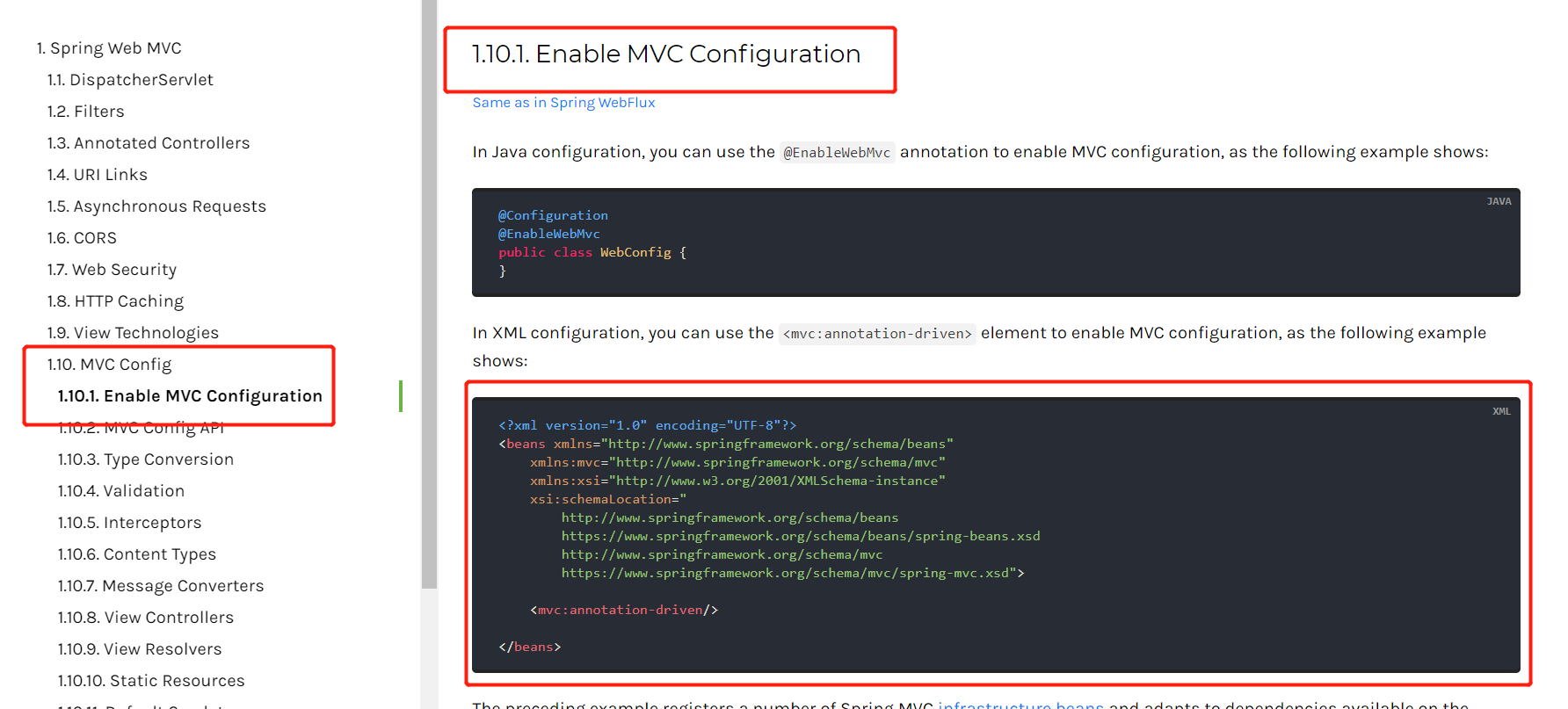
<?xml version="1.0" encoding="UTF-8"?>

<beans xmlns="http://www.springframework.org/schema/beans"

    xmlns:mvc="http://www.springframework.org/schema/mvc"

    xmlns:xsi="http://www.w3.org/2001/XMLSchema-instance"

    xsi:schemaLocation="

        http://www.springframework.org/schema/beans

        https://www.springframework.org/schema/beans/spring-beans.xsd

        http://www.springframework.org/schema/mvc

        https://www.springframework.org/schema/mvc/spring-mvc.xsd">

    <mvc:annotation-driven/>

</beans>
在example-servlet.xml中有这样一句配置
<context:component-scan

        base-package="com.example.springweb.mvc" />
因此,要在src/main/java下新建一个 com.example.springweb.mvc 包,并在其下建立controller类
5.建立controller类
在src/main/java下新建一个名为 com.example.springweb.mvc 的包,并新建一个名为IndexController的java类。
IndexController.java
package com.example.springweb.mvc;

import org.springframework.stereotype.Controller;

import org.springframework.web.bind.annotation.RequestMapping;

@Controller

public class IndexController {

    @RequestMapping("/home")   //这里路由映射为/home,所以http://localhost:8080/springmvc-maven/不能访问到

    public String home() {    //这 里方法是Sring类型,因此要在WEB-INF创建一个home.jsp的页面

        return "home";

    }

}
此时在IndexController.java定义了一个String类型返回值的方法,对应的要在 在WEB-INF创建一个名为home.jsp的页面(原理我也不懂)
<%@ page language="java" contentType="text/html; charset=utf-8" pageEncoding="utf-8"%>

<!DOCTYPE html PUBLIC "-//W3C//DTD HTML 4.01 Transitional//EN" "http://www.w3.org/TR/html4/loose.dtd">

<html>

<head>

<meta http-equiv="Content-Type" content="text/html; charset=utf-8">

<title>Insert title here</title>

</head>

<body>

<h1>你好</h1>

</body>

</html>
最后,右键项目Run on Server 即可。
Eclipse+maven 构建第一个简单的springmvc项目的更多相关文章
- 使用Eclipse maven构建springmvc项目
Eclipse maven构建springmvc项目 Listener 监听器 架构 使用Log4J监控系统日志邮件警报 2014-12-16 13:09:16 控制器在完成逻辑处理后,通常会产生一些 ...
- 创建一个可用的简单的SpringMVC项目,图文并茂
转载麻烦注明下来源:http://www.cnblogs.com/silentdoer/articles/7134332.html,谢谢. 最近在自学SpringMVC,百度了很多资料都是比较老的,而 ...
- Eclipse maven构建springmvc项目
原文地址: http://www.cnblogs.com/fangjins/archive/2012/05/06/2485459.html 一.背景介绍 对于初学者,用maven构建项目并不是一件容易 ...
- Eclipse Maven构建Spring MVC项目
工作中项目开发使用Maven管理项目的构建.打包.编译,框架採用的是Spring MVC框架,而且实现了多模块.多项目的管理.自己也简单的參与了架构的设计.对于刚開始学习的人来说,使用Maven构建项 ...
- Eclipse中使用Maven新建 Servlet 2.5的 SpringMVC项目
1.前言: 最近在学习SpringMVC框架,由于使用Eclipse创建的webAPP项目默认使用的还是比较旧的servlet2.3,而且默认使用的还是JDK1.5,所以便有一次开始了我的配置之路 2 ...
- Eclipse Maven构建WebApp项目资源目录显示不全的原因与解决方式
一.问题展示 1.Eclipse在使用Maven构建WebApp项目的时候,首先Maven的安装和配置都没有问题的,但是构建项目之后,Maven项目要求的几个必须要有的资源目录显示不了: 问题如下图: ...
- 配置Maven环境并创建简单的web项目步骤
Maven的介绍 主要包含以下三个内容: 1.POM(Project Object Model):即An xml file(pom.xml):依赖管理.生命周期和插件的需要等都在pom.xml文件中完 ...
- 零配置简单搭建SpringMVC 项目
SpringMVC是比较常用的JavaWeb框架,非常轻便强悍,能简化Web开发,大大提高开发效率,在各种Web程序中广泛应用.本文采用Java Config的方式搭建SpringMVC项目,并对Sp ...
- eclipse maven 构建简单springmvc项目
环境:eclipse Version: Oxygen.3a Release (4.7.3a) 创建maven Project项目,目录结构 修改工程的相关编译属性 修改pop.xml,引入spring ...
随机推荐
- Dubbox分布式框架之入门
Dubbox简介 Dubbox是一个分布式服务框架,其前身是阿里巴巴开源项目Dubbox,被国内电商及换联网项目中使用,后期阿里巴巴停止了该项目的维护,当当网便在Dubbo基础上进行优化,并继续维护, ...
- Cause: com.mysql.jdbc.exceptions.jdbc4.MySQLSyntaxErrorException:
### Error updating database. Cause: com.mysql.jdbc.exceptions.jdbc4.MySQLSyntaxErrorException: You h ...
- 获取微信access_token
/** * 获取微信access_token * @return mixed */function get_access_token() { $appId = C('APPID'); $secret ...
- Linux学习笔记之Linux环境变量总结
0x00 概述 Linux是一个多用户多任务的操作系统,可以在Linux中为不同的用户设置不同的运行环境,具体做法是设置不同用户的环境变量. 0x01 Linux环境变量分类 按照生命周期来分,Lin ...
- Linux LAMP架构搭建
一.部署LAMP基本架构 1.L(linux)A(apache)M(mysql)P(php) 2.稳定版本(mysql5.1,php5.3,apache2.2) 3.安装顺序,mysql-->a ...
- [内核驱动] 链表LIST_ENTRY的操作(转)
转载:https://www.cnblogs.com/forlina/archive/2011/08/11/2134610.html 转载:http://www.xuebuyuan.com/15443 ...
- 牛客网数据库SQL实战(21-25)
21.查找所有员工自入职以来的薪水涨幅情况,给出员工编号emp_no以及其对应的薪水涨幅growth,并按照growth进行升序CREATE TABLE `employees` (`emp_no` i ...
- 牛客网数据库SQL实战(16-20)
16.统计出当前各个title类型对应的员工当前薪水对应的平均工资.结果给出title以及平均工资avg.CREATE TABLE `salaries` (`emp_no` int(11) NOT N ...
- Python3 tkinter基础 event keysym 查看按键的按键名
Python : 3.7.0 OS : Ubuntu 18.04.1 LTS IDE : PyCharm 2018.2.4 Conda ...
- tp框架中的一些疑点知识-3
rewrite就是伪静态, 伪静态就是 rewirte, 可以把入口地址隐藏掉. 兼容模式就是 普通模式 和 pathinfo模式的 结合, 前面是普通模式 ?s= , 后面的 模块/控制器/操作和参 ...