
使用SpringBoot Admin监控SpringCloud微服务
spring-boot admin的github地址:https://github.com/codecentric/spring-boot-admin
本文基于SpringCloud的环境和配置上增加配置信息,而不是从0开始的配置。
一、搭建admin服务端
1、引入pom
<properties>

    <spring-boot-admin-starter-client.version>1.5.6</spring-boot-admin-starter-client.version>

    <spring-boot-admin-serve.version>1.5.7</spring-boot-admin-serve.version>

    <spring-boot-admin-serve-ui.version>1.5.7</spring-boot-admin-serve-ui.version>

</properties>

<dependencies>

    <!-- 增加admin server 和 ui支持 -->

    <dependency>

        <groupId>de.codecentric</groupId>

        <artifactId>spring-boot-admin-server</artifactId>

        <version>${spring-boot-admin-serve.version}</version>

    </dependency>

    <dependency>

        <groupId>de.codecentric</groupId>

        <artifactId>spring-boot-admin-server-ui</artifactId>

        <version>${spring-boot-admin-serve-ui.version}</version>

    </dependency>

    <!-- 增加对hystrix的UI支持,需要服务依赖了hystrix -->

    <dependency>

        <groupId>de.codecentric</groupId>

        <artifactId>spring-boot-admin-server-ui-hystrix</artifactId>

        <version>1.5.7</version>

    </dependency>

    <!-- 增加对turbine的集成支持,需要指定相关turbine参数信息 -->

    <dependency>

        <groupId>de.codecentric</groupId>

        <artifactId>spring-boot-admin-server-ui-turbine</artifactId>

        <version>1.5.4</version>

    </dependency>

</dependencies>
2、application.properties
# 应用名称

# 这个变量必须写在这里,因为项目启动的时候需要记录日志文件,如果写在git上讲导致生成bootstrap.log和springAppName_IS_UNDEFINED.log

spring.application.name=crm-admin-server

# 服务端口

server.port=

spring.profiles.active=local

# 非本地的启动,注册中心采用启动参数传入,本地测试也在启动参数中注入

eureka.client.serviceUrl.defaultZone=http://127.0.0.1:/eureka/

eureka.instance.lease-renewal-interval-in-seconds=

eureka.instance.lease-expiration-duration-in-seconds=

eureka.instance.preferIpAddress=true

eureka.client.registryFetchIntervalSeconds=

#禁用管理的鉴权

management.security.enabled=false

#开启shutdown

endpoints.shutdown.enabled=true

#禁用shutdown的鉴权

endpoints.shutdown.sensitive=false

#开启重启支持

endpoints.restart.enabled=true

#admin管理的端点(actuator)

spring.boot.admin.routes.endpoints=env,metrics,dump,jolokia,info,configprops,trace,logfile,refresh,flyway,liquibase,heapdump,loggers,auditevents,hystrix.stream

# turbine服务id

spring.boot.admin.turbine.location=crm-turbine
3、Main方法
import org.springframework.boot.SpringApplication;

import org.springframework.boot.autoconfigure.SpringBootApplication;

import org.springframework.cloud.client.discovery.EnableDiscoveryClient;

import de.codecentric.boot.admin.config.EnableAdminServer;

@SpringBootApplication

@EnableDiscoveryClient

@EnableAdminServer

public class CrmAdminServerApplication {

    public static void main(String[] args) {

        SpringApplication.run(CrmAdminServerApplication.class, args);

    }

}
二、admin客户端
1、引用pom
对于SpringCloud项目来说会默认依赖actuator,只要再加入如下依赖即可
<dependency>

      <groupId>org.jolokia</groupId>

      <artifactId>jolokia-core</artifactId>

</dependency>
当然,简单省事的方案就是直接引用spring-boot-admin-starter-client
<dependency>

    <groupId>de.codecentric</groupId>

    <artifactId>spring-boot-admin-starter-client</artifactId>

</dependency>
2、application.properties
# 禁用actuator管理端鉴权

management.security.enabled=false

# 启用shutdown   host:port/shutdown

endpoints.shutdown.enabled=true

# 禁用密码验证

endpoints.shutdown.sensitive=false

# 开启重启支持

endpoints.restart.enabled=true

# admin的log选项卡用

logging.file=/data/logs/crm/${spring.application.name}.log
3、logback-spring.xml中增加对JMX的支持
<configuration>

    <include resource="org/springframework/boot/logging/logback/defaults.xml" />

    <jmxConfigurator/>
这样做的好处是可以在admin的ui界面动态改变某些的日志级别。
三、访问Spring Boot Admin UI界面
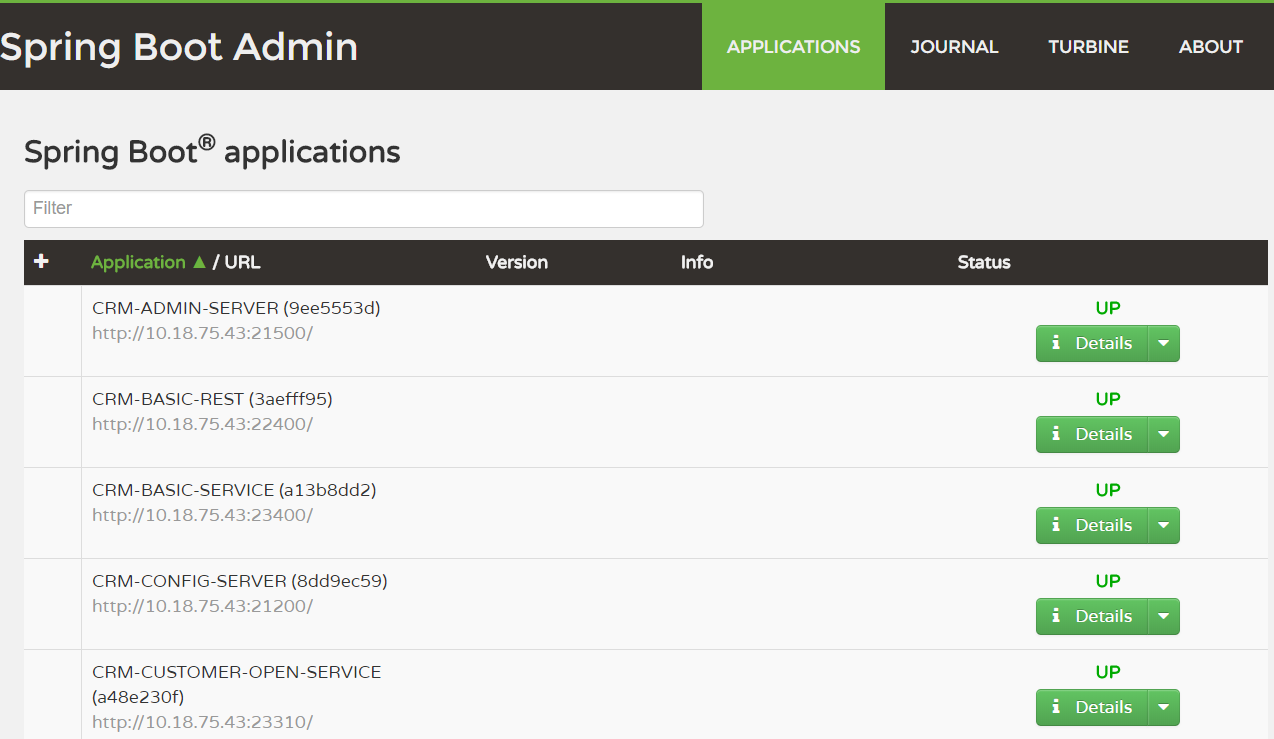
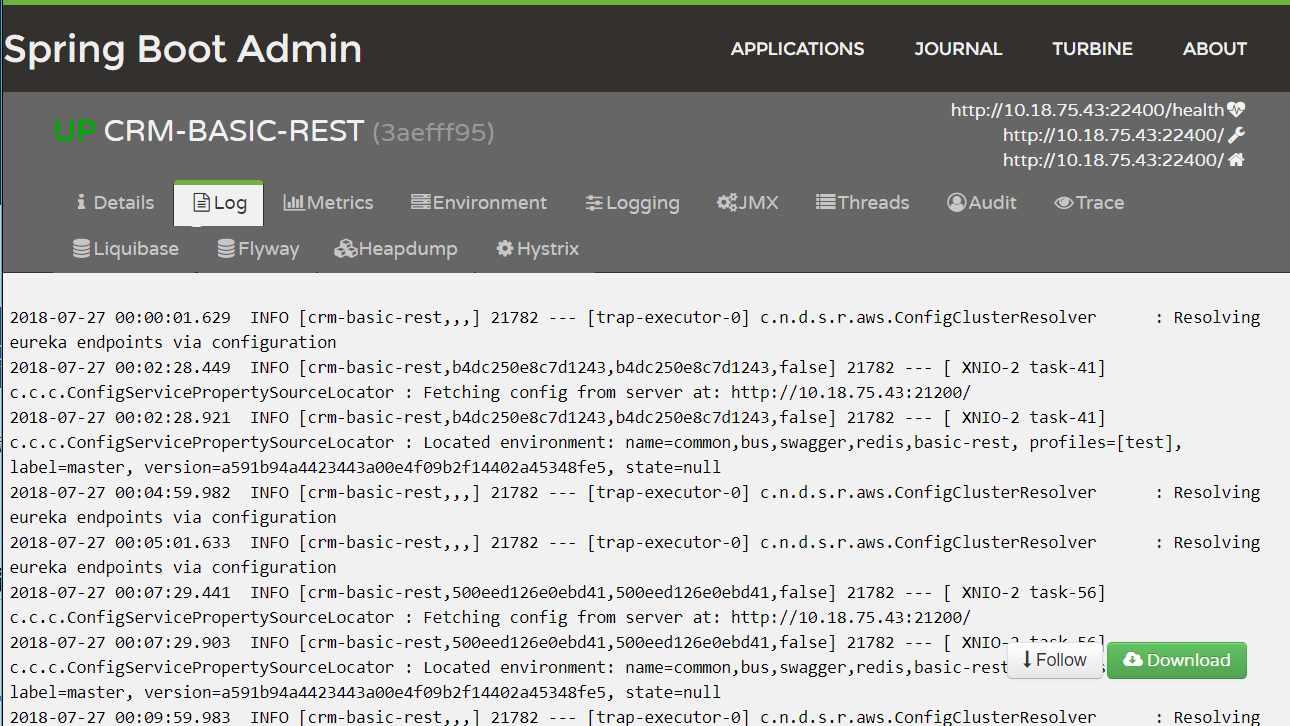
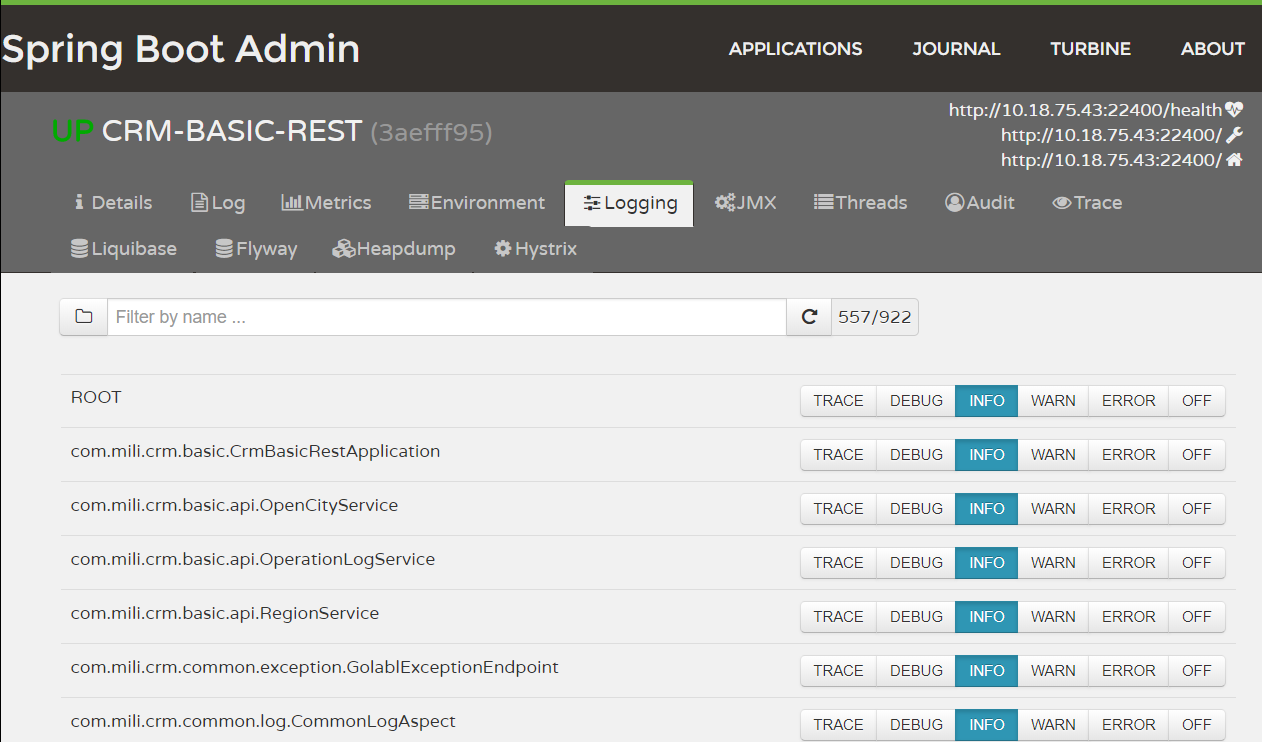
Admin Server的配置文件:
spring.boot.admin.routes.endpoints=env,metrics,dump,jolokia,info,configprops,trace,logfile,restart,shutdown,refresh,heapdump,loggers,auditevents,hystrix.stream

# turbine服务id

spring.boot.admin.turbine.location=crm-admin-server

spring.boot.admin.turbine.clusters=default

turbine.clusterNameExpression=new String("default")

#设置需要监控的serviceId

turbine.app-config=crm-security-rest,crm-security-service,crm-basic-rest,crm-basic-service,crm-customer-open-service,crm-customer-rest,crm-customer-service,crm-report-rest,crm-report-service,crm-gateway,crm-inside-gateway

#同一主机上的服务通过host和port的组合来进行区分

turbine.combine-host-port=true

spring.mail.host=smtp.exmail.qq.com

spring.mail.username=xx@qq.com

spring.mail.password=xxxxxx

spring.mail.properties.mail.smtp.auth=true

spring.mail.properties.mail.smtp.starttls.enable=true

spring.mail.properties.mail.smtp.starttls.required=true

spring.mail.properties.mail.smtp.ssl.enable=true

spring.mail.properties.mail.smtp.socket.factory.class=javax.net.ssl.SSLSocketFactory

spring.mail.properties.mail.smtp.socket.factory.fallback=false

spring.mail.properties.mail.smtp.port=

spring.mail.properties.mail.transport.protocol=smtp

#需要忽略的状态改变通知,逗号分隔,例如不通知离线到上线的状态,则填写为OFFLINE:UP

#spring.boot.admin.notify.mail.ignore-changes=

#接收通知的邮箱地址,逗号分隔

spring.boot.admin.notify.mail.to=yangzhilong@qq.com

#需要抄送的邮箱地址,逗号分隔

#spring.boot.admin.notify.mail.cc=test1@qq.com

#邮件发送者,大部分情况与登录名相同

spring.boot.admin.notify.mail.from=${spring.mail.username}

#邮件主题,默认是:#{application.name} (#{application.id}) is #{to.status}

spring.boot.admin.notify.mail.subject=${spring.profiles.active} profile's #{application.name} (#{application.id}) is #{to.status}

#邮件内容,默认是:#{application.name} (#{application.id})\nstatus changed from #{from.status} to #{to.status}\n\n#{application.healthUrl}

spring.boot.admin.notify.mail.text=${spring.profiles.active} profile's #{application.name} (#{application.id})\nstatus changed from #{from.status} to #{to.status}

#Comma-delimited list of status changes to be ignored. Format: "<from-status>:<to-status>". Wildcards allowed.默认值:"UNKNOWN:UP"

#spring.boot.admin.notify.mail.ignore-changes=
使用SpringBoot Admin监控SpringCloud微服务的更多相关文章
- 使用springboot Admin 2.0.6版本 集成监控springcloud微服务应用
一 新建 添加依赖 <dependencies> <dependency> <groupId>de.codecentric</groupId> < ...
- SpringCloud微服务(04):Turbine组件,实现微服务集群监控
本文源码:GitHub·点这里 || GitEE·点这里 写在前面,阅读本文前,你需要了解熔断器相关内容 SpringCloud微服务:Hystrix组件,实现服务熔断 一.聚合监控简介 1.Dash ...
- SpringCloud微服务学习笔记
SpringCloud微服务学习笔记 项目地址: https://github.com/taoweidong/Micro-service-learning 单体架构(Monolithic架构) Mon ...
- springcloud微服务实战:Eureka+Zuul+Feign/Ribbon+Hystrix Turbine+SpringConfig+sleuth+zipkin
相信现在已经有很多小伙伴已经或者准备使用springcloud微服务了,接下来为大家搭建一个微服务框架,后期可以自己进行扩展.会提供一个小案例: 服务提供者和服务消费者 ,消费者会调用提供者的服务,新 ...
- SpringCloud微服务简介(一)
Spring Cloud简单认识 微服务英文名称Microservice,Microservice架构模式就是将整个Web应用组织为一系列小的Web服务.这些小的Web服务可以独立地编译及部署,并通过 ...
- springcloud微服务实战:Eureka+Zuul+Ribbon+Hystrix+SpringConfig
原文地址:http://blog.csdn.net/yp090416/article/details/78017552 springcloud微服务实战:Eureka+Zuul+Ribbon+Hyst ...
- SpringCloud微服务:基于Nacos组件,整合Dubbo框架
源码地址:GitHub·点这里 || GitEE·点这里 一.基础组件简介 1.Dubbo框架 Dubbo服务化治理的核心框架,之前几年在国内被广泛使用,后续由于微服务的架构的崛起,更多的公司转向微服 ...
- SpringCloud微服务项目实战 - API网关Gateway详解实现
前面讲过zuul的网关实现,那为什么今天又要讲Spring Cloud Gateway呢?原因很简单.就是Spring Cloud已经放弃Netflix Zuul了.现在Spring Cloud中引用 ...
- 08 . Jenkins之SpringCloud微服务+Vue+Docker持续集成
简介 大致流程 /* 1.开发人员每天把代码提交到Gitlab代码仓库 2.jenkins从gitlab中拉取项目源码,编译并打包成war包,然后构建Docker镜像,将镜像上传到Harbor私有仓库 ...
随机推荐
- 【图的遍历】广度优先遍历(DFS)、深度优先遍历(BFS)及其应用
无向图满足约束条件的路径 •[目的]:掌握深度优先遍历算法在求解图路径搜索问题的应用 [内容]:编写一个程序,设计相关算法,从无向图G中找出满足如下条件的所有路径: (1)给定起点u和终点v. ( ...
- 查看Linux端口的占用及连接情况
[root@cloudplatform ~]# netstat -nap | grep 22066 | grep 127.0.0.1 -vtcp 0 0 :::22066 ...
- poj 2406 求字符串中重复子串的个数
Sample Input abcdaaaaababab.Sample Output 1 //1个abcd4 //4个a3 //3个ab #include<stdio.h> #include ...
- POJ 2718【permutation】
POJ 2718 问题描述: 给一串数,求划分后一个子集以某种排列构成一个数,余下数以某种排列构成另一个数,求这两个数最小的差,注意0开头的处理. 超时问题:一开始是得到一个数列的组合之后再从中间进行 ...
- 「BZOJ2882」工艺
题解: 就是个最小表示法 大概做法就是扩大2倍原串 然后双指针比较,如果不相同了直接跳 原理随便画画就知道了
- BZOJ1084 [SCOI2005]最大子矩阵 动态规划
欢迎访问~原文出处——博客园-zhouzhendong 去博客园看该题解 题目传送门 - BZOJ1084 题意概括 这里有一个n*m的矩阵,请你选出其中k个子矩阵,使得这个k个子矩阵分值之和最大.注 ...
- 【noip模拟赛9】123法典
描述 很久很久以前,有个叫123的国家,这个国家的国王很喜欢颁布各种法令,并把这些法令记录在一部<123法典>中.最近这部法典终于被发掘了出来,专家们经过研究发现法典中的法令是按颁布的时间 ...
- 6-3 二叉树的重建 uva536
已知先序和中序 求后序 可以有两种方式输出 一种是建好树按照树输出 一种是不建树 在遍历的过程中存入vector 再倒叙输出 #include<bits/stdc++.h> usin ...
- TotoriseGit安装
1.前提 前提是有安装过git. 2.下载 3.安装 二:参考的文档 1.不错的文档 https://www.cnblogs.com/xinlj/p/5978730.html http://blog. ...
- Redis特性--多数据库与事务性
一:多数据库 1.默认 默认是数据库0 2.移动 二:事务 1.介绍 使用命令有三个:multi,exec,discard 2.再开启一个客户端方便进行验证 3.没有开启事务的情况 1端口设置: 在2 ...