
Apache升级PHP教程(以5.3.3升级到5.6.30为例)
最简单的LAMP环境搭建当然是通过yum来安装,但由于镜像仓库中的软件版本更新较慢,经常会遇到版本过旧的问题,尤其是安装一些新版本的CMS时的PHP。
这时我们需要手动编译PHP,Linux编译安装经常是./configure--make--make install三大步,但是实践中发现简单地这样安装会发现通过php -v呈现的版本号已经改变但是通过phpinfo()函数查看到的httpd使用的php版本还是没有改变。
回顾apache引入php支持的配置过程,其中最主要的是在httpd.conf中配置了LoadModule php5_module modules/libphp5.so,结合系统php已更新而apache中的php却未更新的现像,可以推测apache调用php并不是直接调用系统的php而就是调用libphp5.so;新编译安装php未成功替换掉apache中的php的原因就是没编译生成新的libphp5.so去替换旧的libphp5.so。
而最终的测试可以验证这种推测是正确的。以下是Apache升级PHP的步骤,这里有些操作比较粗操比如提示未知的编译选项--with-exec-dir等并未理会,生产环境按此升级需谨慎。
1.下载php
下载链接:http://php.net/downloads.php
选择需要版本下载,5.x版本和7.x版本还是有点区别的,建议原先是5.x的选择5.x版本下载7.x的版本选择7.x下载
2.安装apxs
apxs是apache扩展的编译程序,要确保apxs已安装
which apxs
如果不存在该命令则通过安装httpd-devel来安装:

装完后再次使用which命令定位apxs安装路径:

3.查看当前使用php编译参数
在apache网站根目录下写个phpinfo文件,然后在浏览器访问
cat > phpinfo.php << EOF

<?php

    phpinfo();

?>

EOF
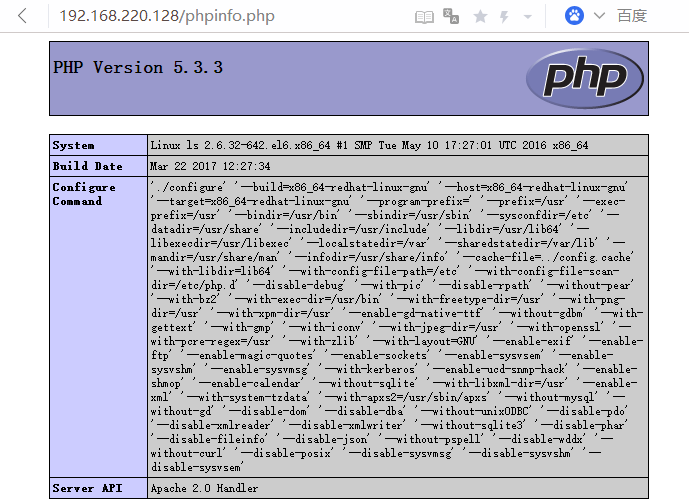
Configure Command右侧即当前PHP编译命令,我们使用一样的命令编译新的PHP即可(注意--with-apxs2的值是否上步安装的apxs所在的路径)
4.编译安装PHP
将压下载的PHP进入解压出的目录,使用./configure--make--make install三大步进行编译安装
./configure就直接复制上边查到的,单引号不影响的,有可能有些包没安装安装即可,有可能有些选项新版不支持这里我没管。如我这里使用:
'./configure' '--build=x86_64-redhat-linux-gnu' '--host=x86_64-redhat-linux-gnu' '--target=x86_64-redhat-linux-gnu' '--program-prefix=' '--prefix=/usr' '--exec-prefix=/usr' '--bindir=/usr/bin' '--sbindir=/usr/sbin' '--sysconfdir=/etc' '--datadir=/usr/share' '--includedir=/usr/include' '--libdir=/usr/lib64' '--libexecdir=/usr/libexec' '--localstatedir=/var' '--sharedstatedir=/var/lib' '--mandir=/usr/share/man' '--infodir=/usr/share/info' '--cache-file=../config.cache' '--with-libdir=lib64' '--with-config-file-path=/etc' '--with-config-file-scan-dir=/etc/php.d' '--disable-debug' '--with-pic' '--disable-rpath' '--without-pear' '--with-bz2' '--with-exec-dir=/usr/bin' '--with-freetype-dir=/usr' '--with-png-dir=/usr' '--with-xpm-dir=/usr' '--enable-gd-native-ttf' '--without-gdbm' '--with-gettext' '--with-gmp' '--with-iconv' '--with-jpeg-dir=/usr' '--with-openssl' '--with-pcre-regex=/usr' '--with-zlib' '--with-layout=GNU' '--enable-exif' '--enable-ftp' '--enable-magic-quotes' '--enable-sockets' '--enable-sysvsem' '--enable-sysvshm' '--enable-sysvmsg' '--with-kerberos' '--enable-ucd-snmp-hack' '--enable-shmop' '--enable-calendar' '--without-sqlite' '--with-libxml-dir=/usr' '--enable-xml' '--with-system-tzdata' '--with-apxs2=/usr/sbin/apxs' '--without-mysql' '--without-gd' '--disable-dom' '--disable-dba' '--without-unixODBC' '--disable-pdo' '--disable-xmlreader' '--disable-xmlwriter' '--without-sqlite3' '--disable-phar' '--disable-fileinfo' '--disable-json' '--without-pspell' '--disable-wddx' '--without-curl' '--disable-posix' '--disable-sysvmsg' '--disable-sysvshm' '--disable-sysvsem'

make

make install
configure报错:checking for BZip2 in default path... not found
解决办法:yum install -y gzip2-devel
configure报错:configure: error: Unable to locate gmp.h
解决办法:yum install -y gmp-devel
make报错:ext/pcre/.libs/php_pcre.o: In function `zm_info_pcre': /usr/myapp/php-5.6.30/ext/pcre/php_pcre.c:133: undefined reference to `php_pcre_version'....
解决办法:看意思是结构体没定义,可能是php_pcre.c没正确include但这可能性不大,也可能是安装的pcre版本太旧;不太清楚,最后我直接把./configure中的--with-pcre-regex=/usr去掉了,慎用。
5.再次查看phpinfo.php页面确认升级成功
先重启apache再刷新页面
service httpd restart

参考:
https://segmentfault.com/q/1010000005115503/a-1020000005116821
http://blog.csdn.net/work888study/article/details/8610467
Apache升级PHP教程(以5.3.3升级到5.6.30为例)的更多相关文章
- Apache Solr 初级教程(介绍、安装部署、Java接口、中文分词)
Python爬虫视频教程零基础小白到scrapy爬虫高手-轻松入门 https://item.taobao.com/item.htm?spm=a1z38n.10677092.0.0.482434a6E ...
- SQL 2008升级SQL 2008 R2完全教程或者10.00.1600升级10.50.1600
http://blog.csdn.net/feng19821209/article/details/8571571 SQL 2008升级SQL 2008 R2完全教程或者10.00.1600升级10. ...
- CentOS6.0(64位)安装Apache+PHP+Mysql教程,安装Magento(解决DOM,Mcrypt,GD问题)完整教程
CentOS6.0(64位)安装Apache+PHP+Mysql教程,安装Magento(解决DOM,Mcrypt,GD问题)完整教程 0 Posted by :小黑 On : 2012 年 9 ...
- SQL 2008升级SQL 2008 R2完全教程或者10.00.4000升级10.50.1600
今天将由于需要就将我的SQL 2008升级到SQL 2008 R2. 说到为什么要升级是因为,从另一台机器上备份了一个数据库,到我的机器上还原的时候提示“System.Data.SqlClient.S ...
- Tips & Tricks:Apache log4j简明教程(二)
在上一讲Apache log4j简明教程(一)中介绍了log4j的基本概念,配置文件,以及将日志写入文件的方法,并给出了一个详细的示例.这一讲,我在继续谈一谈如何使用log4j将日志写入MySQL数据 ...
- Tips & Tricks:Apache log4j简明教程(一)
Apache log4j的官方介绍是“log4j is a reliable, fast and flexible logging framework (APIs) written in Java, ...
- Apache Solr入门教程(初学者之旅)
Apache Solr入门教程(初学者之旅) 写在前面:本文涉及solr入门的各方面,建议边思考边实践,相信能帮助你对solr有个清晰全面的了解并能简单实用. 在Apache Solr初学者教程的这个 ...
- Apache Pig中文教程集合
Apache Pig中文教程集合: http://www.codelast.com/?p=4550#more-4550
- python2.7.5升级到2.7.14或者直接升级到3.6.4
python2.7.5升级到2.7.14 1.安装升级GCC yum install -y gcc* openssl openssl-devel ncurses-devel.x86_64 bzip2 ...
- Python—python2.7.5升级到2.7.14或者直接升级到3.6.4
python2.7.5升级到2.7.14 1.安装升级GCC yum install -y gcc* openssl openssl-devel ncurses-devel.x86_64 bzip2 ...
随机推荐
- 查看iis对应w3wp.exe显示的进程ID号
1.任务管理器,查看,选择列,选择PID(进程标识符) 2.通过cmd查询: 管理员身份运行cmd,跳转到C:\Windows\System32\inetsrv目录,然后运行appcmd list w ...
- gym 101164 H.Pub crawl 凸包
题目链接:http://codeforces.com/gym/101164/attachments 题意:对于已知的 n 个二维坐标点,要求按照某种特定的连线方式将尽可能多的点连接(任意相邻的 3 个 ...
- Intellij idea 2017 图标含义
File Type Icon Recognized in ActionScript files ActionScript files Ultimate Edition Active Server Pa ...
- 一般删除网页数据和jquery下使用Ajax删除数据的区别
1. 一般删除网页数据 就是指用户在点击删除的时候,会跳转到DeleteUser.ashx一般处理程序中,并且通过get传参的方式传递一个id的参数,然后在后台处理 <a href='Delet ...
- vue定义全局方法 调用其他组件的方法
官网的写法 vue实例.$on就可以在根实例上定义全局方法 this.$root就是获取根实例 如果没有根实例 就表示当前实例 this.$root.$on 不需要.eventHub 不需要下面这 ...
- 关于js函数,方法,对象实例的一些说明
朋友们大家好,好久没有更新文章了,最近正好有空就想着写点什么吧,加上这段时间总是能听到一些朋友们问关于js函数,方法,对象实例到底有什么区别这个问题,所以今天就献丑来简单说明一些吧! 其实这些主要都是 ...
- C# 视频多人脸识别的实现
上一篇内容的调整,提交到git了,https://github.com/catzhou2002/ArcFaceDemo基本思路如下:一.识别线程1.获取当前图片2.识别当前图片的人脸位置,并将结果存入 ...
- axios写法
- P481tabtenn0
编程环境为Qt Creator 4.0.3 (Community) tabtenn0.h #ifndef TABTENN0_H #define TABTENN0_H #include <stri ...
- Nested Comment Treads in ROR
建立一个嵌套的评论 建立数据库结构和嵌套视图(使用Stimulus取元素和绑event) 可以删除评论,可以对嵌套视图的层数进行控制. 用Ajax代替完全的刷新页面. 删除一个评论,但不丢失它的子评论 ...