
Gerrit和OpenLDAP服务器集成
Gerrit和OpenLDAP服务器集成
作者:尹正杰
版权声明:原创作品,谢绝转载!否则将追究法律责任。
一.安装LDAP服务器
详情请参考:https://www.cnblogs.com/yinzhengjie/p/11020700.html

二.安装Gerrit基于LDAP验证(我们之前演示基于"development_become_any_account"认证的方式)
[gerrit@node201.yinzhengjie.org.cn ~/soft]$  java -jar gerrit-2.15..war init

Using secure store: com.google.gerrit.server.securestore.DefaultSecureStore

*** Gerrit Code Review 2.15.

***

*** Git Repositories

***

Location of Git repositories   [git]:

*** SQL Database

***

Database server type           [mysql]:

Server hostname                [node201.yinzhengjie.org.cn]:

Server port                    []:

Database name                  [gerrit]:

Database username              [gerrit]:

Change gerrit's password       [y/N]? n

*** Index

***

Type                           [lucene/?]:

The index must be rebuilt before starting Gerrit:

  java -jar gerrit.war reindex -d site_path

*** User Authentication

***

Authentication method          [development_become_any_account/?]: ?

       Supported options are:

         openid

         openid_sso

         http

         http_ldap

         client_ssl_cert_ldap

         ldap

         ldap_bind

         custom_extension

         development_become_any_account

         oauth

Authentication method          [development_become_any_account/?]: ldap

Git/HTTP authentication        [http/?]:

LDAP server                    [ldap://localhost]: ldap://node202.yinzhengjie.org.cn:389              #指定LDAP的服务器地址

LDAP username                  : cn=Manager,dc=yinzhengjie,dc=org,dc=cn                        #指定LDAP的用户名

cn=Manager,dc=yinzhengjie,dc=org,dc=cn's password :                                     #输入登陆LDAP的密码

              confirm password :

Account BaseDN                 [DC=yinzhengjie,DC=org,DC=cn:]: ou=People,dc=yinzhengjie,dc=org,dc=cn      #指定我们认证用户对应的LDAP路径

Group BaseDN                   [ou=People,dc=yinzhengjie,dc=org,dc=cn]: ou=Group,dc=yinzhengjie,dc=org,dc=cn   #指定我们认证的用户组对应的LDAP路径

Enable signed push support     [y/N]? n

*** Email Delivery

***

SMTP server hostname           [smtp.qq.com]:

SMTP server port               []:

SMTP encryption                [ssl/?]:

SMTP username                  [y1053419035@qq.com]:

Change y1053419035@qq.com's password [y/N]? n

*** Container Process

***

Run as                         [gerrit]:

Java runtime                   [/usr/lib/jvm/java-1.8.-openjdk-1.8.0.212.b04-.el7_6.x86_64/jre]:

Upgrade ./bin/gerrit.war       [Y/n]? n

*** SSH Daemon

***

Listen on address              [node201.yinzhengjie.org.cn]:

Listen on port                 []:

*** HTTP Daemon

***

Behind reverse proxy           [y/N]? n

Use SSL (https://)             [y/N]? n

Listen on address              [node201.yinzhengjie.org.cn]:

Listen on port                 []:

Canonical URL                  [http://172.30.1.201:8080]:

*** Cache

***

Delete cache file /yinzhengjie/softwares/gerrit/soft/cache/diff_summary.lock.db [y/N]? y        #删除掉之前的缓存文件

Delete cache file /yinzhengjie/softwares/gerrit/soft/cache/diff_summary.h2.db [y/N]? y

Delete cache file /yinzhengjie/softwares/gerrit/soft/cache/change_kind.lock.db [y/N]? y

Delete cache file /yinzhengjie/softwares/gerrit/soft/cache/change_kind.h2.db [y/N]? y

Delete cache file /yinzhengjie/softwares/gerrit/soft/cache/mergeability.lock.db [y/N]? y

Delete cache file /yinzhengjie/softwares/gerrit/soft/cache/mergeability.h2.db [y/N]? y

Delete cache file /yinzhengjie/softwares/gerrit/soft/cache/conflicts.lock.db [y/N]? y

Delete cache file /yinzhengjie/softwares/gerrit/soft/cache/conflicts.h2.db [y/N]? y

Delete cache file /yinzhengjie/softwares/gerrit/soft/cache/diff_intraline.lock.db [y/N]? y

Delete cache file /yinzhengjie/softwares/gerrit/soft/cache/diff_intraline.h2.db [y/N]? y

Delete cache file /yinzhengjie/softwares/gerrit/soft/cache/diff.lock.db [y/N]? y

Delete cache file /yinzhengjie/softwares/gerrit/soft/cache/diff.h2.db [y/N]? y

Delete cache file /yinzhengjie/softwares/gerrit/soft/cache/oauth_tokens.lock.db [y/N]? y

Delete cache file /yinzhengjie/softwares/gerrit/soft/cache/oauth_tokens.h2.db [y/N]? y

Delete cache file /yinzhengjie/softwares/gerrit/soft/cache/git_tags.lock.db [y/N]? y

Delete cache file /yinzhengjie/softwares/gerrit/soft/cache/git_tags.h2.db [y/N]? y

Delete cache file /yinzhengjie/softwares/gerrit/soft/cache/web_sessions.lock.db [y/N]? y

Delete cache file /yinzhengjie/softwares/gerrit/soft/cache/web_sessions.h2.db [y/N]? y

*** Plugins

***

Installing plugins.

Install plugin commit-message-length-validator version v2.15.14 [Y/n]? y          #安装对应的插件但不覆盖

commit-message-length-validator v2.15.14 is already installed, overwrite it [Y/n]? n

Install plugin download-commands version v2.15.14 [Y/n]? y

download-commands v2.15.14 is already installed, overwrite it [Y/n]? n

Install plugin hooks version v2.15.14 [Y/n]? y

hooks v2.15.14 is already installed, overwrite it [Y/n]? n

Install plugin replication version v2.15.14 [Y/n]? y

replication v2.15.14 is already installed, overwrite it [Y/n]? n

Install plugin reviewnotes version v2.15.14 [Y/n]? y

reviewnotes v2.15.14 is already installed, overwrite it [Y/n]? n

Install plugin singleusergroup version v2.15.14 [Y/n]? y

singleusergroup v2.15.14 is already installed, overwrite it [Y/n]? n

Initializing plugins.

*** Experimental features

***

Enable any experimental features [y/N]? y

Default to PolyGerrit UI       [Y/n]? y

Enable GWT UI                  [Y/n]? y

Tue Jun  :: EDT  WARN: Establishing SSL connection without server's identity verification is not recommended. According to MySQL 5.5.45+, 5.6.26+ and 5.7.6+ requirements SSL connection must be established by default if explicit option isn't set. For compliance with existing applications not using SSL the verifyServerCertificate property is set to 'false'. You need either to explicitly disable SSL by setting useSSL=false, or set useSSL=true and provide truststore for server certificate verification.

Tue Jun  :: EDT  WARN: Establishing SSL connection without server's identity verification is not recommended. According to MySQL 5.5.45+, 5.6.26+ and 5.7.6+ requirements SSL connection must be established by default if explicit option isn't set. For compliance with existing applications not using SSL the verifyServerCertificate property is set to 'false'. You need either to explicitly disable SSL by setting useSSL=false, or set useSSL=true and provide truststore for server certificate verification.

Initialized /yinzhengjie/softwares/gerrit/soft

[gerrit@node201.yinzhengjie.org.cn ~/soft]$

[gerrit@node201.yinzhengjie.org.cn ~/soft]$
三.启动Gerrit服务
1>.启动Gerrit服务(MySQL数据库别忘记启动了哈)
[gerrit@node201.yinzhengjie.org.cn ~/soft]$ ./bin/gerrit.sh start

Starting Gerrit Code Review: WARNING: Could not adjust Gerrit's process for the kernel's out-of-memory killer.

         This may be caused by ./bin/gerrit.sh not being run as root.

         Consider changing the OOM score adjustment manually for Gerrit's PID=21559 with e.g.:

         echo '-1000' | sudo tee /proc//oom_score_adj

OK

[gerrit@node201.yinzhengjie.org.cn ~/soft]$
2>.检查启动的端口
[gerrit@node201.yinzhengjie.org.cn ~/soft]$ ss -ntl

State       Recv-Q Send-Q                                                    Local Address:Port                                                                   Peer Address:Port

LISTEN                                                                     172.30.1.201:                                                                             *:*

LISTEN                                                                     172.30.1.201:                                                                              *:*

LISTEN                                                                               *:                                                                                *:*

LISTEN                                                                       127.0.0.1:                                                                                *:*

LISTEN                                                                               :::                                                                             :::*

LISTEN                                                                              :::                                                                               :::*

[gerrit@node201.yinzhengjie.org.cn ~/soft]$
3>.访问Gerrit对应的WebUI(http://node201.yinzhengjie.org.cn:8080/q/status:open)

4>.输入在LDAP中创建的用户名和密码(如果你输入的用户和密码不存在,则登陆失败,服务器也会产生错误日志,根据日志的报错信息来解决问题即可)
[gerrit@node201.yinzhengjie.org.cn ~/soft/logs]$ tail -100f error_log       #登陆成功后,我们会在对应的如下日志信息

......

[-- ::,] [HTTP-] INFO  com.googlesource.gerrit.plugins.hooks.HookFactory : hooks.path: /yinzhengjie/softwares/gerrit/soft/hooks

[-- ::,] [HTTP-] INFO  com.googlesource.gerrit.plugins.hooks.HookFactory : hooks.refUpdatedHook resolved to /yinzhengjie/softwares/gerrit/soft/hooks/ref-updated

[-- ::,] [HTTP-] INFO  com.google.gerrit.server.account.ChangeUserName : Created the new external Id with key: username:jason
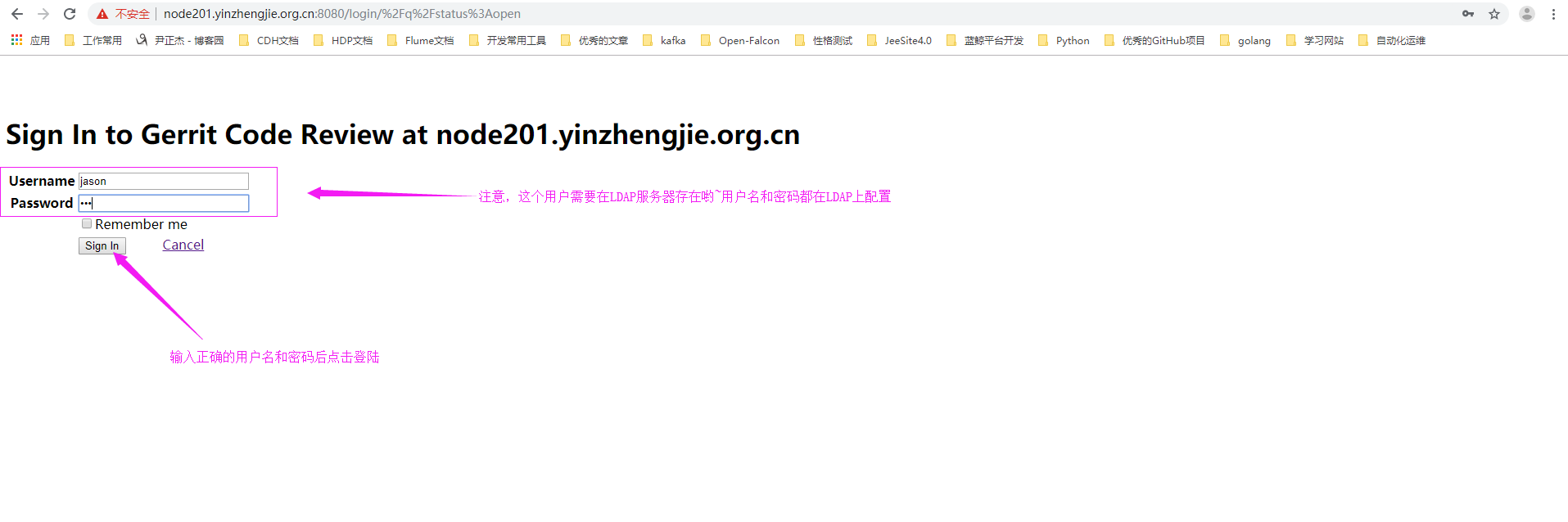
5>.登陆成功

四.对账户进行授权
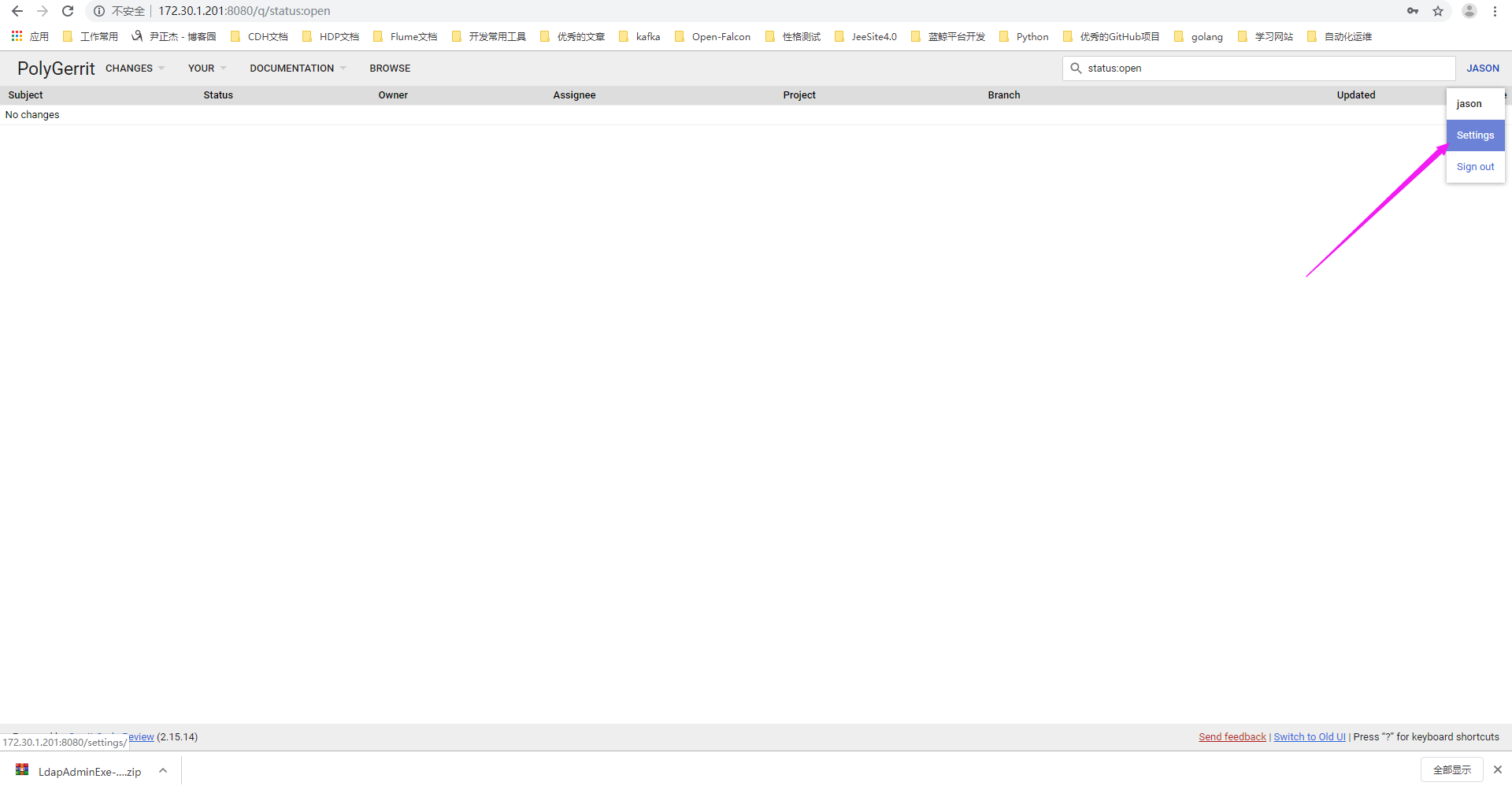
1>.点击设置,你会发现jason没有管理员权限
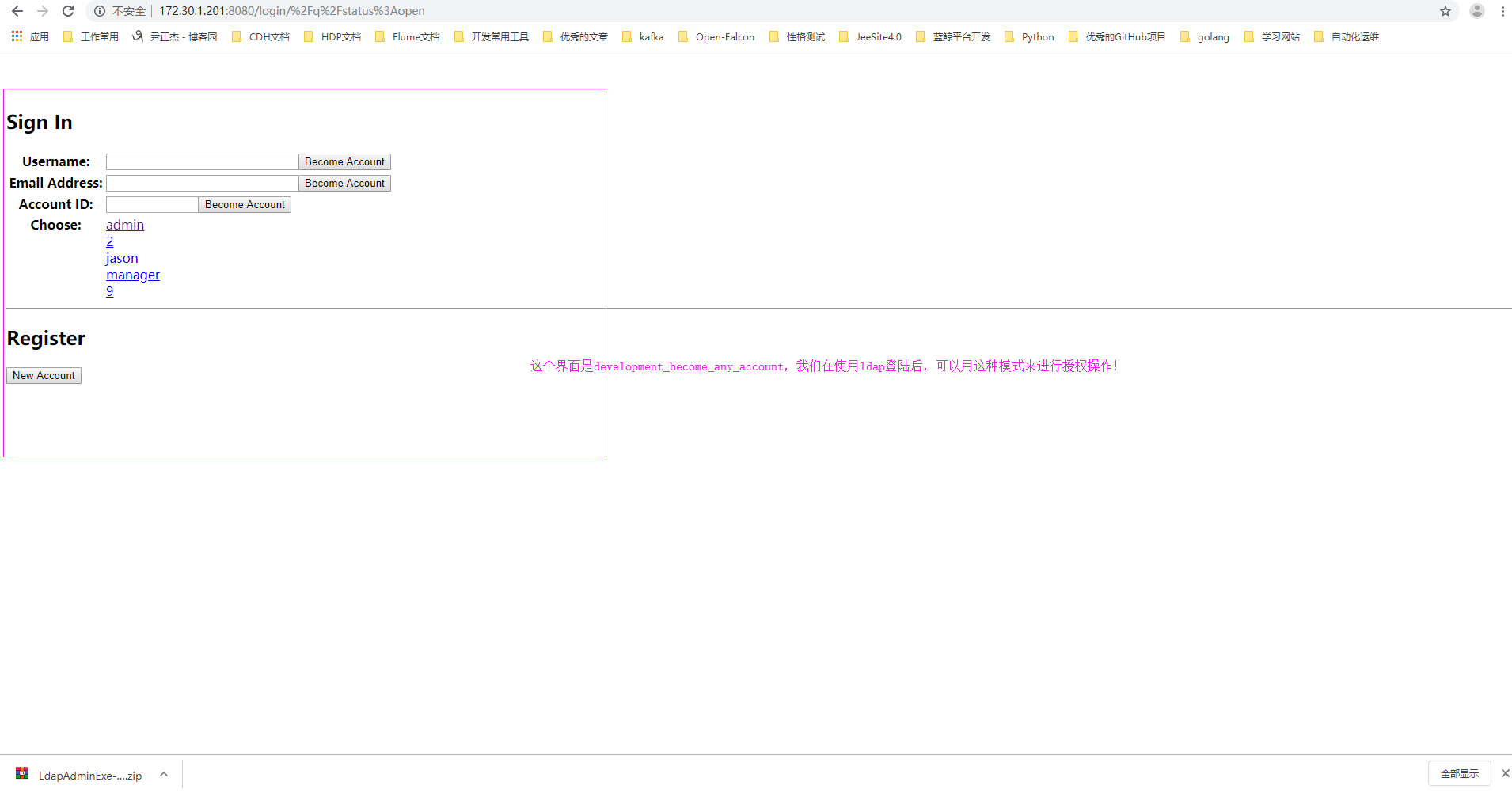
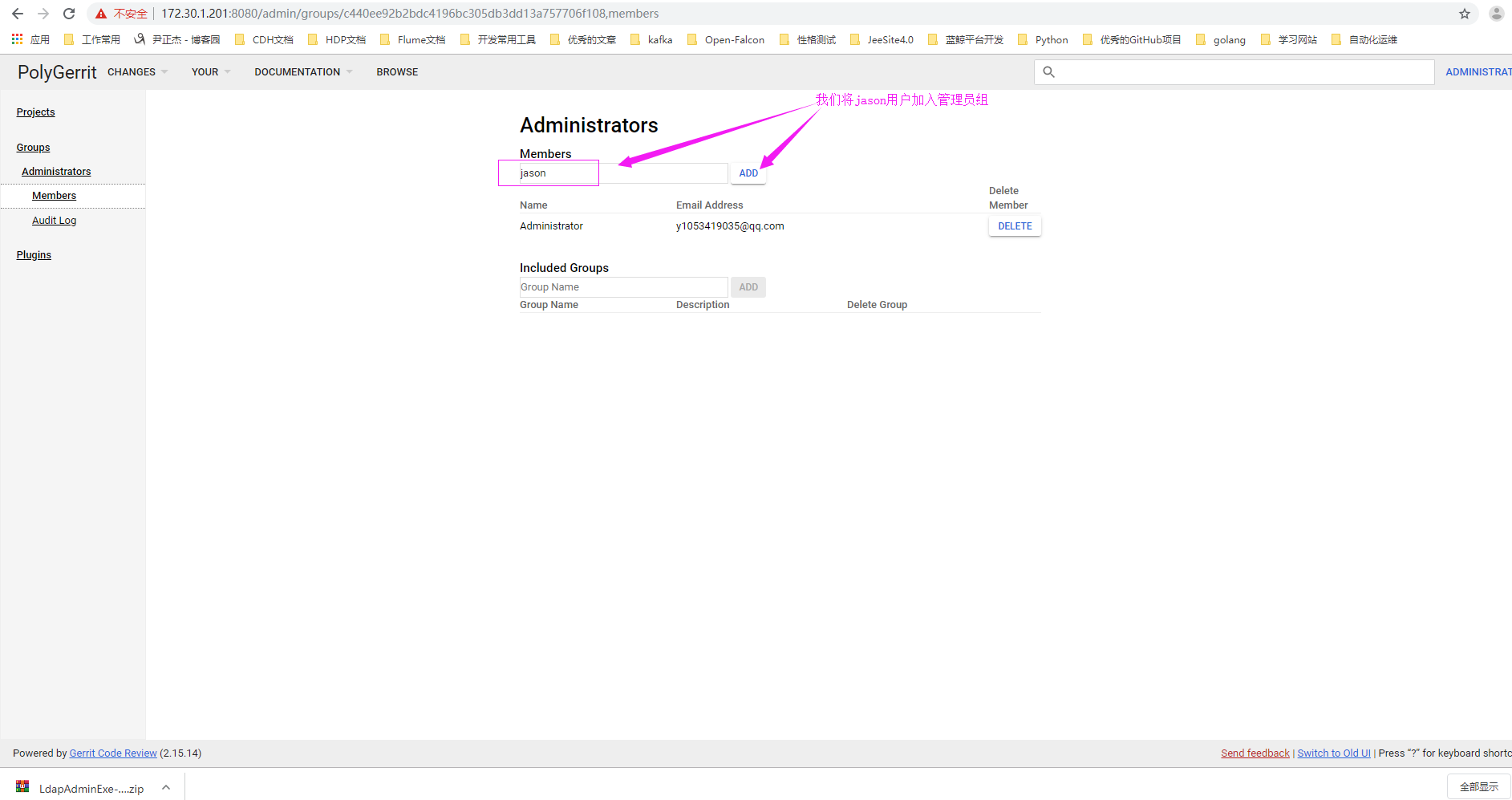
2>.使用"development_become_any_account"进行认证,然后把jason用户加入到管理员用户
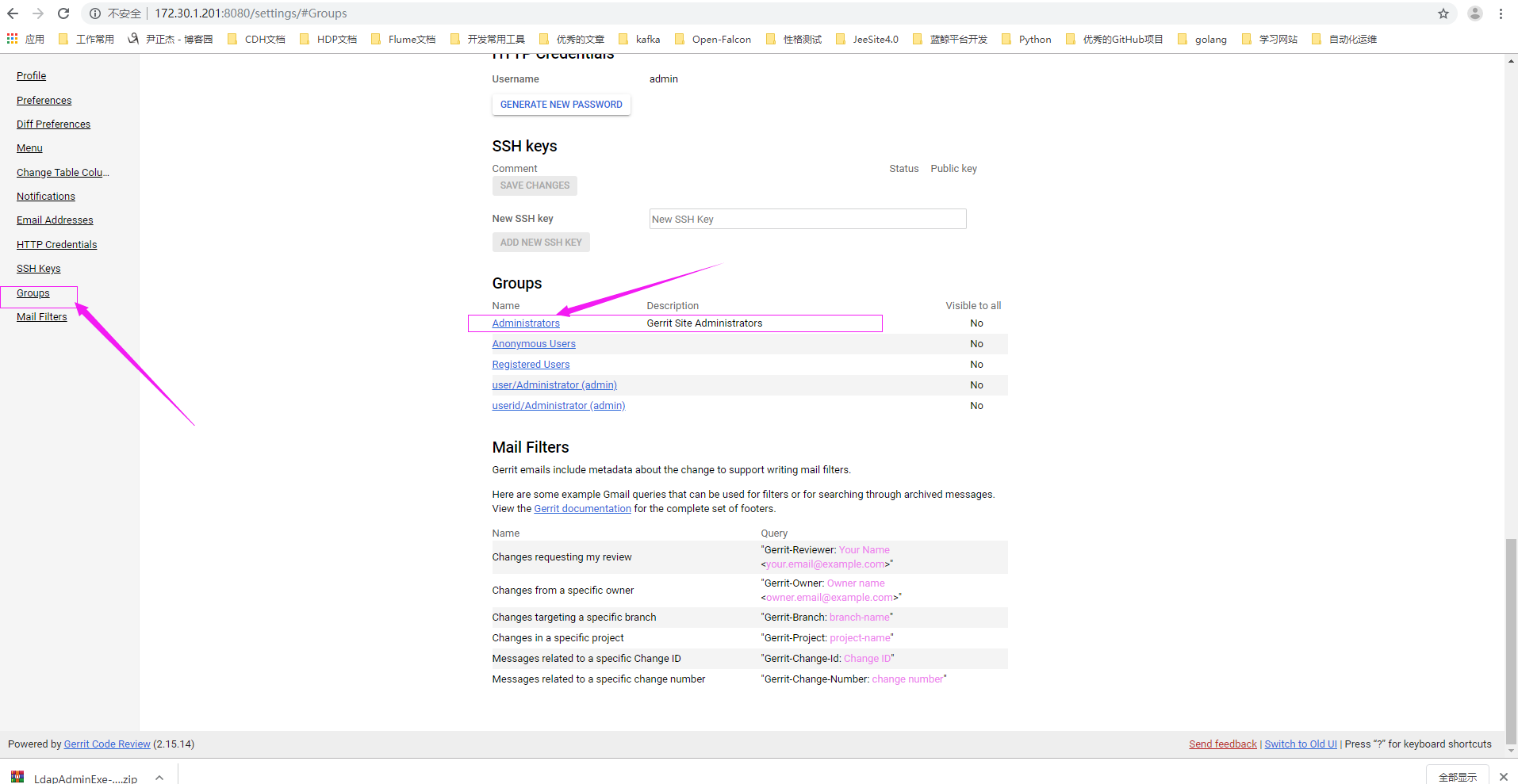
3>.点击设置

4>.进入管理员组
5>.搜索用户,将其加入管理员组中
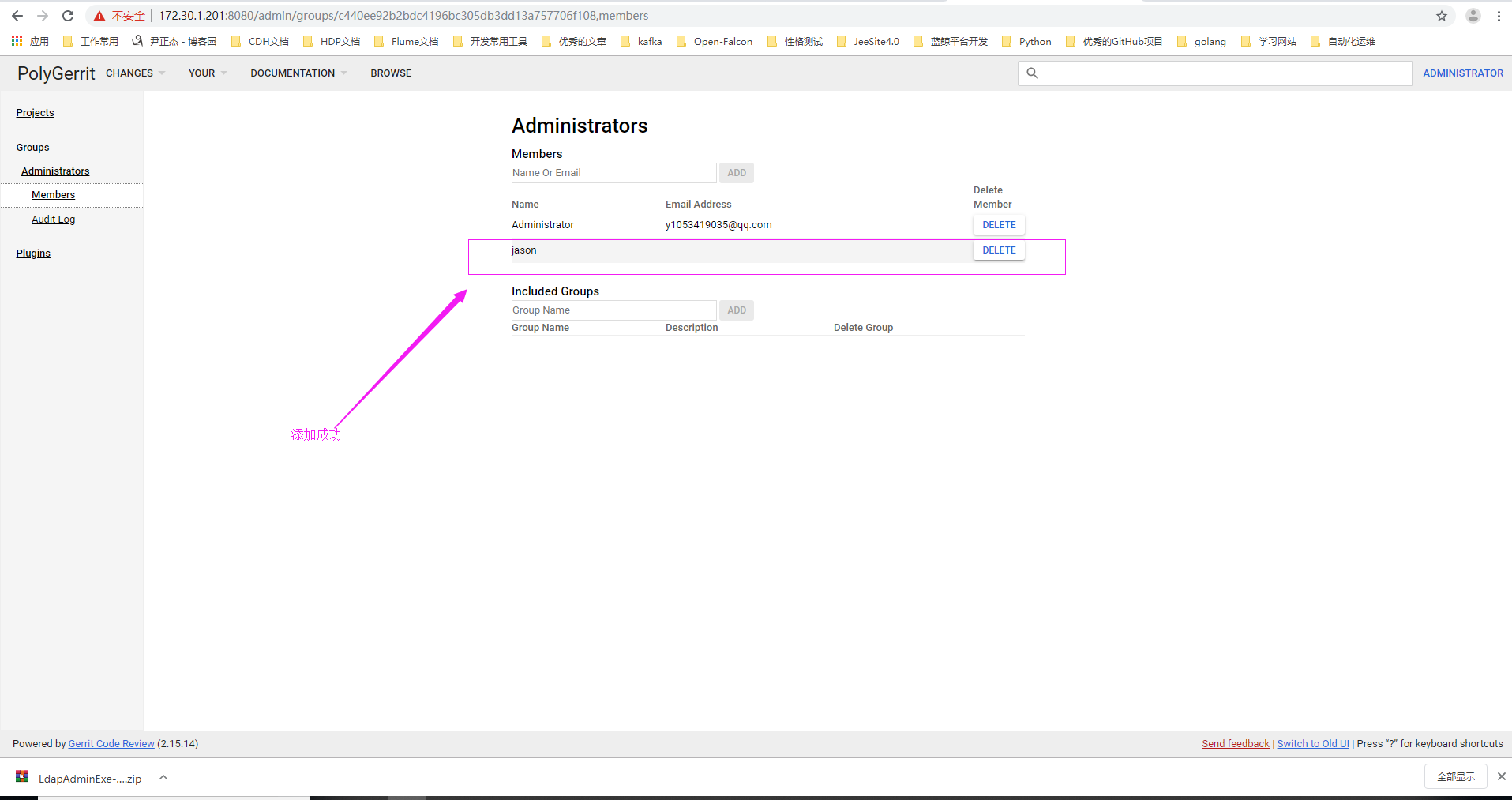
6>.将jason用户添加到管理员成功
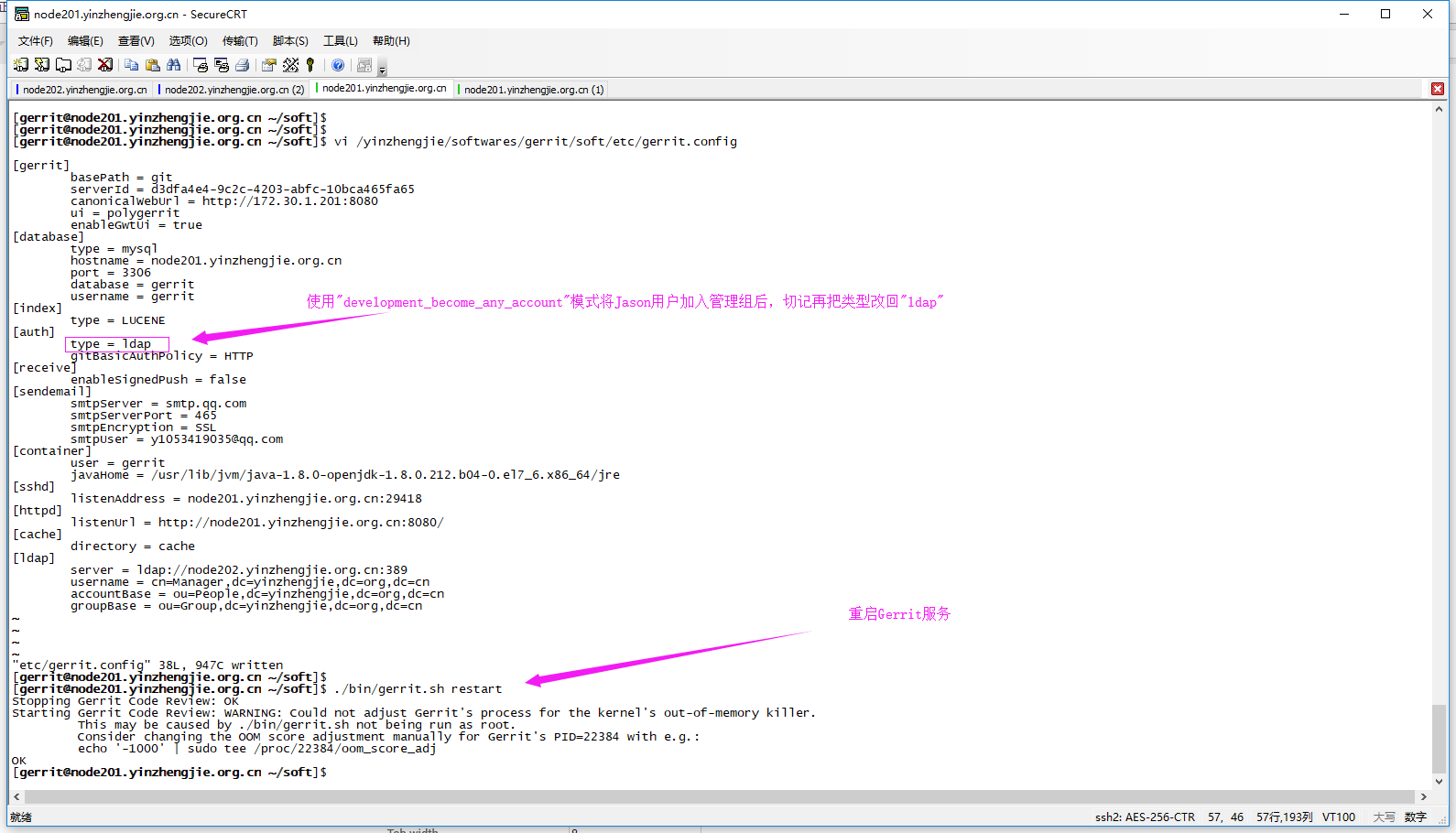
7>.将"development_become_any_account"认证模式改回"ldap"认证模式,修改配置文件"yinzhengjie/softwares/gerrit/soft/etc/gerrit.config"
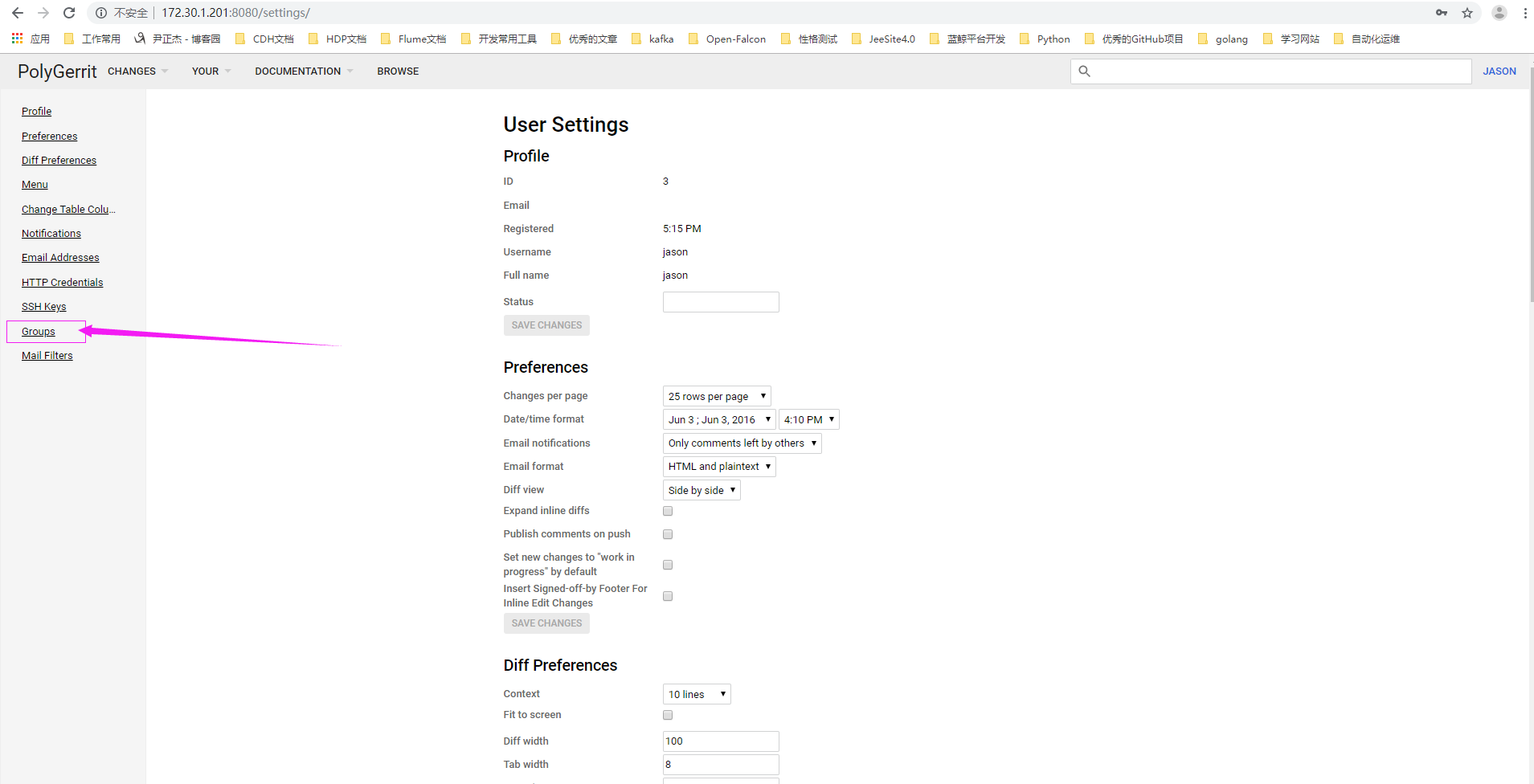
8>.再次使用Jason用户登陆,点击设置

9>.点击组
10>.查看Jason属于管理组权限啦

Gerrit和OpenLDAP服务器集成的更多相关文章
- Gerrit和Gitlab服务器的集成
Gerrit和Gitlab服务器的集成 作者:尹正杰 版权声明:原创作品,谢绝转载!否则将追究法律责任. 一.安装gitlab 详情请参考:https://www.cnblogs.com/yinzhe ...
- 架设 OpenLDAP服务器
OpenLDAP是一个开放源代码的软件,可以免费获取使用,其主页地址是:http://www.openldap.org/.在RHEL 6上安装OpenLDAP还需要libtool-ltdl-2.2.6 ...
- 架设 OpenLDAP服务器(转)
OpenLDAP是一个开放源代码的软件,可以免费获取使用,其主页地址是:http://www.openldap.org/.在RHEL 6上安装OpenLDAP还需要libtool-ltdl-2.2.6 ...
- Jira配置openLdap服务器进行用户认证
测试环境 注:进过测试,Jira6.3.6和Jira7.3.8界面和配置方法相同,不过7.3.x版本默认的用户组只有jira-software-users和jira-administrators,好在 ...
- Gerrit代码审核服务器搭建全过程
Gerrit代码审核服务器搭建全过程 转载请标明出处:http://blog.csdn.net/ganshuyu/article/details/8978614 环境:Ubuntu12.xx 1.建立 ...
- ubuntu搭建Gerrit代码审核服务器
谷歌的 Android 开源项目在 Git 的使用上有两个重要的创新,一个是为多版本库协同而引入的 repo,另外一个重要的创新就是 Gerrit —— 代码审核服务器.Gerrit 为 git 引入 ...
- 基于 CentOS 8 搭建 openLDAP 服务器
转载请注明原文地址:基于 CentOS 8 搭建 openLDAP 服务器 环境 OS: CentOS 8.4.2105 PHP: 7.4.21 注意 CentOS 7 中可能默认提供了 openLD ...
- windows系统下Tomcat与Apache服务器集成
说明:此文是看书真实试验成功的,书中提到了不同版本不兼容的问题,但是很荣幸我没碰到,此例可供参考. 本文假设你已经有了java环境和tomcat,你已经熟悉tomcat的应用. Jdk 1.7.0_5 ...
- 通过iLO进行Zabbix监控——针对HP服务器集成
iLO 全名是 Integrated Lights-out,它是惠普某些型号的服务器上集成的远程管理端口,它能够允许用户基于不同的操作系统从远端管理服务器,实现了虚拟存在和控制,从而进行智能型基础构架 ...
随机推荐
- 浏览器查看和手动设置cookie的值
1.查看:按F12进入浏览器的开发者模式——console——在命令行输入javascript:alert(document.cookie),再回车 2.按F12进入浏览器的开发者模式——consol ...
- phpspreadsheet 中文文档(六)读写文件+读取文件
2019年10月11日14:05:58 读写文件 从体系结构您已经知道,使用基本PhpSpreadsheet类无法对持久性存储进行读写.为此,PhpSpreadsheet提供读者和作家,这是实现\Ph ...
- BottomTabNavigator 顶部导航的显示隐藏
const TabNavigator = createBottomTabNavigator({ ...模块, ...模块, },{ navigationOptions:{ header:null }
- javascript中var、let、const的区别
这几天修改别人的js,发现声明变量有的用var,有的用let,那它们有什么区别呢? javascript中声明变量的方式有:var.let.const 1.var (1)作用域: 整个函数范围内,或者 ...
- Python监听键盘和鼠标事件
我们可以利用windows提供的api函数来实现对系统键盘事件和鼠标事件的监听,主要利用的是SetWindowsHookEx函数,这个函数可以允许调用者传入一个钩子函数也叫回调函数,当指定的事件发生时 ...
- 微信公众号开发 token 验证程序
<?php traceHttp(); define("TOKEN", "gmll001"); $wechatObj = new wechatCallbac ...
- 解决 niceScroll 自适应DOM 高度变化
利用dataTable展示数据列表时,当选择每页显示数量时,滚动条还是按照页面初始化时显示的,导致无法滚动查看下面的数据, 在stackoverflower 找到一个可用的方法,但不知道为什么仅写 ...
- LeetCode 1223. 掷骰子模拟 Dice Roll Simulation - Java - DP
题目链接:1223. 掷骰子模拟 有一个骰子模拟器会每次投掷的时候生成一个 1 到 6 的随机数. 不过我们在使用它时有个约束,就是使得投掷骰子时,连续 掷出数字 i 的次数不能超过 rollMax[ ...
- 关于nslookup以及dig命令的研究报告
我们在日常上网时都是用域名访问网路,如www.baidu.com,而在实际寻址过程中,是使用IP地址,如180.101.49.11,域名到IP地址的解析是通过DNS服务器来实现的,系统中我们可以用一些 ...
- spring整合RabbitMQ
今天就来康康spring怎么整合RabbitMQ 注意一点,在发送消息的时候对template进行配置mandatory=true保证监听有效 生产端还可以配置其他属性,比如发送重试,超时时间.次数. ...