
Gerrit和Gitlab服务器的集成
Gerrit和Gitlab服务器的集成
作者:尹正杰
版权声明:原创作品,谢绝转载!否则将追究法律责任。
一.安装gitlab
详情请参考:https://www.cnblogs.com/yinzhengjie/p/9568657.html
二.在Gitlib上创建项目
1>.点击"New Project"

2>.自定义项目名称

3>.项目创建成功,点击README链接
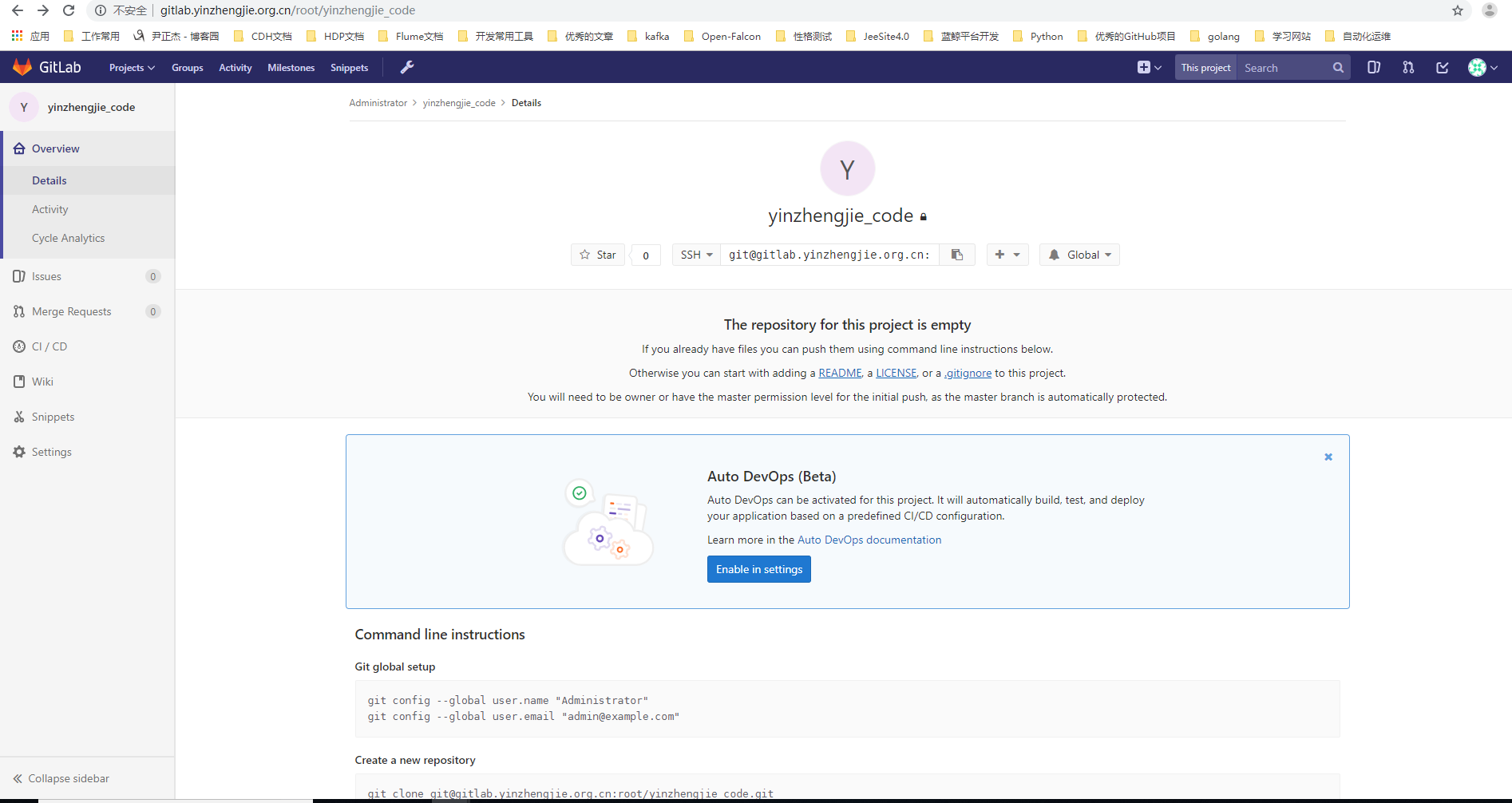
4>.编辑REDEME文件

5>.文件添加成功

三.Gerrit创建同名的项目
1>.点击存储库
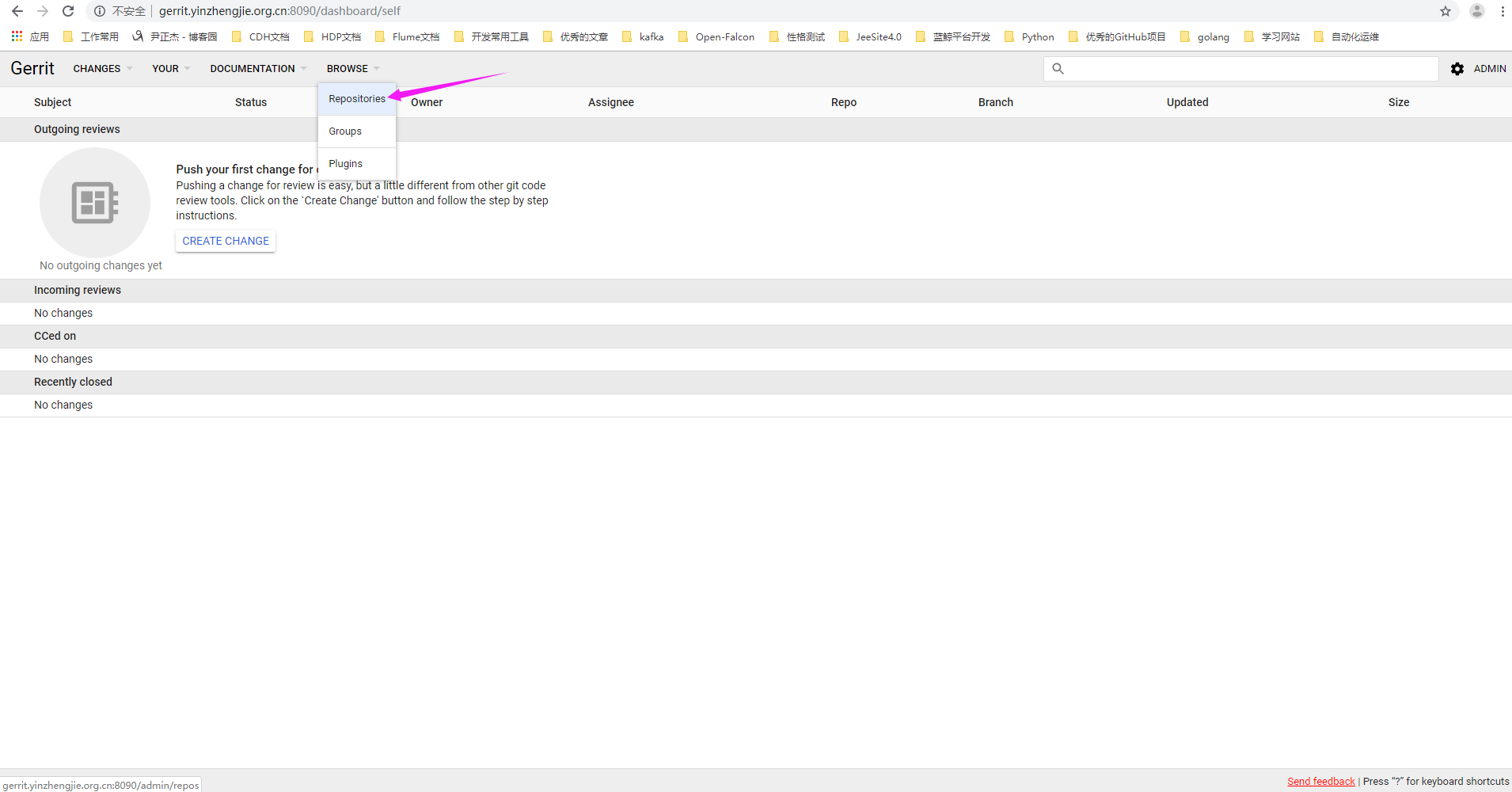
2>.点击"CREATE NEW"
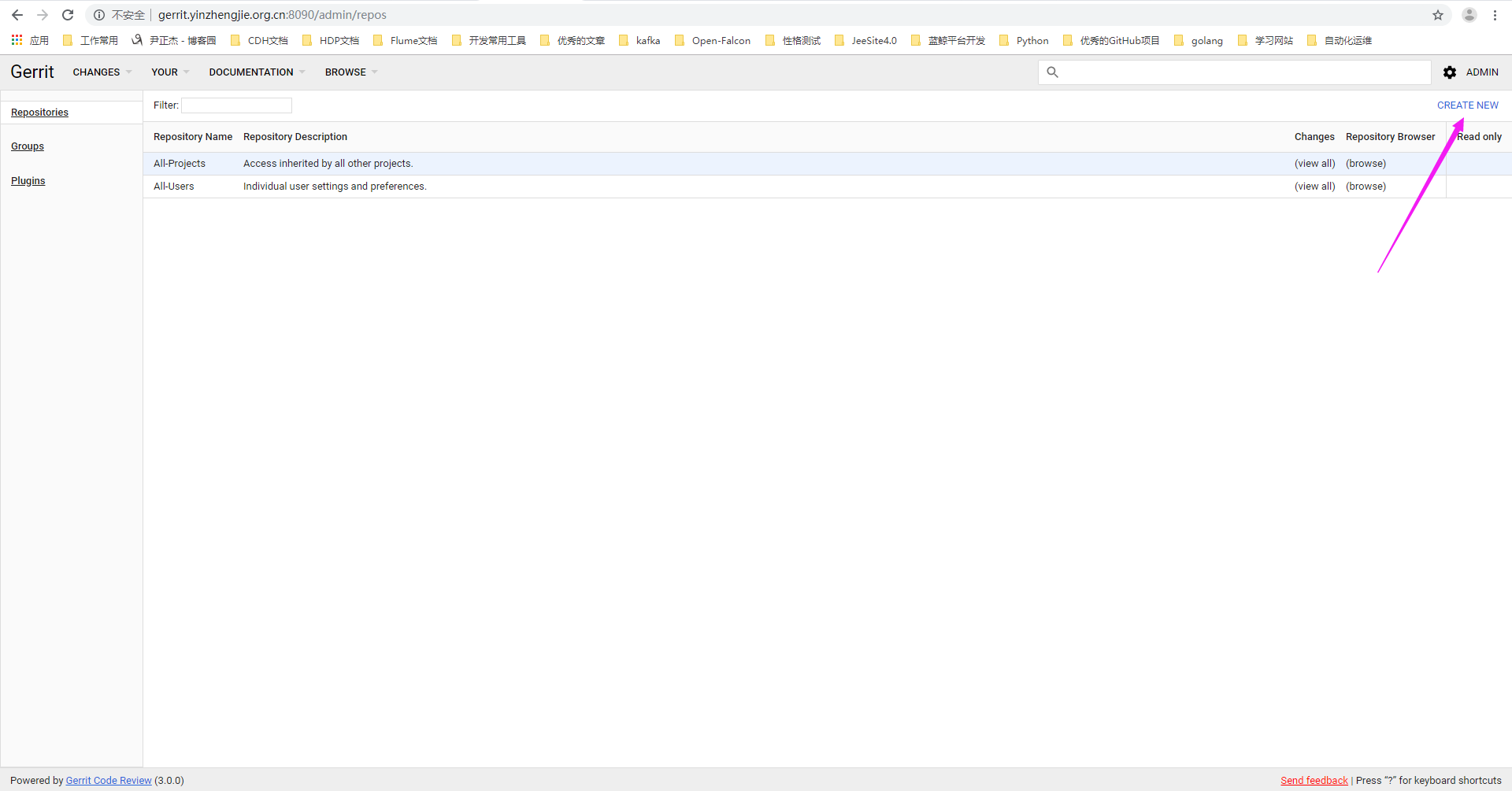
3>.点击"CREATE"
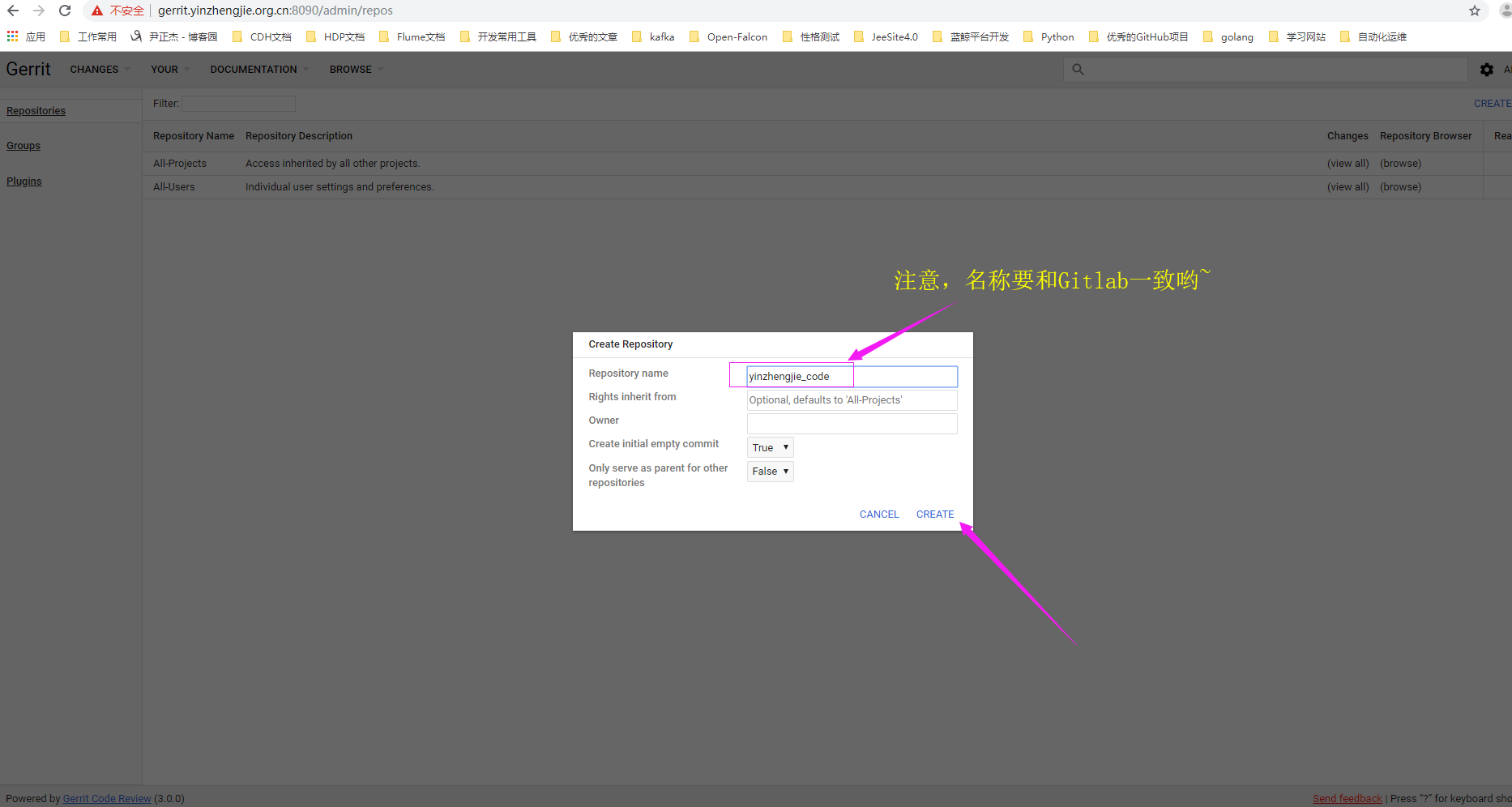
4>.项目创建成功

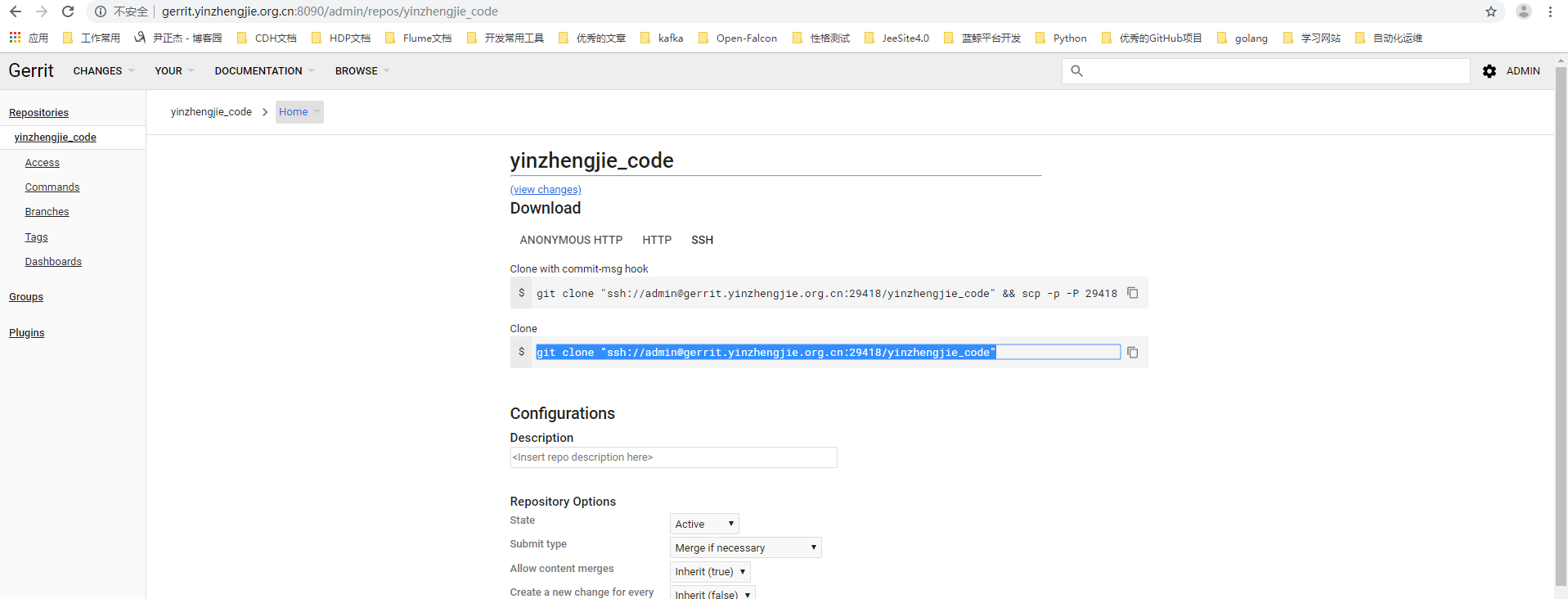
四.在Gerrit服务器上克隆代码到本地
1>.在Gerrit生成密钥
[root@gerrit.yinzhengjie.org.cn ~]# ssh-keygen -t rsa -P '' -f ~/.ssh/id_rsa

Generating public/private rsa key pair.

Created directory '/root/.ssh'.

Your identification has been saved in /root/.ssh/id_rsa.

Your public key has been saved in /root/.ssh/id_rsa.pub.

The key fingerprint is:

SHA256:9ROz1CLGzbskWd0nvJMc1jfgmOez8Lpm7kcz1YjSb7k root@git.yinzhengjie.org.cn

The key's randomart image is:

+---[RSA ]----+

|             .   |

|         . o++.o |

|          =+O+Bo*|

|         o.*=O.*=|

|        S oo*+*. |

|           oo**. |

|            o+o. |

|           o..E  |

|          ==o    |

+----[SHA256]-----+

[root@gerrit.yinzhengjie.org.cn ~]#

[root@gerrit.yinzhengjie.org.cn ~]#

[root@gerrit.yinzhengjie.org.cn ~]# cat ~/.ssh/id_rsa.pub

ssh-rsa AAAAB3NzaC1yc2EAAAADAQABAAABAQC+28LdoSvWfllJVfD0OdWV4ku3bIO5u/AtatQJrYhBifIWnWa2WnIQggz6/KIBWF/QCJHzGaPpZrjVzvPnJaDMwaQNFIutSPchob/HebQ7SRI09a1xRHCYZ3hJzSvaYLDrOt41HHAW2gTTmWMQTMtnX0ZZpst6HHwHluCqWCX6j7uNK2jDgOfGxC4RzbR6bVVYsZ2vN+6BvFyrfHL5wUBsIwKBxgfuHj+a0+i6LJtfyqkom/VTLEtvCnizBw41UMPm/rlH5rBIfE52qjrFqgqg2d9Uaz6st7stmguToPwCHjGUPqJVKk2Cf8JaHUOXsP8o73gXESbe9GSZEgqtpapd root@git.yinzhengjie.org.cn

[root@gerrit.yinzhengjie.org.cn ~]#
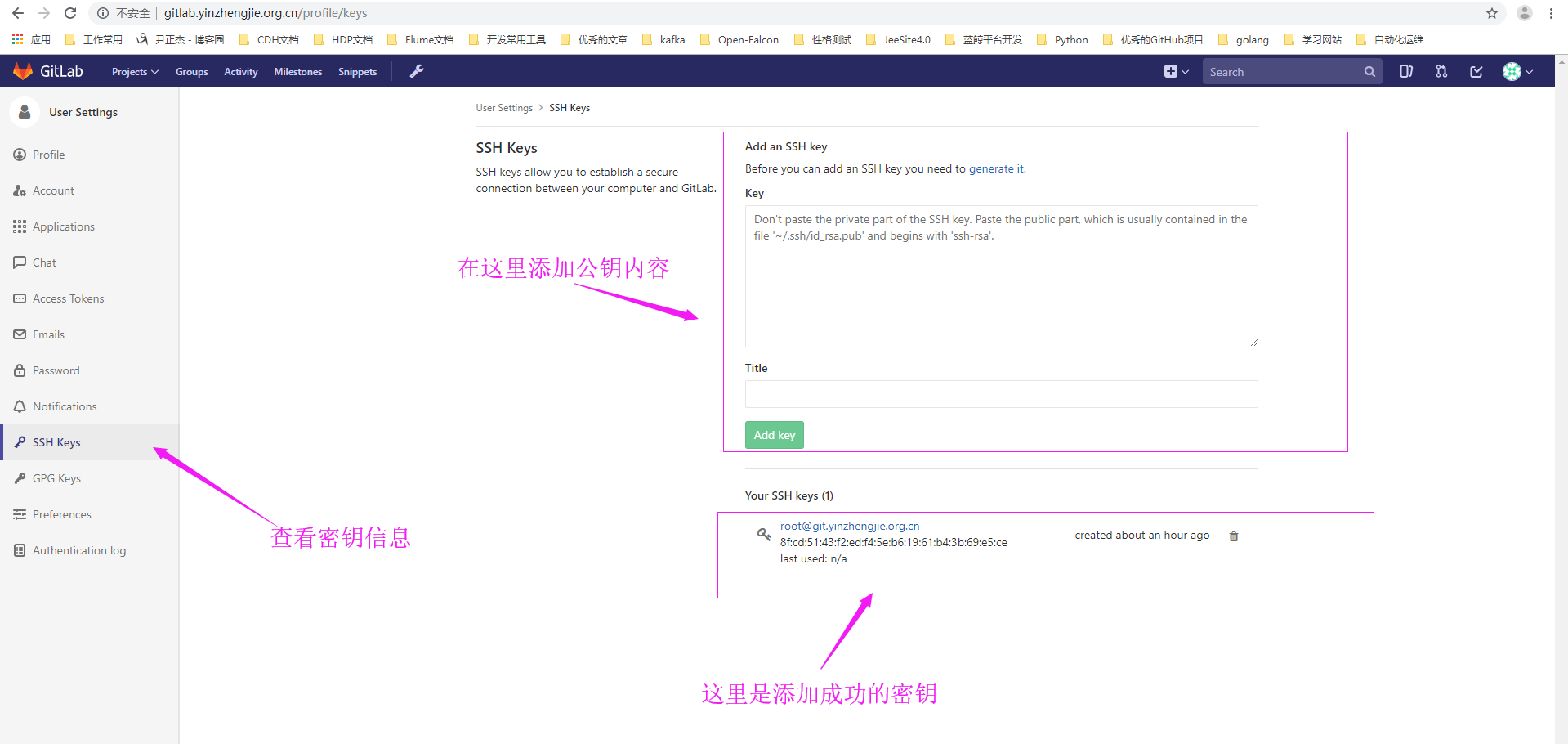
2>.将公钥拷贝到gitlab上
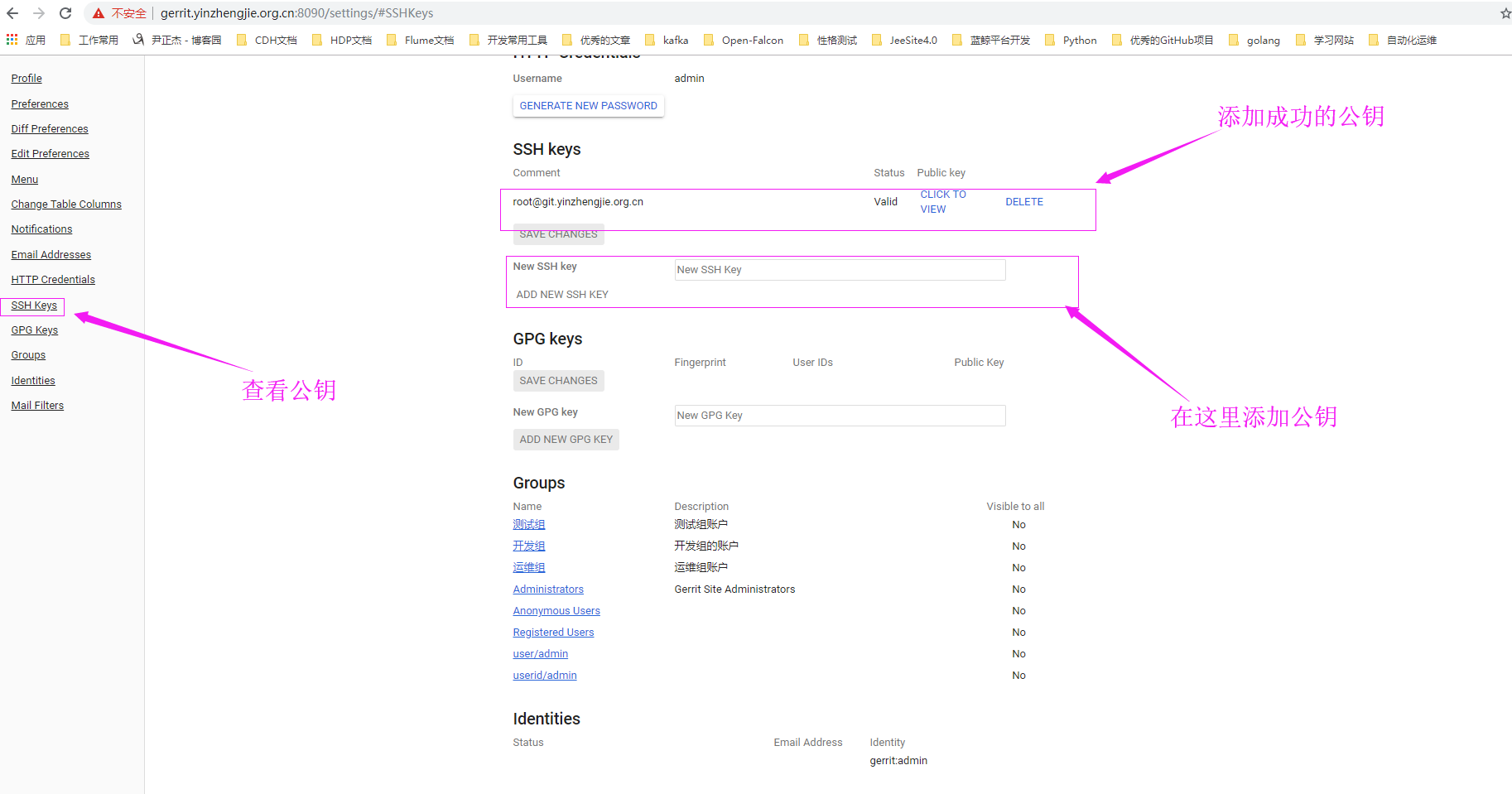
3>.将公钥拷贝到Gerrit上
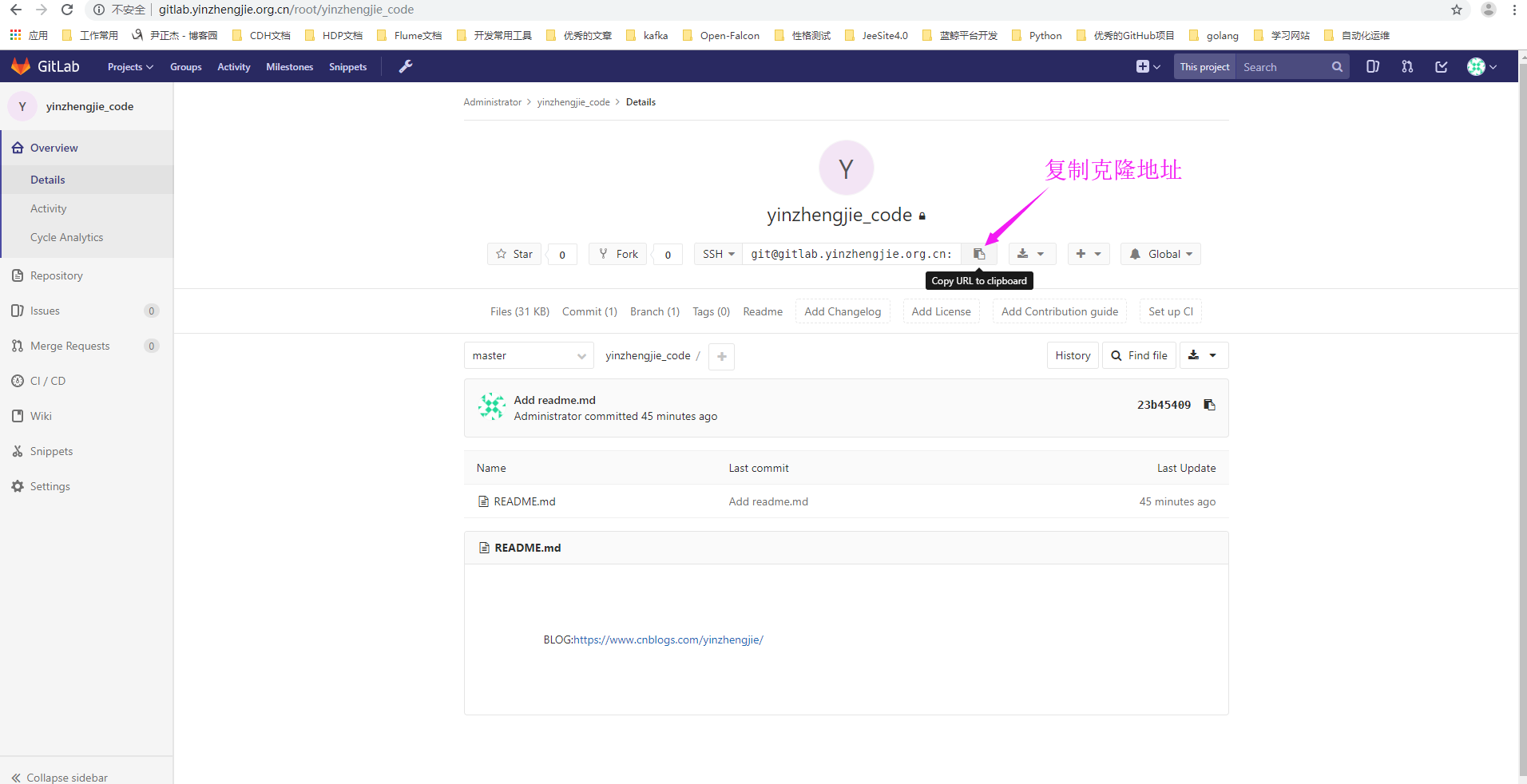
4>.将gitlab的代码克隆到本地
[root@gerrit.yinzhengjie.org.cn ~]# cd /yinzhengjie/softwares/gerrit/

[root@gerrit.yinzhengjie.org.cn /yinzhengjie/softwares/gerrit]#

[root@gerrit.yinzhengjie.org.cn /yinzhengjie/softwares/gerrit]# ll

total

drwxr-xr-x  root root  Jun  : All-Projects.git

drwxr-xr-x  root root  Jun  : All-Users.git

drwxr-xr-x  root root  Jun  : yinzhengjie_code.git

[root@gerrit.yinzhengjie.org.cn /yinzhengjie/softwares/gerrit]#

[root@gerrit.yinzhengjie.org.cn /yinzhengjie/softwares/gerrit]# rm -rf yinzhengjie_code.git        #先将Gerrit创建的同名项目删除

[root@gerrit.yinzhengjie.org.cn /yinzhengjie/softwares/gerrit]#

[root@gerrit.yinzhengjie.org.cn /yinzhengjie/softwares/gerrit]# ll

total

drwxr-xr-x  root root  Jun  : All-Projects.git

drwxr-xr-x  root root  Jun  : All-Users.git

[root@gerrit.yinzhengjie.org.cn /yinzhengjie/softwares/gerrit]#

[root@gerrit.yinzhengjie.org.cn /yinzhengjie/softwares/gerrit]# git clone --bare git@gitlab.yinzhengjie.org.cn:root/yinzhengjie_code.git      #然后把gitlab的项目克隆到Gerrit的目录中

Cloning into bare repository 'yinzhengjie_code.git'...

The authenticity of host 'gitlab.yinzhengjie.org.cn (172.30.1.80)' can't be established.

ECDSA key fingerprint is SHA256:dxYzHaEpkoSjSE0UDEtz14Y4dCn+GX3HJZ+P8AzsF54.

ECDSA key fingerprint is MD5:f6:a9:3b::2c::2f:e3:d7:2f:0b:fb:b2::4f:.

Are you sure you want to continue connecting (yes/no)? yes

Warning: Permanently added 'gitlab.yinzhengjie.org.cn,172.30.1.80' (ECDSA) to the list of known hosts.

remote: Counting objects: , done.

remote: Total  (delta ), reused  (delta )

Receiving objects: % (/), done.

[root@gerrit.yinzhengjie.org.cn /yinzhengjie/softwares/gerrit]#

[root@gerrit.yinzhengjie.org.cn /yinzhengjie/softwares/gerrit]# ll

total

drwxr-xr-x  root root  Jun  : All-Projects.git

drwxr-xr-x  root root  Jun  : All-Users.git

drwxr-xr-x  root root  Jun  : yinzhengjie_code.git

[root@gerrit.yinzhengjie.org.cn /yinzhengjie/softwares/gerrit]#
5>.客户端克隆Gerrit的代码(同理,客户端需要把公钥内容上传到Gerrit服务器)
[root@git.yinzhengjie.org.cn ~]# git clone "ssh://admin@gerrit.yinzhengjie.org.cn:29418/yinzhengjie_code"            #我们在客户端把Gerrit的项目克隆到本地

Cloning into 'yinzhengjie_code'...

The authenticity of host '[gerrit.yinzhengjie.org.cn]:29418 ([172.30.1.81]:29418)' can't be established.

ECDSA key fingerprint is SHA256:LfFtLE0id3OuNcGSZokcrCFCv9HxzJtS8xIqLWw+SIM.

ECDSA key fingerprint is MD5::ae:2d::::::ef:7f::::5c::0a.

Are you sure you want to continue connecting (yes/no)? yes

Warning: Permanently added '[gerrit.yinzhengjie.org.cn]:29418,[172.30.1.81]:29418' (ECDSA) to the list of known hosts.

remote: Counting objects: , done

remote: Finding sources: % (/)

remote: Total  (delta ), reused  (delta )

Receiving objects: % (/), done.

[root@git.yinzhengjie.org.cn ~]#

[root@git.yinzhengjie.org.cn ~]# ll

total

drwxr-xr-x  root root  Jun  : yinzhengjie_code

[root@git.yinzhengjie.org.cn ~]#

[root@git.yinzhengjie.org.cn ~]# ll yinzhengjie_code/

total

-rw-r--r--  root root  Jun  : README.md

[root@git.yinzhengjie.org.cn ~]#

[root@git.yinzhengjie.org.cn ~]# more yinzhengjie_code/README.md                                     #查看我们聪Gerrit服务器下载的代码,其内容和Gitlab数据是一致的。

BLOG:https://www.cnblogs.com/yinzhengjie/

[root@git.yinzhengjie.org.cn ~]#

五.配置Gerrit和Gitlab互信
1>.在Gerrit服务器上配置和Gitlab互信
[root@gerrit.yinzhengjie.org.cn ~]# ssh-copy-id root@gitlab.yinzhengjie.org.cn

/usr/bin/ssh-copy-id: INFO: Source of key(s) to be installed: "/root/.ssh/id_rsa.pub"

/usr/bin/ssh-copy-id: INFO: attempting to log in with the new key(s), to filter out any that are already installed

/usr/bin/ssh-copy-id: INFO:  key(s) remain to be installed -- if you are prompted now it is to install the new keys

root@gitlab.yinzhengjie.org.cn's password:

Number of key(s) added:

Now try logging into the machine, with:   "ssh 'root@gitlab.yinzhengjie.org.cn'"

and check to make sure that only the key(s) you wanted were added.

[root@gerrit.yinzhengjie.org.cn ~]#

[root@gerrit.yinzhengjie.org.cn ~]# ssh gitlab.yinzhengjie.org.cn

Last login: Tue Jun  ::  from 172.30.1.1

[root@gitlab.yinzhengjie.org.cn ~]#

[root@gitlab.yinzhengjie.org.cn ~]# who

root     pts/        -- : (172.30.1.1)

root     pts/        -- : (172.30.1.81)

[root@gitlab.yinzhengjie.org.cn ~]#

[root@gitlab.yinzhengjie.org.cn ~]# logout

Connection to gitlab.yinzhengjie.org.cn closed.

[root@gerrit.yinzhengjie.org.cn ~]#

[root@gerrit.yinzhengjie.org.cn ~]#
2>.在Gitlab上配置和Gerrit互信
[root@gitlab.yinzhengjie.org.cn ~]# ssh-keygen -t rsa -P '' -f ~/.ssh/id_rsa

Generating public/private rsa key pair.

Your identification has been saved in /root/.ssh/id_rsa.

Your public key has been saved in /root/.ssh/id_rsa.pub.

The key fingerprint is:

SHA256:vlO7fU06xQYclRWDbjs6hKCp/zX+OSCSh6gLFJBDpPY root@gitlab.yinzhengjie.org.cn

The key's randomart image is:

+---[RSA ]----+

|++            .+*|

|=            ....|

|.+          .. . |

|. o    .     oo  |

| . E. = S . . .o |

|.  . * + o.. o  =|

|. . . o o+o.. .* |

|.. .    +.o=. + .|

| .. .....oo++. . |

+----[SHA256]-----+

[root@gitlab.yinzhengjie.org.cn ~]#

[root@gitlab.yinzhengjie.org.cn ~]#

[root@gitlab.yinzhengjie.org.cn ~]# ssh-copy-id gerrit.yinzhengjie.org.cn

/usr/bin/ssh-copy-id: INFO: Source of key(s) to be installed: "/root/.ssh/id_rsa.pub"

The authenticity of host 'gerrit.yinzhengjie.org.cn (172.30.1.81)' can't be established.

ECDSA key fingerprint is SHA256:dxYzHaEpkoSjSE0UDEtz14Y4dCn+GX3HJZ+P8AzsF54.

ECDSA key fingerprint is MD5:f6:a9:3b::2c::2f:e3:d7:2f:0b:fb:b2::4f:.

Are you sure you want to continue connecting (yes/no)? yes

/usr/bin/ssh-copy-id: INFO: attempting to log in with the new key(s), to filter out any that are already installed

/usr/bin/ssh-copy-id: INFO:  key(s) remain to be installed -- if you are prompted now it is to install the new keys

root@gerrit.yinzhengjie.org.cn's password:

Number of key(s) added:

Now try logging into the machine, with:   "ssh 'gerrit.yinzhengjie.org.cn'"

and check to make sure that only the key(s) you wanted were added.

[root@gitlab.yinzhengjie.org.cn ~]#

[root@gitlab.yinzhengjie.org.cn ~]# ssh gerrit.yinzhengjie.org.cn

Last login: Tue Jun  ::

[root@gerrit.yinzhengjie.org.cn ~]#

[root@gerrit.yinzhengjie.org.cn ~]# who

root     pts/        -- : (172.30.1.1)

root     pts/        -- : (172.30.1.1)

root     pts/        -- : (172.30.1.80)

[root@gerrit.yinzhengjie.org.cn ~]#

[root@gerrit.yinzhengjie.org.cn ~]#

[root@gerrit.yinzhengjie.org.cn ~]# logout

Connection to gerrit.yinzhengjie.org.cn closed.

[root@gitlab.yinzhengjie.org.cn ~]#

[root@gitlab.yinzhengjie.org.cn ~]#
六.在Gerrit服务器上编辑同步Gitlab的配置文件
1>.编辑 “review_site/.ssh/config”配置文件,需要手动创建(同步gitlab的项目用的)
[root@gerrit.yinzhengjie.org.cn ~]# ll review_site/etc/

total

-rw-r--r--  root root   Jun  : gerrit.config

drwxr-xr-x  root root  Jun  : mail

-rw-------  root root    Jun  : secure.config

-rw-------  root root   Jun  : ssh_host_ecdsa_384_key

-rw-r--r--  root root   Jun  : ssh_host_ecdsa_384_key.pub

-rw-------  root root   Jun  : ssh_host_ecdsa_521_key

-rw-r--r--  root root   Jun  : ssh_host_ecdsa_521_key.pub

-rw-------  root root   Jun  : ssh_host_ecdsa_key

-rw-r--r--  root root   Jun  : ssh_host_ecdsa_key.pub

-rw-------  root root   Jun  : ssh_host_ed25519_key

-rw-r--r--  root root   Jun  : ssh_host_ed25519_key.pub

-rw-------  root root  Jun  : ssh_host_rsa_key

-rw-r--r--  root root   Jun  : ssh_host_rsa_key.pub

[root@gerrit.yinzhengjie.org.cn ~]#

[root@gerrit.yinzhengjie.org.cn ~]#

[root@gerrit.yinzhengjie.org.cn ~]# mkdir review_site/.ssh

[root@gerrit.yinzhengjie.org.cn ~]#

[root@gerrit.yinzhengjie.org.cn ~]# vi review_site/.ssh/config

[root@gerrit.yinzhengjie.org.cn ~]#

[root@gerrit.yinzhengjie.org.cn ~]# cat review_site/.ssh/config

 HOST 172.30.1.80        # 这个IP是gitlab服务器的IP地址

 IdentityFile ~/.ssh/id_rsa

 PreferredAuthenticationns publickey

[root@gerrit.yinzhengjie.org.cn ~]#

[root@gerrit.yinzhengjie.org.cn ~]# ll review_site/.ssh/config

-rw-r--r--  root root  Jun  : review_site/.ssh/config

[root@gerrit.yinzhengjie.org.cn ~]#

[root@gerrit.yinzhengjie.org.cn ~]# chmod  review_site/.ssh/config       #修改权限~降低安全风险

[root@gerrit.yinzhengjie.org.cn ~]#

[root@gerrit.yinzhengjie.org.cn ~]# ll review_site/.ssh/config

-rw-------  root root  Jun  : review_site/.ssh/config

[root@gerrit.yinzhengjie.org.cn ~]#
2>.配置gerrit replication功能(用于复制具体项目)
[root@gerrit.yinzhengjie.org.cn ~]# ll review_site/

total

drwxr-xr-x  root root    Jun  : bin

drwxr-xr-x  root root  Jun  : cache

drwxr-xr-x  root root    Jun  : data

drwxr-xr-x  root root    Jun  : db

drwxr-xr-x  root root  Jun  : etc

drwxr-xr-x  root root     Jun  : git

drwxr-xr-x  root root   Jun  : index

drwxr-xr-x  root root     Jun  : lib

drwxr-xr-x  root root   Jun  : logs

drwxr-xr-x  root root   Jun  : plugins

drwxr-xr-x  root root     Jun  : static

drwx------  root root  Jun  : tmp

[root@gerrit.yinzhengjie.org.cn ~]#

[root@gerrit.yinzhengjie.org.cn ~]# cat ~/review_site/etc/replication.config      #该文件需要手动创建

[remote "yinzhengjie_code"]                                    #remote后面是项目名称

projects =  yinzhengjie_code                                   #也是项目名称

url = git@gitlab.yinzhengjie.org.cn:root/yinzhengjie_code.git               #就是你gitlab服务器上面的项目刻隆地址,注意,这边使用提ssh协议进行刻隆的, 所以不要选择http方式了。

push = +refs/heads/*:refs/heads/*

push = +refs/tags/*:refs/tags/*

push = +refs/changes/*:refs/changes/*

threads = 3

[root@gerrit.yinzhengjie.org.cn ~]#

[root@gerrit.yinzhengjie.org.cn ~]#
3>.重启Gerrit服务
[root@gerrit.yinzhengjie.org.cn ~]# cd review_site/bin/

[root@gerrit.yinzhengjie.org.cn ~/review_site/bin]# ll

total

-rwxr-xr-x  root root       Jun  : gerrit.service

-rwxr-xr-x  root root     Jun  : gerrit.sh

-rwxr-xr-x  root root       Jun  : gerrit.socket

-rw-r--r--  root root  Jun  : gerrit.war

[root@gerrit.yinzhengjie.org.cn ~/review_site/bin]#

[root@gerrit.yinzhengjie.org.cn ~/review_site/bin]# ./gerrit.sh restart

Stopping Gerrit Code Review: OK

Starting Gerrit Code Review: OK

[root@gerrit.yinzhengjie.org.cn ~/review_site/bin]#
七.验证Gerrit和Gitlab的集成效果-使用客户端直接提交代码到Gitlab
1>.客户端克隆Gerrit代码后直接提交给master分支
[root@git.yinzhengjie.org.cn ~]# git clone "ssh://admin@gerrit.yinzhengjie.org.cn:29418/yinzhengjie_code"

Cloning into 'yinzhengjie_code'...

remote: Counting objects: , done

remote: Finding sources: % (/)

remote: Total  (delta ), reused  (delta )

Receiving objects: % (/), done.

[root@git.yinzhengjie.org.cn ~]#

[root@git.yinzhengjie.org.cn ~]# ll

total

drwxr-xr-x  root root  Jun  : yinzhengjie_code

[root@git.yinzhengjie.org.cn ~]#

[root@git.yinzhengjie.org.cn ~]# cd yinzhengjie_code/

[root@git.yinzhengjie.org.cn ~/yinzhengjie_code]#

[root@git.yinzhengjie.org.cn ~/yinzhengjie_code]# ll

total

-rw-r--r--  root root  Jun  : README.md

[root@git.yinzhengjie.org.cn ~/yinzhengjie_code]#

[root@git.yinzhengjie.org.cn ~/yinzhengjie_code]# echo "https://www.cnblogs.com/yinzhengjie/" >> blog.txt

[root@git.yinzhengjie.org.cn ~/yinzhengjie_code]#

[root@git.yinzhengjie.org.cn ~/yinzhengjie_code]# ll

total

-rw-r--r--  root root  Jun  : blog.txt

-rw-r--r--  root root  Jun  : README.md

[root@git.yinzhengjie.org.cn ~/yinzhengjie_code]#

[root@git.yinzhengjie.org.cn ~/yinzhengjie_code]# git add blog.txt

[root@git.yinzhengjie.org.cn ~/yinzhengjie_code]#

[root@git.yinzhengjie.org.cn ~/yinzhengjie_code]# git config --global user.name "admin"

[root@git.yinzhengjie.org.cn ~/yinzhengjie_code]#

[root@git.yinzhengjie.org.cn ~/yinzhengjie_code]# git config --global user.email "admin@yinzhengjie.org.cn"

[root@git.yinzhengjie.org.cn ~/yinzhengjie_code]#

[root@git.yinzhengjie.org.cn ~/yinzhengjie_code]# git commit -m "add blog.txt"

[master d064e5b] add blog.txt

  file changed,  insertion(+)

 create mode  blog.txt

[root@git.yinzhengjie.org.cn ~/yinzhengjie_code]#

[root@git.yinzhengjie.org.cn ~/yinzhengjie_code]# git push            #我们直接提交到master,数据会直接提交的Gerrit中,而我们在Gerrit中编写了同步的文件,因此,咱们没有通过Gerrit审核就直接提交到gitlab中去啦!!!生产环境并不推荐这样搞

warning: push.default is unset; its implicit value is changing in

Git 2.0 from 'matching' to 'simple'. To squelch this message

and maintain the current behavior after the default changes, use:

  git config --global push.default matching

To squelch this message and adopt the new behavior now, use:

  git config --global push.default simple

See 'git help config' and search for 'push.default' for further information.

(the 'simple' mode was introduced in Git 1.7.. Use the similar mode

'current' instead of 'simple' if you sometimes use older versions of Git)

Counting objects: , done.

Delta compression using up to  threads.

Compressing objects: % (/), done.

Writing objects: % (/),  bytes |  bytes/s, done.

Total  (delta ), reused  (delta )

remote: Processing changes: refs: , done

To ssh://admin@gerrit.yinzhengjie.org.cn:29418/yinzhengjie_code

   23b4540..d064e5b  master -> master

[root@git.yinzhengjie.org.cn ~/yinzhengjie_code]#

[root@git.yinzhengjie.org.cn ~/yinzhengjie_code]#

2>.查看Gerrit日志
[root@gerrit.yinzhengjie.org.cn ~]# cat review_site/logs/replication_log

[-- ::,] [] scheduling replication yinzhengjie_code:refs/heads/master => git@gitlab.yinzhengjie.org.cn:root/yinzhengjie_code.git

[-- ::,] [] scheduled yinzhengjie_code:refs/heads/master => [edcdfd7f] push git@gitlab.yinzhengjie.org.cn:root/yinzhengjie_code.git to run after 15s

[-- ::,] [edcdfd7f] Replication to git@gitlab.yinzhengjie.org.cn:root/yinzhengjie_code.git started...

[-- ::,] [edcdfd7f] Push to git@gitlab.yinzhengjie.org.cn:root/yinzhengjie_code.git references: [RemoteRefUpdate[remoteName=refs/heads/master, NOT_ATTEMPTED, (null)...d064e5b53b48fe757ceea8714ff49de200ed2949, srcRef=refs/heads/master, forceUpdate, message=null]]

[-- ::,] [edcdfd7f] Replication to git@gitlab.yinzhengjie.org.cn:root/yinzhengjie_code.git completed in 824ms, 15004ms delay,  retries

[root@gerrit.yinzhengjie.org.cn ~]#
3>.查看gitlab库中的文件
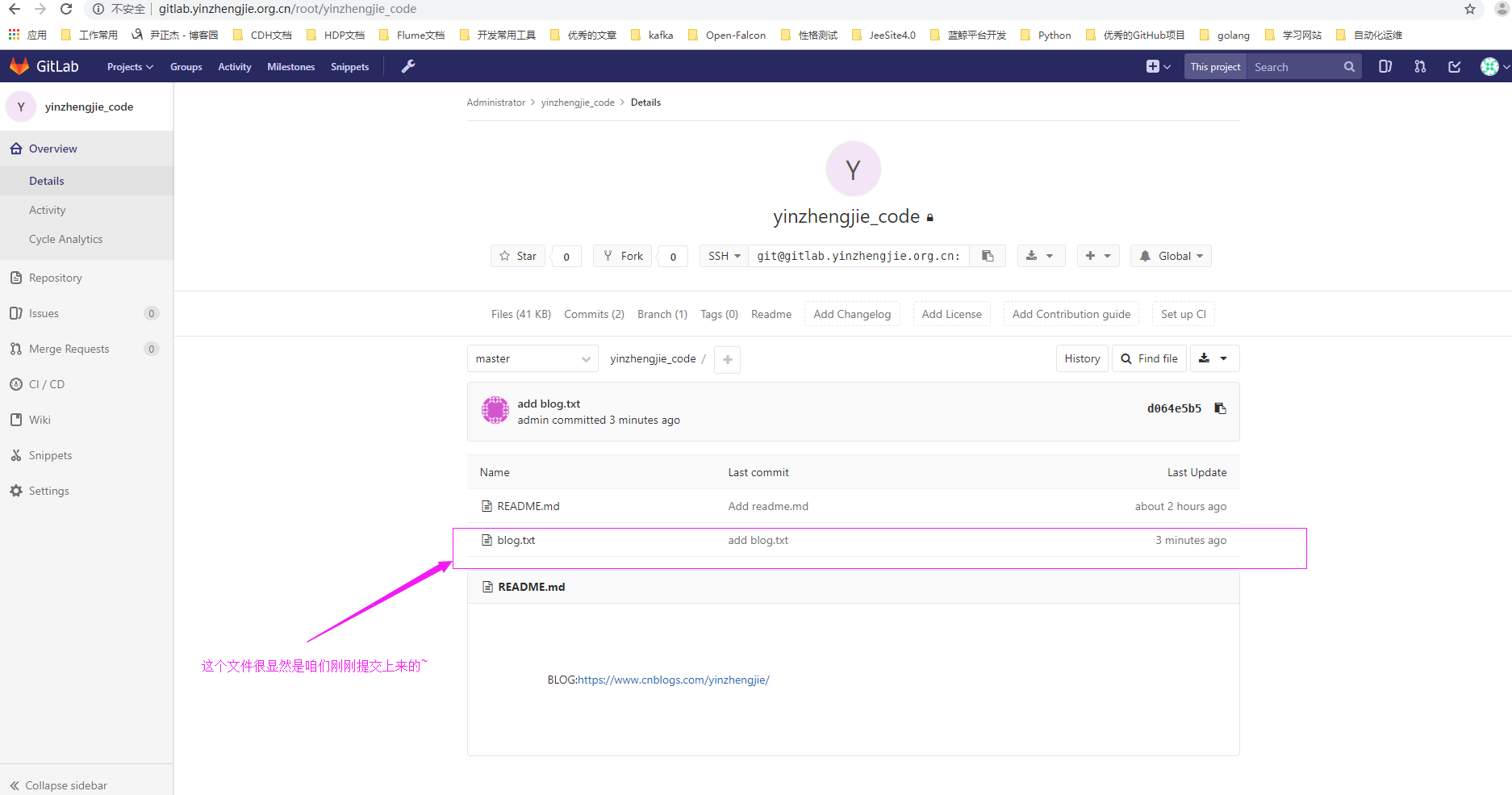
4>.查看blog.txt文件内容,的确和我们写的文件内容是一致的
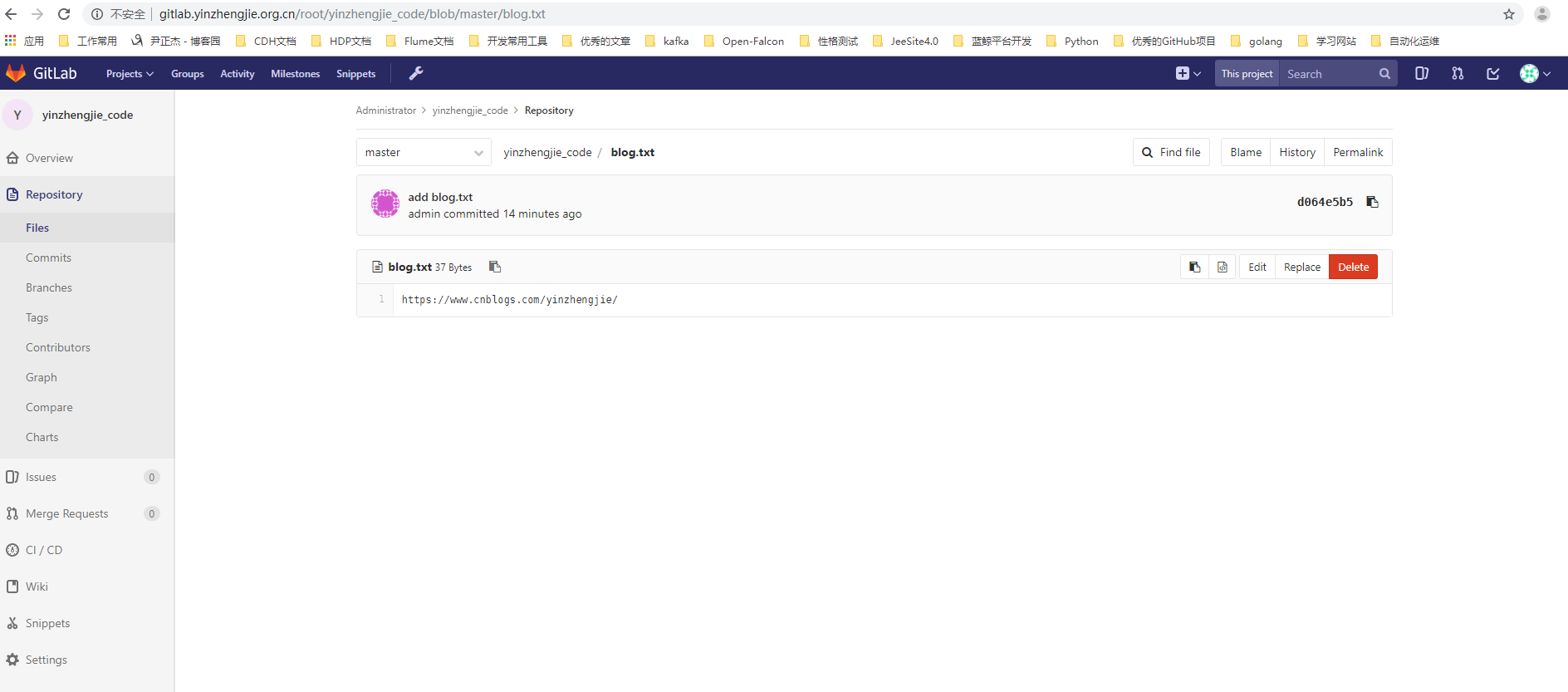
八.验证Gerrit和Gitlab的集成效果-使用客户端提交代码到Gerrit后,由Gerrit审核通过后在提交到Gitlab
1>.客户端克隆Gerrit代码后直接提交给master分支
[root@git.yinzhengjie.org.cn ~]# git clone "ssh://admin@gerrit.yinzhengjie.org.cn:29418/yinzhengjie_code" && scp -p -P  admin@gerrit.yinzhengjie.org.cn:hooks/commit-msg "yinzhengjie_code/.git/hooks/"

Cloning into 'yinzhengjie_code'...

remote: Counting objects: , done

remote: Finding sources: % (/)

remote: Total  (delta ), reused  (delta )

Receiving objects: % (/),  bytes |  bytes/s, done.

commit-msg                                                                                                                                          %      .0MB/s   :

[root@git.yinzhengjie.org.cn ~]#

[root@git.yinzhengjie.org.cn ~]# cd yinzhengjie_code/

[root@git.yinzhengjie.org.cn ~/yinzhengjie_code]#

[root@git.yinzhengjie.org.cn ~/yinzhengjie_code]# ll

total

-rw-r--r--  root root  Jun  : blog.txt

-rw-r--r--  root root  Jun  : README.md

[root@git.yinzhengjie.org.cn ~/yinzhengjie_code]#

[root@git.yinzhengjie.org.cn ~/yinzhengjie_code]# echo "尹正杰" > name.list

[root@git.yinzhengjie.org.cn ~/yinzhengjie_code]#

[root@git.yinzhengjie.org.cn ~/yinzhengjie_code]# git config --global user.name "admin"

[root@git.yinzhengjie.org.cn ~/yinzhengjie_code]#

[root@git.yinzhengjie.org.cn ~/yinzhengjie_code]# git config --global user.email "admin@yinzhengjie.org.cn"

[root@git.yinzhengjie.org.cn ~/yinzhengjie_code]#

[root@git.yinzhengjie.org.cn ~/yinzhengjie_code]# git add name.list

[root@git.yinzhengjie.org.cn ~/yinzhengjie_code]#

[root@git.yinzhengjie.org.cn ~/yinzhengjie_code]# git commit -m "add name.list"

[master ce71335] add name.list

  file changed,  insertion(+)

 create mode  name.list

[root@git.yinzhengjie.org.cn ~/yinzhengjie_code]#

[root@git.yinzhengjie.org.cn ~/yinzhengjie_code]# git push origin HEAD:refs/for/master

Counting objects: , done.

Delta compression using up to  threads.

Compressing objects: % (/), done.

Writing objects: % (/),  bytes |  bytes/s, done.

Total  (delta ), reused  (delta )

remote: Processing changes: refs: , new: , done

remote:

remote: SUCCESS

remote:

remote:   http://gerrit.yinzhengjie.org.cn/c/yinzhengjie_code/+/1 add name.list [NEW]

remote:

To ssh://gerrit.yinzhengjie.org.cn:29418/yinzhengjie_code

 * [new branch]      HEAD -> refs/for/master

[root@git.yinzhengjie.org.cn ~/yinzhengjie_code]#

[root@git.yinzhengjie.org.cn ~/yinzhengjie_code]# git --version        #需要注意的是,git版本最好使用git2.X版本哟~,否则在将代码push到Gerrit的时候可能会报错~在Gerrit服务端git版本好像git1.X版本也可以正常使用。

git version 2.12.

[root@git.yinzhengjie.org.cn ~/yinzhengjie_code]#
2>.查看Gerrit的Web UI界面
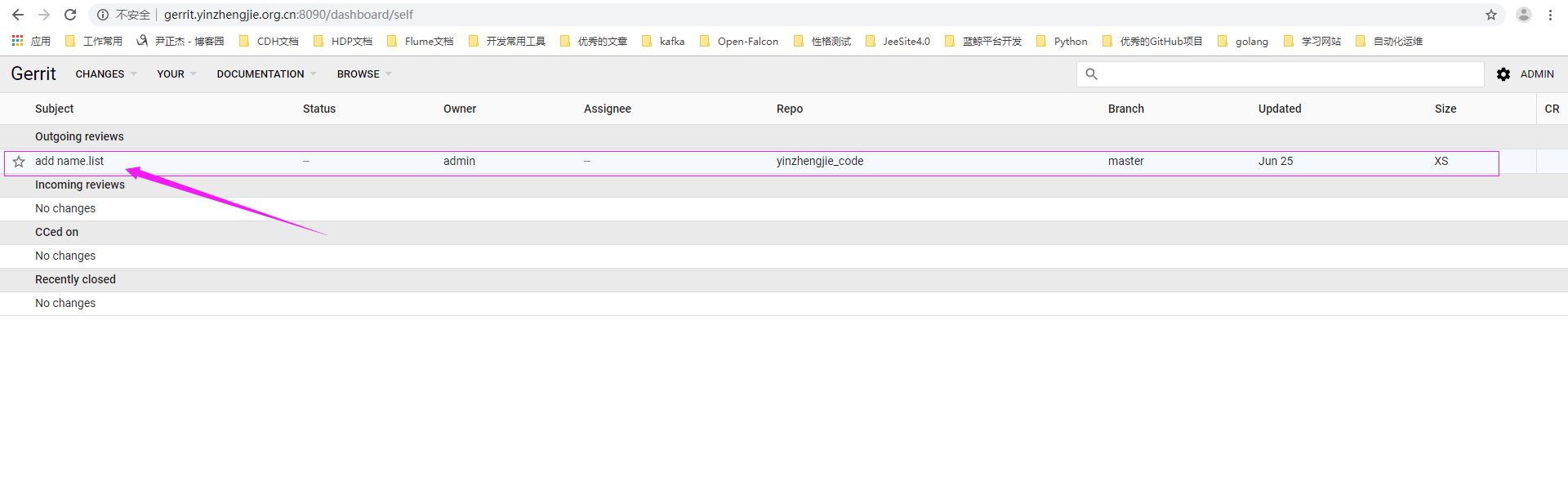
3>.在Gerrit还没有通过审批之前,我们克隆一下Gerrit代码
[root@git.yinzhengjie.org.cn ~]# ll yinzhengjie_code/            #这是我们提交到Gerrit的代码

total

-rw-r--r--  root root  Jun  : blog.txt

-rw-r--r--  root root  Jun  : name.list

-rw-r--r--  root root  Jun  : README.md

[root@git.yinzhengjie.org.cn ~]#

[root@git.yinzhengjie.org.cn ~]# rm -rf yinzhengjie_code/          #我们将源文件删除

[root@git.yinzhengjie.org.cn ~]#

[root@git.yinzhengjie.org.cn ~]# git clone "ssh://admin@gerrit.yinzhengjie.org.cn:29418/yinzhengjie_code"      #从Gerrit的库中clone一份出来,观察里面的内容。

Cloning into 'yinzhengjie_code'...

remote: Counting objects: , done

remote: Finding sources: % (/)

remote: Total  (delta ), reused  (delta )

Receiving objects: % (/), done.

[root@git.yinzhengjie.org.cn ~]#

[root@git.yinzhengjie.org.cn ~]# ll yinzhengjie_code/            #很显然,代码库中并没有我们提交的代码

total

-rw-r--r--  root root  Jun  : blog.txt

-rw-r--r--  root root  Jun  : README.md

[root@git.yinzhengjie.org.cn ~]#

[root@git.yinzhengjie.org.cn ~]#
4>.在Gerrit还没有通过审批之前,我们克隆一下Gitlab代码
[root@git.yinzhengjie.org.cn ~]# ll

total

drwxr-xr-x  root root  Jun  : yinzhengjie_code

[root@git.yinzhengjie.org.cn ~]#

[root@git.yinzhengjie.org.cn ~]# rm -rf yinzhengjie_code/                                #删除源文件

[root@git.yinzhengjie.org.cn ~]#

[root@git.yinzhengjie.org.cn ~]# git clone git@gitlab.yinzhengjie.org.cn:root/yinzhengjie_code.git        #将gitlab的代码克隆到本地。

Cloning into 'yinzhengjie_code'...

The authenticity of host 'gitlab.yinzhengjie.org.cn (172.30.1.80)' can't be established.

ECDSA key fingerprint is SHA256:dxYzHaEpkoSjSE0UDEtz14Y4dCn+GX3HJZ+P8AzsF54.

ECDSA key fingerprint is MD5:f6:a9:3b::2c::2f:e3:d7:2f:0b:fb:b2::4f:.

Are you sure you want to continue connecting (yes/no)? yes

Warning: Permanently added 'gitlab.yinzhengjie.org.cn,172.30.1.80' (ECDSA) to the list of known hosts.

remote: Counting objects: , done.

remote: Compressing objects: % (/), done.

remote: Total  (delta ), reused  (delta )

Receiving objects: % (/), done.

[root@git.yinzhengjie.org.cn ~]#

[root@git.yinzhengjie.org.cn ~]# ll yinzhengjie_code/            #很显然,我们发现提交的代码既不在Gerrit中也不再Gitlab中。

total

-rw-r--r--  root root  Jun  : blog.txt

-rw-r--r--  root root  Jun  : README.md

[root@git.yinzhengjie.org.cn ~]#

5>.评审Chenge

6>.点击"Submit",会将代码同步到Gerrit存储库,需要注意的是,Gerrit存储库我们配置和Gitla集成,因此2个同名的存储库数据应该时一致的哟~
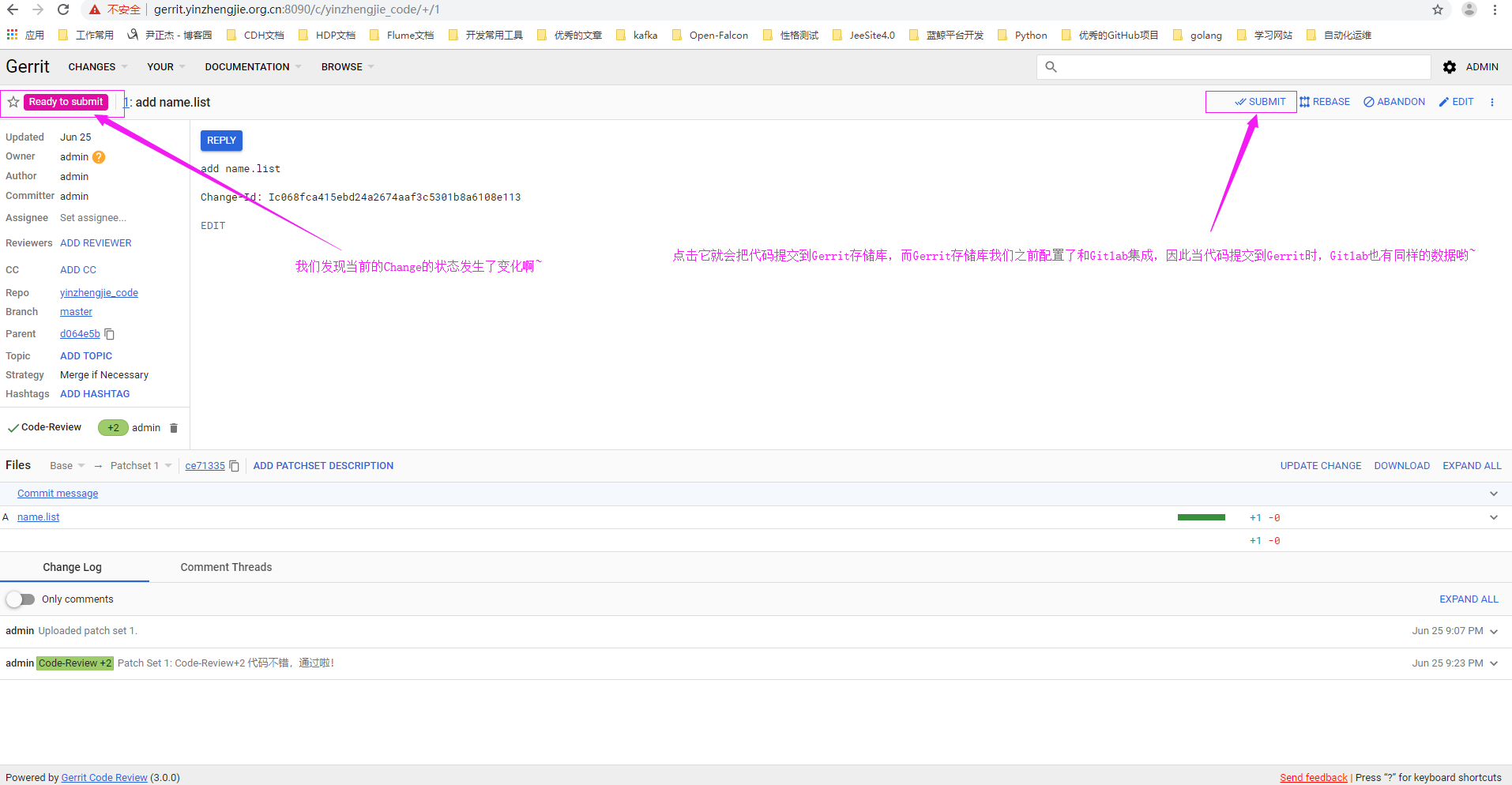
7>点击“CONTINUE”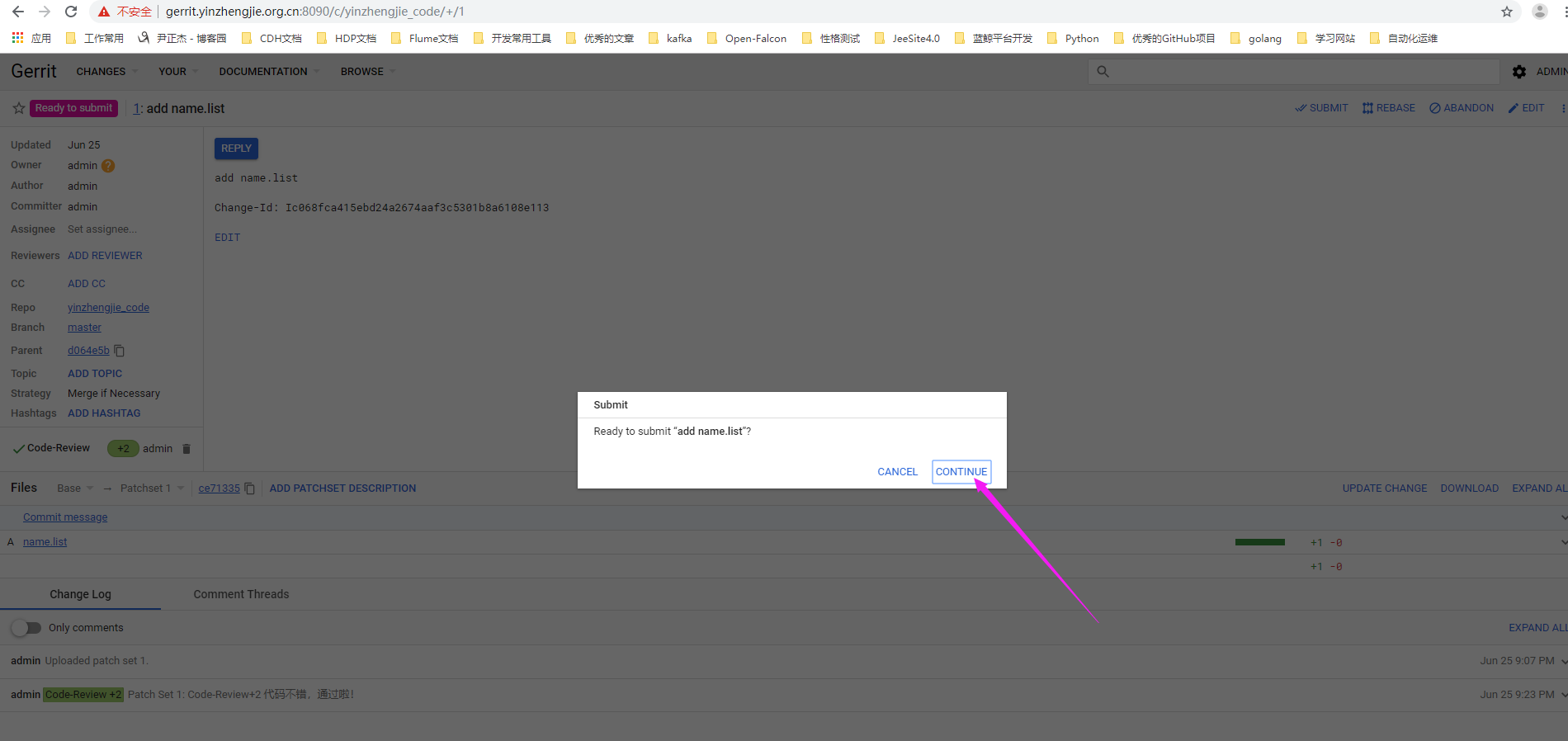
8>.Change提交成功

9>.查看Change状态
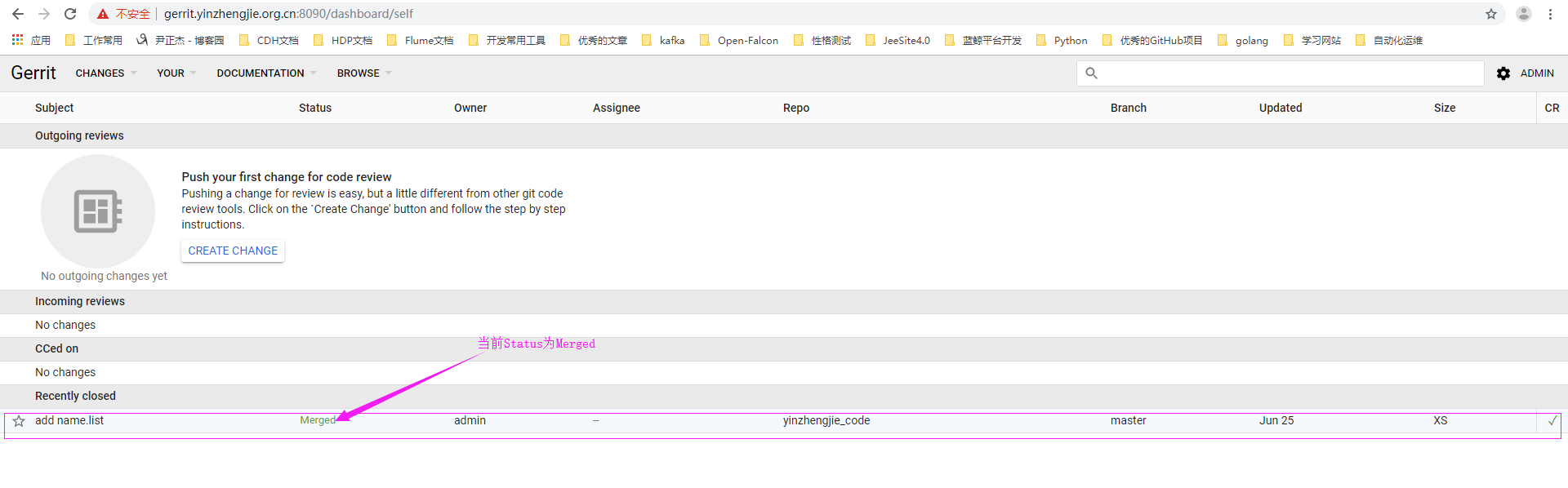
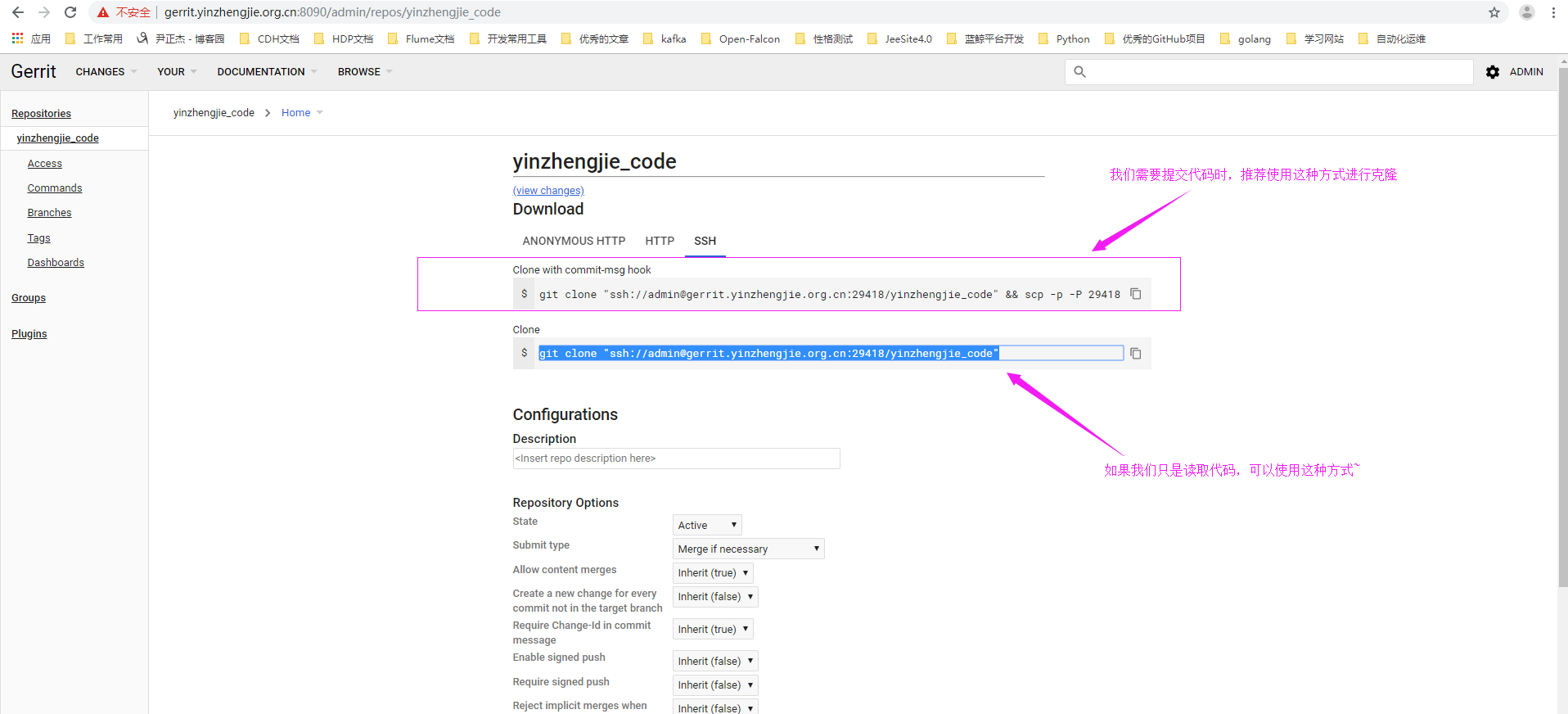
10>.在Gerrit通过审批之后,我们克隆一下Gerrit代码
[root@git.yinzhengjie.org.cn ~]# ll

total

drwxr-xr-x  root root  Jun  : yinzhengjie_code

[root@git.yinzhengjie.org.cn ~]#

[root@git.yinzhengjie.org.cn ~]# ll yinzhengjie_code/                                       #在审核之前,我们发现代码并没有被合并到主分支

total

-rw-r--r--  root root  Jun  : blog.txt

-rw-r--r--  root root  Jun  : README.md

[root@git.yinzhengjie.org.cn ~]#

[root@git.yinzhengjie.org.cn ~]# rm -rf yinzhengjie_code

[root@git.yinzhengjie.org.cn ~]#

[root@git.yinzhengjie.org.cn ~]#

[root@git.yinzhengjie.org.cn ~]# git clone "ssh://admin@gerrit.yinzhengjie.org.cn:29418/yinzhengjie_code"        #当我们审批通过后,再次clone代码进行观察

Cloning into 'yinzhengjie_code'...

remote: Counting objects: , done

remote: Finding sources: % (/)

Receiving objects: % (/), done.

remote: Total  (delta ), reused  (delta )

[root@git.yinzhengjie.org.cn ~]#

[root@git.yinzhengjie.org.cn ~]#

[root@git.yinzhengjie.org.cn ~]# ll yinzhengjie_code/                                       #很显然,多了一个我们之前提交的文件"name.list",说明我们测试成功啦~

total

-rw-r--r--  root root  Jun  : blog.txt

-rw-r--r--  root root  Jun  : name.list

-rw-r--r--  root root  Jun  : README.md

[root@git.yinzhengjie.org.cn ~]#

[root@git.yinzhengjie.org.cn ~]#
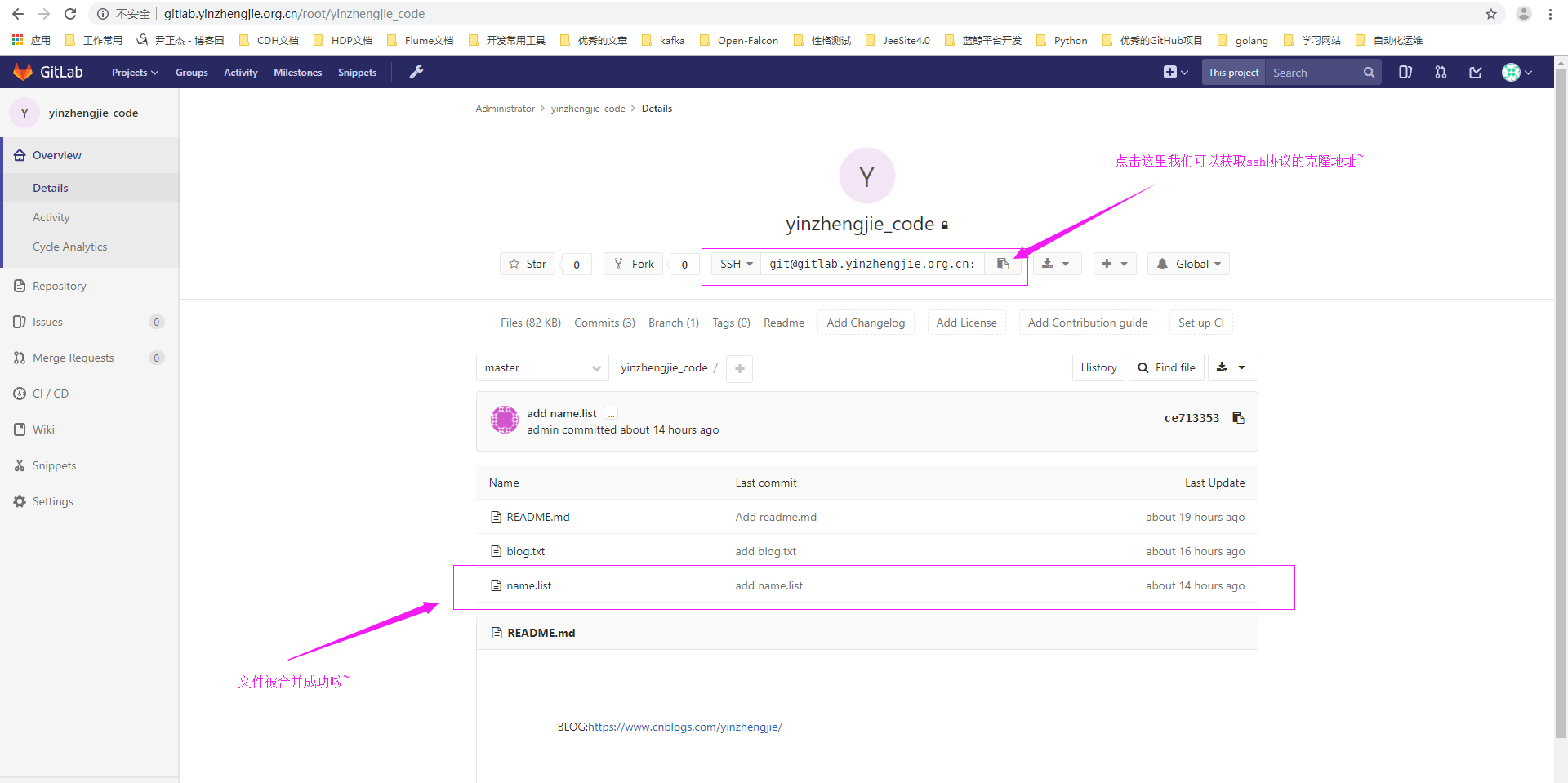
11>.在Gerrit通过审批之后,我们克隆一下Gitlab代码
[root@git.yinzhengjie.org.cn ~]# rm -rf yinzhengjie_code/

[root@git.yinzhengjie.org.cn ~]#

[root@git.yinzhengjie.org.cn ~]# git clone git@gitlab.yinzhengjie.org.cn:root/yinzhengjie_code.git

Cloning into 'yinzhengjie_code'...

remote: Counting objects: , done.

remote: Compressing objects: % (/), done.

remote: Total  (delta ), reused  (delta )

Receiving objects: % (/), done.

Resolving deltas: % (/), done.

[root@git.yinzhengjie.org.cn ~]#

[root@git.yinzhengjie.org.cn ~]#

[root@git.yinzhengjie.org.cn ~]# ll yinzhengjie_code/                #不难发现,通过Gerrit审批后,Gitlab中的数据也被同步啦~这充分说明Gerrit和Gitlab集成成功啦~

total

-rw-r--r--  root root  Jun  : blog.txt

-rw-r--r--  root root  Jun  : name.list

-rw-r--r--  root root  Jun  : README.md

[root@git.yinzhengjie.org.cn ~]#

[root@git.yinzhengjie.org.cn ~]#
Gerrit和Gitlab服务器的集成的更多相关文章
- Gerrit - Gerrit与GitLab集成
1 - 简介 虽然Gerrit 本身提供 Code Review和 Git 仓库的两大功能,但实际上很多项目用的是其他的Git仓库,例如GitLab和GitHub. 一般情况下,Gerrit位于最终代 ...
- Gerrit和OpenLDAP服务器集成
Gerrit和OpenLDAP服务器集成 作者:尹正杰 版权声明:原创作品,谢绝转载!否则将追究法律责任. 一.安装LDAP服务器 详情请参考:https://www.cnblogs.com/yinz ...
- 如何搭建基于Docker的gitlab服务器集成CI/CD实现DEVOPS(完整版)
From this lesson you will learn about 1,How to install and configure a docker based gitlab server 2, ...
- GitLab CI持续集成配置方案
目录 1. 持续集成介绍 1.1 概念 1.2 持续集成的好处 2. GitLab持续集成(CI) 2.1 简介 2.2 GitLab简单原理图 2.3 GitLab持续集成所需环境 2.4 需要了解 ...
- Ubuntu Docker 安装和配置 GitLab CI 持续集成
相关文章: Ubuntu Docker 简单安装 GitLab 劈荆斩棘:Gitlab 部署 CI 持续集成 目的:在 Ubuntu 服务器上,使用 Docker 安装和配置 GitLab Runne ...
- CentOS 7 Gitlab+Jenkins持续集成+自动化部署
基于上次的环境<部署Gitlab+Jenkins持续集成环境> 来实现自动化部署 系统管理–>插件管理–>安装以下插件: Credentials Plugin(默认已经安装) ...
- 持续集成之Jenkins+Gitlab实现持续集成 [二]
持续集成之Jenkins+Gitlab实现持续集成 [二] 项目:使用git+jenkins实现持续集成 开始构建 General 源码管理 我们安装的是Git插件,还可以安装svn插件 我们将 ...
- Git Hooks、GitLab CI持续集成以及使用Jenkins实现自动化任务
Git Hooks.GitLab CI持续集成以及使用Jenkins实现自动化任务 前言 在一个共享项目(或者说多人协同开发的项目)的开发过程中,为有效确保团队成员编码风格的统一,确保部署方式的统一, ...
- Jenkins+Maven+Gitlab+Nexus持续集成环境搭建
1.软件及服务介绍 Jenkins:jenkins是实现代码自动化流程上线的工具,Jenkins是一个独立的开源软件项目,是基于Java开发的一种持续集成工具,用于监控持续重复的工作,旨在提供一个 ...
随机推荐
- FastJson序列化时过滤字段(属性)的方法总结
FastJson序列化时(即转成JSON字符串时),可以过滤掉部分字段,或者只保留部分字段,方法有很多,下面举一些常用的方法. 方法一.FastJson的注解 @JSONField(serialize ...
- react-navigation安卓从右到左切换视图
百度搜了3天都没一个正确的答案,最后还是google查到的: "react-navigation": "^4.0.10", "react-navi ...
- IDEA 2018.3.5,修改js文件,html页面不及时更新
问题描述 使用IDEA 开发时,修改js文件,前端页面不能及时更新. 解决方法: 1. IDEA settings--> Compiler --> Build project automa ...
- C# FluentFTP类上传下载文件
前言:最近要实现从FTP服务器下载和上传文件,在网上搜了一下据说 FluentFTP 是个客户端FTP功能的实现,使用还比较顺畅,所以对此展开研究,无奈网上给出的案例并没有想象中的那么简洁,所以想着自 ...
- Oracle RAC 创建实例出错(非+DATA目录)的简单处理
今天进行oracle的rac测试 发现开发同事没有写好 oracle rac的设置. 创建完之后就会报错了 因为自己对oracle 的RAC 不太熟悉 不太会用.. 所以用 一个比较简单的办法. a ...
- Codeforces Round #603 (Div. 2) (题解)
A. Sweet Problem (找规律) 题目链接 大致思路: 有一点瞎猜的,首先排一个序, \(a_1>a_2>a_3\) ,发现如果 \(a_1>=a_2+a_3\) ,那么 ...
- Matlab 信号与系统课设 - BiRadio仿真电台
BiRadio Matlab 信号与系统课设 - BiRadio仿真电台 Author : Benjamin142857 Date : 2018-12 Video : BiliBili Github ...
- MongoDB 概述
一.概述: 1.NoSQL数据库(非关系型数据库) 2.文档存储 3.格式类似JSON,BSON 4.最终一致性(非ACID) , CAP定理(C 一致性,A 高可用,P 分区性) 5.高可扩展性(分 ...
- kafka学习笔记(二)——基础入门
1.集群规划 从官网下载jar包 http://kafka.apache.org/downloads.html,我选择的是kafka_2.11-0.11.0.0.tgz版本 规划一下集群环境先~ ha ...
- 多次执行echarts时出现 there is a chart instance already initialized on the dom
原因,多次使用 echarts.init(document.getElementById(this.options.zid)); 解决方案 设为全局