
pytest文档29-allure-pytest(最新最全,保证能搞成功!)
前言
之前写了个pytest的allure相关的教程,只是停留在环境搭建完成,后续一直没用,小编一直不喜欢这种花里胡哨的报告。
没办法,领导就喜欢这种,小伙伴们也喜欢,所以还是得把allure用起来,年底了,给领导一个漂亮的报告,也好加鸡腿
之前用的是pytest-allure-adaptor插件,一年多前写的了,很古老了,跟不上时代了,不能吸引当代的小青年,这里用最新的allure-pytest,符合当代小青年的口味。
allure-pytest 环境准备
windows环境相关:
python 3.6版本
pytest 4.5.0版本
allure-pytest 2.8.6 最新版
使用pip安装pytest和allure-pytest,加上--index-url地址,下载会快一些
pip install pytest4.5.0 --index-url https://pypi.douban.com/simple
pip install allure-pytest2.8.6 --index-url https://pypi.douban.com/simple
安装完成之后,打开一个你之前写的pytest脚本,看能不正常使用,如果报错:AttributeError: module 'allure' has no attribute 'severity_level'
这个是之前 pytest-allure-adaptor 这个插件与 allure-pytest 不能共存,卸载掉 pytest-allure-adaptor
pip uninstall pytest-allure-adaptor
allure命令行工具
allure是一个命令行工具,需要去github上下载最新版https://github.com/allure-framework/allure2/releases
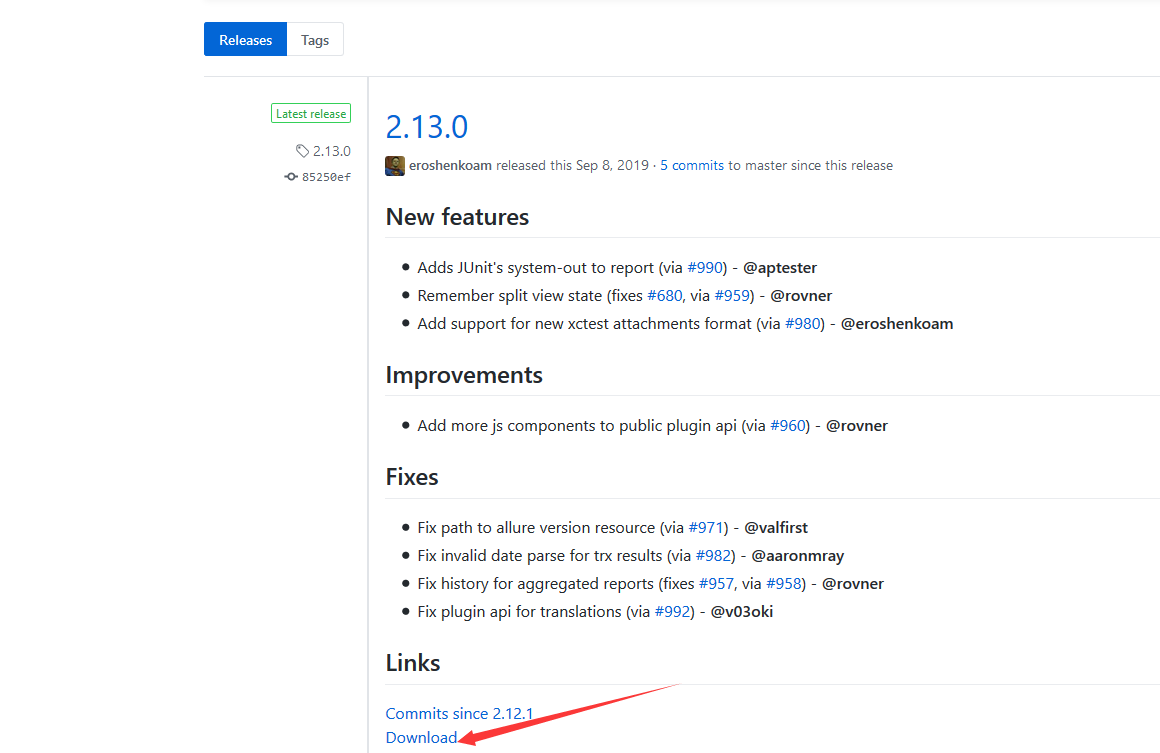
下载完成之后,解压到本地电脑
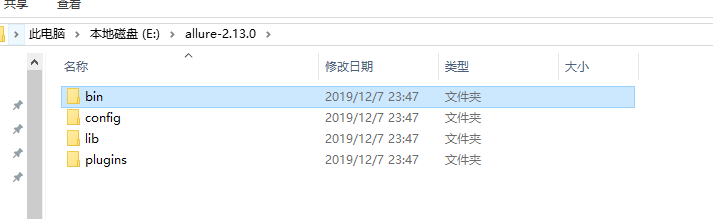
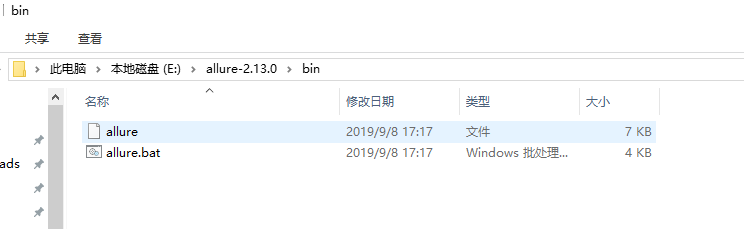
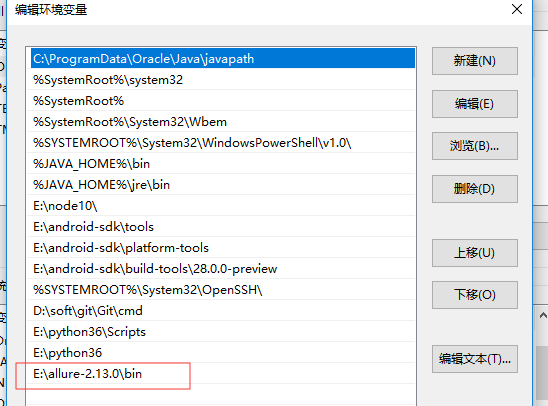
把bin目录添加到环境变量Path下
用例demo
conftest.py内容
import pytest

@pytest.fixture(scope="session")

def login():

    print("用例先登录")
test_allure_demo.py内容
import allure

import pytest

@allure.step("步骤1:点xxx")

def step_1():

    print("111")

@allure.step("步骤2:点xxx")

def step_2():

    print("222")

@allure.feature("编辑页面")

class TestEditPage():

    '''编辑页面'''

    @allure.story("这是一个xxx的用例")

    def test_1(self, login):

        '''用例描述:先登录,再去执行xxx'''

        step_1()

        step_2()

        print("xxx")

    @allure.story("打开a页面")

    def test_2(self, login):

        '''用例描述:先登录,再去执行yyy'''

        print("yyy")
运行用例
cd到test_allure_demo.py所在的目录文件,命令行执行
pytest --alluredir ./report/allure_raw
D:\soft\code\xuexipytest>pytest --alluredir ./report/allure_raw

============================= test session starts =============================

platform win32 -- Python 3.6.0, pytest-4.5.0, py-1.5.4, pluggy-0.13.1

rootdir: D:\soft\code\xuexipytest

plugins: allure-pytest-2.8.6, forked-0.2, html-1.19.0, metadata-1.7.0, repeat-0.7.0, xdist-1.23.2

collected 9 items

case\test_allure_demo.py ..                                              [ 22%]

case\test_x.py ......                                                    [ 88%]

case\test_y.py .                                                         [100%]

============================== 9 passed in 0.21s ==============================
执行完成后,在当前目录下,report目录会生成一个allure_raw的原始文件,这个只是测试报告的原始文件,不能打开成html的报告
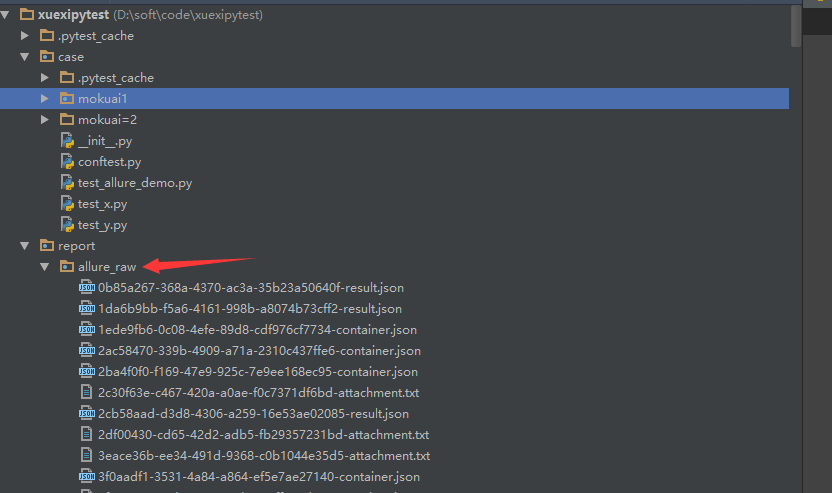
打开html的报告需要启动allure服务,启动命令如下
allure serve report/allure_raw
启动服务,它会自动给个端口,直接用默认浏览器打开了
D:\soft\code\xuexipytest>allure serve report/allure_raw

Generating report to temp directory...

Report successfully generated to C:\Users\dell\AppData\Local\Temp\6056757827461248074\allure-report

Starting web server...

2019-12-08 00:41:09.921:INFO::main: Logging initialized @2228ms to org.eclipse.jetty.util.log.StdErrLog

Server started at <http://192.168.1.125:35346/>. Press <Ctrl+C> to exit
查看报告
浏览器上打开的报告内容
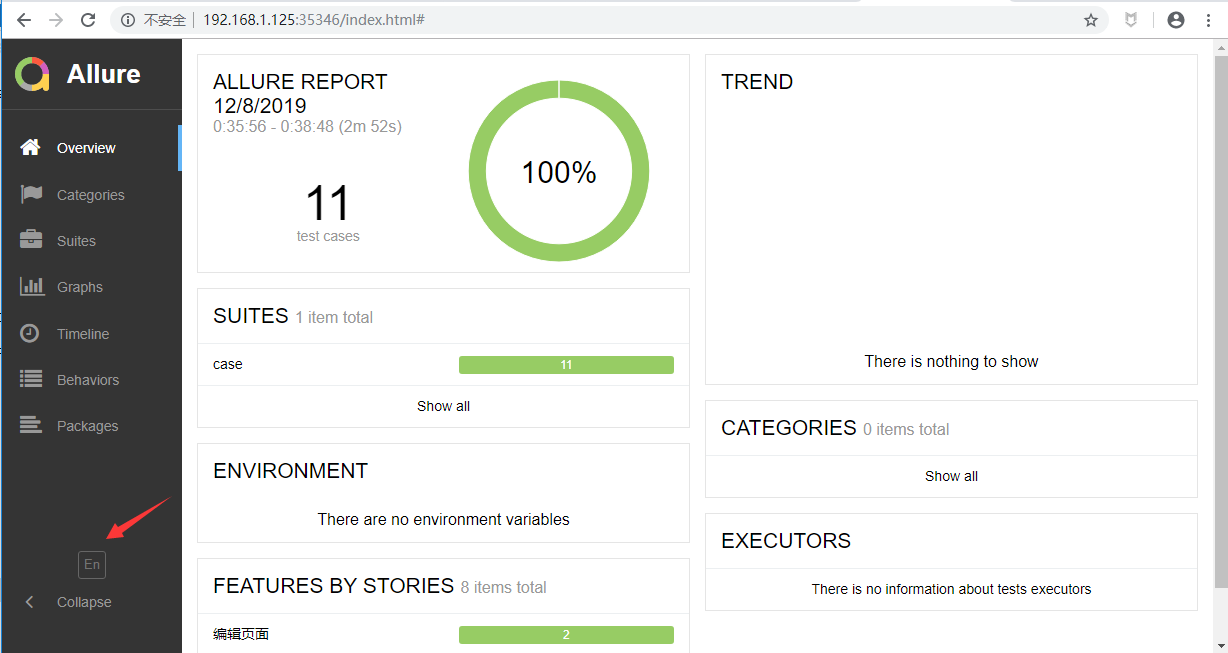
点 EN 按钮可以查看中文报告
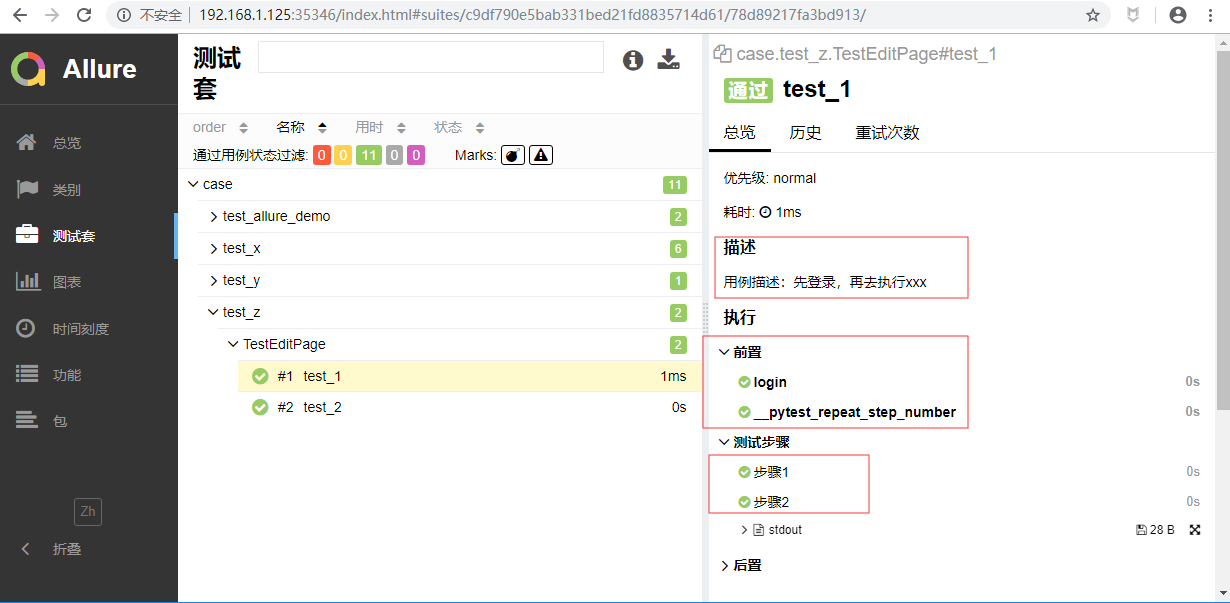
打开测试套件,可以查看报告的详情,显示的还是很详细的
pytest文档29-allure-pytest(最新最全,保证能搞成功!)的更多相关文章
- pytest文档3-pycharm运行pytest
前言 上一篇pytest文档2-用例运行规则已经介绍了如何在cmd执行pytest用例,平常我们写代码在pycharm比较多 写完用例之后,需要调试看看,是不是能正常运行,如果每次跑去cmd执行,太麻 ...
- pytest文档3-pytest+Allure+jenkins+邮箱发送
前言: 虽然网上有很多邮件配置的文章,但还是想自己写一下配置的过程,因为在中间也碰到了不同坑.按照这个文档配置的话,99%都可以成功. 一.jenkins 配置邮箱 1.打开jenkins后进入点 ...
- pytest文档2-pytest+Allure+jenkins+邮箱发送
前言: 上一章节讲解了tomcat+jenkins的环境搭建,这一章节主要讲一下Allure报告在jenkins上的配置 步骤: 1.新建一个item 2.输入项目的名称,选择自由风格,点击保存 3. ...
- pytest文档1-pytest+Allure+jenkins+邮箱发送
前言: 1.pytest+allure是目前很多公司使用较多的一种报告样式,因为它更详细,各种指标更直观(简单的说就是看着更高大上,更能装X). 环境准备: 1.Windows10 2.Allure ...
- pytest文档7-pytest-html生成html报告
前言 pytest-HTML是一个插件,pytest用于生成测试结果的HTML报告.兼容Python 2.7,3.6 pytest-html 1.github上源码地址[https://github. ...
- pytest文档51-内置fixture之cache使用
前言 pytest 运行完用例之后会生成一个 .pytest_cache 的缓存文件夹,用于记录用例的ids和上一次失败的用例. 方便我们在运行用例的时候加上--lf 和 --ff 参数,快速运行上一 ...
- pytest文档46-关于https请求警告问题(InsecureRequestWarning: Unverified HTTPS request is being made)
前言 使用 pytest 执行 https 请求用例的时候,控制台会出现警告:InsecureRequestWarning: Unverified HTTPS request is being mad ...
- pytest文档19-doctest测试框架
前言 doctest从字面意思上看,那就是文档测试.doctest是python里面自带的一个模块,它实际上是单元测试的一种. 官方解释:doctest 模块会搜索那些看起来像交互式会话的 Pytho ...
- pytest文档1-环境准备与入门
前言 首先说下为什么要学pytest,在此之前相信大家已经掌握了python里面的unittest单元测试框架,那再学一个框架肯定是需要学习时间成本的. 刚开始我的内心是拒绝的,我想我用unittes ...
- pytest文档56-插件打包上传到 pypi 库
前言 pytest 的插件完成之后,可以上传到 github,方便其他小伙伴通过 pip 源码安装.如果我们想通过 pip install packages 这种方式安装的话,需上传到 pypi 仓库 ...
随机推荐
- Apache(基于端口号)
1.配置服务器的IP地址 2. 创建网站数据目录 (1).分别创建端口为6111,6222的网站数据目录 (2).分别在网站数据目录中写入不同的内容 3.在配置文件中描述基于端口号的虚拟主机 (1) ...
- ioctl操作
在本书中有两个地方都对这个函数进行了介绍,其实还有很多地方需要这个函数.ioclt函数传统上一直作为纳西而不适合归入其他精细定义类别的特性的系统接口.网络程序(特别是服务器程序)经常在程序启动执行后使 ...
- (day48)Bootstrap、Adminlte框架、sweetalert
目录 Bootstrap框架官网 Adminlte框架官网 sweetalert 一.基础 二.布局 三.组件 四.插件 Bootstrap框架官网 Adminlte框架官网 sweetalert g ...
- 剑指Offer-18.二叉树的镜像(C++/Java)
题目: 题目描述 操作给定的二叉树,将其变换为源二叉树的镜像. 输入描述: 二叉树的镜像定义:源二叉树 8 / \ 6 10 / \ / \ 5 7 9 11 镜像二叉树 8 / \ 10 6 / \ ...
- 详解C++ STL set 容器
详解C++ STL set 容器 本篇随笔简单介绍一下\(C++STL\)中\(set\)容器的使用方法及常见使用技巧. set容器的概念和性质 \(set\)在英文中的意义是:集合.\(set\)容 ...
- CF1185F Two Pizzas
CF1185F Two Pizzas 洛谷评测传送门 题目描述 A company of nn friends wants to order exactly two pizzas. It is kno ...
- jQuery与IE兼容性问题处理
jQuery虽然是兼容所有主流的浏览器,但实际应用中也会存在很多兼容性的问题.使用IE11+jquery-3.2.1.min.js遇到的问题如: 对象不支持indexOf 在低版本中,1.8写法如下: ...
- Unity 2018 Artificial Intelligence Cookbook Second Edition (Jorge Palacios 著)
https://github.com/PacktPublishing/Unity-2018-Artificial-Intelligence-Cookbook-Second-Edition 1 Beha ...
- Navicat Premium Mac 12 破解(亲测可用!!!)
今天不知怎的,出于强迫症的我就是要强行搞个Navicat Premium Mac 12 破解版本. 历经了种种种种种种磨难与艰辛与火海,终于破解成功了. 因为要经常使用MySQL,使用命令行那是相当的 ...
- Spark学习笔记01-基础
目录 简介 特性 Spark运行模式 Mac本地安装 本文基于 Spark 2.4.1 进行演示,相关代码可以在我的Github上看到. 简介 Spark是一个分布式集群计算系统,类似Hadoop提供 ...