
利用Python读取图片exif敏感信息
众所周知,现在很多的照相机等软件,拍摄会有选项,是否包含位置信息等。
当然有的人会说,我在微信中查看图片exif信息并没有啊,这是因为你发送到微信服务器的时候,微信帮你完成了保密工作。
常见的图片中包含了exif信息,我们可以根据exif信息读取GPS坐标、摄像机类型、摄像头信息等。
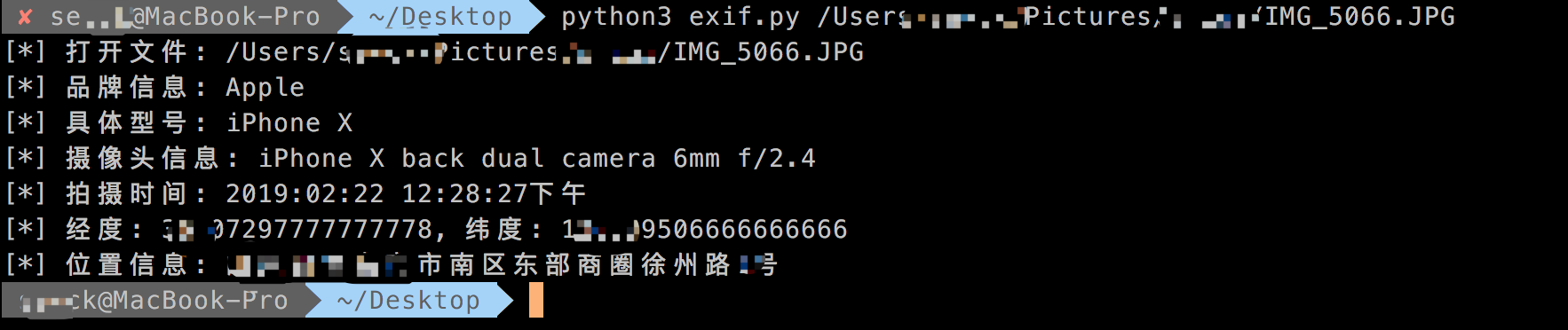
代码如下:
#!/usr/bin/env python

# coding:utf-8

# @Date    : 2019/3/12 6:48 PM

# @File    : exif.py

# @Author  : sevck (sevck@jdsec.cn)

# @Link    : https://www.javasec.cn

# -------------------------------------------------------------------------

import exifread

import re

import json

import requests

import sys

def latitude_and_longitude_convert_to_decimal_system(*arg):

    """

    经纬度转为小数, 作者尝试适用于iphone6、ipad2以上的拍照的照片,

    :param arg:

    :return: 十进制小数

    """

    return float(arg[0]) + ((float(arg[1]) + (float(arg[2].split('/')[0]) / float(arg[2].split('/')[-1]) / 60)) / 60)

def find_GPS_image(pic_path):

    GPS = {}

    date = ''

    with open(pic_path, 'rb') as f:

        tags = exifread.process_file(f)

        for tag, value in tags.items():

            if re.match('Image Make', tag):

                print('[*] 品牌信息: ' + str(value))

            if re.match('Image Model', tag):

                print('[*] 具体型号: ' + str(value))

            if re.match('EXIF LensModel', tag):

                print('[*] 摄像头信息: ' + str(value))

            if re.match('GPS GPSLatitudeRef', tag):

                GPS['GPSLatitudeRef'] = str(value)

            elif re.match('GPS GPSLongitudeRef', tag):

                GPS['GPSLongitudeRef'] = str(value)

            elif re.match('GPS GPSAltitudeRef', tag):

                GPS['GPSAltitudeRef'] = str(value)

            elif re.match('GPS GPSLatitude', tag):

                try:

                    match_result = re.match('\[(\w*),(\w*),(\w.*)/(\w.*)\]', str(value)).groups()

                    GPS['GPSLatitude'] = int(match_result[0]), int(match_result[1]), int(match_result[2])

                except:

                    deg, min, sec = [x.replace(' ', '') for x in str(value)[1:-1].split(',')]

                    GPS['GPSLatitude'] = latitude_and_longitude_convert_to_decimal_system(deg, min, sec)

            elif re.match('GPS GPSLongitude', tag):

                try:

                    match_result = re.match('\[(\w*),(\w*),(\w.*)/(\w.*)\]', str(value)).groups()

                    GPS['GPSLongitude'] = int(match_result[0]), int(match_result[1]), int(match_result[2])

                except:

                    deg, min, sec = [x.replace(' ', '') for x in str(value)[1:-1].split(',')]

                    GPS['GPSLongitude'] = latitude_and_longitude_convert_to_decimal_system(deg, min, sec)

            elif re.match('GPS GPSAltitude', tag):

                GPS['GPSAltitude'] = str(value)

            elif re.match('.*Date.*', tag):

                date = str(value)

    #print({'GPS_information':GPS, 'date_information': date})

    print('[*] 拍摄时间: '+ date)

    return {'GPS_information': GPS, 'date_information': date}

def find_address_from_GPS(GPS):

    """

    使用Geocoding API把经纬度坐标转换为结构化地址。

    :param GPS:

    :return:

    """

    secret_key = ''

    if not GPS['GPS_information']:

        return '该照片无GPS信息'

    lat, lng = GPS['GPS_information']['GPSLatitude'], GPS['GPS_information']['GPSLongitude']

    print('[*] 经度: ' + str(lat) + ', 纬度: ' + str(lng))

    baidu_map_api = "http://api.map.baidu.com/geocoder/v2/?ak={0}&callback=renderReverse&location={1},{2}s&output=json&pois=0".format(

        secret_key, lat, lng)

    response = requests.get(baidu_map_api)

    content = response.text.replace("renderReverse&&renderReverse(", "")[:-1]

    #print(content)

    baidu_map_address = json.loads(content)

    formatted_address = baidu_map_address["result"]["formatted_address"]

    # province = baidu_map_address["result"]["addressComponent"]["province"]

    # city = baidu_map_address["result"]["addressComponent"]["city"]

    # district = baidu_map_address["result"]["addressComponent"]["district"]

    return formatted_address

img_path = sys.argv[1]

if len(img_path) >= 2:

    print('[*] 打开文件: '+ img_path)

    GPS_info = find_GPS_image(pic_path=img_path)

    address = find_address_from_GPS(GPS=GPS_info)

    print('[*] 位置信息: '+address)

else:

    print('python script.py filename')
需要把secret_key改成你自己的即可。
利用Python读取图片exif敏感信息的更多相关文章
- Android中读取图片EXIF元数据之metadata-extractor的使用
一.引言及介绍 近期在开发中用到了metadata-extractor-xxx.jar 和 xmpcore-xxx.jar这个玩意, 索性查阅大量文章了解学习,来分享分享. 本身工作也是常常和处理大图 ...
- python 读取图片的尺寸、分辨率
#需要安装PIL模块 #encoding=gbk#--------------------------------------------------------------------------- ...
- Python读取图片尺寸、图片格式
Python读取图片尺寸.图片格式 需要用到PIL模块,使用pip安装Pillow.Pillow是从PIL fork过来的Python 图片库. from PIL import Image im = ...
- 利用Python读取外部数据文件
不论是数据分析,数据可视化,还是数据挖掘,一切的一切全都是以数据作为最基础的元素.利用Python进行数据分析,同样最重要的一步就是如何将数据导入到Python中,然后才可以实现后面的数据分析.数 ...
- 使用Python读取Mp3的标签信息
什么是ID3 MP3是音频文件最流行的格式,它的全称是 MPEG layer III.但是这种格式不支持对于音频内容的描述信息,包括歌曲名称.演唱者.专辑等等. 因此在1996年,Eric Kemp在 ...
- 小程序 读取照片 EXIF 元信息
安装 exif.js npm install exif-js --save UI <button type="primary" @click="onExif&quo ...
- Java读取图片exif信息实现图片方向自动纠正
起因 一个对试卷进行OCR识别需求,需要实现一个功能,一个章节下的题目图片需要上下拼接合成一张大图,起初写了一个工具实现图片的合并,程序一直很稳定的运行着,有一反馈合成的图片方向不对,起初怀疑是本身图 ...
- C#读取图片Exif信息
Exif是可交换图像文件的缩写,是专门为数码相机的照片设定的,可以记录数码照片的属性和拍摄数据 ////调用 //string strFile="fffff.jpg";//文件名 ...
- 利用Python读取文件名并生成txt文件——以图片文件为例
效果如下: 代码: import os class ReadImageName(): def __init__(self): self.path = '.' def readname(self): f ...
随机推荐
- c# 第9节 数据类型之引用类型
本节内容: 1:数据类型之引用类型 2:字符串要注意的两点: 1:数据类型之引用类型 实例: 2:字符串要注意的两点: 对变量进行重新赋值:其原本的字符串并没有销毁
- 0.Jenkins 介绍
一.持续集成的概念 continuous intergaration (简称CI),持续集成. 持续集成是一种软件开发实践,即团队开发成员经常集成他们的工作,通常每个成员每天至少集成一次,也就意味 ...
- Mac环境下 jieba 配置记录
在终端里输入: pip3 install jieba -i http://pypi.douban.com/simple --trusted-host pypi.douban.com
- MySQL 5.5/5.6/5.7及以上版本安装包安装时如何选择安装路径
安装环境需求: 自从昨天安装了mysql 5.7,发现了一个问题,mysql5.6起,已经不支持2003系统了,如果安装了无法开启服务而且会出现在 本地计算机 无法启动 MySQL57 服务.错误 1 ...
- Maven 本地仓库同步到私服中
步骤: 第一步:找到安装私服的目录中plexus.properties文件. 地址:C:\Windows\apache-tomcat-7.0.26\webapps\nexus-2.7.0-06\WEB ...
- The 13th Chinese Northeast Collegiate Programming Contest
题解: solution Code: A. Apple Business #include<cstdio> #include<algorithm> #include<ve ...
- requests--传递参数
传递参数 传递URL参数 data = {'city': '北京'} # 参数有中文如果发送不了,必须要编码 city = parse.urlencode(data).encode('utf-8') ...
- 【CF438D】The Child and Sequence(线段树)
点此看题面 大致题意: 给你一个序列,让你支持区间求和.区间取模.单点修改操作. 区间取模 区间求和和单点修改显然都很好维护吧,难的主要是区间取模. 取模标记无法叠加,因此似乎只能暴力搞? 实际上,我 ...
- 【CSP2019】树上的数
[CSP2019]树上的数 题面 洛谷 题解 我们设每个点上的编号分别为\(a_1,a_2...a_n\). 10pts ... 菊花 假设现在菊花中心编号是\(rt\),设你依次拆边\((p_1,r ...
- machine_math2
1. 2. 3.拉格朗日对偶??? 弱对偶 强对偶: <1>slater条件(强对偶的充分条件): 1.凸函数. 2.存在一个可行解满足不等式成立. 4.KKT条件