
用ZooKeeper做为注册中心搭建基于Spring Cloud实现服务注册与发现
前提:
先安装好ZooKeeper的环境,搭建参考:http://www.cnblogs.com/EasonJim/p/7482961.html
说明:
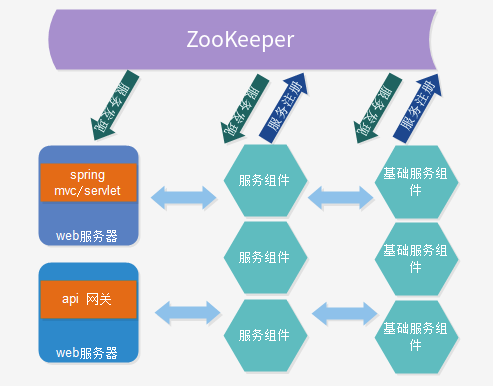
可以再简单的理解为有两方协作,一个是服务提供这,另一个是服务消费者。
搭建实例:
说明:基于Maven的模块工程
父工程POM:
<project xmlns="http://maven.apache.org/POM/4.0.0" xmlns:xsi="http://www.w3.org/2001/XMLSchema-instance"

    xsi:schemaLocation="http://maven.apache.org/POM/4.0.0 http://maven.apache.org/xsd/maven-4.0.0.xsd">

    <modelVersion>4.0.0</modelVersion>

    <groupId>com.jsoft.testzookeeper</groupId>

    <artifactId>zookeeperdemo</artifactId>

    <version>0.0.1-SNAPSHOT</version>

    <packaging>pom</packaging>

    <name>ZooKeeperDemo</name>

    <description>This is ZookKeeperDemo</description>

    <parent>

        <groupId>org.springframework.boot</groupId>

        <artifactId>spring-boot-starter-parent</artifactId>

        <version>1.4.5.RELEASE</version>

    </parent>

    <properties>

        <project.build.sourceEncoding>UTF-8</project.build.sourceEncoding>

        <project.reporting.outputEncoding>UTF-8</project.reporting.outputEncoding>

        <java.version>1.8</java.version>

    </properties>

    <dependencies>

        <!-- 健康监控 -->

        <dependency>

            <groupId>org.springframework.boot</groupId>

            <artifactId>spring-boot-starter-actuator</artifactId>

        </dependency>

        <!-- 断路器 -->

        <dependency>

            <groupId>org.springframework.cloud</groupId>

            <artifactId>spring-cloud-starter-hystrix</artifactId>

        </dependency>

        <!-- 负载均衡 -->

        <dependency>

            <groupId>org.springframework.cloud</groupId>

            <artifactId>spring-cloud-starter-ribbon</artifactId>

        </dependency>

        <!-- ZK依赖 -->

        <dependency>

            <groupId>org.springframework.cloud</groupId>

            <artifactId>spring-cloud-starter-zookeeper-discovery</artifactId>

        </dependency>

        <!-- Web支持 -->

        <dependency>

            <groupId>org.springframework.boot</groupId>

            <artifactId>spring-boot-starter-web</artifactId>

        </dependency>

        <!-- 测试 -->

        <dependency>

            <groupId>junit</groupId>

            <artifactId>junit</artifactId>

            <scope>test</scope>

        </dependency>

    </dependencies>

    <dependencyManagement>

        <dependencies>

            <dependency>

                <groupId>org.springframework.cloud</groupId>

                <artifactId>spring-cloud-dependencies</artifactId>

                <version>Camden.SR7</version>

                <type>pom</type>

                <scope>import</scope>

            </dependency>

            <dependency>

                <groupId>junit</groupId>

                <artifactId>junit</artifactId>

                <version>3.8.1</version>

                <scope>test</scope>

            </dependency>

        </dependencies>

    </dependencyManagement>

    <modules>

        <module>zookeeperservice</module>

        <module>zookeeperclient</module>

    </modules>

</project>
服务提供者POM:
<?xml version="1.0"?>

<project

    xsi:schemaLocation="http://maven.apache.org/POM/4.0.0 http://maven.apache.org/xsd/maven-4.0.0.xsd"

    xmlns="http://maven.apache.org/POM/4.0.0" xmlns:xsi="http://www.w3.org/2001/XMLSchema-instance">

    <modelVersion>4.0.0</modelVersion>

    <parent>

        <groupId>com.jsoft.testzookeeper</groupId>

        <artifactId>zookeeperdemo</artifactId>

        <version>0.0.1-SNAPSHOT</version>

    </parent>

    <groupId>com.jsoft.testzookeeper</groupId>

    <artifactId>zookeeperservice</artifactId>

    <version>0.0.1-SNAPSHOT</version>

    <name>zookeeperservice</name>

    <url>http://maven.apache.org</url>

    <properties>

        <project.build.sourceEncoding>UTF-8</project.build.sourceEncoding>

    </properties>

    <dependencies>

    </dependencies>

</project>
application.properties:
server.port=8800

spring.application.name=/service-zookeeper

spring.cloud.zookeeper.discovery.root=/spring-cloud-service

spring.cloud.zookeeper.connect-string=localhost:2181
说明:定义端口,应用的名称,服务在ZK的路径,ZK的服务器地址,其中ZK的服务器地址可以有多个,用逗号隔开。
HelloController:
服务接口
package com.jsoft.testzookeeper.service.controller;

import org.slf4j.Logger;

import org.slf4j.LoggerFactory;

import org.springframework.web.bind.annotation.RequestMapping;

import org.springframework.web.bind.annotation.RequestMethod;

import org.springframework.web.bind.annotation.RequestParam;

import org.springframework.web.bind.annotation.RestController;

@RestController

public class HelloController {

    private static final Logger log = LoggerFactory.getLogger(HelloController.class);

    @RequestMapping(value = "/hello", method = RequestMethod.GET)

    public String sayHello(@RequestParam(name = "name") String name) {

        log.info("param:name->{}", name);

        return "hello: " + name;

    }

}
App:
程序入口
package com.jsoft.testzookeeper.service;

import org.springframework.boot.SpringApplication;

import org.springframework.boot.autoconfigure.SpringBootApplication;

import org.springframework.cloud.client.discovery.EnableDiscoveryClient;

@SpringBootApplication

@EnableDiscoveryClient

public class App

{

    public static void main( String[] args )

    {

        SpringApplication.run(App.class, args);

    }

}
说明:其中要@EnableDiscoveryClient标注为服务发现注解。
服务消费者POM:
<?xml version="1.0"?>

<project

    xsi:schemaLocation="http://maven.apache.org/POM/4.0.0 http://maven.apache.org/xsd/maven-4.0.0.xsd"

    xmlns="http://maven.apache.org/POM/4.0.0" xmlns:xsi="http://www.w3.org/2001/XMLSchema-instance">

    <modelVersion>4.0.0</modelVersion>

    <parent>

        <groupId>com.jsoft.testzookeeper</groupId>

        <artifactId>zookeeperdemo</artifactId>

        <version>0.0.1-SNAPSHOT</version>

    </parent>

    <groupId>com.jsoft.testzookeeper</groupId>

    <artifactId>zookeeperclient</artifactId>

    <version>0.0.1-SNAPSHOT</version>

    <name>zookeeperclient</name>

    <url>http://maven.apache.org</url>

    <properties>

        <project.build.sourceEncoding>UTF-8</project.build.sourceEncoding>

    </properties>

    <dependencies>

        <!-- Feign客户端 -->

        <dependency>

            <groupId>org.springframework.cloud</groupId>

            <artifactId>spring-cloud-starter-feign</artifactId>

        </dependency>

    </dependencies>

</project>
说明:由于使用了Feign客户端,所以引入Feign依赖。
application.properties:
server.port=8810

spring.application.name=/client-zookeeper

spring.cloud.zookeeper.discovery.register=false

spring.cloud.zookeeper.discovery.root=/spring-cloud-service

spring.cloud.zookeeper.connect-string=localhost:2181

spring.cloud.zookeeper.dependencies.service-zookeeper.required=true

spring.cloud.zookeeper.dependencies.service-zookeeper.path=/service-zookeeper

spring.cloud.zookeeper.dependencies.service-zookeeper.loadBalancerType=ROUND_ROBIN
说明:由于服务提供者的应用名使用了斜杠,所以必须采用依赖关系spring.cloud.zookeeper.dependencies进行别名的选择,注意,使用了这个之后要引入actuator健康监控组件,不然调用时会报错。
App:
程序入口
package com.jsoft.testzookeeper.client;

import org.springframework.boot.SpringApplication;

import org.springframework.boot.autoconfigure.SpringBootApplication;

import org.springframework.cloud.client.circuitbreaker.EnableCircuitBreaker;

import org.springframework.cloud.client.discovery.EnableDiscoveryClient;

import org.springframework.cloud.netflix.feign.EnableFeignClients;

@SpringBootApplication

@EnableDiscoveryClient

@EnableCircuitBreaker

@EnableFeignClients

public class App

{

    public static void main( String[] args )

    {

        SpringApplication.run(App.class,args);

    }

}
说明:@EnableCircuitBreaker为断路器的支持,@EnableFeignClients为Feign客户端的支持。
Client的实现:
主要有两种,基于RestTemplate和Feign
RestTemplate
package com.jsoft.testzookeeper.client.service;

import com.netflix.hystrix.contrib.javanica.annotation.HystrixCommand;

import org.springframework.beans.factory.annotation.Autowired;

import org.springframework.stereotype.Service;

import org.springframework.web.client.RestTemplate;

@Service

public class HelloService {

    @Autowired

    private RestTemplate restTemplate;

    @HystrixCommand(fallbackMethod = "sayHelloFallback")

    public String sayHello(String name) {

        return restTemplate.getForEntity("http://service-zookeeper/hello?name=" + name, String.class).getBody();

    }

    private String sayHelloFallback(String name) {

        return "service error";

    }

}
说明:@HystrixCommand为断路器写法。
Feign
package com.jsoft.testzookeeper.client.service;

import org.springframework.cloud.netflix.feign.FeignClient;

import org.springframework.web.bind.annotation.RequestMapping;

import org.springframework.web.bind.annotation.RequestParam;

import com.jsoft.testzookeeper.client.service.fallback.FeignFallback;

@FeignClient(value = "service-zookeeper", fallback = FeignFallback.class)

public interface ServiceFeign {

    @RequestMapping(value = "/hello")

    String sayHello(@RequestParam(name = "name") String name);

}
说明:fallback为断路器回调。
消费服务:
package com.jsoft.testzookeeper.client.controller;

import org.springframework.beans.factory.annotation.Autowired;

import org.springframework.web.bind.annotation.RequestMapping;

import org.springframework.web.bind.annotation.RequestParam;

import org.springframework.web.bind.annotation.RestController;

import com.jsoft.testzookeeper.client.service.HelloService;

import com.jsoft.testzookeeper.client.service.ServiceFeign;

@RestController

public class HelloController {

    @Autowired

    private HelloService helloService;

    @Autowired

    private ServiceFeign serviceFeign;

    @RequestMapping(value = "hello")

    public String hello(@RequestParam String name) {

        return helloService.sayHello(name);

    }

    @RequestMapping(value = "hello2")

    public String hello2(@RequestParam String name) {

        return serviceFeign.sayHello(name);

    }

}
总结:
Spring Cloud在服务发现和注册上其实很多坑,上面展示的只是核心代码,最全的还是参考例子代码进行调试。
Maven示例:
https://github.com/easonjim/spring-cloud-demo/tree/master/ZooKeeper
参考:
http://theseus.iteye.com/blog/2366237
http://www.cnblogs.com/skyblog/p/5133752.html
http://blog.csdn.net/mn960mn/article/details/51803703
http://www.jianshu.com/p/775c363d0fda
用ZooKeeper做为注册中心搭建基于Spring Cloud实现服务注册与发现的更多相关文章
- 如何优化Spring Cloud微服务注册中心架构?
作者: 石杉的架构笔记 1.再回顾:什么是服务注册中心? 先回顾一下什么叫做服务注册中心? 顾名思义,假设你有一个分布式系统,里面包含了多个服务,部署在不同的机器上,然后这些不同机器上的服务之间要互相 ...
- spring cloud(服务注册中心及服务提供者——初学一)
Eureka是Netflix开源的一款提供服务注册和发现的产品,它提供了完整的Service Registry和Service Discovery实现.也是springcloud体系中最重要最核心的组 ...
- Spring cloud实现服务注册及发现
服务注册与发现对于微服务系统来说非常重要.有了服务发现与注册,你就不需要整天改服务调用的配置文件了,你只需要使用服务的标识符,就可以访问到服务. 本文属于<7天学会spring cloud系列& ...
- Spring Cloud 之 服务注册与发现
作为微服务框架,提供服务注册发现是最基本的功能.Spring Cloud 针对服务注册发现 提供了 Eureka版本的实现 .Zookeeper版本的实现.Consul版本的实现.由于历史原因 Eur ...
- spring cloud(二)服务(注册)中心Eureka
Eureka是Netflix开源的一款提供服务注册和发现的产品,它提供了完整的Service Registry和Service Discovery实现.也是springcloud体系中最重要最核心的组 ...
- Spring Cloud 之服务注册中心高可用
服务注册中心高可用 服务注册中心 eureka-server 高可用实施 版本 Spring Boot 版本 # Spring Boot 版本: <parent> <groupId& ...
- Spring Cloud之服务注册中心搭建Eureka Server服务注册中⼼
Spring Cloud并不与Spring MVC类似是一个开源框架,而是一组解决问题的规范(个人理解).解决哪些问题呢?如下: 1)服务管理:⾃动注册与发现.状态监管 2)服务负载均衡 3)熔断 4 ...
- SpringCloud的服务注册中心(四)- 高可用服务注册中心的搭建
一.双 服务注册注册中心 1.服务注册中心的服务端 - EurekaServer 1.1.EurekaServer1 String.application.name=eureka-server ser ...
- Spring Cloud Eureka 服务注册中心(二)
序言 Eureka 是 Netflix 开发的,一个基于 REST 服务的,服务注册与发现的组件 它主要包括两个组件:Eureka Server 和 Eureka Client Eureka Clie ...
随机推荐
- 368 Largest Divisible Subset 最大整除子集
给出一个由无重复的正整数组成的集合, 找出其中最大的整除子集, 子集中任意一对 (Si, Sj) 都要满足: Si % Sj = 0 或 Sj % Si = 0.如果有多个目标子集,返回其中任何一个均 ...
- 300 Longest Increasing Subsequence 最长上升子序列
给出一个无序的整形数组,找到最长上升子序列的长度.例如,给出 [10, 9, 2, 5, 3, 7, 101, 18],最长的上升子序列是 [2, 3, 7, 101],因此它的长度是4.因为可能会有 ...
- Spring Boot (30) 上传文件
文件上传 上传文件和下载文件是Java Web中常见的一种操作,文件上传主要是将文件通过IO流传输到服务器的某一个文件夹下. 导入依赖 在pom.xml中添加上spring-boot-starter- ...
- netty 引用计数器 ,垃圾回收
netty 引用计数器 ,垃圾回收 https://blog.csdn.net/u013851082/article/details/72170065 Netty之有效规避内存泄漏 https://w ...
- Codeforces_768_D_(概率dp)
D. Jon and Orbs time limit per test 2 seconds memory limit per test 256 megabytes input standard inp ...
- RocketMQ学习笔记(16)----RocketMQ搭建双主双从(异步复制)集群
1. 修改RocketMQ默认启动端口 由于只有两台机器,部署双主双从需要四个节点,所以只能修改rocketmq的默认启动端口,从官网下载rocketmq的source文件,解压后使用idea打开,全 ...
- day21-2 类的派生
目录 类的派生 派生方法一 派生方法二 类的派生 派生:子类中新定义属性的这个过程叫做派生 派生方法一 指明道姓访问某一个类的函数:该方法与继承无关 class People: def __init_ ...
- Vue.js 是什么
Vue.js 是什么 Vue.js(读音 /vjuː/, 类似于 view) 是一套构建用户界面的 渐进式框架.Vue 采用自底向上增量开发的设计. Vue 的核心库只关注视图层. 单页应用:Vue ...
- "ping: unknown host www.baidu.com"问题解决方式
参考:https://blog.csdn.net/wbainngg123/article/details/51540535 在虚拟机VMware里选择桥接模式,并配置网络之后,发现ping ip地址可 ...
- java基础——String的常用方法
java中String的常用方法 1.length() 字符串的长度 例:char chars[]={'a','b'.'c'}; String s=new String(chars); i nt le ...