
c# PID算法入门
离开工控行业已经有一段时间了,最近回忆起以前的工作,又对 PID 算法有了兴趣。所以写了一个小项目,希望可以帮到需要的人,也算是对那段工作经历的一个总结。
这是一个 winform 的项目。负载是一个水箱,有一个进水口,一个出水口。设定值为液位,通过控制进水口的阀门开度使液位达到设定值,传感器的滞后时间为10秒。每秒执行一次 PID 算法(对于运动控制的项目需要将采样时间调低)。
结果:
左图采用原生 PID 调节,右图采用积分分离后的 PID 调节(在误差小于一定值的情况下积分才开始累积)。可以看出积分分离可以有效的抑制超调量,但是会增加调节时间。
由于微分调节对系统稳定性影响较大,不建议初学者使用。
在分配 PID 的各项参数时,除了使用 “自动控制理论” 中计算传递函数,还可以通过试凑的方法。先确定比例的大致范围,再加入积分。加入积分时,需要先将积分值调到很大(积分值大表示效果较弱),再慢慢降低。
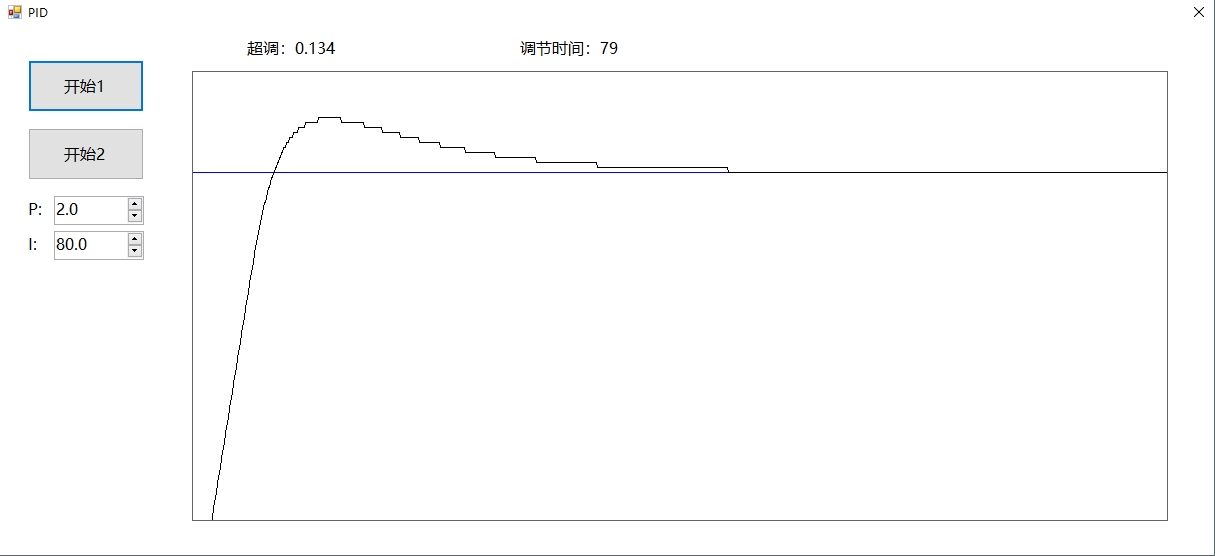
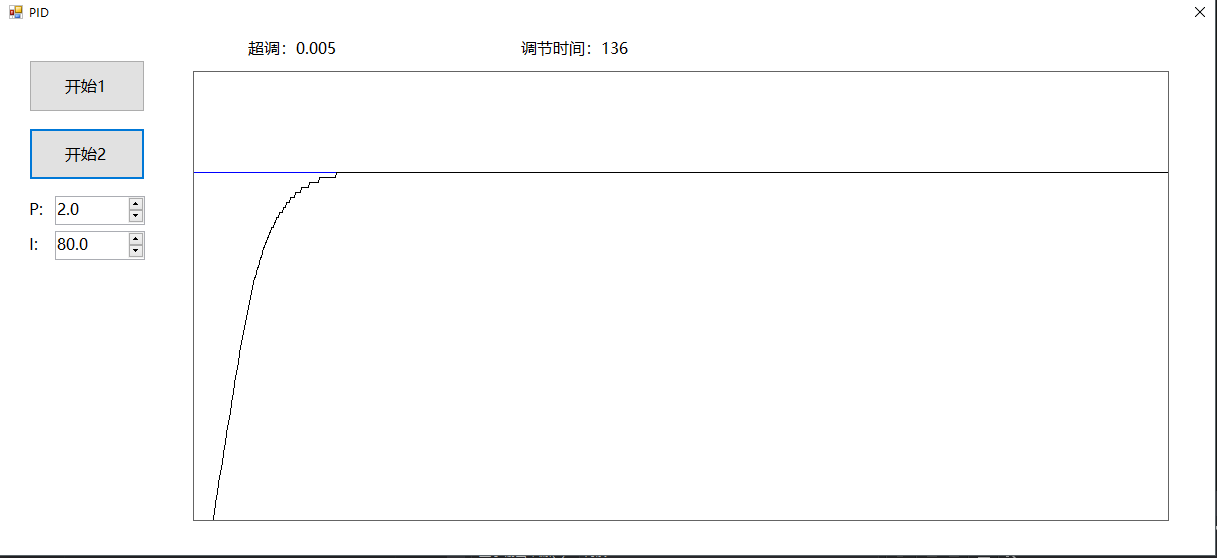
窗口中的控件:
label : lblInfo1(用于显示超调)lblInfo2(用于显示调节时间)
button:btnStart(开始普通 PID 算法)btnStart2(开始改进型 PID 算法)(主要采用积分分离算法)
numericupdown:numP(比例值)numI(积分值)
panel:panel2(用于绘图显示 PID 调节过程)
代码:
using System;

using System.Collections.Generic;

using System.ComponentModel;

using System.Data;

using System.Drawing;

using System.Linq;

using System.Text;

using System.Threading.Tasks;

using System.Windows.Forms;

namespace PID

{

    public partial class Form1 : Form

    {

        PID frmPid;

        Box frmBox;

        const int yBase = ;

        const int yMul = ;

        const int xMul = ;

        int time = ;//上次采样时间 时间为秒

        Point lastPoint;

        decimal maxLevel = ;//最大值用于求超调

        public Form1()

        {

            InitializeComponent();

            frmPid = new PID();

            frmBox = new Box(, 0.3m, 0.1m, 0m, 0.5m);

            Init();

        }

        //初始化

        private void Init()

        {

            using (Graphics g = panel2.CreateGraphics())

            {

                Pen whitePen = new Pen(Brushes.White, );

                Point point1 = new Point(, );

                Point point2 = new Point(, );

                g.DrawLine(whitePen, point1, point2);

            }

            maxLevel = ;

            time = ;

            lastPoint = new Point(, yBase);

        }

        private void btnStart_Click(object sender, EventArgs e)

        {

            Start();

        }

        private void btnStart2_Click(object sender, EventArgs e)

        {

            Start();

        }

        /// <summary>

        /// 开始

        /// </summary>

        /// <param name="number">0使用普通pi调节,1使用改进pi调节</param>

        private void Start(int number)

        {

            Init();

            frmPid.Init(0.8m, numP.Value, numI.Value, , );

            frmBox.Init();

            Pen bluePen = new Pen(Brushes.Blue, );

            using (Graphics g = panel2.CreateGraphics())

            {

                Point point1 = new Point(, yBase - Convert.ToInt32(frmPid.Target * ) * yMul);

                Point point2 = new Point(, yBase - Convert.ToInt32(frmPid.Target * ) * yMul);

                g.DrawLine(bluePen, point1, point2);

            }

            bool complete = false;

            for (int i = ; i < ; i++)

            {

                {

                    time++;

                    frmBox.ChangeLevel();

                    Pen blackPen = new Pen(Brushes.Black, );

                    using (Graphics g = panel2.CreateGraphics())

                    {

                        Point point = new Point(time * xMul, yBase - Convert.ToInt32(frmBox.GetLevel() * ) * yMul);

                        g.DrawLine(blackPen, point, lastPoint);

                        lastPoint = point;

                    }

                    decimal degreeIn = frmPid.GetOutPutValue(frmBox.GetLevel(), number);

                    frmBox.ChangeDegreeIn(degreeIn);

                }

                if (frmBox.GetLevel() > maxLevel)

                {

                    maxLevel = frmBox.GetLevel();

                }

                if ((Math.Abs(frmBox.GetLevel() - frmPid.Target) / frmPid.Target < 0.01m) && (!complete))

                {

                    complete = true;

                    lblInfo2.Text = "调节时间:" + time;

                }

            }

            decimal up = ;

            if (maxLevel > frmPid.Target)

            {

                up = (maxLevel - frmPid.Target) / frmPid.Target;

            }

            lblInfo1.Text = "超调:" + up.ToString("0.000");

        }

    }

    public class Box

    {

        private List<decimal> levelList;

        private decimal area; //底面积  平方米

        private decimal maxFlowOut = 0.05m; //出水阀最大流量立方每秒

        private decimal maxFlowIn = 0.1m;  //进水阀最大流量 立方每秒

        private decimal degreeIn;   //进水阀开度

        private decimal degreeOut; //出水阀开度

        /// <summary>

        /// 构造函数

        /// </summary>

        /// <param name="area">底面积</param>

        /// <param name="maxFlowIn">进水阀最大流量 立方每秒</param>

        /// <param name="maxFlowOut">出水阀最大流量立方每秒</param>

        /// <param name="degreeIn">进水阀开度</param>

        /// <param name="degreeOut">出水阀开度</param>

        public Box(decimal area, decimal maxFlowIn, decimal maxFlowOut, decimal degreeIn, decimal degreeOut)

        {

            this.area = area;

            this.maxFlowOut = maxFlowOut;

            this.maxFlowIn = maxFlowIn;

            this.degreeIn = degreeIn;

            this.degreeOut = degreeOut;

            this.levelList = new List<decimal>();

            this.levelList.Add();

        }

        public void Init()

        {

            this.levelList = new List<decimal>();

            this.levelList.Add();

        }

        private decimal GetActualLevel()

        {

            return this.levelList[this.levelList.Count - ];

        }

        /// <summary>

        ///每调用一次表示经过了一秒

        /// </summary>

        public void ChangeLevel()

        {

            decimal myflow = this.degreeIn * this.maxFlowIn - this.degreeOut * this.maxFlowOut;//增加的流量

            decimal level = this.GetActualLevel() + myflow / this.area;//新的液位

            if (level < )

            {

                level = ;

            }

            if (level > )

            {

                level = ;

            }

            this.levelList.Add(level);

            while (this.levelList.Count > )

            {

                this.levelList.RemoveAt();

            }

        }

        public decimal GetLevel()

        {

            return this.levelList[];

        }

        /// <summary>

        /// 改变进水阀开度

        /// </summary>

        public void ChangeDegreeIn(decimal degreeIn)

        {

            this.degreeIn = degreeIn;

        }

    }

    /// <summary>

    /// PID控制类

    /// </summary>

    public class PID

    {

        /// <summary>

        /// 积分累计值

        /// </summary>

        public decimal IntegralValue { get; set; }

        /// <summary>

        /// 设定值

        /// </summary>

        public decimal Target { get; set; }

        /// <summary>

        /// 比例

        /// </summary>

        public decimal P { get; set; }

        /// <summary>

        /// 积分

        /// </summary>

        public decimal I { get; set; }

        /// <summary>

        /// 输出限幅

        /// </summary>

        private decimal MinOutPut { get; set; }

        /// <summary>

        /// 输出限幅

        /// </summary>

        private decimal MaxOutPut { get; set; }

        public void Init(decimal target, decimal p, decimal i, decimal minOutput, decimal maxOutput)

        {

            this.Target = target;

            this.P = p;

            this.I = i;

            IntegralValue = ;

            if (minOutput > maxOutput)

            {

                throw new Exception("下限幅不能大于上限幅");

            }

            this.MinOutPut = minOutput;

            this.MaxOutPut = maxOutput;

        }

        /// <summary>

        /// 获得输出值

        /// </summary>

        /// <param name="feedBack">反馈值</param>

        /// <param name="number">0普通算法,1改进后的算法</param>

        /// <returns></returns>

        public decimal GetOutPutValue(decimal feedBack, int number)

        {

            decimal error = this.Target - feedBack;

            if (this.I > )

            {

                if (number == )

                {

                    this.IntegralValue += error / this.I;

                }

                else

                {

                    if ((Math.Abs(error) < 0.5m))

                    {

                        this.IntegralValue += error / this.I;

                    }

                }

            }

            decimal output = error * this.P + this.IntegralValue;

            if (output < this.MinOutPut)

            {

                return this.MinOutPut;

            }

            if (output > this.MaxOutPut)

            {

                return this.MaxOutPut;

            }

            return output;

        }

    }

}
c# PID算法入门的更多相关文章
- 某科学的PID算法学习笔记
最近,在某社团的要求下,自学了PID算法.学完后,深切地感受到PID算法之强大.PID算法应用广泛,比如加热器.平衡车.无人机等等,是自动控制理论中比较容易理解但十分重要的算法. 下面是博主学习过程中 ...
- 基本的PID算法整理(水缸的例子有问题!!)
一,先谈关于水缸漏水的问题 谈到PID原理入门的时候,大家经常会举的一个例子就是水缸漏水的例子.这里把一个解释水缸漏水的帖子放在这里:https://blog.csdn.net/qq_41736609 ...
- 线性控制原理——PID算法应用
使用控制系统(PID)控制被控对象 PID控制的三要素:控制器,被控对象,反馈器.控制器就是一个数学模型,就PID来说,等同于PID算法.是对反馈量的一个处理与输出.通俗的说就是对于每个被控的量,我的 ...
- PID算法学习记录
最近做项目需要用到PID算法,这个本来是我的专业(控制理论与控制工程),可是我好像是把这个东西全部还给老师了. 没办法,只好抽时间来学习了. 先占个座,后续将持续更新!
- 【转】 SVM算法入门
课程文本分类project SVM算法入门 转自:http://www.blogjava.net/zhenandaci/category/31868.html (一)SVM的简介 支持向量机(Supp ...
- 位置式PID与增量式PID算法
位置式PID与增量式PID算法 PID控制是一个二阶线性控制器 定义:通过调整比例.积分和微分三项参数,使得大多数的工业控制系统获得良好的闭环控制性能. 优点 ...
- 三角函数计算,Cordic 算法入门
[-] 三角函数计算Cordic 算法入门 从二分查找法说起 减少乘法运算 消除乘法运算 三角函数计算,Cordic 算法入门 三角函数的计算是个复杂的主题,有计算机之前,人们通常通过查找三角函数表来 ...
- 循环冗余校验(CRC)算法入门引导
目录 写给嵌入式程序员的循环冗余校验CRC算法入门引导 前言 从奇偶校验说起 累加和校验 初识 CRC 算法 CRC算法的编程实现 前言 CRC校验(循环冗余校验)是数据通讯中最常采用的校验方式.在嵌 ...
- 【算法入门】广度/宽度优先搜索(BFS)
广度/宽度优先搜索(BFS) [算法入门] 1.前言 广度优先搜索(也称宽度优先搜索,缩写BFS,以下采用广度来描述)是连通图的一种遍历策略.因为它的思想是从一个顶点V0开始,辐射状地优先遍历其周围较 ...
随机推荐
- 在Python中处理大型文件的最快方法
我们需要处理的各种目录中有大约500GB的图像.每个图像的大小约为4MB,我们有一个python脚本,一次处理一个图像(它读取元数据并将其存储在数据库中).每个目录可能需要1-4小时才能处理,具体取决 ...
- [Fw]初探linux中断系统(2)
初探linux中断系统(2) 中断系统初始化的过程 用来初始化中断系统的函数位于arch/x86/kernel/irqinit.c,定义如下 void __init init_IRQ(void){ i ...
- docker--shell和Exec格式
shell格式 RUN apt-get install -y vim CMD echo "docker so easy" ENTRYPOINT echo "docker ...
- POJ 3020:Antenna Placement(无向二分图的最小路径覆盖)
Antenna Placement Time Limit: 1000MS Memory Limit: 65536K Total Submissions: 6334 Accepted: 3125 ...
- webpack插件之html-webpack-plugin
官方文档:https://www.npmjs.com/package/html-webpack-plugin html-webpack-plugin 插件专门为由webpack打包后的js提供一个载体 ...
- Eigen ,MKL和 matlab 矩阵乘法速度比较
Eigen 矩阵乘法的速度 < MKL矩阵乘法的速度,MKL矩阵乘法的速度与matlab矩阵乘法的速度相差不大,但matlab GPU版本的矩阵乘法速度是CUP的两倍,在采用float数据类型 ...
- emoji处理方法
在做微信公众号开发时碰到了获取微信基本信息的需求,但是在像数据库保存用户昵称的时候出错了, 出错原因是微信用户的昵称中包含emoji等特殊符号,表情图片, mysql数据库使用的是utf8,最大存储3 ...
- 深入理解java虚拟机:笔记
1.运行时数据区域 1.程序计数器 当前线程执行字节码的行号指示器,字节码解释器工作通过改变这个计数器的值来选取下一条需要执行的字节码指令,每一个线程拥有独立的程序计数器,线程私有的内存 2.虚拟机栈 ...
- 【leedcode】950. Reveal Cards In Increasing Order
题目如下: In a deck of cards, every card has a unique integer. You can order the deck in any order you ...
- python字符串的截取,查找
1.字符串的截取 str = "123456" str[:3] = 123 str[1:3] = 23 str[0:-1] = 12345 里面的数字都是index索引,从第一个索 ...