
Jenkins搭建(by tomcat)
Jenkins官网https://jenkins.io/download/下载最新版本jenkins.war
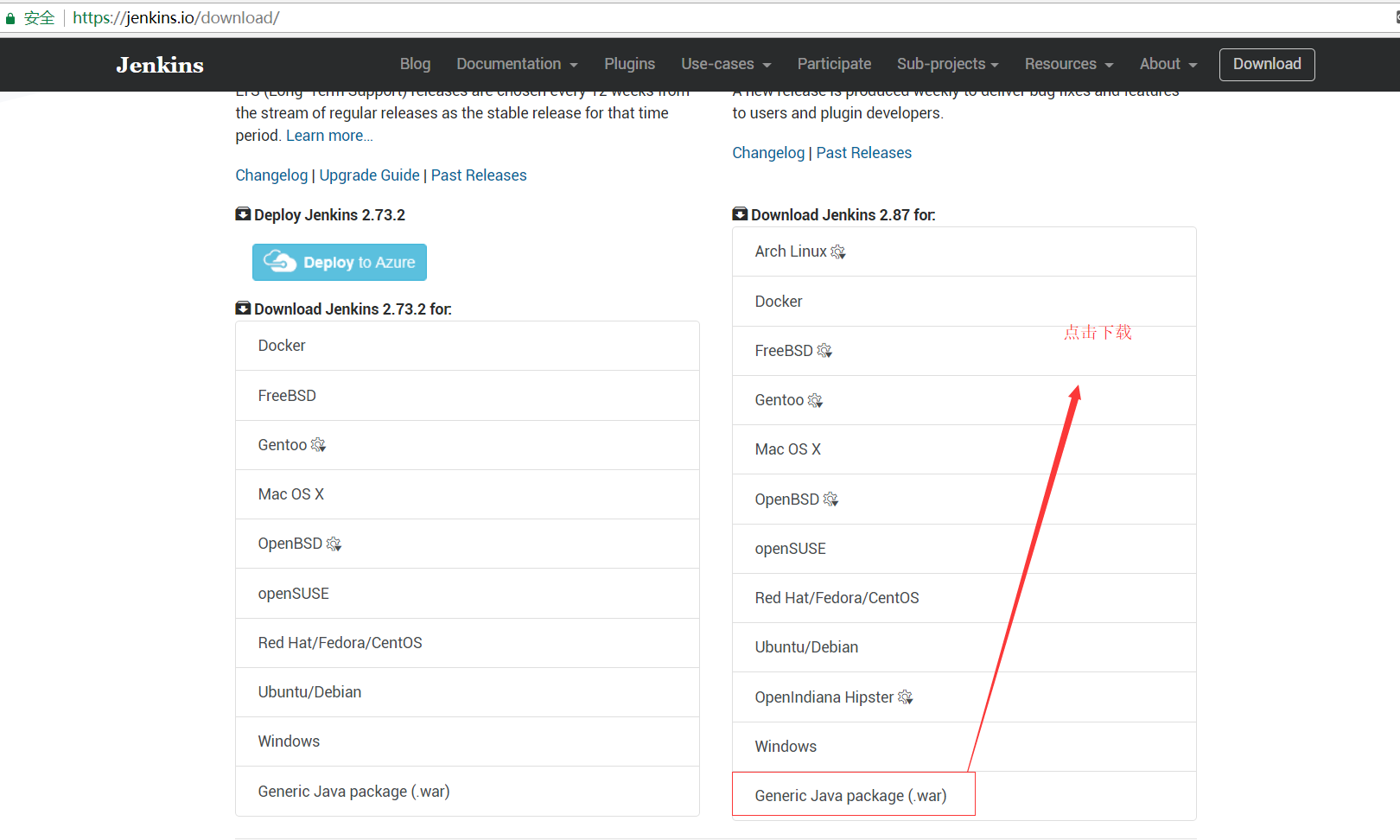
把jenkins.war放到tomcat-jenkins的webapps下

修改tomcat-jenkins的conf下的server.xml
配置http访问端口(80XX),shutdown端口(81XX),https访问端口(83XX),重定向端口redirectPort(82XX)
<?xml version='1.0' encoding='utf-8'?>
<!--
Licensed to the Apache Software Foundation (ASF) under one or more
contributor license agreements. See the NOTICE file distributed with
this work for additional information regarding copyright ownership.
The ASF licenses this file to You under the Apache License, Version 2.0
(the "License"); you may not use this file except in compliance with
the License. You may obtain a copy of the License at http://www.apache.org/licenses/LICENSE-2.0 Unless required by applicable law or agreed to in writing, software
distributed under the License is distributed on an "AS IS" BASIS,
WITHOUT WARRANTIES OR CONDITIONS OF ANY KIND, either express or implied.
See the License for the specific language governing permissions and
limitations under the License.
-->
<!-- Note: A "Server" is not itself a "Container", so you may not
define subcomponents such as "Valves" at this level.
Documentation at /docs/config/server.html
-->
<Server port="8101" shutdown="SHUTDOWN">
<Listener className="org.apache.catalina.startup.VersionLoggerListener" />
<!-- Security listener. Documentation at /docs/config/listeners.html
<Listener className="org.apache.catalina.security.SecurityListener" />
-->
<!--APR library loader. Documentation at /docs/apr.html -->
<Listener className="org.apache.catalina.core.AprLifecycleListener" SSLEngine="on" />
<!--Initialize Jasper prior to webapps are loaded. Documentation at /docs/jasper-howto.html -->
<Listener className="org.apache.catalina.core.JasperListener" />
<!-- Prevent memory leaks due to use of particular java/javax APIs-->
<Listener className="org.apache.catalina.core.JreMemoryLeakPreventionListener" />
<Listener className="org.apache.catalina.mbeans.GlobalResourcesLifecycleListener" />
<Listener className="org.apache.catalina.core.ThreadLocalLeakPreventionListener" /> <!-- Global JNDI resources
Documentation at /docs/jndi-resources-howto.html
-->
<GlobalNamingResources>
<!-- Editable user database that can also be used by
UserDatabaseRealm to authenticate users
-->
<Resource name="UserDatabase" auth="Container"
type="org.apache.catalina.UserDatabase"
description="User database that can be updated and saved"
factory="org.apache.catalina.users.MemoryUserDatabaseFactory"
pathname="conf/tomcat-users.xml" />
</GlobalNamingResources> <!-- A "Service" is a collection of one or more "Connectors" that share
a single "Container" Note: A "Service" is not itself a "Container",
so you may not define subcomponents such as "Valves" at this level.
Documentation at /docs/config/service.html
-->
<Service name="Catalina"> <!--The connectors can use a shared executor, you can define one or more named thread pools-->
<!--
<Executor name="tomcatThreadPool" namePrefix="catalina-exec-"
maxThreads="150" minSpareThreads="4"/>
--> <!-- A "Connector" represents an endpoint by which requests are received
and responses are returned. Documentation at :
Java HTTP Connector: /docs/config/http.html (blocking & non-blocking)
Java AJP Connector: /docs/config/ajp.html
APR (HTTP/AJP) Connector: /docs/apr.html
Define a non-SSL HTTP/1.1 Connector on port 8080
--> <Connector port="8001"
protocol="HTTP/1.1"
URIEncoding="UTF-8"
maxThreads="2000"
connectionTimeout="20000"
executor="tomcatThreadPool"
acceptCount="5000"
enableLookups="false"
disableUploadTimeout="false"
connectionUploadTimeout="60000"
compression="on"
compressionMinSize="2048"
compressableMimeType="text/html,text/xml,text/javascript,text/css,text/plain"
redirectPort="8201"/> <Connector port="8301"
SSLEnabled="true"
protocol="org.apache.coyote.http11.Http11Protocol"
URIEncoding="UTF-8"
maxThreads="1000"
enableLookups="false"
disableUploadTimeout="false"
keystoreFile="/opt/ssl/tomcat.keystore"
keystorePass="password"
clientAuth="false"
scheme="https"
secure="true"
sslProtocol="TLS"/> <!-- A "Connector" using the shared thread pool-->
<!--
<Connector executor="tomcatThreadPool"
port="8080" protocol="HTTP/1.1"
connectionTimeout="20000"
redirectPort="8443" />
-->
<!-- Define a SSL HTTP/1.1 Connector on port 8443
This connector uses the BIO implementation that requires the JSSE
style configuration. When using the APR/native implementation, the
OpenSSL style configuration is required as described in the APR/native
documentation -->
<!--
<Connector port="8443" protocol="org.apache.coyote.http11.Http11Protocol"
maxThreads="150" SSLEnabled="true" scheme="https" secure="true"
clientAuth="false" sslProtocol="TLS" />
--> <!-- Define an AJP 1.3 Connector on port 8009 -->
<!-- Connector port="8401" protocol="AJP/1.3" redirectPort="8201" / --> <!-- An Engine represents the entry point (within Catalina) that processes
every request. The Engine implementation for Tomcat stand alone
analyzes the HTTP headers included with the request, and passes them
on to the appropriate Host (virtual host).
Documentation at /docs/config/engine.html --> <!-- You should set jvmRoute to support load-balancing via AJP ie :
<Engine name="Catalina" defaultHost="localhost" jvmRoute="jvm1">
-->
<Engine name="Catalina" defaultHost="localhost"> <!--For clustering, please take a look at documentation at:
/docs/cluster-howto.html (simple how to)
/docs/config/cluster.html (reference documentation) -->
<!--
<Cluster className="org.apache.catalina.ha.tcp.SimpleTcpCluster"/>
--> <!-- Use the LockOutRealm to prevent attempts to guess user passwords
via a brute-force attack -->
<Realm className="org.apache.catalina.realm.LockOutRealm">
<!-- This Realm uses the UserDatabase configured in the global JNDI
resources under the key "UserDatabase". Any edits
that are performed against this UserDatabase are immediately
available for use by the Realm. -->
<Realm className="org.apache.catalina.realm.UserDatabaseRealm"
resourceName="UserDatabase"/>
</Realm> <Host name="localhost" appBase="webapps"
unpackWARs="true" autoDeploy="true"> <!-- SingleSignOn valve, share authentication between web applications
Documentation at: /docs/config/valve.html -->
<!--
<Valve className="org.apache.catalina.authenticator.SingleSignOn" />
--> <!-- Access log processes all example.
Documentation at: /docs/config/valve.html
Note: The pattern used is equivalent to using pattern="common" -->
<Valve className="org.apache.catalina.valves.AccessLogValve" directory="logs"
prefix="localhost_access_log." suffix=".txt"
pattern="%h %l %u %t "%r" %s %b" /> </Host>
</Engine>
</Service>
</Server>
生成tomcat.keystore
keytool -genkey -alias tomcat -keyalg RSA -keystore /opt/ssl/tomcat.keystore
密码填写password,然后一路按回车;是否正确填写是;
配置jenkins_home
修改tomcat-jenkins的conf下的context.xml
<?xml version='1.0' encoding='utf-8'?>

<!--

  Licensed to the Apache Software Foundation (ASF) under one or more

  contributor license agreements.  See the NOTICE file distributed with

  this work for additional information regarding copyright ownership.

  The ASF licenses this file to You under the Apache License, Version 2.0

  (the "License"); you may not use this file except in compliance with

  the License.  You may obtain a copy of the License at

      http://www.apache.org/licenses/LICENSE-2.0

  Unless required by applicable law or agreed to in writing, software

  distributed under the License is distributed on an "AS IS" BASIS,

  WITHOUT WARRANTIES OR CONDITIONS OF ANY KIND, either express or implied.

  See the License for the specific language governing permissions and

  limitations under the License.

-->

<!-- The contents of this file will be loaded for each web application -->

<Context>

    <!-- Default set of monitored resources -->

    <WatchedResource>WEB-INF/web.xml</WatchedResource>

    <Environment name="JENKINS_HOME" value="/server/jenkins/" type="java.lang.String"/>

    <!-- Uncomment this to disable session persistence across Tomcat restarts -->

    <!--

    <Manager pathname="" />

    -->

    <!-- Uncomment this to enable Comet connection tacking (provides events

         on session expiration as well as webapp lifecycle) -->

    <!--

    <Valve className="org.apache.catalina.valves.CometConnectionManagerValve" />

    -->

</Context>
启动tomcat;就可以正常访问了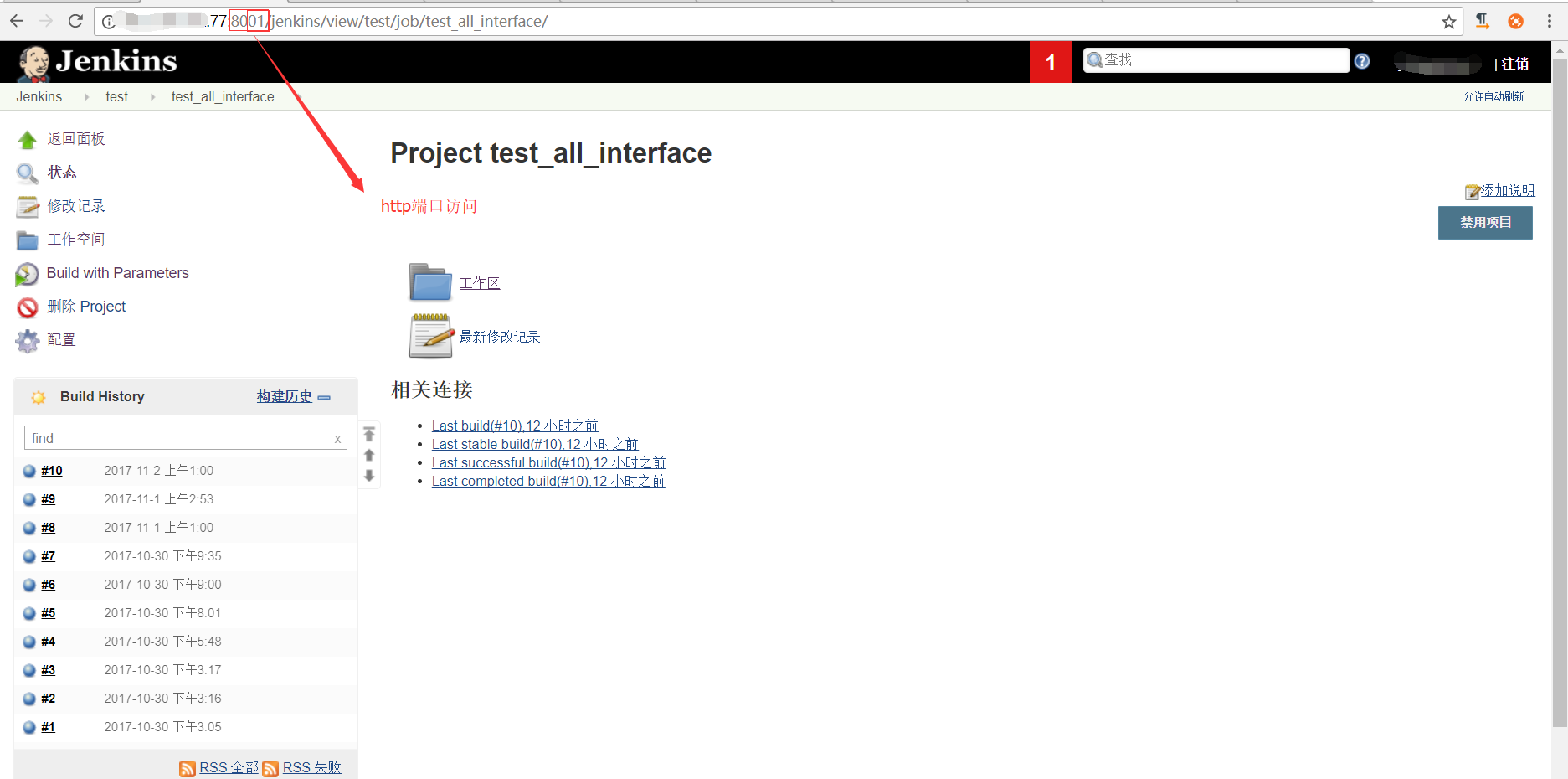

Jenkins搭建(by tomcat)的更多相关文章
- jenkins+Gitlab+maven+tomcat实现自动集成、打包、部署
一.前言 首先出于提高自己技术水平和琢磨能做点什么能提高工作效率,上线工作实在无聊.重复(手动编译.打包,传包,重启),于是就想到了jenkins,jenkins持续集成已经不是什么新鲜的话题,网上文 ...
- [Jenkins]CentOS7下Jenkins搭建
最近在倒腾Kubernetes的一些东西,这次需要用到Jenkins来实现自动化构建.来讲一讲搭建的整个过程. Jenkins是什么 Jenkins提供了软件开发的持续集成服务.它运行在Servlet ...
- jenkins+maven+git+tomcat+salt自动构建
jenkins 安装步骤 环境: centos7,jdk1.8.0,jenkins2.165,maven3.5.2 一. 安装配置java环境 JDK1.8下载地址:http://www.orac ...
- Jenkins 搭建企业实战案例 (发布与回滚)
让我们的代码部署变得easy,不再难,Jenkins是一个可扩展的持续集成引擎,是一个开源软件项目,旨在提供一个开放易用的软件平台,使软件的持续集成变成可能.Jenkins非常易于安装和配置,简单易用 ...
- jmeter+ant+jenkins搭建接口自动化测试环境
jmeter+ant+jenkins搭建接口自动化测试环境(基于win) 1.jmeter jmeter依赖java运行环境,所以需要提前下载jdk并配置好环境变量 官网下载(http://jmete ...
- Jenkins自动部署Tomcat项目
Jenkins自动部署Tomcat项目 1.安装jenkins 插件 启动Jenkins,进入系统管理-插件管理: 选择Deploy to container Plugin 插件安装:
- 用MSBuild和Jenkins搭建持续集成环境(2)
http://www.infoq.com/cn/articles/MSBuild-2 作者 Mustafa Saeed Haji Ali ,译者 李剑 发布于 2012年10月23日 | 注意: ...
- Linux平台上搭建apache+tomcat负载均衡集群
传统的Java Web项目是通过tomcat来运行和发布的.但在实际的企业应用环境中,采用单一的tomcat来维持项目的运行是不现实的.tomcat 处理能力低,效率低,承受并发小(1000左右).当 ...
- [置顶] 搭建apache+tomcat+memcached集群环境
一.搭建apache server服务器 1.apache server图示:(加载图片要一张一张,所以可以到下面网站下载带图片的word) http://download.csdn.net/user ...
- 使用 Jenkins 搭建 iOS/Android 持续集成打包平台【转】
背景描述 根据项目需求,现要在团队内部搭建一个统一的打包平台,实现对iOS和Android项目的打包.而且为了方便团队内部的测试包分发,希望在打包完成后能生成一个二维码,体验用户(产品.运营.测试等人 ...
随机推荐
- 【SD系列】SAP SD和QM模块常用bapi
公众号:SAP Technical 本文作者:matinal 原文出处:http://www.cnblogs.com/SAPmatinal/ 原文链接:[SD系列]SAP SD和QM模块常用bapi ...
- [Udemy] ES 7 and Elastic Stack - part 3
Section 7: Analyzing Log Data with the Elastic Stack
- 医院里的CR、DR、CT、磁共振、B超都是什么?
转自 百度知道MR CT CR DR DSA X线 都事医学影像疾病诊断的一种. MRI 是磁共振影像检查,可以获得横断面,矢状面和冠状面的影像.空间分辩率好. CT 是一种X线诊断设备,是一种复杂的 ...
- JavaScript 开发的 睡眠状况自测(SRSS)
Javascript 开发睡眠状况自测程序,手记!2019.11.13日... <script>//初始化fbox = new Findpair('fbox','output');fbox ...
- 7、 正则化(Regularization)
7.1 过拟合的问题 到现在为止,我们已经学习了几种不同的学习算法,包括线性回归和逻辑回归,它们能够有效地解决许多问题,但是当将它们应用到某些特定的机器学习应用时,会遇到过拟合(over-fittin ...
- [TabControl] TabControl控件的最佳实践,可以把一个窗体和用户控件添加进来
看下效果吧<ignore_js_op> 下面是一个公共的添加方法看代码 [C#] 纯文本查看 复制代码 ? 01 02 03 04 05 06 07 08 09 10 11 12 13 1 ...
- vue 一个轮播的组件
当我们进行开发的时候,并不是说所有信息都会在写一个组件中 作为项目的老大,我们要去思考每个文件下面需要放什么业务,分的越细.越合理为好 我们在componts文件下新建一个Banner.vue 组件 ...
- nginx读取请求体
请求体的读取一般发生在nginx的content handler中,一些nginx内置的模块,比如proxy模块,fastcgi模块,uwsgi模块等,这些模块的行为必须将客户端过来的请求体(如果有的 ...
- 并发工具CountDownLatch源码分析
CountDownLatch的作用类似于Thread.join()方法,但比join()更加灵活.它可以等待多个线程(取决于实例化时声明的数量)都达到预期状态或者完成工作以后,通知其他正在等待的线程继 ...
- python之流程控制升级
python之流程控制:if elif else while for 一.流程控制之if: 1.1为什要有if判断:让计算机能像人一样代替人类工作,那么计算机应该有对于事务的读错,真假,是否可行的 ...