
Python 通过wmi获取Window服务器硬件信息
通过pip install wmi安装wmi
查看cpu序列号:
wmic cpu get processorid

查看主板序列号:
wmic baseboard get serialnumber

查看网卡信息:
wmic nicconfig get macaddress
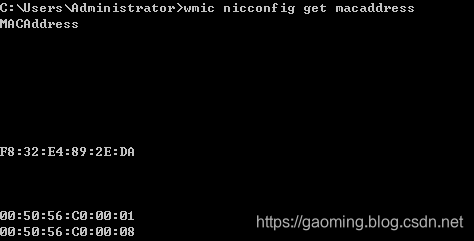
通过Python获取
#!/usr/bin/env python

# -*- coding: utf-8 -*-

import os, sys

import wmi

c = wmi.WMI()

# 处理器

def printCPU():

    tmpdict = {}

    tmpdict["CpuCores"] = 0

    for cpu in c.Win32_Processor():

        tmpdict["cpuid"] = cpu.ProcessorId.strip()

        tmpdict["CpuType"] = cpu.Name

        tmpdict['systemName'] = cpu.SystemName

        try:

            tmpdict["CpuCores"] = cpu.NumberOfCores

        except:

            tmpdict["CpuCores"] += 1

        tmpdict["CpuClock"] = cpu.MaxClockSpeed

        tmpdict['DataWidth'] = cpu.DataWidth

    print (tmpdict)

    return  tmpdict

# 主板

def printMain_board():

    boards = []

    # print len(c.Win32_BaseBoard()):

    for board_id in c.Win32_BaseBoard():

        tmpmsg = {}

        tmpmsg['UUID'] = board_id.qualifiers['UUID'][1:-1]  # 主板UUID,有的主板这部分信息取到为空值,ffffff-ffffff这样的

        tmpmsg['SerialNumber'] = board_id.SerialNumber  # 主板序列号

        tmpmsg['Manufacturer'] = board_id.Manufacturer  # 主板生产品牌厂家

        tmpmsg['Product'] = board_id.Product  # 主板型号

        boards.append(tmpmsg)

    print (boards)

    return boards

# BIOS

def printBIOS():

    bioss = []

    for bios_id in c.Win32_BIOS():

        tmpmsg = {}

        tmpmsg['BiosCharacteristics'] = bios_id.BiosCharacteristics  # BIOS特征码

        tmpmsg['version'] = bios_id.Version  # BIOS版本

        tmpmsg['Manufacturer'] = bios_id.Manufacturer.strip()  # BIOS固件生产厂家

        tmpmsg['ReleaseDate'] = bios_id.ReleaseDate  # BIOS释放日期

        tmpmsg['SMBIOSBIOSVersion'] = bios_id.SMBIOSBIOSVersion  # 系统管理规范版本

        bioss.append(tmpmsg)

    print (bioss)

    return bioss

# 硬盘

def printDisk():

    disks = []

    for disk in c.Win32_DiskDrive():

        # print disk.__dict__

        tmpmsg = {}

        tmpmsg['SerialNumber'] = disk.SerialNumber.strip()

        tmpmsg['DeviceID'] = disk.DeviceID

        tmpmsg['Caption'] = disk.Caption

        tmpmsg['Size'] = disk.Size

        tmpmsg['UUID'] = disk.qualifiers['UUID'][1:-1]

        disks.append(tmpmsg)

    for d in disks:

        print (d)

    return disks

# 内存

def printPhysicalMemory():

    memorys = []

    for mem in c.Win32_PhysicalMemory():

        tmpmsg = {}

        tmpmsg['UUID'] = mem.qualifiers['UUID'][1:-1]

        tmpmsg['BankLabel'] = mem.BankLabel

        tmpmsg['SerialNumber'] = mem.SerialNumber.strip()

        # tmpmsg['ConfiguredClockSpeed'] = mem.ConfiguredClockSpeed

        tmpmsg['Capacity'] = mem.Capacity

        # tmpmsg['ConfiguredVoltage'] = mem.ConfiguredVoltage

        memorys.append(tmpmsg)

    for m in memorys:

        print (m)

    return memorys

# 电池信息,只有笔记本才会有电池选项

def printBattery():

    isBatterys = False

    for b in c.Win32_Battery():

        isBatterys = True

    return isBatterys

# 网卡mac地址:

def printMacAddress():

    macs = []

    for n in  c.Win32_NetworkAdapter():

        mactmp = n.MACAddress

        if mactmp and len(mactmp.strip()) > 5:

            tmpmsg = {}

            tmpmsg['MACAddress'] = n.MACAddress

            tmpmsg['Name'] = n.Name

            tmpmsg['DeviceID'] = n.DeviceID

            tmpmsg['AdapterType'] = n.AdapterType

            tmpmsg['Speed'] = n.Speed

            macs.append(tmpmsg)

    print (macs)

    return macs

def main():

    printCPU()

    printMain_board()

    printBIOS()

    printDisk()

    printPhysicalMemory()

    printMacAddress()

    printBattery()

if __name__ == '__main__':

    main()

Python 通过wmi获取Window服务器硬件信息的更多相关文章
- Python使用wmi获取Windows相关信息
在使用Python获取Windows系统上的相关的信息可以使用WMI接口来获取, 什么是wmi? WMI是一项核心的Windows管理技术,WMI作为一种规范和基础结构,通过它可以访问.配置.管理和监 ...
- Python 通过dmidecode获取Linux服务器硬件信息
通过 dmidecode 命令可以获取到 Linux 系统的包括 BIOS. CPU.内存等系统的硬件信息,这里使用 python 代码来通过调用 dmidecode 命令来获取 Linux 必要的系 ...
- 通过wmi获取本地硬件信息的一些疑问。
通过wmi获取本地硬件信息的一些疑问. http://bbs.csdn.net/topics/391017789 http://blog.csdn.net/xcntime/article/detail ...
- 用PYTHON + PYWIN32 + WMI获取WINDOWS系统基本信息
网上原码,去了DECODE编码的问题. PyScripter这个PYTHON的IDE工具在WIN下表现不错哟. 感觉比SPYDER,ERIC,SUBLEME TEXT3之类的好用呀.. #!/usr/ ...
- 利用python 与 wmi 获取WINDOWS基本信息
#!/usr/bin/env python3.5 # -*- coding:utf8 -*- import platform import subprocess import wmi def serv ...
- Python基础:获取平台相关信息
Windows 10家庭中文版,Python 3.6.4, 本文介绍了使用os.platform.sys三个模块获取Python程序的运行平台相关的信息. os模块:提供 各种各样的操作系统接口 os ...
- C++ WMI获取系统硬件信息(CPU/DISK/NetWork etc)
官网找到一个例子,根据例子修改下可以获取很多信息 #define _WIN32_DCOM #include <iostream> using namespace std; #include ...
- python开发_platform_获取操作系统详细信息工具
''' python中,platform模块给我们提供了很多方法去获取操作系统的信息 如: import platform platform.platform() #获取操作系统名称及版本号,'Win ...
- c# WMI获取机器硬件信息(硬盘,cpu,内存等)
using System; using System.Collections.Generic; using System.Globalization; using System.Management; ...
随机推荐
- ubuntu彻底删除nginx
1.先执行一下命令: 1.1 删除nginx,–purge包括配置文件 sudo apt-get --purge remove nginx 1 1.2 自动移除全部不使用的软件包 sudo apt-g ...
- 步步向前之Element-UI
Table 固定表头 只要在el-table元素中定义了height属性,即可实现固定表头的表格,而不需要额外的代码.例如: <el-table :data="tableData3&q ...
- webpack插件之webpack-dev-server
webpack插件之webpack-dev-server webpack插件 自动化 webpack-dev-server 现在只需要使用 npm run build指令就可以自动打包,并自动处理好 ...
- sso单点登录原理详解
sso单点登录原理详解 01 单系统登录机制 1.http无状态协议 web应用采用browser/server架构,http作为通信协议.http是无状态协议,浏览器的每一次请求,服务 ...
- Ubuntu - apt 下载源设置为阿里的源
# 备份 sources.list cp /etc/apt/sources.list /etc/apt/sources.list.bak # 切换为阿里的源 echo "deb http:/ ...
- 使用 Dom4j 对XML操作!!!
转自:http://blog.csdn.net/redarmy_chen/article/details/12969219 dom4j是一个Java的XML API,类似于jdom,用来读写XML文件 ...
- tomcat7源码包编译安装
tomcat/:作用解析jsp程序.先安装jdk容器.1.下载jdk, wget http://download.oracle.com/otn- pub/java/jdk/8u131- b11/d54 ...
- python对象的引用
1 利用 * 星号生成二维及二维以上的list时,特别要注意有的量引用是相同的.如果后面要给list赋值,最好不要这样生成list. 可以先这样生成,再打印输出后,粘贴到程序中重新赋值. a = [[ ...
- tensorflow运行原理分析(源码)
tensorflow运行原理分析(源码) https://pan.baidu.com/s/1GJzQg0QgS93rfsqtIMURSA
- 【RequestContext】关于RequestContext的一些小心得
版权声明:随意转载,注明出处 https://blog.csdn.net/River_Continent/article/details/77511389后台传参,一直是一个比较重要的地方,如果涉及W ...