
python开发_platform_获取操作系统详细信息工具
'''

    python中,platform模块给我们提供了很多方法去获取操作系统的信息

    如:

        import platform

        platform.platform()   #获取操作系统名称及版本号,'Windows-7-6.1.7601-SP1'

        platform.version()    #获取操作系统版本号,'6.1.7601'

        platform.architecture()   #获取操作系统的位数,('32bit', 'WindowsPE')

        platform.machine()    #计算机类型,'x86'

        platform.node()       #计算机的网络名称,'hongjie-PC'

        platform.processor()  #计算机处理器信息,'x86 Family 16 Model 6 Stepping 3, AuthenticAMD'

        platform.uname()      #包含上面所有的信息汇总,uname_result(system='Windows', node='hongjie-PC',

                               release='7', version='6.1.7601', machine='x86', processor='x86 Family

                               16 Model 6 Stepping 3, AuthenticAMD')

        还可以获得计算机中python的一些信息:

        import platform

        platform.python_build()

        platform.python_compiler()

        platform.python_branch()

        platform.python_implementation()

        platform.python_revision()

        platform.python_version()

        platform.python_version_tuple()

'''
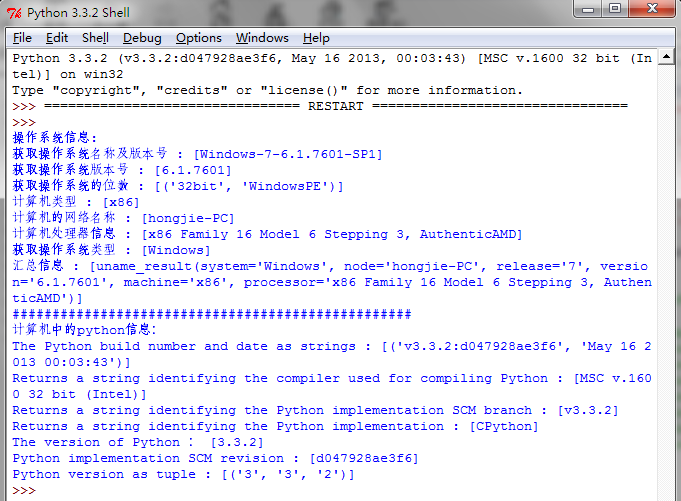
下面是我做的demo:
运行效果:
=======================================================
代码部分:
=======================================================
 #python platform

 #Author   :   Hongten

 #Mailto   :   hongtenzone@foxmail.com

 #Blog     :   http://www.cnblogs.com/hongten

 #QQ       :   648719819

 #Version  :   1.0

 #Create   :   2013-08-28

 import platform

 '''

     python中,platform模块给我们提供了很多方法去获取操作系统的信息

     如:

         import platform

         platform.platform()   #获取操作系统名称及版本号,'Windows-7-6.1.7601-SP1'

         platform.version()    #获取操作系统版本号,'6.1.7601'

         platform.architecture()   #获取操作系统的位数,('32bit', 'WindowsPE')

         platform.machine()    #计算机类型,'x86'

         platform.node()       #计算机的网络名称,'hongjie-PC'

         platform.processor()  #计算机处理器信息,'x86 Family 16 Model 6 Stepping 3, AuthenticAMD'

         platform.uname()      #包含上面所有的信息汇总,uname_result(system='Windows', node='hongjie-PC',

                                release='7', version='6.1.7601', machine='x86', processor='x86 Family

                                16 Model 6 Stepping 3, AuthenticAMD')

         还可以获得计算机中python的一些信息:

         import platform

         platform.python_build()

         platform.python_compiler()

         platform.python_branch()

         platform.python_implementation()

         platform.python_revision()

         platform.python_version()

         platform.python_version_tuple()

 '''

 #global var

 #是否显示日志信息

 SHOW_LOG = True

 def get_platform():

     '''获取操作系统名称及版本号'''

     return platform.platform()

 def get_version():

     '''获取操作系统版本号'''

     return platform.version()

 def get_architecture():

     '''获取操作系统的位数'''

     return platform.architecture()

 def get_machine():

     '''计算机类型'''

     return platform.machine()

 def get_node():

     '''计算机的网络名称'''

     return platform.node()

 def get_processor():

     '''计算机处理器信息'''

     return platform.processor()

 def get_system():

     '''获取操作系统类型'''

     return platform.system()

 def get_uname():

     '''汇总信息'''

     return platform.uname()

 def get_python_build():

     ''' the Python build number and date as strings'''

     return platform.python_build()

 def get_python_compiler():

     '''Returns a string identifying the compiler used for compiling Python'''

     return platform.python_compiler()

 def get_python_branch():

     '''Returns a string identifying the Python implementation SCM branch'''

     return platform.python_branch()

 def get_python_implementation():

     '''Returns a string identifying the Python implementation. Possible return values are: ‘CPython’, ‘IronPython’, ‘Jython’, ‘PyPy’.'''

     return platform.python_implementation()

 def get_python_version():

     '''Returns the Python version as string 'major.minor.patchlevel'

     '''

     return platform.python_version()

 def get_python_revision():

     '''Returns a string identifying the Python implementation SCM revision.'''

     return platform.python_revision()

 def get_python_version_tuple():

     '''Returns the Python version as tuple (major, minor, patchlevel) of strings'''

     return platform.python_version_tuple()

 def show_python_all_info():

     '''打印python的全部信息'''

     print('The Python build number and date as strings : [{}]'.format(get_python_build()))

     print('Returns a string identifying the compiler used for compiling Python : [{}]'.format(get_python_compiler()))

     print('Returns a string identifying the Python implementation SCM branch : [{}]'.format(get_python_branch()))

     print('Returns a string identifying the Python implementation : [{}]'.format(get_python_implementation()))

     print('The version of Python : [{}]'.format(get_python_version()))

     print('Python implementation SCM revision : [{}]'.format(get_python_revision()))

     print('Python version as tuple : [{}]'.format(get_python_version_tuple()))

 def show_python_info():

     '''只打印python的信息,没有解释部分'''

     print(get_python_build())

     print(get_python_compiler())

     print(get_python_branch())

     print(get_python_implementation())

     print(get_python_version())

     print(get_python_revision())

     print(get_python_version_tuple())

 def show_os_all_info():

     '''打印os的全部信息'''

     print('获取操作系统名称及版本号 : [{}]'.format(get_platform()))

     print('获取操作系统版本号 : [{}]'.format(get_version()))

     print('获取操作系统的位数 : [{}]'.format(get_architecture()))

     print('计算机类型 : [{}]'.format(get_machine()))

     print('计算机的网络名称 : [{}]'.format(get_node()))

     print('计算机处理器信息 : [{}]'.format(get_processor()))

     print('获取操作系统类型 : [{}]'.format(get_system()))

     print('汇总信息 : [{}]'.format(get_uname()))

 def show_os_info():

     '''只打印os的信息,没有解释部分'''

     print(get_platform())

     print(get_version())

     print(get_architecture())

     print(get_machine())

     print(get_node())

     print(get_processor())

     print(get_system())

     print(get_uname())

 def test():

     print('操作系统信息:')

     if SHOW_LOG:

         show_os_all_info()

     else:

         show_os_info()

     print('#' * 50)

     print('计算机中的python信息:')

     if SHOW_LOG:

         show_python_all_info()

     else:

         show_python_info()

 def init():

     global SHOW_LOG

     SHOW_LOG = True

 def main():

     init()

     test()

 if __name__ == '__main__':

     main()
python开发_platform_获取操作系统详细信息工具的更多相关文章
- NX二次开发-UFUN获取工程图详细信息UF_DRAW_ask_drawing_info
NX9+VS2012 #include <uf.h> #include <uf_draw.h> #include <uf_part.h> UF_initialize ...
- python开发 getpass获取操作系统登陆名
需用使用python getpass模块 import getpass def get_system_user_name(): return getpass.getuser() def main(): ...
- 钉钉开发入门,微应用识别用户身份,获取用户免登授权码code,获取用户userid,获取用户详细信息
最近有个需求,在钉钉内,点击微应用,获取用户身份,根据获取到的用户身份去企业内部的用户中心做校验,校验通过,相关子系统直接登陆; 就是在获取这个用户身份的时候,网上的资料七零八落的,找的人烦躁的很,所 ...
- TriAquae 是一款由国产的基于Python开发的开源批量部署管理工具
怀着鸡动的心情跟大家介绍一款国产开源运维软件TriAquae,轻松帮你搞定大部分运维工作!TriAquae 是一款由国产的基于Python开发的开源批量部署管理工具,可以允许用户通过一台控制端管理上千 ...
- [课程设计]Scrum 3.4 多鱼点餐系统开发进度(下单详细信息页面&会员信息页面)
Scrum 3.4 多鱼点餐系统开发进度(下单详细信息页面&会员信息页面) 1.团队名称:重案组 2.团队目标:长期经营,积累客户充分准备,伺机而行 3.团队口号:矢志不渝,追求完美 4.团队 ...
- [课程设计]Scrum 3.3 多鱼点餐系统开发进度(下单详细信息页面设计)
Scrum 3.3 多鱼点餐系统开发进度(下单详细信息页面设计) 1.团队名称:重案组 2.团队目标:长期经营,积累客户充分准备,伺机而行 3.团队口号:矢志不渝,追求完美 4.团队选题:餐厅到店点 ...
- Lucene学习-深入Lucene分词器,TokenStream获取分词详细信息
Lucene学习-深入Lucene分词器,TokenStream获取分词详细信息 在此回复牛妞的关于程序中分词器的问题,其实可以直接很简单的在词库中配置就好了,Lucene中分词的所有信息我们都可以从 ...
- python开发_tkinter_获取文本框内容_给文本框添加键盘输入事件
在之前的blog中有提到python的tkinter中的菜单操作 python开发_tkinter_窗口控件_自己制作的Python IDEL_博主推荐 python开发_tkinter_窗口控件_自 ...
- 微信小程序 报错 “对应的服务器无效。控制台输入 showRequestInfo()可以获取更详细信息”
之前做的项目突然无法读出数据了,一测试发现报这个错误==>对应的服务器无效.控制台输入 showRequestInfo()可以获取更详细信息,后来发现是SSL证书到期了.重新申请了一个证书,免费 ...
随机推荐
- centos 安装memcache服务后memcahce本机连接Permission
自己手动在虚拟机下装了下memcache,整个过程真是充满波折,本身用php5.3安装memcache扩展就麻烦很多,无法通过yum直接安装,安装方法详见http://chenwei.me/blog/ ...
- codevs 1230 元素查找
题目链接:http://codevs.cn/problem/1230/ 题解: 会有很多方法写这道题,写个裸的哈希练练手 #include<cstdio> ,MOD=; int n,m,h ...
- 学习网站总结->
慕课大巴网:这是一个学习各类技术视频的网站 慕课大巴网点我-> 吾爱破解: 这是一个破解各类软件的网站 吾爱破解点我-> 鸠摩搜书:可以搜一些免费的书,我喜欢的都能搜到 鸠摩搜书点我-&g ...
- jumpserver安装教程
centos7系统一步一步安装jumpserver 参照官方文档,查找了百度所有的文档,基本上都是按照官方的文档操作的 官方文档点我-> 安装jumpserver需注意: 1:网络环境要好,有的 ...
- 五、springboot单元测试
1.为什么要写测试用例 1. 可以避免测试点的遗漏,为了更好的进行测试,可以提高测试效率 2. 可以自动测试,可以在项目打包前进行测试校验 3. 可以及时发现因为修改代码导致新的问题的出现,并及时解决 ...
- 24 The Go image package go图片包:图片包的基本原理
The Go image package go图片包:图片包的基本原理 21 September 2011 Introduction The image and image/color packag ...
- sqlserver中一些常用的函数总结
去掉空格方面 LTRIM('内容'):去掉字符串左边的空格 RTRIM('内容'):去掉右边的空格 LTRIM(RTRIM('内容')):去掉字符串左边和右边的空格 REPLACE(‘内容’,' ', ...
- ROS + Caffe 机器人操作系统框架和深度学习框架笔记 (機器人控制與人工智能)
ROS + Caffe,这里以环境中物体识别为示例,机器人怎么知道环境里面有什么呢? [0.0567392 - n03376595 folding chair][0.0566773 - n040999 ...
- SQL行列转换的另一种方法
create table tb(姓名 varchar(10) , 课程 varchar(10) , 分数 int)insert into tb values('张三' , '语文' , 74)inse ...
- 首次加载进来DEV控件列表第一行颜色总是不对,后台代码显示的数据正确
1:行改变的颜色正确的颜色: 1.1颜色效果如下图: 1.2:设置行改变颜色: 2:结果首次加载第一行颜色为: 3:解决方案: 3.1 :Views-->OptionsSelection --& ...