
从 Vue 1.x 迁移 — Vue.js
闲聊:
又到周五啦,明天不用上班啦哈哈哈哈哈,想想就好开心啊,嘻嘻,小颖这周三的早晨做个一个美梦,把自己愣是笑醒了,梦的大概剧情我忘记了,总之宝宝是被笑醒的,醒了之后还傻笑了一段时间,真希望每天早上都能梦到这样的梦,估计当时我家仔仔看着我傻笑内心是崩溃的,估计在想,这傻妞又做什么梦了,太能折腾了,哭醒、笑醒、从床上掉下去 摔醒,估计也就我家铲屎的有这技能。哈哈哈哈

目录:
1.v-for
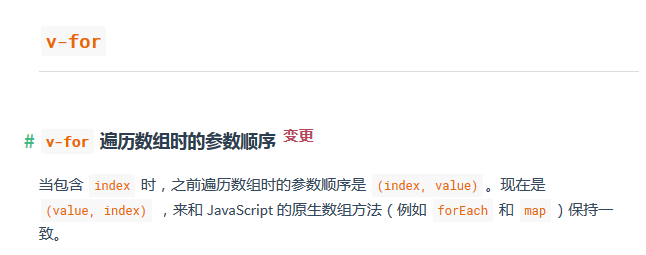
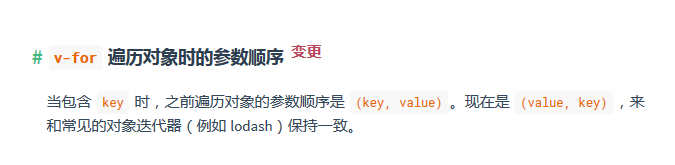
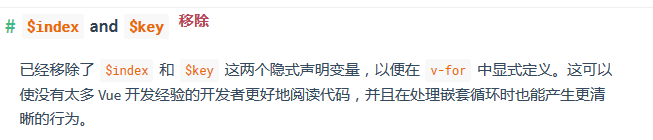
vue1.0例子:
效果图:
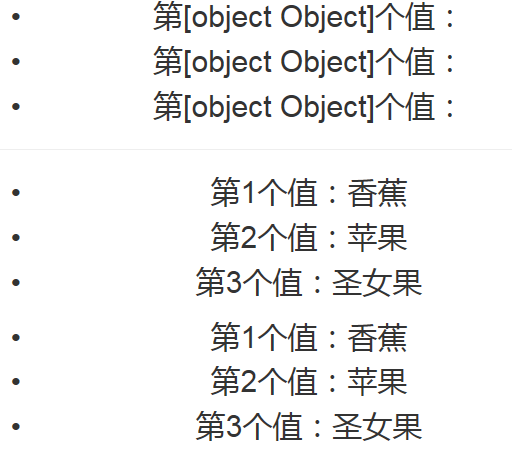
vue1.0中的 v-for 的用法:
<template>

<div class="father-container">

    <ul>

        <li v-for='(val,index) in fruitData'>第{{index}}个值:{{val.name}}</li>

    </ul>

    <hr>

    <ul>

        <li v-for='(index,val) in fruitData'>第{{index+1}}个值:{{val.name}}</li>

    </ul>

    <ul>

        <li v-for='val in fruitData'>第{{$index+1}}个值:{{val.name}}</li>

    </ul>

</div>

</template>

<script>

export default {

    components: {},

    methods: {},

    watch: {},

    data() {

        return {

            fruitData: [{

                name: '香蕉'

            }, {

                name: '苹果'

            }, {

                name: '圣女果'

            }]

        }

    }

}

</script>
vue2.0例子:
效果图:
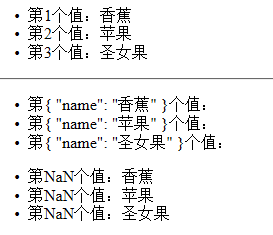
vue2.0中 v-for 的用法:
<template>

<div class="father-container">

    <ul>

        <li v-for='(val,index) in fruitData'>第{{index+1}}个值:{{val.name}}</li>

    </ul>

    <hr>

    <ul>

        <li v-for='(index,val) in fruitData'>第{{index}}个值:{{val.name}}</li>

    </ul>

    <ul>

        <li v-for='val in fruitData'>第{{$index+1}}个值:{{val.name}}</li>

    </ul>

</div>

</template>

<script>

export default {

    components: {},

    methods: {},

    data() {

        return {

            fruitData: [{

                name: '香蕉'

            }, {

                name: '苹果'

            }, {

                name: '圣女果'

            }]

        }

    }

}

</script>
2.twoWay-Prop-的参数-移除
小颖在之前用vue1.的时候子组件可以通过Prop中twoWay的参数,直接修改父组件的值,但是现在不行了。
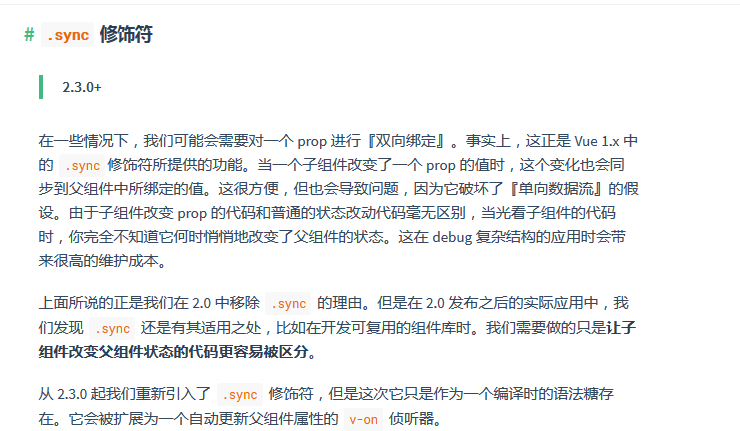
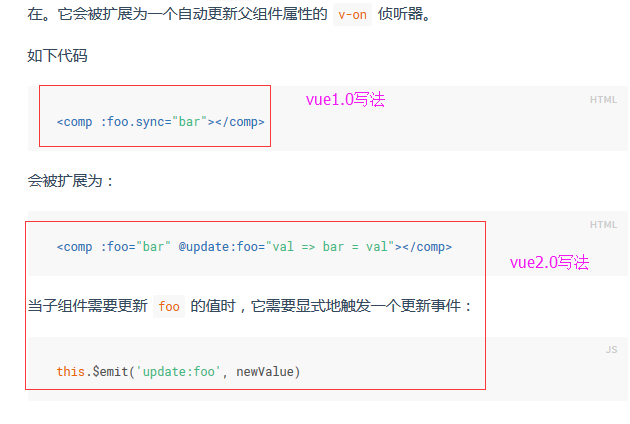
光看,可能大家不太理解,下面小颖就做个demo,帮大家更好的理解。嘻嘻,
目录:
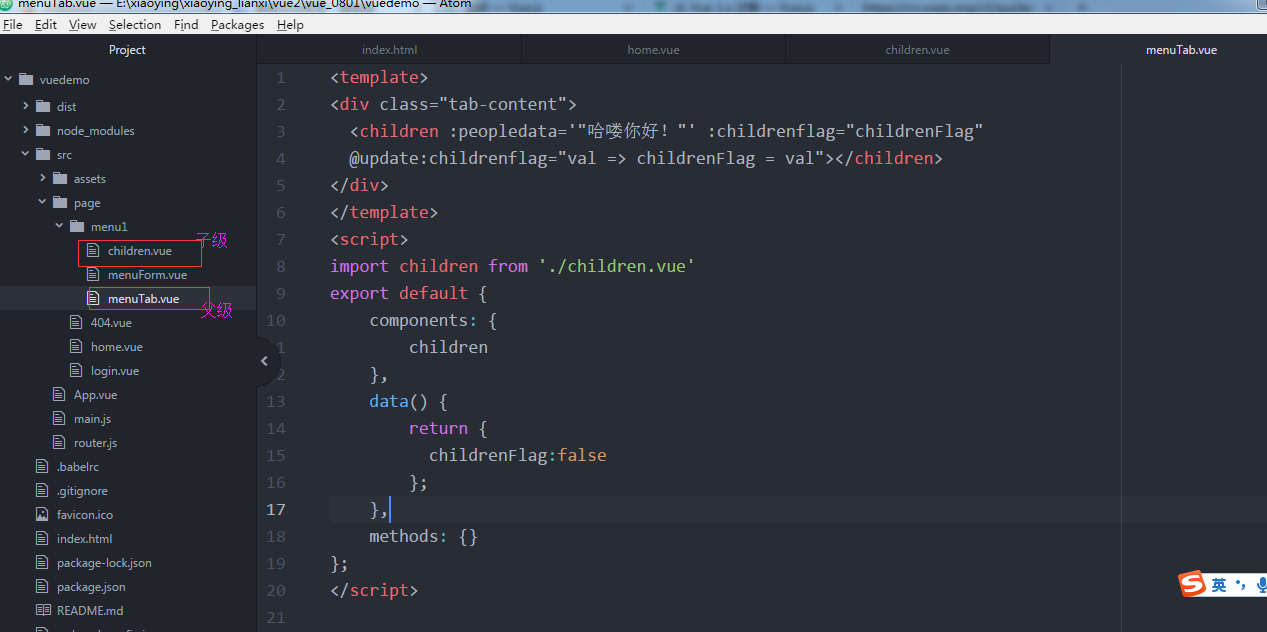
父组件:
<template>

<div class="tab-content">

  <children :peopledata='"哈喽你好!"' :childrenflag="childrenFlag"

  @update:childrenflag="val => childrenFlag = val"></children>

</div>

</template>

<script>

import children from './children.vue'

export default {

    components: {

        children

    },

    data() {

        return {

          childrenFlag:false

        };

    },

    methods: {}

};

</script>

<style lang="css">

</style>
子组件:
<template lang="html">

  <div class="children-content" v-if='childrenflag'>{{peopledata}}

    <div class="fruit-content">

      <ul v-for='fruit in fruitData'>

        <li>{{fruit.name}}</li>

      </ul>

    </div>

  </div>

</template>

<script>

export default {

    components: {},

    props: {

        peopledata: {

            type: String

        },

        childrenflag: {

            type: Boolean

        }

    },

    mounted: function() {

      this.$emit('update:childrenflag', !this.childrenflag);

    },

    data() {

        return {

            fruitData: [{

                name: '香蕉'

            }, {

                name: '苹果'

            }, {

                name: '圣女果'

            }]

        }

    }

}

</script>

<style lang="css">

</style>
当父组件的值 childrenFlag:false 时: 当父组件的值 childrenFlag:true 时:
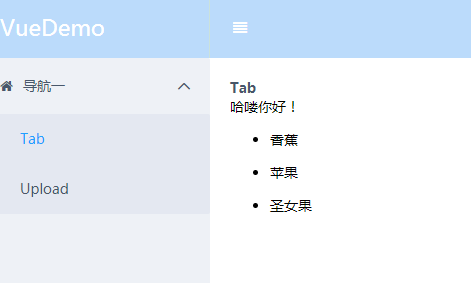
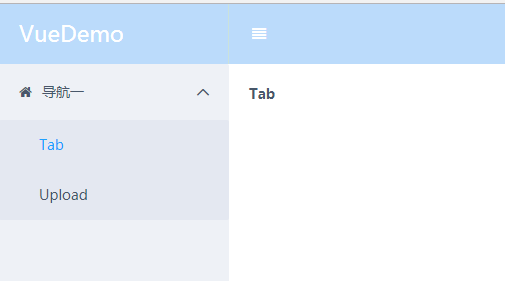
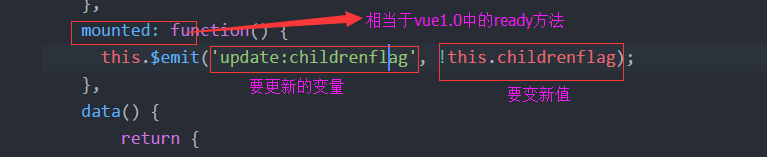
这是怎么实现的呢?
在父组件中:

在子组件中:
或者用 parent 来实现子组件修改父组件的值。
代码:
父组件调用子组件的时候直接调用,传好参数,别的不用改。

子组件中:

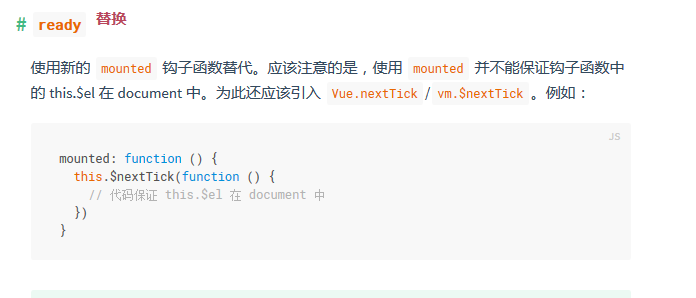
3.ready-替换
以前的写法:
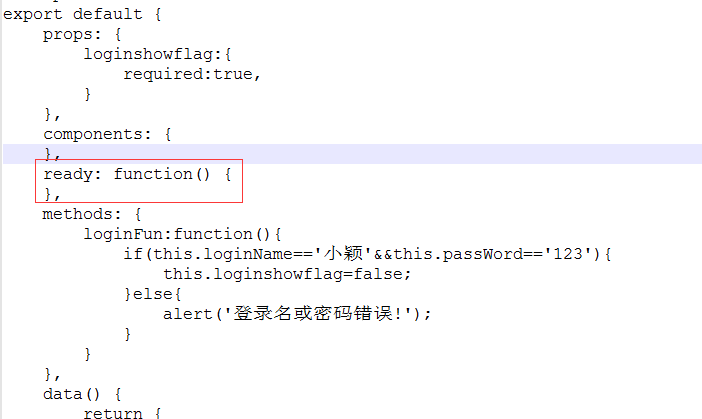
vue2.0的写法:
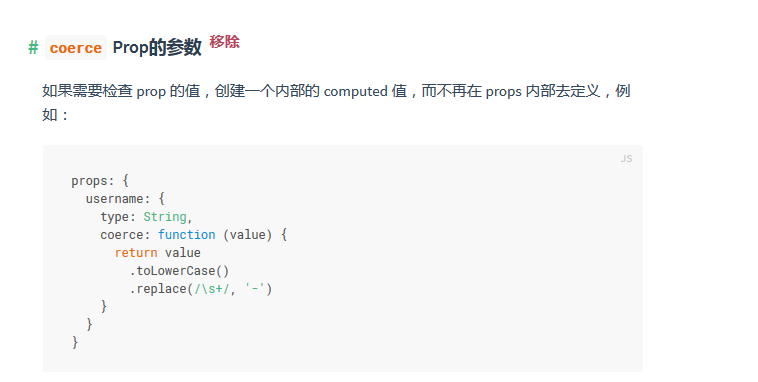
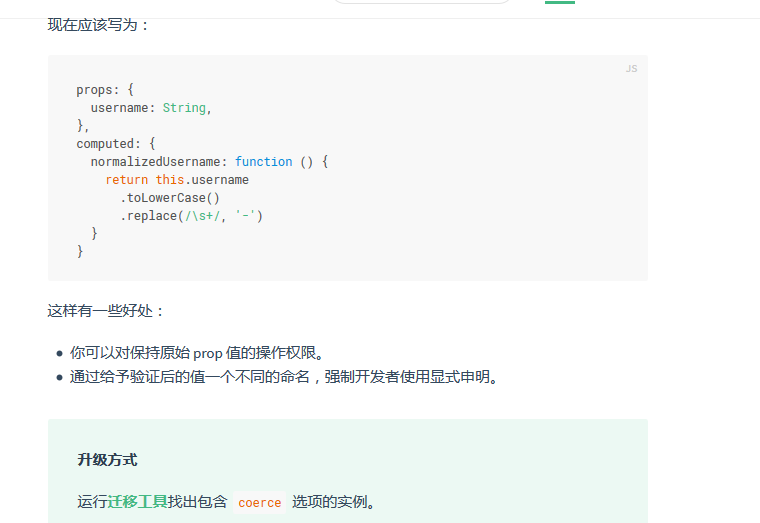
4.coerce-Prop的参数-移除
vue1.0:
vue2.0
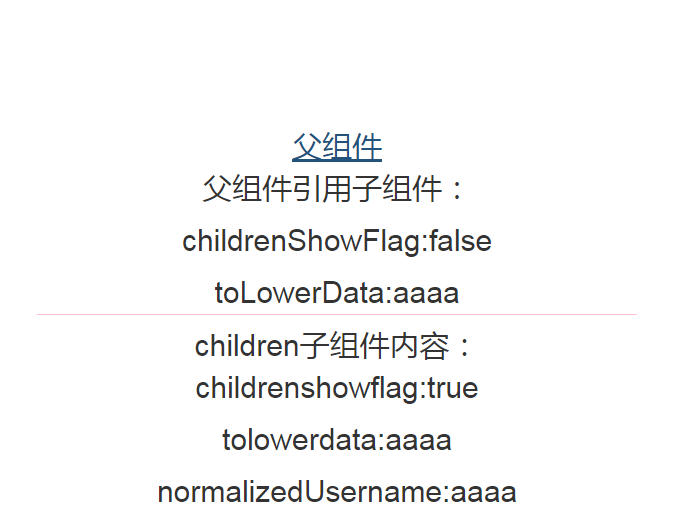
vue1.0例子:
效果图:
App.vue
<style>

div#app {

    width: 600px;

    text-align: center;

    margin: 200px auto 0;

}

</style>

<template>

<div class='all-page-container'>

    <a v-link='"/father"'>父组件</a>

    <router-view transition='animation' class='content' keep-alive></router-view>

</div>

</template>

<script>

import father from './page/father.vue'

export default {

    components: {

        father

    },

    methods: {},

    data() {

        return {}

    }

}

</script>
father.vue
<style>

.last-p {

    border-bottom: 1px solid pink;

}

</style>

<template>

<div class="father-container">

    <p>父组件引用子组件:</p>

    <p>childrenShowFlag:{{childrenShowFlag}}</p>

    <p class="last-p">toLowerData:{{toLowerData}}</p>

    <children :childrenshowflag.sync='childrenShowFlag' :tolowerdata.sync='toLowerData'></children>

</div>

</template>

<script>

import children from './children.vue'

export default {

    components: {

        children

    },

    methods: {},

    watch: {},

    data() {

        return {

            childrenShowFlag: false,

            toLowerData: 'AAAA'

        }

    }

}

</script>
children.vue
<template>

<div class='children-container'>

    children子组件内容:

    <p>childrenshowflag:{{childrenshowflag}}</p>

    <p>tolowerdata:{{tolowerdata}}</p>

    <p>normalizedUsername:{{normalizedUsername}}</p>

</div>

</template>

<script>

export default {

    props: {

        childrenshowflag: {

            required: true,

            coerce: function(value) {

                return !value;

            }

        },

        tolowerdata: {

            type: String

        }

    },

    computed: {

        normalizedUsername: function() {

            this.tolowerdata = this.tolowerdata.toLowerCase();

            return this.tolowerdata.toLowerCase();

        }

    },

    components: {},

    ready: function() {},

    methods: {},

    data() {

        return {}

    }

}

</script>
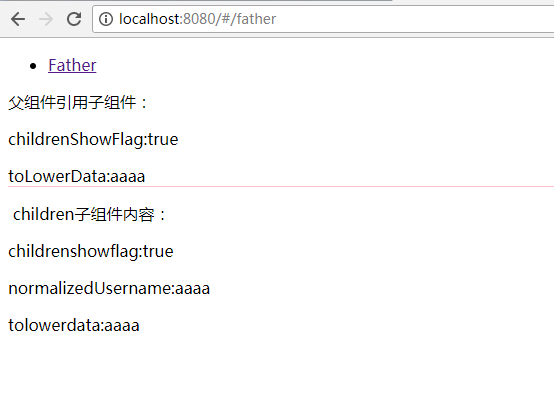
通过上面的示例,大家应该发现coerce-Prop的参数只会改变子组件中的值,父组件的值不变,即使是在vue1.0中父组件和子组件是用twoWay的方式绑定的,但在computed中改变子组件的值,父组件的值也会发生变化。
vue2.0例子:
效果图:
App.vue
<template>

<div id="app">

    <ul>

        <li>

            <router-link to="/father">Father</router-link>

        </li>

    </ul>

    <router-view></router-view>

</div>

</template>

<script>

export default {}

</script>
father.vue
<style>

.last-p {

    border-bottom: 1px solid pink;

}

</style>

<template>

<div class="father-container">

    <p>父组件引用子组件:</p>

    <p>childrenShowFlag:{{childrenShowFlag}}</p>

    <p class="last-p">toLowerData:{{toLowerData}}</p>

    <children :childrenshowflag='childrenShowFlag' :tolowerdata='toLowerData'

    @update:tolowerdata="val => toLowerData = val"></children>

</div>

</template>

<script>

import children from './children.vue'

export default {

    components: {

        children

    },

    methods: {},

    data() {

        return {

            childrenShowFlag: false,

            toLowerData: 'AAAA'

        }

    }

}

</script>
children.vue
<style>

.last-p {

    border-bottom: 1px solid pink;

}

</style>

<template>

<div class="father-container">

    <p>父组件引用子组件:</p>

    <p>childrenShowFlag:{{childrenShowFlag}}</p>

    <p class="last-p">toLowerData:{{toLowerData}}</p>

    <children :childrenshowflag='childrenShowFlag' :tolowerdata='toLowerData'

    @update:tolowerdata="val => toLowerData = val"></children>

</div>

</template>

<script>

import children from './children.vue'

export default {

    components: {

        children

    },

    methods: {},

    data() {

        return {

            childrenShowFlag: false,

            toLowerData: 'AAAA'

        }

    }

}

</script>
通过上面的示例,大家会发现:
当父组件和子组件通过

实现子组件改变父组件的值时,子组件中:
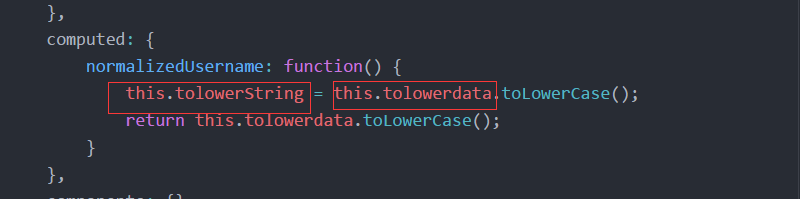
在computed中就不能再用:this.tolowerdata = this.tolowerdata.toLowerCase();
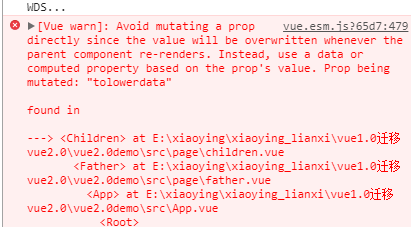
所以小颖给其重新定义了一个变量,改变这个变量的值然后再 this.$emit('update:tolowerdata', this.tolowerString); 在这个例子中,其实子组件的值改变后,父组件的值也发生了变化。
5.#v-el-和v-ref-替换
vue1.0用法:
请看小颖之前写的一篇文章:vue实例属性(vm.$els)
vue2.0用法:
<script>

export default {

    methods: {

        //点击登录页面中的登录按钮,实现用户登录

        loginFun: function() {

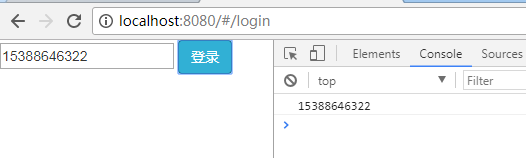
            var userPhone = this.$refs.phone.value;

            console.log(userPhone);

        }

    },

    data() {

        return {

            userData: {

                userPhone: '15388646322',

                passWord: 'yy1028'

            }

        }

    }

}

</script>
(未完待续..............................................................................................)
从 Vue 1.x 迁移 — Vue.js的更多相关文章
- vue脚手架使用swiper /引入js文件/引入css文件
1.安装vue-cli 参考地址:https://github.com/vuejs/vue-cli 如果不使用严格语法需要在后三项打no:(加了挺头疼的,老是报错,但是对自己的代码规范性也是有很大的帮 ...
- Vue框架下的node.js安装教程
Vue框架下的node.js安装教程 python服务器.php ->aphche.java ->tomcat. iis -->它是一个可以运行JAVASCRIPTR 的运行环 ...
- 从壹开始前后端分离 [ Vue2.0+.NET Core2.1] 十七 ║Vue基础:使用Vue.js 来画博客首页+指令(一)
缘起 书说前两篇文章<十五 ║ Vue前篇:JS对象&字面量&this>和 <十六 ║ Vue前篇:ES6初体验 & 模块化编程>,已经通过对js面向对 ...
- 导航栏中各按钮在点击当前按钮变色其他按钮恢复为原有色的实现方法(vue、jq、原生js)
一.vue如何实现? 代码: <!DOCTYPE html> <html lang="en"> <head> <meta charset= ...
- vue 调用常量的config.js文件
我遇到问题,就是有很多常量需要应用的项目里面.所以需要打算设置一个config.js文件 1.填写config.js 文件 //常量配置 //快递公司名单 对应的页面为: src/pages/othe ...
- vue引入swiper vue使用swiper vue脚手架使用swiper /引入js文件/引入css文件
vue引入swiper vue使用swiper vue脚手架使用swiper /引入js文件/引入css文件 ------------------------------------------- ...
- 基于Vue的通用框架Nuxt.js
问题:最近有些朋友问我写官网,用Vue框架实现好不好? 相信很多使用Vue的小伙伴们一样疑惑这个问题,其实从这个问题就可以知道你对Vue这个框架是否真的熟悉了.其实单单使用Vue这个框架来做官网的,其 ...
- [vue] vue服务端渲染nuxt.js
初始化 使用脚手架工具 create-nuxt-app 快速创建 npx create-nuxt-app <项目名> npx create-nuxt-app 执行一些选择 在集成的服务器端 ...
- vue使用案例,vue初始化,vue初始化方法,vue条件语句,vue在js里面添加元素调用vue方法
<div id="main" > <button id='but1' type="button" v-on:click="save ...
随机推荐
- PHPUnit-函数依赖-数据提供-异常-忽略-自动生成
1. 本文目的 本文目的是收录一些PHPUnit的有用技巧,这些技巧能够为给PHPUnit单元测试带来很多便利.本文将要介绍的技巧如下: 函数依赖测试 数据提供函数 异常测试 跳过忽略测试 自动生成测 ...
- 怀念Galois
我的第一篇谈到具体学科的博客,还是献给我最钟爱的数学. 个人比较喜欢离散数学,并非因为曲高和寡,而是因为数学分析.概率论.拓扑学.泛函之类的高手实在太多.而离散数学更为抽象,抽象到抽象代数直接以抽象二 ...
- select change事件给其它元素赋值,本select的value或tex
select change事件给其它元素赋值,本select的value或textonchange='$("#areaname").val($("option:selec ...
- AI相关 TensorFlow -卷积神经网络 踩坑日记之一
上次写完粗浅的BP算法 介绍 本来应该继续把 卷积神经网络算法写一下的 但是最近一直在踩 TensorFlow的坑.所以就先跳过算法介绍直接来应用场景,原谅我吧. TensorFlow 介绍 TF是g ...
- jqueryl操作dom文档实例
<include file="Public:header"/> <link rel="stylesheet" href="../Pu ...
- 发布.NET MVC网站 到Azure
最近的项目部署在Microsoft Azure,学习了一些新东西,记录下. 1.账号. 用于登录portal(https://portal.azure.cn/),账号下有对应的Subscription ...
- 【LeetCode】225. Implement Stack using Queues
题目: Implement the following operations of a stack using queues. push(x) -- Push element x onto stack ...
- 【Android Developers Training】 67. 响应触摸事件
注:本文翻译自Google官方的Android Developers Training文档,译者技术一般,由于喜爱安卓而产生了翻译的念头,纯属个人兴趣爱好. 原文链接:http://developer ...
- jq-animate实现返回顶部效果
jq-animate实现返回顶部效果: <!doctype html> <html lang="en"> <head> <meta cha ...
- Vue.js入学教程
Vue.js是什么Vue.js 是用于构建交互式的 Web 界面的库.Vue.js 提供了 MVVM 数据绑定和一个可组合的组件系统,具有简单.灵活的 API.Vue.js(类似于view)是一套构建 ...