
c# networkcomms 3.0实现模拟登陆总结
最近项目需要做一个客户查询状态系统,当前上位机缺少服务功能,于是找到了networkcomms 开源框架,作为项目使用.
最新版networkcomms 下载地址:https://github.com/MarcFletcher/NetworkComms.Net
下载直接vs打开
新建服务器端
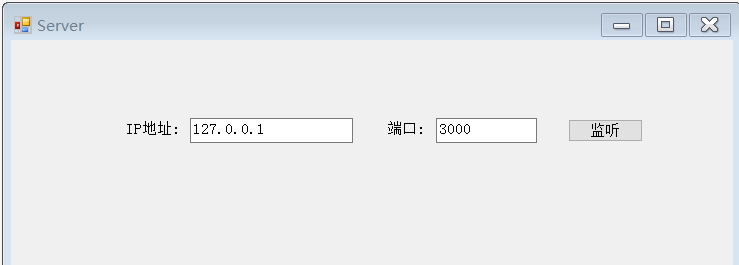
using MessageContract;

using NetworkCommsDotNet;

using NetworkCommsDotNet.Connections;

using NetworkCommsDotNet.Connections.TCP;

using NetworkCommsDotNet.DPSBase;

using System;

using System.Collections.Generic;

using System.ComponentModel;

using System.Data;

using System.Drawing;

using System.Linq;

using System.Net;

using System.Text;

using System.Windows.Forms;

namespace AppServer

{

    public partial class MaiForm : Form

    {

        public MaiForm()

        {

            InitializeComponent();

        }

        SendReceiveOptions aboveOptions = new SendReceiveOptions(DPSManager.GetDataSerializer<ProtobufSerializer>(), null, null);

        private void button1_Click(object sender, EventArgs e)

        {

            //服务器开始监听客户端的请求

            Connection.StartListening(ConnectionType.TCP, new IPEndPoint(IPAddress.Parse(txtIP.Text), int.Parse(txtPort.Text)));

            //服务器开始监听客户端的请求

            //IPEndPoint thePoint = new IPEndPoint(IPAddress.Parse(txtIP.Text), int.Parse(txtPort.Text));

            //TCPConnection.StartListening(thePoint, false);

            button1.Text = "监听中";

            button1.Enabled = false;

            //button1.Text = "监听中";

            //button1.Enabled = false;

            //此方法中包含服务器具体的处理方法。

            StartListening();

        }

        private void StartListening()

        {

            //开启日志记录

            //配置日志记录器

            //ILogger logger = new LiteLogger(LiteLogger.LogMode.ConsoleAndLogFile, "ServerLogFile_" + NetworkComms.NetworkIdentifier + ".txt");

            //NetworkComms.EnableLogging(logger);

            //禁用日志记录  服务器端正式使用时,赢禁用日志记录

            NetworkComms.DisableLogging();

            //服务器端处理收到的消息

            //为简单起见,此示例中我们只处理字符类型的信息,也返回字符类型的信息。

            //处理的信息可以使自定义类,具体见下一个Demo

            NetworkComms.AppendGlobalIncomingPacketHandler<LoginContract>("ReqLogin", IncomingLoginRequest);

        }

        //处理某个具体的请求

        private void IncomingLoginRequest(PacketHeader header, Connection connection, LoginContract loginContract)

        {

            try

            {

                string resMsg = "";

                //为了简单,这里不调用数据库,而是模拟一下登录

                if (loginContract.UserID == "" && loginContract.PassWord == "")

                    resMsg = "登录成功";

                else

                    resMsg = "用户名密码错误";

                //把返回结果写入到契约类中,后面返回给客户端

                //ResMsgContract contract = new ResMsgContract();

                //contract.Message = resMsg;

                //connection.SendObject<ResMsgContract>("ResLogin", contract);

                ResMsgContract contract = new ResMsgContract();

                contract.Message = resMsg;

                connection.SendObject("ResLogin", contract);

            }

            catch (Exception ex)

            {

                // LogTools.LogException(ex, "IncomingMsgHandle");

            }

        }

    }

}
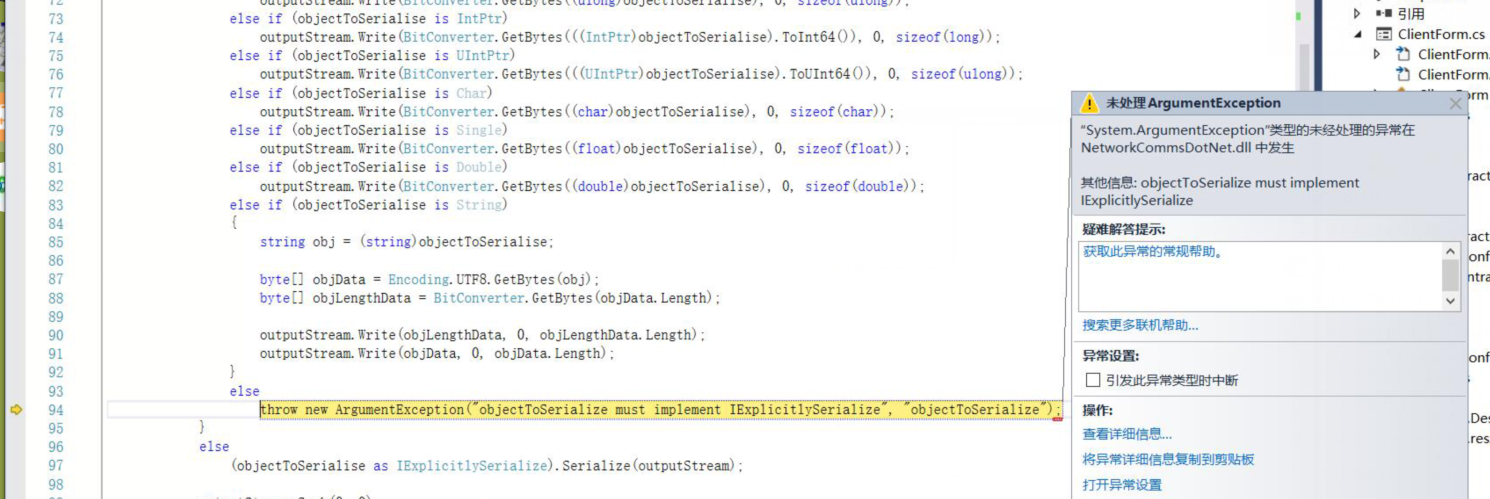
在别的帮助中往往少了这行:导致出现客户端发送时,类型打包出现问题. 这行代码是客户端服务器两端都要加上的,是指定传输方式
SendReceiveOptions aboveOptions = new SendReceiveOptions(DPSManager.GetDataSerializer<ProtobufSerializer>(), null, null);
就是这个报错了
一下是客户端
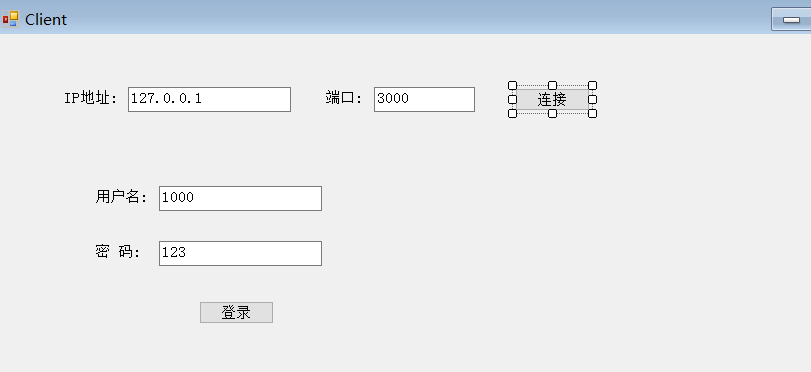
using MessageContract;

using NetworkCommsDotNet;

using NetworkCommsDotNet.Connections;

using NetworkCommsDotNet.Connections.TCP;

using NetworkCommsDotNet.DPSBase;

using System;

using System.Collections.Generic;

using System.ComponentModel;

using System.Data;

using System.Drawing;

using System.Linq;

using System.Text;

using System.Windows.Forms;

namespace AppClient

{

    public partial class MainForm : Form

    {

        public MainForm()

        {

            InitializeComponent();

        }

        //连接信息对象

        public ConnectionInfo connInfo = null;

        //连接对象

        Connection newTcpConnection;

        SendReceiveOptions aboveOptions = new SendReceiveOptions(DPSManager.GetDataSerializer<ProtobufSerializer>(), null, null);

        private void button1_Click(object sender, EventArgs e)

        {

            //给连接信息对象赋值

            connInfo = new ConnectionInfo(txtIP.Text, int.Parse(txtPort.Text));

            //如果不成功,会弹出异常信息

            newTcpConnection = TCPConnection.GetConnection(connInfo);

            button1.Enabled = false;

            button1.Text = "连接成功";

        }

        private void btnlogin_Click(object sender, EventArgs e)

        {

            //给契约类赋值

            LoginContract contract = new LoginContract(txtUserName.Text, txtPassword.Text);

            //contract.UserID = txtUserName.Text;

            //contract.PassWord = txtPassword.Text;

            //向服务器发送登录信息并获取登录结果

              ResMsgContract resMsg = newTcpConnection.SendReceiveObject<LoginContract, ResMsgContract>("ReqLogin", "ResLogin", , contract);

            //向服务器发送登录信息并获取登录结果

           // ResMsgContract resMsg = newTcpConnection.SendReceiveObject<ResMsgContract>("ReqLogin", "ResLogin", 5000, contract);

            if (resMsg.Message == "登录成功")

            {

                MessageBox.Show("登录成功");

            }

            else

            {

                MessageBox.Show("用户名密码错误");

            }

        }

    }

}
契约类
using System;

using System.Collections.Generic;

using System.Linq;

using System.Text;

namespace MessageContract

{

    [ProtoContract]

    public class LoginContract

    {

        [ProtoMember()]

        public string UserID { get; set; }

        [ProtoMember()]

        public string PassWord { get; set; }

        public LoginContract() { }

        public LoginContract(string userID, string passWord)

        {

            this.UserID = userID;

            this.PassWord = passWord;

        }

    }

}
using ProtoBuf;

using System;

using System.Collections.Generic;

using System.Linq;

using System.Text;

namespace MessageContract

{

    [ProtoContract]

    public  class ResMsgContract

    {

        [ProtoMember()]

        public string Message;

        public ResMsgContract() { }

        public ResMsgContract(string message)

        {

            this.Message = message;

        }

    }

}
注意:
使用这个框架要配合谷歌的protobuf 要选好版本.本人没重复测试最高版本,因为在调试登录过程中出现别的问题过程中,也顺改了protobuf 的版本,至今未测试最高版本是否存在兼容问题.本人成功的使用的是2.0.0.668
protobuf简介protobuf是google提供的一个开源序列化框架,类似于XML,JSON这样的数据表示语言,其最大的特点是基于二进制,因此比传统的XML表示高效短小
vs nuget添加方式
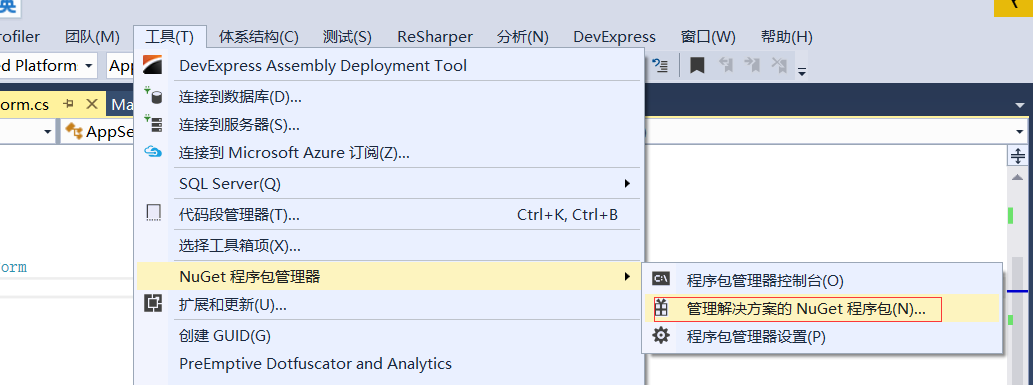
输入
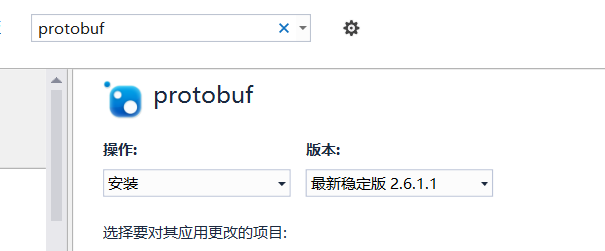
版本选择自己指定一下,加大项目的契约类里边.这是自己定义传输对象的方式.

结果:

c# networkcomms 3.0实现模拟登陆总结的更多相关文章
- c# networkcomms 3.0实现模拟登陆总结 转载https://www.cnblogs.com/zuochanzi/p/7039636.html
最近项目需要做一个客户查询状态系统,当前上位机缺少服务功能,于是找到了networkcomms 开源框架,作为项目使用. 最新版networkcomms 下载地址:https://github.com ...
- NetworkComms V3 模拟登陆
演示NetworkComms V3的用法 例子很简单 界面如下: 服务器端代码: 开始监听: //服务器开始监听客户端的请求 Connection.StartListening(ConnectionT ...
- Python 爬虫模拟登陆知乎
在之前写过一篇使用python爬虫爬取电影天堂资源的博客,重点是如何解析页面和提高爬虫的效率.由于电影天堂上的资源获取权限是所有人都一样的,所以不需要进行登录验证操作,写完那篇文章后又花了些时间研究了 ...
- Python模拟登陆新浪微博
上篇介绍了新浪微博的登陆过程,这节使用Python编写一个模拟登陆的程序.讲解与程序如下: 1.主函数(WeiboMain.py): import urllib2 import cookielib i ...
- PHP 之 CURL 模拟登陆并获取数据
1.CURL模拟登陆的流程和步骤 2.tempnam 创建一个临时文件 3.使用CURL模拟登陆到PHP100论坛 <?php $cookie_file = tempnam('./temp',' ...
- pytho简单爬虫_模拟登陆西电流量查询_实现一键查询自己的校园网流量
闲来无事,由于校园内网络是限流量的,查询流量很是频繁,于是萌生了写一个本地脚本进行一键查询自己的剩余流量. 整个部分可以分为三个过程进行: 对登陆时http协议进行分析 利用python进行相关的模拟 ...
- python模拟登陆知乎并爬取数据
一些废话 看了一眼上一篇日志的时间 已然是5个月前的事情了 不禁感叹光阴荏苒其实就是我懒 几周前心血来潮想到用爬虫爬些东西 于是先后先重写了以前写过的求绩点代码 爬了草榴贴图,妹子图网,后来想爬婚恋网 ...
- php模拟登陆的两种实现方法分析
php模拟登陆的实现方法分析 本文实例分析了php模拟登陆的实现方法.分享给大家供大家参考.具体分析如下: php模拟登陆的实现方法,这里分别列举两种方法实现模拟登陆人人网.具体实例代码如下: 1)使 ...
- python 模拟登陆,请求包含cookie信息
需求: 1.通过GET方法,访问URL地址一,传入cookie参数 2.根据地址一返回的uuid,通过POST方法,传入cooki参数 实现思路: 1.理解http的GET和POST差别 (网上有很多 ...
随机推荐
- javascript动画毛爷爷满天飘
var minSize=50;var maxSize=100;var newOn=200;var flakeColor="#fff";var flak=$("<di ...
- [ext4]04 磁盘布局 - Meta Block Groups
Meta Block Groups,可以翻译为元块组集. 如果不采用Meta Block Groups特性,在每个冗余备份的超级块的后面是一个完整的(包含所有块组描述符的)块组描述符表的备份.如前所述 ...
- 完美实现在同一个页面中使用不同样式的artDialog样式
偶然发现artDialog.js这个插件,就被其优雅的设计及漂亮的效果深深吸引,在做例子时碰到了一些想当然它应该提供但却没有提供的功能,不过这都不影响我对它的喜爱,下面说一下遇到的问题吧! artDi ...
- poj1751最小生成树
The island nation of Flatopia is perfectly flat. Unfortunately, Flatopia has a very poor system of p ...
- 对象克隆(clone)实例详解
<?php class Staff { public $name; public $age; public $salary; public function __construct($name, ...
- Tomcat的一些实际操作
1:tomcat7开启远程debug模式: ./catalina.sh jpda start 2:tomcat支持URL中文,解决tomcat get请求乱码问题(在TOMCAT_HOME/conf/ ...
- 在QT中创建文件
最近在做QT东西时遇到在指定路径下创建文件,发现qt中没有直接用的. 主要通过自定义一个createFile()函数来实现,其中需要用到<QFile> <QDir> <Q ...
- 抓包工具 Charles 使用心得
前言 虽然实习工作还没有着落,但学习还是要继续的嘛,今天就来学习使用下 Mac 下截取网络封包的工具:Charles. 我想,如果你是个善于利用搜索引擎的人,那么在 Google 中输入「Charle ...
- 初次尝试Linux并记录一二
假如我有一个Linux系统 安装过程:加载中... 版本:Ubuntu Server 16.04.1 LTS 64位 得到一个IP:*.*.*.* 下载工具 WinSCP: WinSCP是一个Wind ...
- 开涛spring3(6.1) - AOP 之 6.1 AOP基础
6.1.1 AOP是什么 考虑这样一个问题:需要对系统中的某些业务做日志记录,比如支付系统中的支付业务需要记录支付相关日志,对于支付系统可能相当复杂,比如可能有自己的支付系统,也可能引入第三方支付平 ...