
自定义ScriptableObject属性显示
1. 继承Editor,重写OnInspectorGUI方法
需求
将TestClass中intData属性和stringData按指定格式显示。
实现
定义一个测试类TestClass,一个可序列化类DataClass
[CreateAssetMenu]

public class TestClass : ScriptableObject

{

    [Range(, )]

    public int intData;

    public string stringData;

    public List<DataClass> dataList;

}

[System.Serializable]

public class DataClass

{

    [Range(, )]

    public int id;

    public Vector3 position;

    public List<int> list;

}
//指定类型

[CustomEditor(typeof(TestClass))]

public class TestClassEditor  : Editor

{

    SerializedProperty intField;

    SerializedProperty stringField;

    void OnEnable()

    {

        intField = serializedObject.FindProperty("intData");

        stringField = serializedObject.FindProperty("stringData");

    }

    public override void OnInspectorGUI()

    {

        // Update the serializedProperty - always do this in the beginning of OnInspectorGUI.

        serializedObject.Update();

        EditorGUILayout.IntSlider(intField, , , new GUIContent("initData"));

        EditorGUILayout.BeginHorizontal();

        EditorGUILayout.PropertyField(stringField);

        if(GUILayout.Button("Select"))

        {

            stringField.stringValue = EditorUtility.OpenFilePanel("", Application.dataPath, "");

        }

        EditorGUILayout.EndHorizontal();

        // Apply changes to the serializedProperty - always do this in the end of OnInspectorGUI.

        //需要在OnInspectorGUI之前修改属性,否则无法修改值

        serializedObject.ApplyModifiedProperties();

        base.OnInspectorGUI();

    }

}
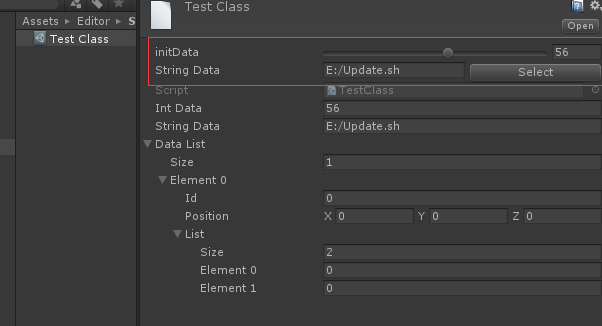
Editor嵌套
通过Edtiro.CreateEditor可实现Editor的嵌套。
创建一个类TestClass2,它包含一个TestClass的属性。
[CreateAssetMenu]

public class TestClass2 : ScriptableObject

{

    public TestClass data;

}
创建一个Test2Class的asset。它的Inspector面板的默认显示:
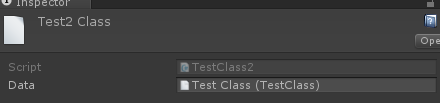
它并没有把TestClass的属性显示出来,如果要查看TestClass的属性,必须双击,跳到相应界面,但这样有看不到TestClass2的属性。
如果想在Test2Class的Inspector面板中直接看到并且可以修改TestClass的属性,可以重写TestClass2的Editor,并在其中嵌套TestClass的Editor。
 [CustomEditor(typeof(TestClass2))]

 public class TestClass2Editor : Editor

 {

     Editor cacheEditor;

     public override void OnInspectorGUI()

     {

         // Update the serializedProperty - always do this in the beginning of OnInspectorGUI.

         serializedObject.Update();

         //显示TestClass2的默认UI

         base.OnInspectorGUI();

         GUILayout.Space();

         var data = ( (TestClass2)target ).data;

         if(data != null)

         {

             //创建TestClass的Editor

             if (cacheEditor == null)

                 cacheEditor = Editor.CreateEditor(data);

             GUILayout.Label("this is TestClass2");

             cacheEditor.OnInspectorGUI();

         }

     }

 }
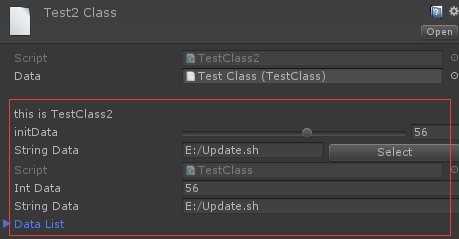
这样就可以直接在TestClass2的面板中直接查看和编辑TestClass的属性。
2. 使用PropertyDrawer
如果想修改某种特定类型的显示,使用继承Editor的方式就会变得很麻烦,因为所有使用特定类型的asset都需要去实现一个自定义的Editor,效率非常低。这种情况就可以通过继承PropertyDrawer的方式,对指定类型的属性,进行统一显示。
需求
为Inspector面板中的所有string属性添加一个选择文件按钮,选中文件的路径直接赋值给该变量。
实现
 [CustomPropertyDrawer(typeof(string))]

 public class StringPropertyDrawer : PropertyDrawer

 {

     public override void OnGUI(Rect position, SerializedProperty property, GUIContent label)

     {

         Rect btnRect = new Rect(position);

         position.width -= ;

         btnRect.x += btnRect.width - ;

         btnRect.width = ;

         EditorGUI.BeginProperty(position, label, property);

         EditorGUI.PropertyField(position, property, true);

         if (GUI.Button(btnRect, "select"))

         {

             string path = property.stringValue;

             string selectStr = EditorUtility.OpenFilePanel("选择文件", path, "");

             if (!string.IsNullOrEmpty(selectStr))

             {

                 property.stringValue = selectStr;

             }

         }

         EditorGUI.EndProperty();

     }

 }

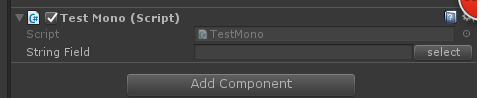
加了一个PropertyDrawer之后,Inspector面板中的所有string变量都会额外添加一个Select按钮。
注意事项
- PropertyDrawer只对可序列化的类有效,非可序列化的类没法在Inspector面板中显示。
- OnGUI方法里只能使用GUI相关方法,不能使用Layout相关方法。
- PropertyDrawer对应类型的所有属性的显示方式都会修改,例如创建一个带string属性的MonoBehaviour:
3. 使用PropertyAttribute
如果想要修改部分类的指定类型的属性的显示,直接使用PropertyDrawer就无法满足条件,这时可以结合PropertyAttribute和PropertyAttribute来实现需求。
需求
为部分指定类的int或float属性的显示添加滑动条,滑动条的上下限可根据类和属性自行设置。
实现
 public class RangeAttribute : PropertyAttribute

 {

     public float min;

     public float max;

     public RangeAttribute(float min, float max)

     {

         this.min = min;

         this.max = max;

     }

 }

 [CustomPropertyDrawer(typeof(RangeAttribute))]

 public class RangeDrawer : PropertyDrawer

 {

     // Draw the property inside the given rect

     public override void OnGUI(Rect position, SerializedProperty property, GUIContent label)

     {

         // First get the attribute since it contains the range for the slider

         RangeAttribute range = attribute as RangeAttribute;

         // Now draw the property as a Slider or an IntSlider based on whether it's a float or integer.

         if (property.propertyType == SerializedPropertyType.Float)

             EditorGUI.Slider(position, property, range.min, range.max, label);

         else if (property.propertyType == SerializedPropertyType.Integer)

             EditorGUI.IntSlider(position, property, (int)range.min, (int)range.max, label);

         else

             EditorGUI.LabelField(position, label.text, "Use Range with float or int.");

     }

 }
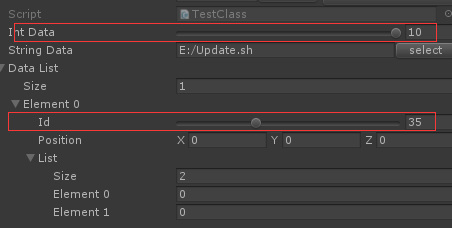
修改TestClass和DataClass
 [CreateAssetMenu]

 public class TestClass : ScriptableObject

 {

     [Range(, )]

     public int intData;

     public string stringData;

     public List<DataClass> dataList;

 }

 [System.Serializable]

 public class DataClass

 {

     [Range(, )]

     public int id;

     public Vector3 position;

     public List<int> list;

 }
其他
- 需要修改显示的类都需要满足Unity的序列化规则
- 这几种显示方式对Serializable Class都可以使用,并不需要一定是ScriptableObject。只是在编辑器下,ScriptableObject来保存临时数据比较常用,所以使用ScriptableObject来做例子。
转载请注明出处:http://www.cnblogs.com/chiguozi/p/6873050.html
自定义ScriptableObject属性显示的更多相关文章
- html5的自定义data-*属性和jquery的data()方法的使用示例
人们总喜欢往HTML标签上添加自定义属性来存储和操作数据. 但这样做的问题是,你不知道将来会不会有其它脚本把你的自定义属性给重置掉,此外,你这样做也会导致html语法上不符合Html规范,以及一些其它 ...
- iOS8自定义推送显示按钮及推送优化
http://www.jianshu.com/p/803bfaae989e iOS8自定义推送显示按钮及推送优化 字数1435 阅读473 评论0 喜欢2 导语 在iOS8中,推送消息不再只是简单地点 ...
- WPF自定义窗口最大化显示任务栏
原文:WPF自定义窗口最大化显示任务栏 当我们要自定义WPF窗口样式时,通常是采用设计窗口的属性 WindowStyle="None" ,然后为窗口自定义放大,缩小,关闭按钮的样式 ...
- Django(四) 后台管理:创建管理员、注册模型类、自定义管理页面显示内容
后台管理 第1步.本地化:设置语言.时区 修改project1/settings.py #LANGUAGE_CODE = 'en-us' LANGUAGE_CODE = 'zh-hans' #设置语言 ...
- Android之探究viewGroup自定义子属性参数的获取流程
通常会疑惑,当使用不同的布局方式时,子view得布局属性就不太一样,比如当父布局是LinearLayout时,子view就能有效的使用它的一些布局属性如layout_weight.weightSum. ...
- 直接用<img> 的src属性显示base64转码后的字符串成图片
直接用<img> 的src属性显示base64转码后的字符串成图片 <img src="base64转码后的字符串" ></img> 下面的图片 ...
- Android读取自定义View属性
Android读取自定义View属性 attrs.xml : <?xml version="1.0" encoding="utf-8"?> < ...
- 自定义Property属性动画
同步发表于 http://avenwu.net/customlayout/2015/04/06/custom_property_animation/ 代码获取 git clone https://gi ...
- android自定义view属性
第一种 /MainActivity/res/values/attrs.xml <?xml version="1.0" encoding="utf-8"?& ...
随机推荐
- 读书笔记 effective c++ Item 43 了解如何访问模板化基类中的名字
1. 问题的引入——派生类不会发现模板基类中的名字 假设我们需要写一个应用,使用它可以为不同的公司发送消息.消息可以以加密或者明文(未加密)的方式被发送.如果在编译阶段我们有足够的信息来确定哪个信息会 ...
- SVG动画实践篇-模拟音量高低效果
git 地址:https://github.com/rainnaZR/svg-animations/tree/master/src/demo/step2/volumn 说明 这个动画的效果就是多个线条 ...
- 测试开发Python培训:实现屌丝的图片收藏愿望(小插曲)
测试开发Python培训:实现屌丝的图片收藏愿望(小插曲) 男学员在学习python的自动化过程中对于爬虫很感兴趣,有些学员就想能收藏一些图片,供自己欣赏.作为讲师只能是满足愿望,帮助大家实现对美的追 ...
- 3.Maven坐标和依赖
1.1 何为Maven坐标 正如之前所说的,Maven的一大功能就是管理项目依赖.为了能自动化地解析任何一个Java构件,Maven就必须将它们唯一标识,这就依赖管理的底层基础——坐标. 1.2 坐标 ...
- 开启 .NET Core 的新篇章
今天开始要开始研究.net core了 规划了一下要学习的点: 1.CentOS7 2.asp.net Core 3.Linux的常用命令与运维 4.nginx的常用配置 5.mysql的使用与日常维 ...
- 1133: 零起点学算法40——多组测试数据(a+b)II
1133: 零起点学算法40--多组测试数据(a+b)II Time Limit: 1 Sec Memory Limit: 64 MB 64bit IO Format: %lldSubmitte ...
- C#中的ArrayList
ArrayList非常类似于数组,也有人称它为数组列表,ArrayList可以动态维护 提示: 和数组相似,ArrayList中存储的数据称为元素,ArrayList可以保存的元素数就是ArrayLi ...
- 用jQuery模拟淘宝购物车
首先我们要实现的内容的需求有如下几点: 1.在购物车页面中,当选中"全选"复选框时,所有商品前的复选框被选中,否则所有商品的复选框取消选中. 2.当所有商品前的复选框选中时,&qu ...
- nginx反向代理的nginx.conf配置
下面的配置是nginx.conf的示例 nginx反向代理 就是说把跨域的url通过本地代理的方式,变成同域的请求,如此来解决跨域问题 该配置下 通过http://localhost/html5/路径 ...
- 前后端分离之vue2.0+webpack2 实战项目 -- webpack介绍
webpack的一点介绍 Webpack 把任何一个文件都看成一个模块,模块间可以互相依赖(require or import),webpack 的功能是把相互依赖的文件打包在一起.webpack 本 ...