
基于Ubuntu的ESP32平台搭建
提要:针对于Ubuntu下的ESP32搭建,网上有很多博文,乐鑫官网也有指导手册,对于到家都知道的部分我就一带而过,我主要描述搭建过程中遇到的问题和细节。
1.创建一个ESP的目录
I)在家目录下创建个ESP文件夹(当然你也可以不在家目录下创建,甚至不创建,只有你找得你的操作目录就行)
mkdir /home/tom/esp (note:tom是我的用户名)
II)切换到ESP目录下
cd ~/esp
2.工具链设置
I)先下载python支持库
sudo apt-get install git wget make libncurses-dev flex bison gperf python python-serial
II)下载工具链
for 64-bit Linux:
https://dl.espressif.com/dl/xtensa-esp32-elf-linux64-1.22.0-75-gbaf03c2-5.2.0.tar.gz
for 32-bit Linux:
https://dl.espressif.com/dl/xtensa-esp32-elf-linux32-1.22.0-75-gbaf03c2-5.2.0.tar.gz
我的用的是64bitLinux,下载以后的文件是这样的

III)将工具链解压到esp文件目录下
tar -xzf ~/Downloads/xtensa-esp32-elf-linux64-1.22.0-75-gbaf03c2-5.2.0.tar.gz
IV)将esp工具链写入环境变量PATH中。
在~/.profile文件中写入:
export PATH="$PATH:$HOME/esp/xtensa-esp32-elf/bin"
V)重新读取PATH环境变量
source ~/.profile
printenv PATH
若是可以看到esp工具链的目录,则表示工具链设置成功了!
3.下载ESP-IDF(也就是乐鑫提供的SDK)
I)下载SDK
git clone --recursive https://github.com/espressif/esp-idf.git
II)添加IDF_PATH环境变量
在 ~/.profile文件添加:
export IDF_PATH=~/esp/esp-idf
加载~/.profile文件:
Source ~/.profile
检查IDF_PATH
printenv IDF_PATH
如果打印出IDF_PATH的目录的话,则表示添加成功
4)开始一个工程
I)在SDK中拷贝一个Demo到esp文件夹下
cp -r $IDF_PATH/examples/get-started/hello_world .
II)设置参数
执行 make menuconfig,会出现以下界面:(置于具体参数的含义,请自行了解)
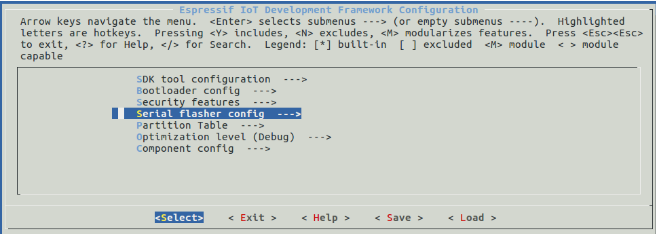
III)编译与运行
在确保硬件连接无误的情况下,执行 make flash,程序将要编译,若编译没有错误,将直接下载到Flash中,出现以下界面,表示程序已经正常运行。

note:提供一些make 指令集,可供开发使用
Welcome to Espressif IDF build system. Some useful make targets:
make menuconfig - Configure IDF project
make defconfig - Set defaults for all new configuration options
make all - Build app, bootloader, partition table
make flash - Flash app, bootloader, partition table to a chip
make clean - Remove all build output
make size - Display the static memory footprint of the app
make size-components, size-files - Finer-grained memory footprints
make erase_flash - Erase entire flash contents
make monitor - Run idf_monitor tool to monitor serial output from app
make simple_monitor - Monitor serial output on terminal console
make list-components - List all components in the project
make app - Build just the app
make app-flash - Flash just the app
make app-clean - Clean just the app
make print_flash_cmd - Print the arguments for esptool when flash
See also 'make bootloader', 'make bootloader-flash', 'make bootloader-clean',
'make partition_table', etc, etc.ls
* 5)更新ESP-IDF(这阶段本人并未实践,以下内容来自乐鑫官网)
After some time of using ESP-IDF, you may want to update it to take advantage of new features or bug fixes. The simplest way to do so is by deleting existing esp-idffolder and cloning it again, exactly as when doing initial installation described in sections Get ESP-IDF.
Another solution is to update only what has changed. This method is useful if you have slow connection to the GiHub. To do the update run the following commands:
cd ~/esp/esp-idf
git pull
git submodule update --init --recursive
The git pull command is fetching and merging changes from ESP-IDF repository on GitHub. Then git submodule update --init --recursive is updating existing submodules or getting a fresh copy of new ones. On GitHub the submodules are represented as links to other repositories and require this additional command to get them onto your PC.
If you would like to use specific release of ESP-IDF, e.g. v2.1, run:
cd ~/esp
git clone https://github.com/espressif/esp-idf.git esp-idf-v2.1
cd esp-idf-v2.1/
git checkout v2.1
git submodule update --init --recursive
After that remember to Add IDF_PATH to User Profile, so the toolchain scripts know where to find the ESP-IDF in it’s release specific location.
基于Ubuntu的ESP32平台搭建的更多相关文章
- 基于认证的代理平台搭建配置squid-20130730
基于认证的代理平台搭建配置squid-20130730 功能:通过squid代理实现 (1)基于用户名密码认证的出口ip路由选择 (2)基于client源ip的出口ip路由选择 (3)基于连接本机ip ...
- 基于locust的性能测试平台搭建
前段时间加入性能测试组,并参与搭建基于locust的性能测试平台,我分到的任务相对独立,开发locust的启动接口和停止运行接口,现开发的差不多了,做一个总结 一.locust运行的相关内容 二.lo ...
- 基于Ubuntu Hadoop的群集搭建Hive
Hive是Hadoop生态中的一个重要组成部分,主要用于数据仓库.前面的文章中我们已经搭建好了Hadoop的群集,下面我们在这个群集上再搭建Hive的群集. 1.安装MySQL 1.1安装MySQL ...
- 基于Docker在Win10平台搭建Ruby on Rails 6.0框架开发环境
原文转载自「刘悦的技术博客」https://v3u.cn/a_id_170 2020年,"非著名Web框架"–Ruby on Rails已经15岁了.在今年,Rails 6.0趋于 ...
- 基于Ubuntu的LNMP环境搭建
装备的工具 Ubuntu16.04 , Xshell 使用Xshell链接到Ubuntu 使用xshell链接Ubuntu不是必须的,只是为了操作的方便,同时默认是你的Ubuntu已经安装好了 在Ub ...
- 腾讯云:基于 Ubuntu 搭建 VNC 远程桌面服务
基于 Ubuntu 搭建 VNC 远程桌面服务 前言 任务时间:5min ~ 10min 必要知识 本教程假设您已学习以下 Ubuntu 基本操作: 连接 SSH 执行命令 编辑文件 如果还没有掌握 ...
- 基于Ubuntu+Python+Tensorflow+Jupyter notebook搭建深度学习环境
基于Ubuntu+Python+Tensorflow+Jupyter notebook搭建深度学习环境 前言一.环境准备环境介绍软件下载VMware下安装UbuntuUbuntu下Anaconda的安 ...
- 基于Moodle的IT课程辅助教育平台搭建
基于Moodle的IT课程辅助教育平台搭建 Moodle是一个开源课程管理系统(CMS),也被称为学习管理系统(LMS)或虚拟学习环境(VLE).它已成为深受世界各地教育工作者喜爱的一种为学生建立网上 ...
- 基于MyEclipse+9.0+++Tomcat+7.0的SSH+平台搭建
基于MyEclipse+9.0+++Tomcat+7.0的SSH+平台搭建 http://wenku.baidu.com/view/96fbfe0f581b6bd97f19ea1d.html 用MyE ...
随机推荐
- fiddler 按条件过滤
使用fiddler抓包过程中最希望获取自己想要的数据,不重要的信息最希望的是过滤,如果重要和不重要的数据都展示对我们在寻找资源的时候产生了很大的干扰,所以我们需要按条件过滤: 1.启用fiddler ...
- MySQL:ERROR 1044 (42000): Access denied for user ''@'localhost' to database 'mysql'
ERROR 1044 (42000): Access denied for user ''@'localhost' to database 'mysql'. 原因是:mysql数据库的user表里,存 ...
- 斐讯N1折腾记
斐讯N1折腾记:运行 Linux 及优化 2018-06-23 37条评论 4,445次阅读 11人点赞 最后更新时间:2019年03月10日 咳咳咳,上篇教程教大家给斐讯 N1 降级并且刷了 ...
- C++指针速记
基本原则:指针类型变量存储的就是地址! 1.数组名就是数组首元素的地址** int age[3]; int* p = age; 2.使用new操作符实际上是向操作系统申请一块内存(包含类型信息),返回 ...
- python基础知识15---三元表达式、列表推导式、生成器表达式、递归、匿名函数、内置函数
阅读目录 一 三元表达式.列表推导式.生成器表达式 二 递归与二分法 三 匿名函数 四 内置函数 五 阶段性练习 一. 三元表达式.列表推导式.生成器表达式 1 三元表达式 name=input('姓 ...
- Functional programming idiom
A functional programming function is like a mathematical function, which produces an output that typ ...
- hibernate left join fetch 出错的问题
1.首先说说manyToOne的问题 比如一个用户所在的组织机构,可能是多个,最多是四个,然后userEntity有下的代码: 关联查询: 第一种方式:代码如下 StringBuilder sql = ...
- python网络爬虫学习笔记(二)BeautifulSoup库
Beautiful Soup库也称为beautiful4库.bs4库,它可用于解析HTML/XML,并将所有文件.字符串转换为'utf-8'编码.HTML/XML文档是与“标签树一一对应的.具体地说, ...
- C# 时钟控件
//控件名:myNewClock //作者:刘典武 //时间:2011-06-10 using System; using System.Collections.Generic; using Syst ...
- Java中的static修饰int值做全局变量与static修饰词初始化顺序
先看一道题 public class HasStatic{ private static int x=100; public static void main(String args[]){ HasS ...