
18/03/18 04:53:44 WARN TaskSchedulerImpl: Initial job has not accepted any resources; check your cluster UI to ensure that workers are registered and have sufficient resources
1:遇到这个问题是在启动bin/spark-shell以后,然后呢,执行spark实现wordcount的例子的时候出现错误了,如:
scala> sc.textFile("hdfs://slaver1:9000/hello.txt").flatMap(_.split(" ")).map((_,)).reduceByKey(_ + _).collect
执行上面操作之前我是这样启动我的spark-shell的,如下所示:
[root@slaver1 spark-1.6.-bin-hadoop2.]# bin/spark-shell
问题就出现在这里,首先你要知道自己笔记本的内存大小,如果你租的服务器内存应该可以满足你的需求,这里就说我的本本8G内存,三个虚拟机分别分配了1G内存,然后呢,spark部署的时候,在spark-env.sh配置的时候,特别写了spark可以使用800M的内存,毕竟这货是靠吃内存闻名的。
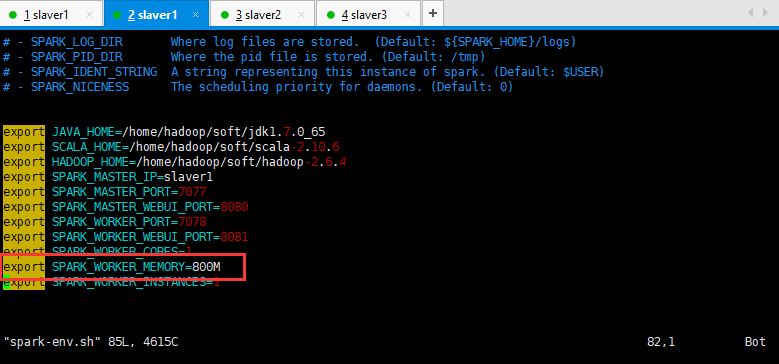
然后呢,感觉一切都挺正常的,但是呢,启动这个spark-shell的时候指明内存大小,就可以解决这个问题,但是指定的内存大小必须比800M小,我指定了500M,如下所示:
[root@slaver1 spark-1.6.-bin-hadoop2.]# bin/spark-shell --master spark://slaver1:7077 --executor-memory 512M --total-executor-cores 2

// :: WARN NativeCodeLoader: Unable to load native-hadoop library for your platform... using builtin-java classes where applicable

// :: INFO SecurityManager: Changing view acls to: root

// :: INFO SecurityManager: Changing modify acls to: root

// :: INFO SecurityManager: SecurityManager: authentication disabled; ui acls disabled; users with view permissions: Set(root); users with modify permissions: Set(root)

// :: INFO HttpServer: Starting HTTP Server

// :: INFO Utils: Successfully started service 'HTTP class server' on port .

Welcome to

      ____              __

     / __/__  ___ _____/ /__

    _\ \/ _ \/ _ `/ __/  '_/

   /___/ .__/\_,_/_/ /_/\_\   version 1.6.

      /_/

Using Scala version 2.10. (Java HotSpot(TM) Client VM, Java 1.7.0_65)

Type in expressions to have them evaluated.

Type :help for more information.

// :: INFO SparkContext: Running Spark version 1.6.

// :: WARN SparkConf:

SPARK_WORKER_INSTANCES was detected (set to '').

This is deprecated in Spark 1.0+.

Please instead use:

 - ./spark-submit with --num-executors to specify the number of executors

 - Or set SPARK_EXECUTOR_INSTANCES

 - spark.executor.instances to configure the number of instances in the spark config.

// :: INFO SecurityManager: Changing view acls to: root

// :: INFO SecurityManager: Changing modify acls to: root

// :: INFO SecurityManager: SecurityManager: authentication disabled; ui acls disabled; users with view permissions: Set(root); users with modify permissions: Set(root)

// :: INFO Utils: Successfully started service 'sparkDriver' on port .

// :: INFO Slf4jLogger: Slf4jLogger started

// :: INFO Remoting: Starting remoting

// :: INFO Remoting: Remoting started; listening on addresses :[akka.tcp://sparkDriverActorSystem@192.168.19.128:35173]

// :: INFO Utils: Successfully started service 'sparkDriverActorSystem' on port .

// :: INFO SparkEnv: Registering MapOutputTracker

// :: INFO SparkEnv: Registering BlockManagerMaster

// :: INFO DiskBlockManager: Created local directory at /tmp/blockmgr-4a581245-fbf6--81b1-bb295995d95a

// :: INFO MemoryStore: MemoryStore started with capacity 517.4 MB

// :: INFO SparkEnv: Registering OutputCommitCoordinator

// :: INFO Utils: Successfully started service 'SparkUI' on port .

// :: INFO SparkUI: Started SparkUI at http://192.168.19.128:4040

// :: INFO AppClient$ClientEndpoint: Connecting to master spark://slaver1:7077...

// :: INFO SparkDeploySchedulerBackend: Connected to Spark cluster with app ID app--

// :: INFO Utils: Successfully started service 'org.apache.spark.network.netty.NettyBlockTransferService' on port .

// :: INFO NettyBlockTransferService: Server created on

// :: INFO BlockManagerMaster: Trying to register BlockManager

// :: INFO AppClient$ClientEndpoint: Executor added: app--/ on worker--192.168.19.130- (192.168.19.130:) with  cores

// :: INFO SparkDeploySchedulerBackend: Granted executor ID app--/ on hostPort 192.168.19.130: with  cores, 512.0 MB RAM

// :: INFO BlockManagerMasterEndpoint: Registering block manager 192.168.19.128: with 517.4 MB RAM, BlockManagerId(driver, 192.168.19.128, )

// :: INFO BlockManagerMaster: Registered BlockManager

// :: INFO AppClient$ClientEndpoint: Executor added: app--/ on worker--192.168.19.129- (192.168.19.129:) with  cores

// :: INFO SparkDeploySchedulerBackend: Granted executor ID app--/ on hostPort 192.168.19.129: with  cores, 512.0 MB RAM

// :: INFO AppClient$ClientEndpoint: Executor updated: app--/ is now RUNNING

// :: INFO AppClient$ClientEndpoint: Executor updated: app--/ is now RUNNING

// :: INFO SparkDeploySchedulerBackend: SchedulerBackend is ready for scheduling beginning after reached minRegisteredResourcesRatio: 0.0

// :: INFO SparkILoop: Created spark context..

Spark context available as sc.

// :: INFO HiveContext: Initializing execution hive, version 1.2.

// :: INFO ClientWrapper: Inspected Hadoop version: 2.6.

// :: INFO ClientWrapper: Loaded org.apache.hadoop.hive.shims.Hadoop23Shims for Hadoop version 2.6.

// :: INFO HiveMetaStore: : Opening raw store with implemenation class:org.apache.hadoop.hive.metastore.ObjectStore

// :: INFO ObjectStore: ObjectStore, initialize called

// :: INFO SparkDeploySchedulerBackend: Registered executor NettyRpcEndpointRef(null) (slaver3:) with ID

// :: INFO BlockManagerMasterEndpoint: Registering block manager slaver3: with 146.2 MB RAM, BlockManagerId(, slaver3, )

// :: INFO Persistence: Property datanucleus.cache.level2 unknown - will be ignored

// :: INFO Persistence: Property hive.metastore.integral.jdo.pushdown unknown - will be ignored

// :: INFO SparkDeploySchedulerBackend: Registered executor NettyRpcEndpointRef(null) (slaver2:) with ID

// :: INFO BlockManagerMasterEndpoint: Registering block manager slaver2: with 146.2 MB RAM, BlockManagerId(, slaver2, )

// :: WARN Connection: BoneCP specified but not present in CLASSPATH (or one of dependencies)

// :: WARN Connection: BoneCP specified but not present in CLASSPATH (or one of dependencies)

// :: INFO ObjectStore: Setting MetaStore object pin classes with hive.metastore.cache.pinobjtypes="Table,StorageDescriptor,SerDeInfo,Partition,Database,Type,FieldSchema,Order"

// :: INFO Datastore: The class "org.apache.hadoop.hive.metastore.model.MFieldSchema" is tagged as "embedded-only" so does not have its own datastore table.

// :: INFO Datastore: The class "org.apache.hadoop.hive.metastore.model.MOrder" is tagged as "embedded-only" so does not have its own datastore table.

// :: INFO Datastore: The class "org.apache.hadoop.hive.metastore.model.MFieldSchema" is tagged as "embedded-only" so does not have its own datastore table.

// :: INFO Datastore: The class "org.apache.hadoop.hive.metastore.model.MOrder" is tagged as "embedded-only" so does not have its own datastore table.

// :: INFO MetaStoreDirectSql: Using direct SQL, underlying DB is DERBY

// :: INFO ObjectStore: Initialized ObjectStore

// :: WARN ObjectStore: Version information not found in metastore. hive.metastore.schema.verification is not enabled so recording the schema version 1.2.

// :: WARN ObjectStore: Failed to get database default, returning NoSuchObjectException

Java HotSpot(TM) Client VM warning: You have loaded library /tmp/libnetty-transport-native-epoll5989457308944360401.so which might have disabled stack guard. The VM will try to fix the stack guard now.

It's highly recommended that you fix the library with 'execstack -c <libfile>', or link it with '-z noexecstack'.

// :: INFO HiveMetaStore: Added admin role in metastore

// :: INFO HiveMetaStore: Added public role in metastore

// :: INFO HiveMetaStore: No user is added in admin role, since config is empty

// :: INFO HiveMetaStore: : get_all_databases

// :: INFO audit: ugi=root    ip=unknown-ip-addr    cmd=get_all_databases

// :: INFO HiveMetaStore: : get_functions: db=default pat=*

// :: INFO audit: ugi=root    ip=unknown-ip-addr    cmd=get_functions: db=default pat=*

// :: INFO Datastore: The class "org.apache.hadoop.hive.metastore.model.MResourceUri" is tagged as "embedded-only" so does not have its own datastore table.

// :: INFO SessionState: Created local directory: /tmp/c6bce663-21e6-4d05-a30a-0114773b6959_resources

// :: INFO SessionState: Created HDFS directory: /tmp/hive/root/c6bce663-21e6-4d05-a30a-0114773b6959

// :: INFO SessionState: Created local directory: /tmp/root/c6bce663-21e6-4d05-a30a-0114773b6959

// :: INFO SessionState: Created HDFS directory: /tmp/hive/root/c6bce663-21e6-4d05-a30a-0114773b6959/_tmp_space.db

// :: INFO HiveContext: default warehouse location is /user/hive/warehouse

// :: INFO HiveContext: Initializing HiveMetastoreConnection version 1.2. using Spark classes.

// :: INFO ClientWrapper: Inspected Hadoop version: 2.6.

// :: INFO ClientWrapper: Loaded org.apache.hadoop.hive.shims.Hadoop23Shims for Hadoop version 2.6.

// :: INFO HiveMetaStore: : Opening raw store with implemenation class:org.apache.hadoop.hive.metastore.ObjectStore

// :: INFO ObjectStore: ObjectStore, initialize called

// :: INFO Persistence: Property datanucleus.cache.level2 unknown - will be ignored

// :: INFO Persistence: Property hive.metastore.integral.jdo.pushdown unknown - will be ignored

// :: WARN Connection: BoneCP specified but not present in CLASSPATH (or one of dependencies)

// :: WARN Connection: BoneCP specified but not present in CLASSPATH (or one of dependencies)

// :: INFO ObjectStore: Setting MetaStore object pin classes with hive.metastore.cache.pinobjtypes="Table,StorageDescriptor,SerDeInfo,Partition,Database,Type,FieldSchema,Order"

// :: INFO Datastore: The class "org.apache.hadoop.hive.metastore.model.MFieldSchema" is tagged as "embedded-only" so does not have its own datastore table.

// :: INFO Datastore: The class "org.apache.hadoop.hive.metastore.model.MOrder" is tagged as "embedded-only" so does not have its own datastore table.

// :: INFO Datastore: The class "org.apache.hadoop.hive.metastore.model.MFieldSchema" is tagged as "embedded-only" so does not have its own datastore table.

// :: INFO Datastore: The class "org.apache.hadoop.hive.metastore.model.MOrder" is tagged as "embedded-only" so does not have its own datastore table.

// :: INFO Query: Reading in results for query "org.datanucleus.store.rdbms.query.SQLQuery@0" since the connection used is closing

// :: INFO MetaStoreDirectSql: Using direct SQL, underlying DB is DERBY

// :: INFO ObjectStore: Initialized ObjectStore

// :: INFO HiveMetaStore: Added admin role in metastore

// :: INFO HiveMetaStore: Added public role in metastore

// :: INFO HiveMetaStore: No user is added in admin role, since config is empty

// :: INFO HiveMetaStore: : get_all_databases

// :: INFO audit: ugi=root    ip=unknown-ip-addr    cmd=get_all_databases

// :: INFO HiveMetaStore: : get_functions: db=default pat=*

// :: INFO audit: ugi=root    ip=unknown-ip-addr    cmd=get_functions: db=default pat=*

// :: INFO Datastore: The class "org.apache.hadoop.hive.metastore.model.MResourceUri" is tagged as "embedded-only" so does not have its own datastore table.

// :: INFO SessionState: Created local directory: /tmp/bcc435a7-3ad6-4cd4--b11e5b6c4adc_resources

// :: INFO SessionState: Created HDFS directory: /tmp/hive/root/bcc435a7-3ad6-4cd4--b11e5b6c4adc

// :: INFO SessionState: Created local directory: /tmp/root/bcc435a7-3ad6-4cd4--b11e5b6c4adc

// :: INFO SessionState: Created HDFS directory: /tmp/hive/root/bcc435a7-3ad6-4cd4--b11e5b6c4adc/_tmp_space.db

// :: INFO SparkILoop: Created sql context (with Hive support)..

SQL context available as sqlContext.

scala>
然后再执行wordcount的例子,如下所示,就可以解决上面出现的问题:
scala> sc.textFile("hdfs://slaver1:9000/hello.txt").flatMap(_.split(" ")).map((_,)).reduceByKey(_ + _).collect

// :: WARN SizeEstimator: Failed to check whether UseCompressedOops is set; assuming yes

// :: INFO MemoryStore: Block broadcast_0 stored as values in memory (estimated size 82.6 KB, free 82.6 KB)

// :: INFO MemoryStore: Block broadcast_0_piece0 stored as bytes in memory (estimated size 19.3 KB, free 102.0 KB)

// :: INFO BlockManagerInfo: Added broadcast_0_piece0 in memory on 192.168.19.128: (size: 19.3 KB, free: 517.4 MB)

// :: INFO SparkContext: Created broadcast  from textFile at <console>:

// :: INFO FileInputFormat: Total input paths to process :

// :: INFO SparkContext: Starting job: collect at <console>:

// :: INFO DAGScheduler: Registering RDD  (map at <console>:)

// :: INFO DAGScheduler: Got job  (collect at <console>:) with  output partitions

// :: INFO DAGScheduler: Final stage: ResultStage  (collect at <console>:)

// :: INFO DAGScheduler: Parents of final stage: List(ShuffleMapStage )

// :: INFO DAGScheduler: Missing parents: List(ShuffleMapStage )

// :: INFO DAGScheduler: Submitting ShuffleMapStage  (MapPartitionsRDD[] at map at <console>:), which has no missing parents

// :: INFO MemoryStore: Block broadcast_1 stored as values in memory (estimated size 4.2 KB, free 106.1 KB)

// :: INFO MemoryStore: Block broadcast_1_piece0 stored as bytes in memory (estimated size 2.3 KB, free 108.4 KB)

// :: INFO BlockManagerInfo: Added broadcast_1_piece0 in memory on 192.168.19.128: (size: 2.3 KB, free: 517.4 MB)

// :: INFO SparkContext: Created broadcast  from broadcast at DAGScheduler.scala:

// :: INFO DAGScheduler: Submitting  missing tasks from ShuffleMapStage  (MapPartitionsRDD[] at map at <console>:)

// :: INFO TaskSchedulerImpl: Adding task set 0.0 with  tasks

// :: INFO TaskSetManager: Starting task 0.0 in stage 0.0 (TID , slaver3, partition ,NODE_LOCAL,  bytes)

// :: INFO BlockManagerInfo: Added broadcast_1_piece0 in memory on slaver3: (size: 2.3 KB, free: 146.2 MB)

// :: INFO BlockManagerInfo: Added broadcast_0_piece0 in memory on slaver3: (size: 19.3 KB, free: 146.2 MB)

// :: INFO TaskSetManager: Starting task 1.0 in stage 0.0 (TID , slaver3, partition ,NODE_LOCAL,  bytes)

// :: INFO TaskSetManager: Finished task 0.0 in stage 0.0 (TID ) in  ms on slaver3 (/)

// :: INFO TaskSetManager: Finished task 1.0 in stage 0.0 (TID ) in  ms on slaver3 (/)

// :: INFO DAGScheduler: ShuffleMapStage  (map at <console>:) finished in 3.242 s

// :: INFO DAGScheduler: looking for newly runnable stages

// :: INFO DAGScheduler: running: Set()

// :: INFO DAGScheduler: waiting: Set(ResultStage )

// :: INFO TaskSchedulerImpl: Removed TaskSet 0.0, whose tasks have all completed, from pool

// :: INFO DAGScheduler: failed: Set()

// :: INFO DAGScheduler: Submitting ResultStage  (ShuffledRDD[] at reduceByKey at <console>:), which has no missing parents

// :: INFO MemoryStore: Block broadcast_2 stored as values in memory (estimated size 2.6 KB, free 111.0 KB)

// :: INFO MemoryStore: Block broadcast_2_piece0 stored as bytes in memory (estimated size 1589.0 B, free 112.6 KB)

// :: INFO BlockManagerInfo: Added broadcast_2_piece0 in memory on 192.168.19.128: (size: 1589.0 B, free: 517.4 MB)

// :: INFO SparkContext: Created broadcast  from broadcast at DAGScheduler.scala:

// :: INFO DAGScheduler: Submitting  missing tasks from ResultStage  (ShuffledRDD[] at reduceByKey at <console>:)

// :: INFO TaskSchedulerImpl: Adding task set 1.0 with  tasks

// :: INFO TaskSetManager: Starting task 0.0 in stage 1.0 (TID , slaver3, partition ,NODE_LOCAL,  bytes)

// :: INFO BlockManagerInfo: Added broadcast_2_piece0 in memory on slaver3: (size: 1589.0 B, free: 146.2 MB)

// :: INFO MapOutputTrackerMasterEndpoint: Asked to send map output locations for shuffle  to slaver3:

// :: INFO MapOutputTrackerMaster: Size of output statuses for shuffle  is  bytes

// :: INFO TaskSetManager: Starting task 1.0 in stage 1.0 (TID , slaver3, partition ,NODE_LOCAL,  bytes)

// :: INFO TaskSetManager: Finished task 0.0 in stage 1.0 (TID ) in  ms on slaver3 (/)

// :: INFO DAGScheduler: ResultStage  (collect at <console>:) finished in 0.153 s

// :: INFO TaskSetManager: Finished task 1.0 in stage 1.0 (TID ) in  ms on slaver3 (/)

// :: INFO TaskSchedulerImpl: Removed TaskSet 1.0, whose tasks have all completed, from pool

// :: INFO DAGScheduler: Job  finished: collect at <console>:, took 3.883545 s

res0: Array[(String, Int)] = Array((hive,), (hello,), (sqoop,), (spark,), (hadoop,), (storm,), (hbase,), (biexiansheng,))
完结.......
18/03/18 04:53:44 WARN TaskSchedulerImpl: Initial job has not accepted any resources; check your cluster UI to ensure that workers are registered and have sufficient resources的更多相关文章
- Spark执行样例报警告:WARN scheduler.TaskSchedulerImpl: Initial job has not accepted any resources
搭建Spark环境后,调测Spark样例时,出现下面的错误:WARN scheduler.TaskSchedulerImpl: Initial job has not accepted any res ...
- Docker 18.03 Centos7.6 安装 内网
首先访问https://download.docker.com/linux/centos/7/x86_64/stable/Packages/获取对应版本的rpm包docker包docker-ce-18 ...
- 5 weekend01、02、03、04、05、06、07的分布式集群的HA测试 + hdfs--动态增加节点和副本数量管理 + HA的java api访问要点
weekend01.02.03.04.05.06.07的分布式集群的HA测试 1) weekend01.02的hdfs的HA测试 2) weekend03.04的yarn的HA测试 1) wee ...
- assertion: 18 { code: 18, ok: 0.0, errmsg: "auth fails" }
MongoDB Version: 2.4.7 Mongodump: $ bin/mongodump -u admin -p admin -d test -o ./tmp/ connected to: ...
- kubespray-2.14.2安装kubernetes-1.18.10(ubuntu-20.04.1)
欢迎访问我的GitHub https://github.com/zq2599/blog_demos 内容:所有原创文章分类汇总及配套源码,涉及Java.Docker.Kubernetes.DevOPS ...
- First step of using junit---------Software Testing Lab 1---2016.03.18
1. Install junit a) Download “junit.jar” b) In eclipse, Windows->Preferences->Java-& ...
- windows的docker开始支持linux的镜像 ,Version 18.03.0-ce-win59 (16762)
LCOW containers can now be run next to Windows containers.Use '--platform=linux' in Windows containe ...
- 2019.03.18 连接my sql
11.登陆功能(链接MySQL) python manage.py starapp movie 新建一个应用模块之后要记得到setting添加这个应用模块 在python2中你还有去导入一个MySQL ...
- 2018/03/18 isset、empty、is_null的区别
在平常的工作中,判断一个值是否为空的情况时,会直接使用 if ($var) 这种形式,有时也会使用这三个函数进行比较,但是当时也没有很深入的学习. -- 还是通过实例来判断这几个的用法和场景 首先定义 ...
随机推荐
- Pytorch tutorial 之Transfer Learning
引自官方: Transfer Learning tutorial Ng在Deeplearning.ai中讲过迁移学习适用于任务A.B有相同输入.任务B比任务A有更少的数据.A任务的低级特征有助于任务 ...
- JavaScript-client、offset、scroll、定时器
client offset scroll client.offset.scroll系列 他们的作用主要与计算盒模型,盒子的偏移量和滚动有关 clientTop 内容区域到边框顶部的距离, 说白了, 就 ...
- Webpack2 中的 NamedModulesPlugin 与 HashedModuleIdsPlugin
要讨论Webpack 2中新增的这两个plugin的功能,还要先从使用Webpack打包的项目的前端资源缓存方案说起. 通常在使用了Webpack的项目中我们会使用CommonsChunkPlugin ...
- 在windows下用vagrant建立lnmp开发环境
1.安装vagrant,vitrualbox 2.下载homestead的box包,并添加到vagrant 下载地址: https://atlas.hashicorp.com/laravel/boxe ...
- MYSQL添加远程用户或允许远程访问
1.用root用户登陆 格式:grant 权限 on 数据库教程名.表名 to 用户@登录主机 identified by "用户密码"; @ 后面是访问M ...
- 8-Images
HTML Image Tags Tag Description <img> Defines an image <map> Defines an image-map <ar ...
- 在eclipse中安装svn插件
1.下载SVN插件 下载地址:https://github.com/subclipse/subclipse 点击"Files" 2.安装 在eclipse 中点击菜单"w ...
- 本地项目提交到github和提交更新(转)
一:首先当然是去github注册账号了. 二:注册完毕登录后,在自己的首页上面点击右上角“+”号,然后选择New repository,或者直接点击下面的绿色按钮,创建一个新仓库.如图: 然后填入仓库 ...
- js -- sort() 使用排序函数
JavaScript sort() 方法 JavaScript Array 对象 定义和用法 sort() 方法用于对数组的元素进行排序. 语法 arrayObject.sort(sortby) 参数 ...
- 基于MVC 的Quartz.Net组件实现的定时执行任务调度
新建mvc项目之后,首先引用Quartz组件.工具-->NuGet包管理器-->管理解决方案的 NuGet包管理器 组件安装完成. Quartz.Net一个最简单任务至少包括三部分实现:j ...