
Vue.js 系列教程 2:组件,Props,Slots
原文:intro-to-vue-2-components-props-slots
译者:nzbin
这是关于 JavaScript 框架 Vue.js 五个教程的第二部分。在这一部分,我们将学习组件,Props 以及 Slots。这个系列教程并不是一个完整的用户手册,而是通过基础知识让你快速了解 Vuejs 以及它的用途。

系列文章:
- 渲染, 指令, 事件
- 组件, Props, Slots (你在这!)
- Vue-cli
- Vuex
- 动画
组件和传递数据
如果你熟悉 React 或者 Angular2,组件思想和传递状态对你并不陌生。如果不是, 让我们先了解一些主要概念。
大小网站通常由不同的部分组成,并且抽象成更小的部分更容易布局、重用、并使得我们的代码更清晰。为了避免在冗长的多层次的页面中搜寻标签,我们可以这样构建组件:
<header></header>

<aside>

  <sidebar-item v-for="item in items"></sidebar-item>

</aside>

<main>

  <blogpost v-for="post in posts"></blogpost>

</main>

<footer></footer>
这是一个简单的例子,但是你可以看到这种组合方式在开始构建网站结构时的用途。如果你要维护这些代码,你可以很容易的了解程序的结构并且找到每一部分。
Vue 有多种创建组件的方式。让我们从易到难,而复杂的例子就是一个普通的 Vue 程序。
app.$mount('#app');

var app = new Vue({

  el: 'hello',

  template: '<h1>Hello World!</h1>'

});
代码正常运行,但用处不大,因为它只能使用一次,我们还没有向不同的组件传递信息。从父组件向子组件传递数据的方式称为 props。
下面是我能做的最简单的例子,所以非常容易理解。记住 HTML 中的 :text 是 Vue 绑定的缩写。我们在指令部分的最后提到过。绑定可以用于所有方面,但是在这个实例中,这样做的好处是不需要把状态放在 mustache 模板中, 比如 {{ message }}。
在下面的代码中,Vue.component 是组件, new Vue 称为实例。一个程序中可以有多个实例。通常情况下,我们会有一个实例和多个组件,因为实例是主要应用程序。
Vue.component('child', {

  props: ['text'],

  template: `<div>{{ text }}<div>`

});

new Vue({

  el: "#app",

  data() {

    return {

      message: 'hello mr. magoo'

    }

  }

});
<div id="app">

  <child :text="message"></child>

</div>
See the Pen simple props by Sarah Drasner (@sdras) on CodePen.
现在我们可以在程序中随意使用这个组件:
<div id="app">

  <child :text="message"></child>

  <child :text="message"></child>

</div>
See the Pen simple props by Sarah Drasner (@sdras) on CodePen.
我们也可以向 props 中添加验证,这和 React 中的 PropTypes 类似。这个功能很好,因为它是自描述的,并且如果与我们的期望值不同会返回错误,但只有在开发模式中才显示 :
Vue.component('child', {

  props: {

    text: {

      type: String,

      required: true

    }

  },

  template: `<div>{{ text }}<div>`

});
在下面的例子中,我在开发模式中加载 Vue ,并且故意在 prop 验证中输入一个非法类型。你可以看到控制台报错。(这非常有帮助,你可以使用 Vue 的开发工具发现错误).
Vue.component('child', {

  props: {

    text: {

      type: Boolean,

      required: true

    }

  },

  template: `<div>{{ text }}<div>`

});
See the Pen simple props with validation by Sarah Drasner (@sdras) on CodePen.
对象应该作为一个工厂函数返回,你也可以传递一个自定义验证函数,这非常有用,因为可以检查不符合业务、输入或者其它逻辑的数值。对于如何使用每一种类型,有一篇写的很好的 指南.
没有必要在在 props 中给子组件传递数据,也可以使用状态或静态值:
Vue.component('child', {

  props: {

    count: {

      type: Number,

      required: true

    }

  },

  template: `<div class="num">{{ count }}</div>`

})

new Vue({

  el: '#app',

  data() {

    return {

      count: 0

    }

  },

  methods: {

    increment() {

      this.count++;

    },

    decrement() {

      this.count--;

    }

  }

})
<div id="app">

  <h3>

    <button @click="increment">+</button>

    Adjust the state

    <button @click="decrement">-</button>

  </h3>

  <h2>This is the app state: <span class="num">{{ count }}</span></h2>

  <hr>

  <h4><child count="1"></child></h4>

  <p>This is a child counter that is using a static integer as props</p>

  <hr>

  <h4><child :count="count"></child></h4>

  <p>This is the same child counter and it is using the state as props</p>

</div>
See the Pen child component using and not using props by Sarah Drasner (@sdras) on CodePen.
区别在于你是否传递了一个属性并绑定它:
没有使用状态
<child count="1"></child>
vs
使用状态
<child :count="count"></child>
到现在为止,我们已经用字符串在子组件中创建了内容,如果使用 babel 的话,你可以在所有浏览器中使用 ES6 (我强烈建议),可以使用 模板字面量 来避免难以阅读的拼接字符串:
Vue.component('individual-comment', {

  template:

  `<li> {{ commentpost }} </li>`,

  props: ['commentpost']

});

new Vue({

  el: '#app',

  data: {

    newComment: '',

    comments: [

      'Looks great Julianne!',

      'I love the sea',

      'Where are you at?'

    ]

  },

  methods: {

    addComment: function () {

      this.comments.push(this.newComment)

      this.newComment = ''

    }

  }

});
<ul>

    <li

      is="individual-comment"

      v-for="comment in comments"

      v-bind:commentpost="comment"

    ></li>

  </ul>

  <input

    v-model="newComment"

    v-on:keyup.enter="addComment"

    placeholder="Add a comment"

  >
See the Pen rjwJdY by Sarah Drasner (@sdras) on CodePen.
虽然有些作用,但是字符串中的内容仍然有限制。最后,在这个评论列表中,我们希望有照片和作者的名字,你可能已经猜到过多的信息会非常拥挤。而字符串中没有语法高亮效果。
考虑到所有这些事情,我们将创建一个模板。我们会用特殊的 script 标签包裹常规的HTML,然后使用 id 引用它来创建一个组件。当文本和元素很多的时候,这种方式更清晰:
<!-- This is the Individual Comment Component -->

<script type="text/x-template" id="comment-template">

<li>

  <img class="post-img" :src="commentpost.authorImg" />

  <small>{{ commentpost.author }}</small>

  <p class="post-comment">"{{ commentpost.text }}"</p>

</li>

</script>
Vue.component('individual-comment', {

  template: '#comment-template',

  props: ['commentpost']

});
See the Pen Photo App post with Vue.js by Sarah Drasner (@sdras) on CodePen.
Slots
这样好多了。但是如果两个组件的内容或者样式略有不同时会怎样?我们可能会通过 props 将所有不同的内容及样式传递到组件,每次切换所有的东西,或者我们可以复制组件并创建不同的版本。但是如果可以重用组件,并用相同的数据或功能填充它们,那就太好了。这就是 slots 的有用之处。
假如我们有一个程序实例,使用相同的组件 <app-child> 两次。在每个子组件内部,我们需要一些相同的内容以及不同的内容。对于要保持一致的内容,我们使用一个标准的 p 标签,而对于要切换的内容,我们放在空的 <slot></slot> 标签中。
<script type="text/x-template" id="childarea">

  <div class="child">

    <slot></slot>

    <p>It's a veritable slot machine!<br>

    Ha ha aw</p>

  </div>

</script>
然后在程序实例中,我们可以在在 <app-child> 组件标签中传递内容,它会自动填充到 slots 中:
<div id="app">

  <h2>We can use slots to populate content</h2>

  <app-child>

    <h3>This is slot number one</h3>

  </app-child>

  <app-child>

    <h3>This is slot number two</h3>

    <small>I can put more info in, too!</small>

  </app-child>

</div>
See the Pen Slots Example by Sarah Drasner (@sdras) on CodePen.
slots 中也可以有默认内容。如果要在 slot 中写内容,而不是写 <slot></slot>,你可以这样填充:
<slot>I am some default text</slot>
如果你没有在 slot 中填充其它内容,就会显示默认文本,这是非常有用的!鼓掌吧。
你也可以使用具名 slot 。如果一个组件中有两个 slot, 可以通过添加 name 属性区分它们 <slot name="headerinfo"></slot>,并且通过特定的名称访问 slot <h1 slot="headerinfo">I will populate the headerinfo slot!</h1> 。这非常有用。如果有多个命名的 slot 而有一个没有命名,Vue 命名的内容填充到命名的 slot 中,而剩余的内容将填充到未命名的 slots 中。
请看以下示例:
子组件模板
<div id="post">

  <main>

    <slot name="header"></slot>

    <slot></slot>

  </main>

</div>
父组件模板
<app-post>

  <h1 slot="header">This is the main title</h1>

  <p>I will go in the unnamed slot!</p>

</app-post>
渲染结果
<main>

  <h1>This is the main title</h1>

  <p>I will go in the unnamed slot!</p>

</main>
就我个人而言,如果我一次使用多个 slot,我会将所有的都命名,这对于其他的维护人员来说非常清晰,但 Vue 提供的这个灵活的 API 也很好。
Slot 示例
另外,我们给不同的组件设置特殊的样式,并保持所有的内容相同,因此可以迅速和容易地改变了外观。在下面的葡萄酒标签制造商中,其中一个按钮将根据用户的选择切换组件和颜色,酒瓶背景、标签和文本将全部切换,同时保持内容不变。
const app = new Vue({

  ...

  components: {

    'appBlack': {

      template: '#black'

    }

  }

});
主要的 Vue App HTML:
  <component :is="selected">

    ...

    <path class="label" d="M12,295.9s56.5,5,137.6,0V409S78.1,423.6,12,409Z" transform="translate(-12 -13.8)" :style="{ fill: labelColor }"/>

    ...

  </component>

<h4>Color</h4>

  <button @click="selected ='appBlack', labelColor = '#000000'">Black Label</button>

  <button @click="selected ='appWhite', labelColor = '#ffffff'">White Label</button>

  <input type="color" v-model="labelColor" defaultValue="#ff0000">
白色组件的 HTML:
<script type="text/x-template" id="white">

  <div class="white">

     <slot></slot>

  </div>

</script>
(这个演示案例非常大,所以最好在一个单独的窗口或者标签页浏览)
See the Pen Vue Wine Label Maker by Sarah Drasner (@sdras) on CodePen.
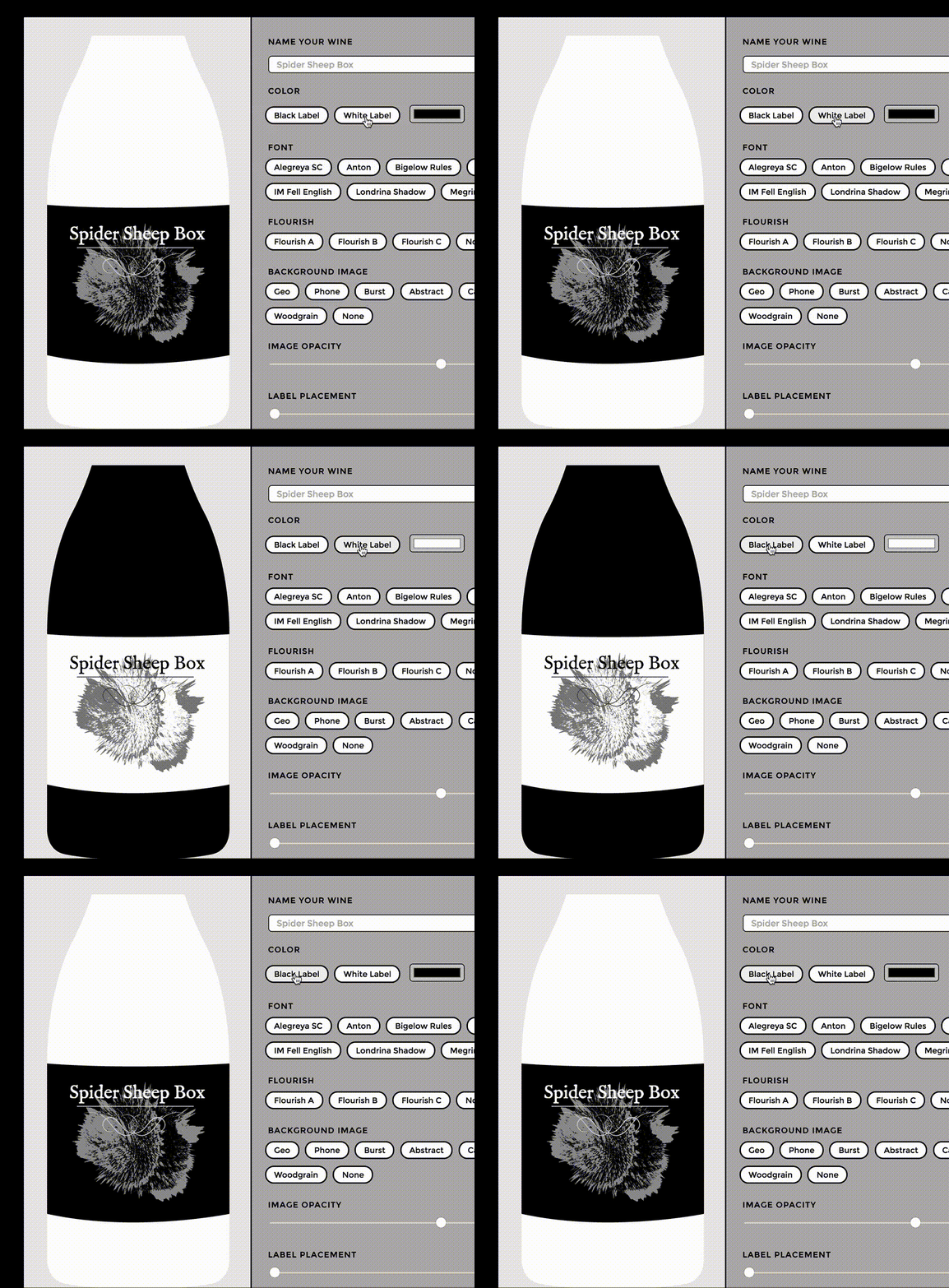
现在,我们已经将所有的 SVG 图片数据放置在程序中,但是实际上它放置在每个组件的 <slot> 中。我们可以根据使用情况切换不同的内容或样式,这是一个非常好的功能。你可以看到,通过创建一个更改组件的“selected”值的按钮,允许用户自己决定使用哪个组件。
现在所有内容都在一个 slot 中,但是我们也可以使用多个 slot,并通过命名区分它们:
<!-- main vue app instance -->

<app-comment>

  <p slot="comment">{{ comment.text }}</p>

</app-comment>

<!-- individual component -->

<script type="text/x-template" id="comment-template">

  <div>

    <slot name="comment"></slot>

  </div>

</script>
我们可以通过引用的相同的 slot 很容易地在不同的组件之间切换,但是如果希望能够来回切换还要保持每个组件的独立状态会怎样?目前,当我们切换黑白标签的时候,模板切换了但内容保持不变。但也许有一种情况,我们希望黑色标签和白色标签是完全不同的。你可以把它们包在称为 <keep-alive></keep-alive> 的特殊组件中,这样切换的时候会保持独立的状态。
检查上面例子的异常——创建一个黑色标签,然后一个不同的白色标签,并在它们之间切换。你会看到,每个状态都被保存下来,并且彼此不同:
<keep-alive>

  <component :is="selected">

    ...

  </component>

</keep-alive>
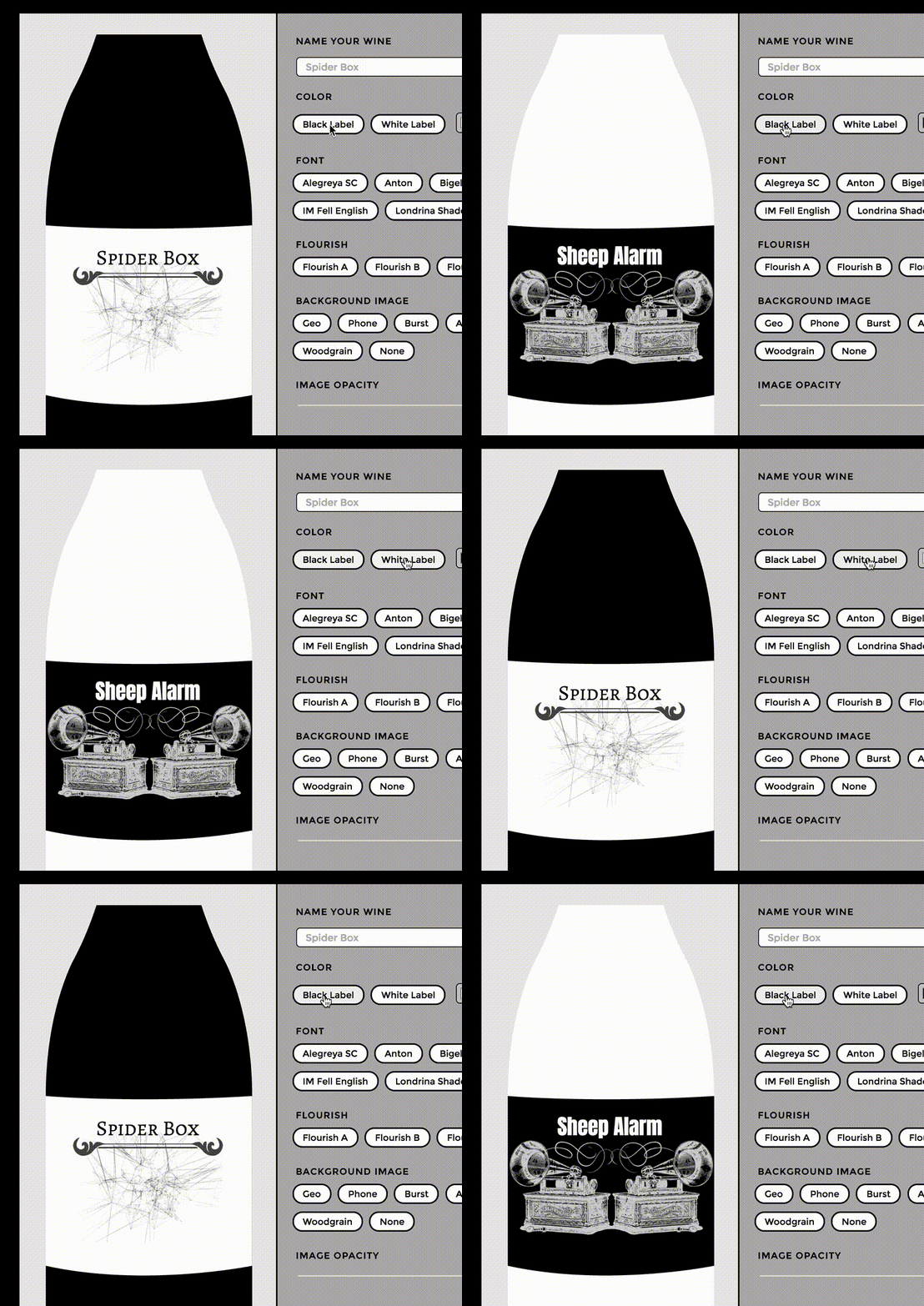
See the Pen Vue Wine Label Maker- with keep-alive by Sarah Drasner (@sdras) on CodePen.
我喜欢这个 API 的功能。
这很好,但为了简单起见,我们总是把所有内容放置在一个或两个文件中。当建立网站时,如果将单独的组件放在不同的文件中,并在需要的时候导入进来,这样的组织性更强。实际上在真实的 Vue 开发中通常是这么做的,我们将在下一部分介绍。接下来谈论 Vue-cli、构建过程以及 vuex 状态管理!
Vue.js 系列教程 2:组件,Props,Slots的更多相关文章
- Vue.js 系列教程 ①
原文:intro-to-vue-1-rendering-directives-events 译者:nzbin 如果要我用一句话描述使用 Vue 的经历,我可能会说“它如此合乎常理”或者“它提供给我需要 ...
- Vue.js 系列教程 ②
这是关于 JavaScript 框架 Vue.js 五个教程的第二部分.在这一部分,我们将学习组件,Props 以及 Slots.这不是一个完整的指南,而是基础知识的概述,所以你可以了解Vue.js ...
- Vue.js 系列教程 3:Vue-cli,生命周期钩子
原文:intro-to-vue-3-vue-cli-lifecycle-hooks 译者:nzbin 这是 JavaScript 框架 Vue.js 五篇教程的第三部分.在这一部分,我们将学习 Vue ...
- Vue.js 系列教程 4:Vuex
这是关于 JavaScript 框架 Vue.js 五个教程的第四部分.在这一部分,我们会学习使用 Vuex 进行状态管理. 这不是一个完整的指南,而是基础知识的概述,所以你可以了解 Vue.js 以 ...
- Vue.js 系列教程 5:动画
原文:intro-to-vue-5-animations 译者:nzbin 译者的话:经过两周的努力,终于完成了这个系列的翻译,由于时间因素及个人水平有限,并没有详细的校对,其中仍然有很多不易理解的地 ...
- Vue.js 系列教程 1:渲染,指令,事件
原文:intro-to-vue-1-rendering-directives-events 译者:nzbin 如果要我用一句话描述使用 Vue 的经历,我可能会说“它如此合乎常理”或者“它提供给我需要 ...
- Vue.js 系列教程 3:Vue
原文:intro-to-vue-3-vue-cli-lifecycle-hooks 译者:nzbin 这是 JavaScript 框架 Vue.js 五篇教程的第三部分.在这一部分,我们将学习 Vue ...
- vue.js 系列教程
Vuejs——(1)入门(单向绑定.双向绑定.列表渲染.响应函数) Vuejs——(2)Vue生命周期,数据,手动挂载,指令,过滤器 Vuejs——(3)计算属性,样式和类绑定 Vuejs——(4)v ...
- 前端框架vue.js系列(9):Vue.extend、Vue.component与new Vue
前端框架vue.js系列(9):Vue.extend.Vue.component与new Vue 本文链接:https://blog.csdn.net/zeping891103/article/det ...
随机推荐
- Java判断一个字符是否是数字的几种方法的代码
在工作期间,将写内容过程经常用到的一些内容段做个记录,下面内容是关于Java判断一个字符是否是数字的几种方法的内容,希望能对码农们有好处. public class Test{ public stat ...
- Android6.0 源码修改之屏蔽导航栏虚拟按键(Home和RecentAPP)/动态显示和隐藏NavigationBar
场景分析, 为了完全实现沉浸式效果,在进入特定的app后可以将导航栏移除,当退出app后再次将导航栏恢复.(下面将采用发送广播的方式来移除和恢复导航栏) ps:不修改源码的情况下,简单的沉浸式效果实现 ...
- Android 内存管理中的 Shallow heap Retained heap
所有包含Heap Profling功能的工具(MAT,Yourkit,JProfiler,TPTP等)都会使用到两个名词,一个是Shallow heap Size,另一个是 Retained heap ...
- 方向键控制圆球运动(简易)(js)
<!DOCTYPE html> <html lang="en"> <head> <meta charset="UTF-8&quo ...
- ALTER SYSTEM ARCHIVELOG CURRENT挂起案例
最近两天,一台ORACLE数据库的作业执行delete_ob_get_epps.sh脚本清理过期备份时,执行下面SQL语句就会被阻塞,在监控工具DPA里面部分截图如下(图片分开截断) sql 'alt ...
- 自动化测试基础篇--Selenium判断元素是够存在
摘自https://www.cnblogs.com/sanzangTst/p/8376101.html selenium+python处于学习阶段,功能实现之后开始整理之前写的代码,突然发现一个功能没 ...
- Spring Cloud Config 配置属性覆盖优先级。
/** * Flag to indicate that the external properties should override system properties. * Default tru ...
- Linux: yum 命令说明
yum命令是在Fedora和RedHat以及SUSE中基于rpm的软件包管理器,它可以使系统管理人员交互和自动化地更细与管理RPM软件包,能够从指定的服务器自动下载RPM包并且安装,可以自动处理依赖性 ...
- 十大经典排序算法的python实现
十种常见排序算法可以分为两大类: 非线性时间比较类排序:通过比较来决定元素间的相对次序,由于其时间复杂度不能突破O(nlogn),因此称为非线性时间比较类排序.包括:冒泡排序.选择排序.归并排序.快速 ...
- ubuntu 打开eclipse出现A Java Runtime Environment (JRE) or Java Development Kit (JDK) must be ... 解决方法(转载)
原创作者:http://www.cnblogs.com/jerome-rong/archive/2013/02/19/2916608.html Java RunTime Environment (JR ...