
Android——数据存储:手机内部存储
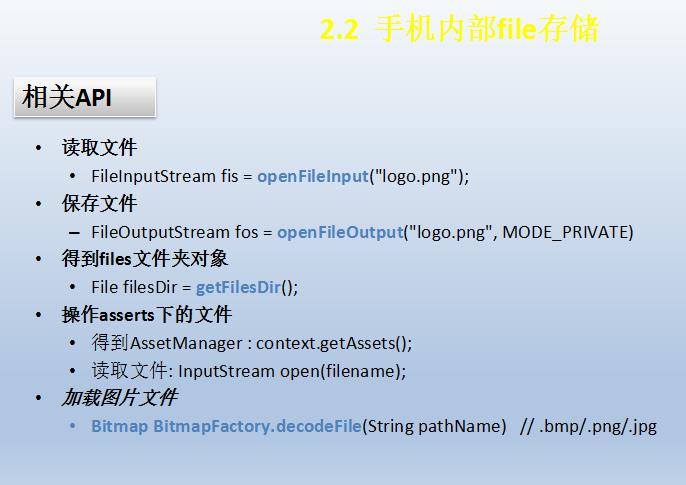


存取字符串和存取图片不相同
xml
<EditText

        android:layout_width="match_parent"

        android:layout_height="wrap_content"

        android:id="@+id/et_3"

        android:hint="要存储的的内容"/>

    <EditText

        android:layout_width="match_parent"

        android:layout_height="wrap_content"

        android:id="@+id/et_4"

        android:hint="从文件中读取的内容"

        />

    <LinearLayout

        android:layout_width="match_parent"

        android:layout_height="wrap_content"

        android:orientation="horizontal">

        <Button

            android:layout_width="0dp"

            android:layout_height="wrap_content"

            android:text="保存"

            android:layout_weight="1"

            android:onClick="onclick3"/>

        <Button

            android:layout_width="0dp"

            android:layout_height="wrap_content"

            android:text="获取"

            android:layout_weight="1"

            android:onClick="onclick4"/>

    </LinearLayout>

    <LinearLayout

        android:layout_width="match_parent"

        android:layout_height="wrap_content"

        android:orientation="horizontal">

        <Button

            android:layout_width="0dp"

            android:layout_height="wrap_content"

            android:text="保存文件"

            android:layout_weight="1"

            android:onClick="onclick5"/>

        <Button

            android:layout_width="0dp"

            android:layout_height="wrap_content"

            android:text="获取文件"

            android:layout_weight="1"

            android:onClick="onclick6"/>

    </LinearLayout>

    <ImageView

        android:layout_width="wrap_content"

        android:layout_height="wrap_content"

        android:src="@drawable/maps"

        android:id="@+id/iv_3"/>
java
 //定义文件名

    //定义常量,一般全大写

    final String FILENAME = "test.txt";

    //手机文件存储

    public void onclick3(View view)

    {

        //1.获取要存储的内容

        String content = et_3.getText().toString();

        //2.获取输出流 以数据为基准 从手机存储往文件走为输出流

        try {

            //追加模式

            FileOutputStream fos_1 = openFileOutput(FILENAME,MODE_APPEND);

            //3.构造打印流 PrintStream

            PrintStream pm = new PrintStream(fos_1);

            //4.写入内容(换行)

            pm.println(content);

            //5.关闭

            pm.close();

            fos_1.close();

            Toast.makeText(Activitydata.this, "保存成功", Toast.LENGTH_SHORT).show();

        } catch (Exception e) {

            e.printStackTrace();

            Toast.makeText(Activitydata.this, "保存失败", Toast.LENGTH_SHORT).show();

        }

    }

    //获取

    public void onclick4(View view)

    {

        //1.获取输入流  从文件到手机存储

        try {

            FileInputStream fis = openFileInput(FILENAME);

            //2.用数组方法读取

            //定义读取的数组

            byte[] b = new byte[1024];

            //3.读出的数据的长度

            int i=0;

            StringBuilder sbr = new StringBuilder();

            //fis.read(b)返回长度

            while((i=fis.read(b))>0)

            {

                //在这里需要字符串,转为字符串

                sbr.append(new String(b,0,i));

            }

            fis.close();

            //显示读出的内容

            et_4.setText(sbr);

            Toast.makeText(Activitydata.this, "读取成功", Toast.LENGTH_SHORT).show();

        } catch (Exception e) {

            e.printStackTrace();

            Toast.makeText(Activitydata.this, "读取失败", Toast.LENGTH_SHORT).show();

        }

    }

    //操作assets内的文件

    public void onclick5(View view)

    {

        //1.获取AssetManager

        AssetManager assetManager = getAssets();

        //2.打开文件  返回输入流 把文件读到内存里

        try {

            InputStream is = assetManager.open("touxiang.jpg");

            //3.获取输出流

            FileOutputStream fos = openFileOutput("touxiang2.jpg",MODE_PRIVATE);

            //4.边读边写

            byte[] b =new byte[1024];

            int i = 0;

            while((i = is.read(b))>0)

            {

                fos.write(b, 0, i);

            }

            fos.close();

            is.close();

            Toast.makeText(Activitydata.this, "保存成功", Toast.LENGTH_SHORT).show();

        } catch (IOException e) {

            e.printStackTrace();

            Toast.makeText(Activitydata.this, "保存失败", Toast.LENGTH_SHORT).show();

        }

    }

    //读取文件 从手机内部存储读图片文件

    public void onclick6(View view)

    {

        //改变ImageView的图片来源,指向手机存储空间

        //1.获取文件存储的绝对路径

        String filepath = getFilesDir().getAbsolutePath();

        //2.组合完整路径

        filepath += "/touxiang2.jpg";

        Toast.makeText(Activitydata.this, "path= "+filepath, Toast.LENGTH_SHORT).show();

        //3.生成位图实例

        Bitmap bm = BitmapFactory.decodeFile(filepath);

        //4.改变ImageView的图片来源

        iv_3.setImageBitmap(bm);

    }


Android——数据存储:手机内部存储的更多相关文章
- Android数据的四种存储方式SharedPreferences、SQLite、Content Provider和File (一) —— 总览
Android数据的四种存储方式SharedPreferences.SQLite.Content Provider和File (一) —— 总览 作为一个完成的应用程序,数据存储操作是必不可少的. ...
- Android数据的四种存储方式SharedPreferences、SQLite、Content Provider和File (三) —— SharePreferences
除了SQLite数据库外,SharedPreferences也是一种轻型的数据存储方式,它的本质是基于XML文件存储key-value键值对数据,通常用来存储一些简单的配置信息.其存储位置在/data ...
- Android数据的四种存储方式SharedPreferences、SQLite、Content Provider和File (四) —— ContentProvider
ContentProvider是安卓平台中,在不同应用程序之间实现数据共享的一种机制.一个应用程序如果需要让别的程序可以操作自己的数据,即可采用这种机制.并且此种方式忽略了底层的数据存储实现,Cont ...
- Android数据的四种存储方式SharedPreferences、SQLite、Content Provider和File (二) —— SQLite
SQLite是一种转为嵌入式设备设计的轻型数据库,其只有五种数据类型,分别是: NULL: 空值 INTEGER: 整数 REAL: 浮点数 TEXT: 字符串 BLOB: 大数据 在SQLite中, ...
- (转)Android数据的四种存储方式SharedPreferences、SQLite、Content Provider和File (三) —— SharePreferences
除了SQLite数据库外,SharedPreferences也是一种轻型的数据存储方式,它的本质是基于XML文件存储key-value键值对数据,通常用来存储一些简单的配置信息.其存储位置在/data ...
- Android数据存储之内部存储、外部存储
首先来介绍下什么是内部存储? 在Android平台下,有着自己独立的数据存储规则,在windows平台下,应用程序能够自由的或者在特定的訪问权限基础上訪问或改动其它应用程序下的文件资源. 可是在And ...
- (转)Android如何编程设置APP安装位置(外部存储或内部存储)?
Beginning with API Level 8, you can allow your application to be installed on the external storage ( ...
- [Android]Android数据的四种存储方式
存储方式 Android提供以下四种存储方式: SharePreference SQLite File ContentProvider Android系统中数据基本都是私有的,一般存放在“data/d ...
- [转][Android]Android数据的四种存储方式
android.database.sqlite类 SQLiteQueryBuilder java.lang.Object android.database.sqlite.SQLiteQueryBuil ...
随机推荐
- C#抽象方法
在覆盖父类的方法时,必须显式说明是在覆盖父类方法,否则相当于没有覆盖. class Animal { public void run() { Console.WriteLine("anima ...
- 【LeetCode】37. Sudoku Solver
Sudoku Solver Write a program to solve a Sudoku puzzle by filling the empty cells. Empty cells are i ...
- Unix环境高级编程(七)fork函数总结
在Unix/Linux中用fork函数创建一个新的进程.进程是由当前已有进程调用fork函数创建,分叉的进程叫子进程,创建者叫父进程.该函数的特点是调用一次,返回两次,一次是在父进程,一次是在子进程. ...
- ELK系统搭建流程
ELK系统搭建流程 1. Logstash 1.1 安装 注:安装在需要收集日志的机器上. cd /data/softs sudo wget https://download.elastic.co/l ...
- Python 元组 index() 方法
描述 Python 元组 index() 方法用于从元祖中找出某个对象第一个匹配项的索引位置,如果这个对象不在元祖中会报一个异常. 语法 index() 方法语法: T.index(obj[,star ...
- python 中hive 取日期时间的方法
#!/usr/bin/env python3 import sys import os import time, datetime sys.path.append(os.getenv('HIVE_TA ...
- 机器学习(6): 层次聚类 hierarchical clustering
假设有N个待聚类的样本,对于层次聚类来说,步骤: 1.(初始化)把每个样本归为一类,计算每两个类之间的距离,也就是样本与样本之间的相似度: 2.寻找各个类之间最近的两个类, ...
- jquery中常见问题及解决办法小结
1 在开发开放聊天室的过程中,遇到使用ajax提交表单插入数据库时会插入两条数据的情况 解决办法,在ajax函数返回后,return false. $("#btn").click( ...
- CentOS 7 设置中文环境
在vultr上的虚拟机虽然安装了中文支持,但是默认显示英语. 只要修改 /etc/locale.conf 即可. LANG="zh_CN.UTF-8" LANGUAGE=" ...
- 批处理学习笔记9 - 深入学习For命令2
这一篇是对于for /f的扩展,上一篇说道/f可以读txt文件里的数据.这里了解下tokens和delims功能 平常文本文件保存数据经常用这样的格式 avi|wmv|rm|mkv|mp4 以读取这个 ...