
Android——数据存储:手机内部存储
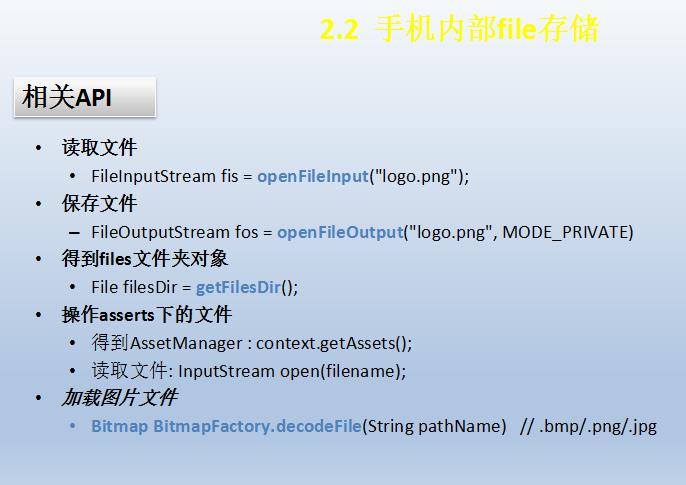


存取字符串和存取图片不相同
xml
<EditText

        android:layout_width="match_parent"

        android:layout_height="wrap_content"

        android:id="@+id/et_3"

        android:hint="要存储的的内容"/>

    <EditText

        android:layout_width="match_parent"

        android:layout_height="wrap_content"

        android:id="@+id/et_4"

        android:hint="从文件中读取的内容"

        />

    <LinearLayout

        android:layout_width="match_parent"

        android:layout_height="wrap_content"

        android:orientation="horizontal">

        <Button

            android:layout_width="0dp"

            android:layout_height="wrap_content"

            android:text="保存"

            android:layout_weight="1"

            android:onClick="onclick3"/>

        <Button

            android:layout_width="0dp"

            android:layout_height="wrap_content"

            android:text="获取"

            android:layout_weight="1"

            android:onClick="onclick4"/>

    </LinearLayout>

    <LinearLayout

        android:layout_width="match_parent"

        android:layout_height="wrap_content"

        android:orientation="horizontal">

        <Button

            android:layout_width="0dp"

            android:layout_height="wrap_content"

            android:text="保存文件"

            android:layout_weight="1"

            android:onClick="onclick5"/>

        <Button

            android:layout_width="0dp"

            android:layout_height="wrap_content"

            android:text="获取文件"

            android:layout_weight="1"

            android:onClick="onclick6"/>

    </LinearLayout>

    <ImageView

        android:layout_width="wrap_content"

        android:layout_height="wrap_content"

        android:src="@drawable/maps"

        android:id="@+id/iv_3"/>
java
 //定义文件名

    //定义常量,一般全大写

    final String FILENAME = "test.txt";

    //手机文件存储

    public void onclick3(View view)

    {

        //1.获取要存储的内容

        String content = et_3.getText().toString();

        //2.获取输出流 以数据为基准 从手机存储往文件走为输出流

        try {

            //追加模式

            FileOutputStream fos_1 = openFileOutput(FILENAME,MODE_APPEND);

            //3.构造打印流 PrintStream

            PrintStream pm = new PrintStream(fos_1);

            //4.写入内容(换行)

            pm.println(content);

            //5.关闭

            pm.close();

            fos_1.close();

            Toast.makeText(Activitydata.this, "保存成功", Toast.LENGTH_SHORT).show();

        } catch (Exception e) {

            e.printStackTrace();

            Toast.makeText(Activitydata.this, "保存失败", Toast.LENGTH_SHORT).show();

        }

    }

    //获取

    public void onclick4(View view)

    {

        //1.获取输入流  从文件到手机存储

        try {

            FileInputStream fis = openFileInput(FILENAME);

            //2.用数组方法读取

            //定义读取的数组

            byte[] b = new byte[1024];

            //3.读出的数据的长度

            int i=0;

            StringBuilder sbr = new StringBuilder();

            //fis.read(b)返回长度

            while((i=fis.read(b))>0)

            {

                //在这里需要字符串,转为字符串

                sbr.append(new String(b,0,i));

            }

            fis.close();

            //显示读出的内容

            et_4.setText(sbr);

            Toast.makeText(Activitydata.this, "读取成功", Toast.LENGTH_SHORT).show();

        } catch (Exception e) {

            e.printStackTrace();

            Toast.makeText(Activitydata.this, "读取失败", Toast.LENGTH_SHORT).show();

        }

    }

    //操作assets内的文件

    public void onclick5(View view)

    {

        //1.获取AssetManager

        AssetManager assetManager = getAssets();

        //2.打开文件  返回输入流 把文件读到内存里

        try {

            InputStream is = assetManager.open("touxiang.jpg");

            //3.获取输出流

            FileOutputStream fos = openFileOutput("touxiang2.jpg",MODE_PRIVATE);

            //4.边读边写

            byte[] b =new byte[1024];

            int i = 0;

            while((i = is.read(b))>0)

            {

                fos.write(b, 0, i);

            }

            fos.close();

            is.close();

            Toast.makeText(Activitydata.this, "保存成功", Toast.LENGTH_SHORT).show();

        } catch (IOException e) {

            e.printStackTrace();

            Toast.makeText(Activitydata.this, "保存失败", Toast.LENGTH_SHORT).show();

        }

    }

    //读取文件 从手机内部存储读图片文件

    public void onclick6(View view)

    {

        //改变ImageView的图片来源,指向手机存储空间

        //1.获取文件存储的绝对路径

        String filepath = getFilesDir().getAbsolutePath();

        //2.组合完整路径

        filepath += "/touxiang2.jpg";

        Toast.makeText(Activitydata.this, "path= "+filepath, Toast.LENGTH_SHORT).show();

        //3.生成位图实例

        Bitmap bm = BitmapFactory.decodeFile(filepath);

        //4.改变ImageView的图片来源

        iv_3.setImageBitmap(bm);

    }


Android——数据存储:手机内部存储的更多相关文章
- Android数据的四种存储方式SharedPreferences、SQLite、Content Provider和File (一) —— 总览
Android数据的四种存储方式SharedPreferences.SQLite.Content Provider和File (一) —— 总览 作为一个完成的应用程序,数据存储操作是必不可少的. ...
- Android数据的四种存储方式SharedPreferences、SQLite、Content Provider和File (三) —— SharePreferences
除了SQLite数据库外,SharedPreferences也是一种轻型的数据存储方式,它的本质是基于XML文件存储key-value键值对数据,通常用来存储一些简单的配置信息.其存储位置在/data ...
- Android数据的四种存储方式SharedPreferences、SQLite、Content Provider和File (四) —— ContentProvider
ContentProvider是安卓平台中,在不同应用程序之间实现数据共享的一种机制.一个应用程序如果需要让别的程序可以操作自己的数据,即可采用这种机制.并且此种方式忽略了底层的数据存储实现,Cont ...
- Android数据的四种存储方式SharedPreferences、SQLite、Content Provider和File (二) —— SQLite
SQLite是一种转为嵌入式设备设计的轻型数据库,其只有五种数据类型,分别是: NULL: 空值 INTEGER: 整数 REAL: 浮点数 TEXT: 字符串 BLOB: 大数据 在SQLite中, ...
- (转)Android数据的四种存储方式SharedPreferences、SQLite、Content Provider和File (三) —— SharePreferences
除了SQLite数据库外,SharedPreferences也是一种轻型的数据存储方式,它的本质是基于XML文件存储key-value键值对数据,通常用来存储一些简单的配置信息.其存储位置在/data ...
- Android数据存储之内部存储、外部存储
首先来介绍下什么是内部存储? 在Android平台下,有着自己独立的数据存储规则,在windows平台下,应用程序能够自由的或者在特定的訪问权限基础上訪问或改动其它应用程序下的文件资源. 可是在And ...
- (转)Android如何编程设置APP安装位置(外部存储或内部存储)?
Beginning with API Level 8, you can allow your application to be installed on the external storage ( ...
- [Android]Android数据的四种存储方式
存储方式 Android提供以下四种存储方式: SharePreference SQLite File ContentProvider Android系统中数据基本都是私有的,一般存放在“data/d ...
- [转][Android]Android数据的四种存储方式
android.database.sqlite类 SQLiteQueryBuilder java.lang.Object android.database.sqlite.SQLiteQueryBuil ...
随机推荐
- (原+转)ubuntu16中安装opencv2.4.11(2.4.13)
转载请注明出处: http://www.cnblogs.com/darkknightzh/p/5638117.html 参考网址: http://www.cnblogs.com/jeakon/arch ...
- A brief introduction to Hashing and Rehashing
偶然发现一篇哈希的综述文章,虽然是1996年写的,里面的一些评测在今天看来早已经小case了.但是今天仍然极具参考价值. 地址:http://www.drdobbs.com/database/hash ...
- 编译后class$1,class$2,class$innerclass中的$的含义
本文转自:http://www.cnblogs.com/stefanlee/p/3403445.html class文件名中的$的含义如下: $后面的类是$前面的类的内部类 内部类有以下两种情况: ...
- 更改 pandas dataframe 中两列的位置
更改 pandas dataframe 中两列的位置: 把其中的某列移到第一列的位置. 原来的 df 是: df = pd.read_csv('I:/Papers/consumer/codeandpa ...
- 【LeetCode】133. Clone Graph (3 solutions)
Clone Graph Clone an undirected graph. Each node in the graph contains a label and a list of its nei ...
- bootstraptable toolbar
- DataGridView合并单元格(一列或一行)
#region"合并单元格的测试(一列或一行)" // int?是搜索一种类型(可空类型),普通的int不能为null,而用int?,其值可以为null //private int ...
- 解决svchost占用内存过高问题
摘抄自:https://jingyan.baidu.com/article/d169e1867cea7e436611d801.html svchost占用内存过高,会导致内存100%电脑卡住,CPU温 ...
- 用jQuery.ajaxWebService请求WebMethod,Ajax处理实现局部刷新;及Jquery传参数,并跳转页面 用post传过长参数
首先在aspx.cs文件里建一个公开的静态方法,然后加上WebMethod属性. 如: [WebMethod] public static string GetUserName() { //. ...
- vue v-model 与 组件化的表单组件如何沟通
参考mint-ui的代码: https://github.com/ElemeFE/mint-ui/blob/master/packages/radio/src/radio.vue https://gi ...